Cloudsql-proxy: cloud-sql-proxy crash loop on workload identity support
I have a deployment with the cloud-sql-proxy sidecar that I'm trying to get work. Following the documentation step-by-step for the workload identity path has lead to a dead-end.
apiVersion: apps/v1
kind: Deployment
metadata:
  name: sherpa
  namespace: default
spec:
  replicas: 1
  selector:
    matchLabels:
      app: sherpa
  template:
    metadata:
      labels:
        app: sherpa
    spec:
      serviceAccountName: k8s-gcp-sa-1
      containers:
        - name: cloud-sql-proxy
          image: gcr.io/cloudsql-docker/gce-proxy:1.17
          command:
            - "/cloud_sql_proxy"
            - "-instances=montfont:us-central1:mf-central-1=tcp:5432"
$ gcloud iam service-accounts add-iam-policy-binding \
--role roles/iam.workloadIdentityUser \
--member "serviceAccount:montfont.svc.id.goog[default/k8s-gcp-sa-1]" \
[email protected]
Updated IAM policy for serviceAccount [[email protected]].
bindings:
- members:
  - serviceAccount:montfont.svc.id.goog[default/k8s-gcp-sa-11]
  - serviceAccount:montfont.svc.id.goog[default/k8s-gcp-sa-1]
  role: roles/iam.workloadIdentityUser
etag: BwWn3xEgguA=
version: 1
$ kubectl describe serviceaccount
Name: default
Namespace: default
Labels: <none>
Annotations: <none>
Image pull secrets: <none>
Mountable secrets: default-token-n7tvh
Tokens: default-token-n7tvh
Events: <none>
Name: k8s-gcp-sa-1
Namespace: default
Labels: <none>
Annotations: iam.gke.io/gcp-service-account: [email protected]
kubectl.kubernetes.io/last-applied-configuration:
{"apiVersion":"v1","kind":"ServiceAccount","metadata":{"annotations":{},"name":"k8s-gcp-sa-1","namespace":"default"}}
Image pull secrets: <none>
Mountable secrets: k8s-gcp-sa-1-token-9h9mn
Tokens: k8s-gcp-sa-1-token-9h9mn
Events: <none>
````

Everything appears to be configured properly. Yet when I apply the yaml file, cloud-sql-proxy launches into a crash loop.
$ kubectl logs sherpa-6ffc74748b-7lb74 cloud-sql-proxy
2020/06/12 08:27:53 current FDs rlimit set to 1048576, wanted limit is 8500. Nothing to do here.
2020/06/12 08:27:53 the default Compute Engine service account is not configured with sufficient permissions to access the Cloud SQL API from this VM. Please create a new VM with Cloud SQL access (scope) enabled under "Identity and API access". Alternatively, create a new "service account key" and specify it using the -credential_file parameter
Name: sherpa-87cdd6c97-bhsk7
Namespace: default
Priority: 0
Node: gke-cluster-1-default-pool-3b02b786-3srj/10.128.0.24
Start Time: Fri, 12 Jun 2020 01:37:31 -0700
Labels: app=sherpa
pod-template-hash=87cdd6c97
Annotations: kubernetes.io/limit-ranger: LimitRanger plugin set: cpu request for container cloud-sql-proxy
Status: Running
IP: 10.4.2.23
IPs:
Controlled By: ReplicaSet/sherpa-87cdd6c97
Containers:
cloud-sql-proxy:
Container ID: docker://6ffc6d07b2f9d1cb8b4aaa264fb601ed790621195e64c0c5b4aa018699f0863c
Image: gcr.io/cloudsql-docker/gce-proxy:1.17
Image ID: docker-pullable://gcr.io/cloudsql-docker/gce-proxy@sha256:d38c54dd31e4302a1c8f976ef67eca3f1b076500cd599f623aba93eb4a78748b
Port:
Host Port:
Command:
/cloud_sql_proxy
-instances=montfont:us-central1:mf-central-1=tcp:5432
State: Waiting
Reason: CrashLoopBackOff
Last State: Terminated
Reason: Error
Exit Code: 1
Started: Fri, 12 Jun 2020 01:43:29 -0700
Finished: Fri, 12 Jun 2020 01:43:29 -0700
Ready: False
Restart Count: 6
Requests:
cpu: 100m
Environment:
Mounts:
/var/run/secrets/kubernetes.io/serviceaccount from k8s-gcp-sa-1-token-9h9mn (ro)
Conditions:
Type Status
Initialized True
Ready False
ContainersReady False
PodScheduled True
Volumes:
k8s-gcp-sa-1-token-9h9mn:
Type: Secret (a volume populated by a Secret)
SecretName: k8s-gcp-sa-1-token-9h9mn
Optional: false
QoS Class: Burstable
Node-Selectors:
Tolerations: node.kubernetes.io/not-ready:NoExecute for 300s
node.kubernetes.io/unreachable:NoExecute for 300s
Events:
Type Reason Age From Message
---- ------ ---- ---- -------
Normal Scheduled 9m58s default-scheduler Successfully assigned default/sherpa-87cdd6c97-bhsk7 to gke-cluster-1-default-pool-3b02b786-3srj
Normal Pulled 8m21s (x5 over 9m57s) kubelet, gke-cluster-1-default-pool-3b02b786-3srj Container image "gcr.io/cloudsql-docker/gce-proxy:1.17" already present on machine
Normal Created 8m21s (x5 over 9m57s) kubelet, gke-cluster-1-default-pool-3b02b786-3srj Created container cloud-sql-proxy
Normal Started 8m20s (x5 over 9m57s) kubelet, gke-cluster-1-default-pool-3b02b786-3srj Started container cloud-sql-proxy
Warning BackOff 4m56s (x25 over 9m56s) kubelet, gke-cluster-1-default-pool-3b02b786-3srj Back-off restarting failed container
```
I'm completely lost on why this is broken.
Thank you for your time and help.
 warent
All 13 comments
From the looks of it, it looks like you are getting the compute service account and not from Workload Identity. Can you verify that Workload Identity is enabled for your cluster?
On the cluster details page there should be "Workload Identity" that says "enabled".
 kurtisvg
on 12 Jun 2020
kurtisvg
on 12 Jun 2020
Hi @kurtisvg thank you very much for the quick reply.
It shows:
Workload Identity
Enabled
Workload Identity Namespace
montfont.svc.id.goog
Is that right?
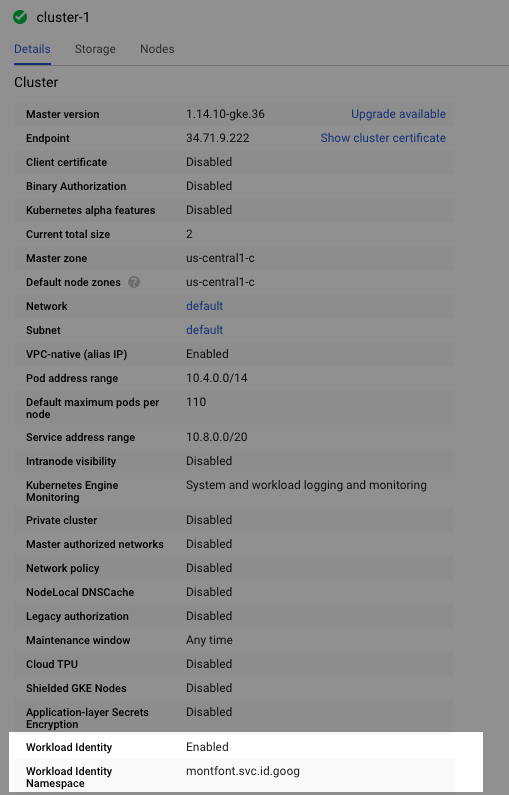
Note that the project id is montfont
warent
on 12 Jun 2020
What's odd is that the cloud-sql-proxy container seems to be receiving the service account credentials but it's just not using them or they're receiving the wrong ones labelled as the right ones.
Mounts: /var/run/secrets/kubernetes.io/serviceaccount from k8s-gcp-sa-1-token-9h9mn (ro)
warent
on 12 Jun 2020
That looks right to me. Can you double check these instructions and make sure you've bound the KSA and GSA together correctly?
I think that mount file is only a Kubernetes thing, and means the service account is active in the pod. However, it doesn't mean that Workload Identity is returning the metadata for the GSA correctly.
kurtisvg
on 12 Jun 2020
Yeah, I did that and included it in the original post. But just now I went ahead and deleted the service account (in GCP), recreated it, ensured it was annotated in kubernetes
$ kubectl annotate serviceaccount \
k8s-gcp-sa-1 \
iam.gke.io/[email protected]
error: --overwrite is false but found the following declared annotation(s): 'iam.gke.io/gcp-service-account' already has a value ([email protected])
and ran the binding
$ gcloud iam service-accounts add-iam-policy-binding \
  --role roles/iam.workloadIdentityUser \
  --member "serviceAccount:montfont.svc.id.goog[default/k8s-gcp-sa-1]" [email protected]
Updated IAM policy for serviceAccount [[email protected]].
bindings:
- members:
  - serviceAccount:montfont.svc.id.goog[default/k8s-gcp-sa-1]
  role: roles/iam.workloadIdentityUser
etag: BwWn6PlCBTc=
version: 1
cloud-sql-proxy is still giving the same logs.
2020/06/12 20:32:57 current FDs rlimit set to 1048576, wanted limit is 8500. Nothing to do here.
2020/06/12 20:32:57 the default Compute Engine service account is not configured with sufficient permissions to access the Cloud SQL API from this VM. Please create a new VM with Cloud SQL access (scope) enabled under "Identity and API access". Alternatively, create a new "service account key" and specify it using the -credential_file parameter
The only thing I can think is that I'm either missing a typo, or there's a bug somewhere in GCP
warent
on 12 Jun 2020
$ kubectl describe po sherpa-87cdd6c97-w6kv5
Name:           sherpa-87cdd6c97-w6kv5
Namespace:      default
Priority:       0
Node:           gke-cluster-1-default-pool-3b02b786-3srj/10.128.0.24
Start Time:     Fri, 12 Jun 2020 13:32:39 -0700
Labels:         app=sherpa
                pod-template-hash=87cdd6c97
Annotations:    kubernetes.io/limit-ranger: LimitRanger plugin set: cpu request for container cloud-sql-proxy
Status:         Running
IP:             10.4.2.28
IPs:            <none>
Controlled By:  ReplicaSet/sherpa-87cdd6c97
Containers:
  cloud-sql-proxy:
    Container ID:  docker://c9a7b68942a691b74eae7ac44123fccd05a5344d308e2036a940c2791d14c34d
    Image:         gcr.io/cloudsql-docker/gce-proxy:1.17
    Image ID:      docker-pullable://gcr.io/cloudsql-docker/gce-proxy@sha256:d38c54dd31e4302a1c8f976ef67eca3f1b076500cd599f623aba93eb4a78748b
    Port:          <none>
    Host Port:     <none>
    Command:
      /cloud_sql_proxy
      -instances=montfont:us-central1:mf-central-1=tcp:5432
    State:          Waiting
      Reason:       CrashLoopBackOff
    Last State:     Terminated
      Reason:       Error
      Exit Code:    1
      Started:      Fri, 12 Jun 2020 13:38:36 -0700
      Finished:     Fri, 12 Jun 2020 13:38:36 -0700
    Ready:          False
    Restart Count:  6
    Requests:
      cpu:        100m
    Environment:  <none>
    Mounts:
      /var/run/secrets/kubernetes.io/serviceaccount from k8s-gcp-sa-1-token-9h9mn (ro)
Conditions:
  Type              Status
  Initialized       True
  Ready             False
  ContainersReady   False
  PodScheduled      True
Volumes:
  k8s-gcp-sa-1-token-9h9mn:
    Type:        Secret (a volume populated by a Secret)
    SecretName:  k8s-gcp-sa-1-token-9h9mn
    Optional:    false
QoS Class:       Burstable
Node-Selectors:  <none>
Tolerations:     node.kubernetes.io/not-ready:NoExecute for 300s
                 node.kubernetes.io/unreachable:NoExecute for 300s
Events:
  Type     Reason     Age                     From                                               Message
  ----     ------     ----                    ----                                               -------
  Normal   Scheduled  7m52s                   default-scheduler                                  Successfully assigned default/sherpa-87cdd6c97-w6kv5 to gke-cluster-1-default-pool-3b02b786-3srj
  Normal   Pulled     6m15s (x5 over 7m51s)   kubelet, gke-cluster-1-default-pool-3b02b786-3srj  Container image "gcr.io/cloudsql-docker/gce-proxy:1.17" already present on machine
  Normal   Created    6m15s (x5 over 7m51s)   kubelet, gke-cluster-1-default-pool-3b02b786-3srj  Created container cloud-sql-proxy
  Normal   Started    6m14s (x5 over 7m51s)   kubelet, gke-cluster-1-default-pool-3b02b786-3srj  Started container cloud-sql-proxy
  Warning  BackOff    2m41s (x26 over 7m50s)  kubelet, gke-cluster-1-default-pool-3b02b786-3srj  Back-off restarting failed container
Note, as mentioned in the original post, the k8s-sa iam is configured as such:
[email protected] | k8s-sa | Cloud SQL Admin / Cloud SQL Client

These are the correct permissions aren't they? I believe it's actually redundant because the Cloud SQL Admin permission should cover client as well, but I just wanted to be sure. Anyway, I went ahead and just granted it a complete "Owner" permission and it still gives the error, so that can't be it.
warent
on 12 Jun 2020
Is it possible that something else is preventing cloud-sql-proxy from connecting to the database, and that error it's giving is inaccurate? e.g. maybe a network connection issue between cloud-sql-proxy and cloud sql which the proxy container is incorrectly interpreting as a permissions error
warent
on 12 Jun 2020
Here's what my firewall settings look like. I don't see anything that would block gke from communicating with cloud sql

warent
on 12 Jun 2020
I deleted the entire cluster, deleted the service account and IAM entry. Recreated everything from scratch in the exact same way, with the only difference being that I created the cluster from the CLI using the following line:
gcloud beta container clusters create cluster-name \
  --release-channel regular \
  --workload-pool=project-id.svc.id.goog
Rather than creating the cluster in the web interface and later enabling the workload identity.
I can't explain why but it all works now.
warent
on 12 Jun 2020
@warent As far as I can tell, everything is correct.
I don't believe it's an issue with either IAM permissions or your firewall (or other related connectivity issues) since those would return different errors (incorrect permissions or non existent resources for the first, and connect timeouts for the second).
This specific error it thrown here, which should only happen if the proxy get's the metadata for the Compute default service account.
I see you've closed this as I'm finishing typing out this response, but another thing to check would have been that the node pool has the GKE Metadata Server enabled:

kurtisvg
on 13 Jun 2020
If a similar issue occurs I will look there as well next time. Thank you for your help!
warent
on 13 Jun 2020
I had a similar issue last night (but 500s on Metadata calls) despite things working. My issue seemed to stem from a problem with the default compute service account. I've started used my own least-privileged SA and that solved the issue. 😁
 arbourd
on 30 Jun 2020
arbourd
on 30 Jun 2020
Related issues
 pdecat
·
6Comments
pdecat
·
6Comments
 krainboltgreene
·
4Comments
krainboltgreene
·
4Comments
 norbert-yoimo
·
3Comments
norbert-yoimo
·
3Comments
 molenpad
·
6Comments
molenpad
·
6Comments
 mlazowik
·
5Comments
mlazowik
·
5Comments
Most helpful comment
@warent As far as I can tell, everything is correct.
I don't believe it's an issue with either IAM permissions or your firewall (or other related connectivity issues) since those would return different errors (incorrect permissions or non existent resources for the first, and connect timeouts for the second).
This specific error it thrown here, which should only happen if the proxy get's the metadata for the Compute default service account.
I see you've closed this as I'm finishing typing out this response, but another thing to check would have been that the node pool has the GKE Metadata Server enabled:
