Cloudsql-proxy: SIGTERM started showing up on GAE Flex since last week
Bug Description
Hello! Here in the company I work at we have an app on App Engine Flex that uses Cloud SQL Proxy to connect to Cloud SQL (Postgres), and it had been working great for almost 2 years. However, since 2020-05-13 16:43:24 UTC something changed - Cloud SQL Proxy started receiving SIGTERM out of nowhere:

Since then we have been banging our heads daily because we're facing lots of connection errors in our company's app. The problem always starts a couple of seconds after Cloud SQL Proxy gets this TERM signal.
Context
Going through Cloud SQL Proxy logs, the only thing that appears in the previous minute or so is that a connection is closed:
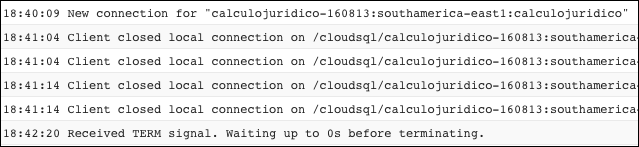

I guess our Rails app automatically adds and removes connections to the pool as needed, but I can dig into that if needed.
Example code (or command)
N/A
Stacktrace
N/A
How to reproduce
- Deploy an app on App Engine Flex with Cloud SQL connection - in our case it's a Rails app with custom Dockerfile
- Watch the connection error logs appear after the app gets some interaction - in our case it happens a couple of times a way. It's a small app that never gets more than 10 requests/second.
Environment
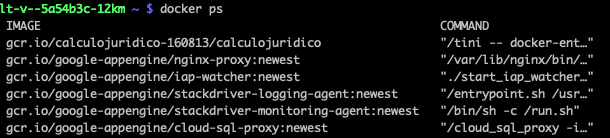
- OS type and version: App Engine Flex with Container Optimized OS and custom Dockerfile
- Cloud SQL Proxy version (
./cloud_sql_proxy -version):version 1.15; sha d93c53a4824cdaf457656ab49a50001636cf3e36 built Wed Aug 28 23:14:31 UTC 2019

Our thoughts
Maybe it's a timeout issue? Would it be better if it kept the pool with a minimum of active connections to prevent Cloud SQL Proxy from shutting off?
I see that SIGTERM has been the subject of some recent changes, so I wonder if something related has changed. On the other hand, it seems like GAE Flex is running Cloud SQL Proxy 1.15, which is from October 2019.
Can you give us any hint?
 giovannibonetti
All 9 comments
It seems like something is sending the SIGTERM to the Proxy, from your description it doesn't seem like this is directly related to the Proxy itself because I don't think the Proxy is going to send a signal to itself like that.
You said you are using a "custom Dockerfile"; does that Dockerfile set up the Proxy? If so it seems relevant to what could be sending the SIGTERM.
Also: can you scan through the logs of the VM around the time this SIGTERM was sent to see if another program logs out the fact that it's sending a SIGTERM? I think CoS has journalctl to summarize all logs, though it's possible not all applications are configured to log there.
 Carrotman42
on 18 May 2020
Carrotman42
on 18 May 2020
It seems like something is sending the SIGTERM to the Proxy, from your description it doesn't seem like this is directly related to the Proxy itself because I don't think the Proxy is going to send a signal to itself like that.
Yeah, makes sense.
You said you are using a "custom Dockerfile"; does that Dockerfile set up the Proxy? If so it seems relevant to what could be sending the SIGTERM.
No, the Proxy is set up by App Engine by writing this to app.yaml:
...
beta_settings:
cloud_sql_instances: $PROJECT_ID:$REGION:$CLOUD_SQL_INSTANCE_NAME
As the app owner I only have control over the app container, not Cloud SQL Proxy, Nginx or the other ones.
Also: can you scan through the logs of the VM around the time this SIGTERM was sent to see if another program logs out the fact that it's sending a SIGTERM? I think CoS has
journalctlto summarize all logs, though it's possible not all applications are configured to log there.
Indeed, looking at the VM logs I can see they're being shut down! That's great progress!


Now I only have to figure out why are my VMs shutting down like this. It seems like Cloud SQL Proxy isn't involved in that, so I'll close the issue. Thank you for your time! 😀
giovannibonetti
on 18 May 2020
@giovannibonetti If you are able to open a private issue against the App Engine Flex issue tracker w/ your project-id and this info, they may be able to look into the problem to see what's causing it.
Feel free to share the issue number here once you've done so.
 kurtisvg
on 19 May 2020
kurtisvg
on 19 May 2020
Thanks, @kurtisvg ! I've opened a public issue in the issue tracker so that other people affected by this behaviour can find it, too. 👍
giovannibonetti
on 19 May 2020
I have same probrem.
But I can't watch this issue, because Access denied.
So, Do you know when this issue will be fixed?
I'm guessing that this problem is due to appengine's shutdown process.
Because I think it's strange that cloud_sql_proxy gets a TERM signal before appengine starts the lameduck process.
Below I paste the log capture of cloud_sql_proxy and vm.shutdown in my environment.
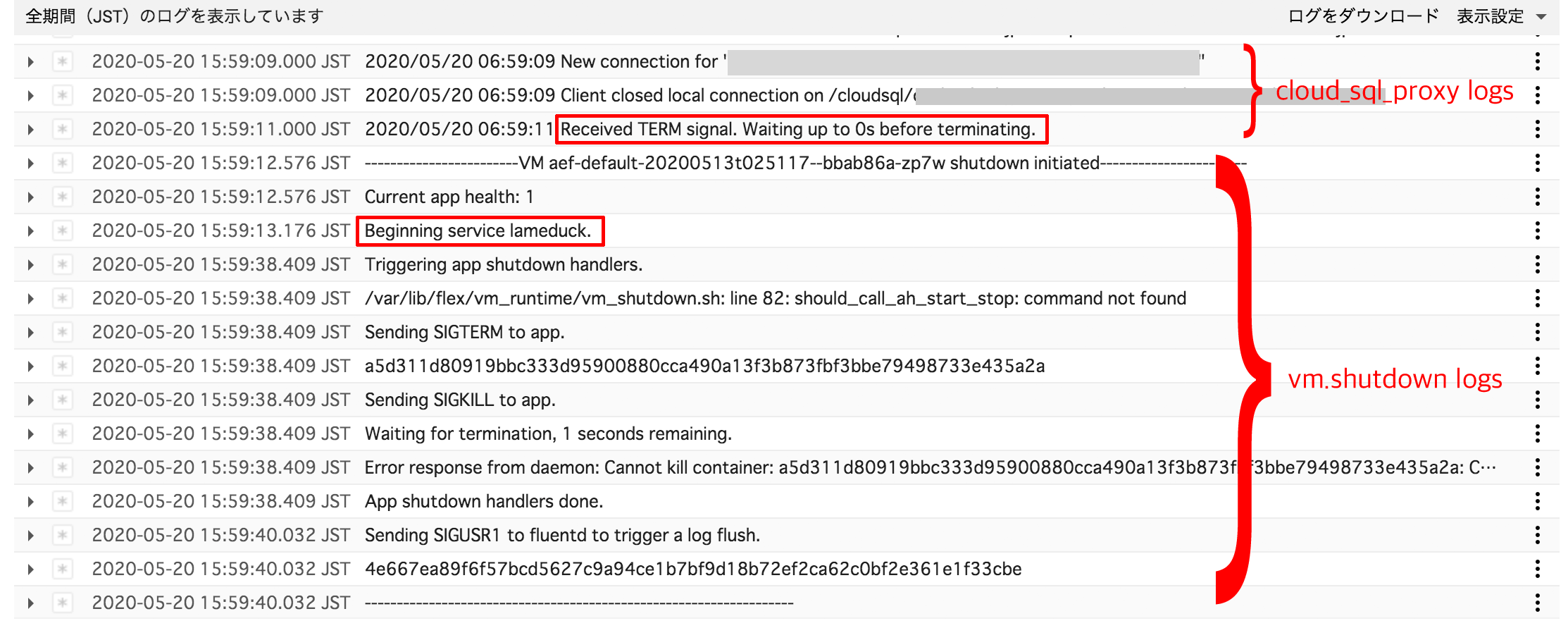
I hope this will help.
 kalibora
on 22 May 2020
kalibora
on 22 May 2020
I have same probrem.
Hi, @kalibora! Here we are using this workaround that is working great for us on App Engine Flex. Please tell us if it works for you, too!
First we dropped the cloud_sql_proxy sidecar container managed by App Engine, by removing this part of app.yaml:
beta_settings:
  cloud_sql_instances: $PROJECT:$REGION:$POSTGRES_INSTANCE_NAME
Then we replaced it by a our own process running in background inside the app container. There are multiple ways of doing this, and we chose to do it by customizing our Docker entrypoint, since we are already using it for dealing with database migrations. It is implemented like this:
Dockerfile
...
# Add Cloud SQL proxy client to run it in background
RUN wget -q https://storage.googleapis.com/cloudsql-proxy/v1.17/cloud_sql_proxy.linux.amd64 \
    && mv cloud_sql_proxy.linux.amd64 /bin/cloud_sql_proxy \
    && chmod +x /bin/cloud_sql_proxy \
    && mkdir /cloudsql \
    && chmod 777 /cloudsql
...
# Add Tini as init process via ENTRYPOINT - https://github.com/krallin/tini
ARG TINI_VERSION=v0.18.0
RUN curl -Lfs https://github.com/krallin/tini/releases/download/${TINI_VERSION}/tini -o /tini
RUN chmod +x /tini
...
# Add entrypoint to run cloud_sql_proxy, migrations and whatnot
COPY ./docker/docker-entrypoint-prod.sh /bin
RUN chmod +x /bin/docker-entrypoint-prod.sh
ENTRYPOINT ["/tini", "--", "docker-entrypoint-prod.sh"]
...
VOLUME ... /cloudsql
...
CMD ["bundle", "exec", "puma", "-C", "config/puma.rb"]
docker/docker-entrypoint-prod.sh
#!/bin/bash
# http://redsymbol.net/articles/unofficial-bash-strict-mode/
set -euo pipefail
IFS=$'\n\t'

# Run cloud_sql_proxy in background
cloud_sql_proxy -check_region -term_timeout=30s -dir=/cloudsql \
  -instances=$PROJECT:$REGION:$POSTGRES_INSTANCE_NAME &

# Run migrations or abort if failed
bundle exec rake db:migrate

# Finally call command issued to the docker service
exec "$@"
Please notice:
- the
&after thecloud_sql_proxycommand ☝🏻 to make it run in background. - The
-term-timeout=30soption which was added a while ago to solve this kind of problem
giovannibonetti
on 22 May 2020
@giovannibonetti
Thank you for your reply.
I'll give it a try and report back with the results.
kalibora
on 25 May 2020
The support team took the issue private to request the project id info. There is a new public issue tracking this here:
https://issuetracker.google.com/issues/157402002
Please feel free to chime in that this is effecting you, and file your own private issue on the issue tracker with more details.
kurtisvg
on 26 May 2020
@giovannibonetti
It worked in my environment as well.
I'm using PHP, therefore I followed the steps below to make it work with supervisord.
- Modify
app.yaml
- Change runtime from
phptocustom - Delete
beta_settings.cloud_sql_instances - Add
env_variables.MY_CLOUD_SQL_INSTANCES
- Change runtime from
- Create
Dockerfile(based on gcr.io/google-appengine/php72)
FROM gcr.io/google-appengine/php72:latest

*snip*

RUN wget -q https://storage.googleapis.com/cloudsql-proxy/v1.17/cloud_sql_proxy.linux.amd64 \
    && mv cloud_sql_proxy.linux.amd64 /bin/cloud_sql_proxy \
    && chmod +x /bin/cloud_sql_proxy \
    && mkdir /cloudsql \
    && chmod 777 /cloudsql

COPY ./cloud-sql-proxy.sh /bin/cloud-sql-proxy.sh
COPY ./supervisor.conf /etc/supervisor/conf.d/cloud-sql-proxy.conf
- Create
cloud-sql-proxy.sh
#!/bin/bash

/bin/cloud_sql_proxy \
    -check_region \
    -term_timeout=30s \
    -dir=/cloudsql \
    -instances="${MY_CLOUD_SQL_INSTANCES}"
- Create
supervisor.conf
[program:cloud-sql-proxy]
command = /bin/cloud-sql-proxy.sh
stdout_logfile = /dev/stdout
stdout_logfile_maxbytes=0
stderr_logfile = /dev/stderr
stderr_logfile_maxbytes=0
user = root
autostart = true
autorestart = true
priority = 1
Thank you for your help.
kalibora
on 27 May 2020
Related issues
 wayneashleyberry
·
8Comments
wayneashleyberry
·
8Comments
 mm-wang
·
4Comments
mm-wang
·
4Comments
 thijsterlouw
·
3Comments
thijsterlouw
·
3Comments
 vadimberezniker
·
6Comments
vadimberezniker
·
6Comments
 kevincvlam
·
6Comments
kevincvlam
·
6Comments
Most helpful comment
Hi, @kalibora! Here we are using this workaround that is working great for us on App Engine Flex. Please tell us if it works for you, too!
First we dropped the
cloud_sql_proxysidecar container managed by App Engine, by removing this part ofapp.yaml:Then we replaced it by a our own process running in background inside the app container. There are multiple ways of doing this, and we chose to do it by customizing our Docker entrypoint, since we are already using it for dealing with database migrations. It is implemented like this:
Dockerfile
docker/docker-entrypoint-prod.sh
Please notice:
&after thecloud_sql_proxycommand ☝🏻 to make it run in background.-term-timeout=30soption which was added a while ago to solve this kind of problem