Cloudsql-proxy: Memory leak when connecting from proxy
I'm not sure if this is a proxy problem but it's likely. It doesn't seem to affect my servers (for the most part), but my Cloud SQL log is flooded by these, nonstop. This has been the case for quite a while (months).
There are this discussion, this one too, this issue in Go SQL driver discussing similar things. There's a buganizer issue (can't find it now) that claims to fix it but doesn't.
Wanted to open an issue so that it can hopefully be investigated.
Full log:
{
 insertId:  "*"
 logName:  "projects/*/logs/cloudsql.googleapis.com%2Fmysql.err"
 receiveTimestamp:  "2017-10-10T00:21:54.291672943Z"
 resource: {
  labels: {
   database_id:  "*"
   project_id:  "*"
   region:  "us-west1"
  }
  type:  "cloudsql_database"
 }
 severity:  "ERROR"
 textPayload:  "2017-10-10T00:21:48.435386Z 705912 [Note] Aborted connection 705912 to db: '*' user: '*' host: 'cloudsqlproxy~*' (Got an error reading communication packets)"
 timestamp:  "2017-10-10T00:21:48.435860Z"
}
 danqing
All 53 comments
Btw, this spans versions 1.09, 1.10 and 1.11.
danqing
on 10 Oct 2017
Based on the 3 links you pasted and google search, "Got an error reading communication packets" this is likely a MySQL error when there's a network issue or too many connections were made. Detail: https://dev.mysql.com/doc/refman/5.7/en/communication-errors.html
And further if this won't solve. In the newest version of Cloud SQL proxy v1.11, a new flag "max_connections" was introduced to limit the max number of connections.
 AthenaShi
on 11 Oct 2017
AthenaShi
on 11 Oct 2017
It is MySQL error happening between proxy and cloud SQL. I've also done a lot of Google search on this topic. If the solution is to decrease max_connections, that likely means that proxy is currently flooding the database and should send fewer requests.
While I'm not sure if this is a proxy or cloud SQL issue, it surely is a problem with GCP. It'd be great if someone at GCP can take a look. :)
danqing
on 11 Oct 2017
Let me clarify a little bit, the error itself is from MySQL, which means there's a network issue or too many connections were made.
The details and solution is: https://dev.mysql.com/doc/refman/5.7/en/communication-errors.html
As it indicated here it might due to "The client program did not call mysql_close() before exiting", or "max_allowed_packet variable is too small", etc.
If you tried all these and there's STILL an issue, it might just due to there ARE too many connections made. And in the newest Cloud SQL proxy v1.11, a new flag "max_connections" was introduced to limit the max connection number.
Further, Cloud SQL proxy just forward any requests to MySQL, and will not send additional requests to MySQL.
AthenaShi
on 20 Oct 2017
So there's something going on with cloud sql - it may be the proxy, or it may be the database itself. I don't know what part exactly is having issue, and hence I'm hoping someone in the cloud sql team can help identify.
All I know is that:
- This is not an isolated issue as many others seem to have the same problem on GCP.
- This doesn't happen on AWS, at least not for me.
I understand that it's an error thrown from mysql. Why mysql and cloud sql doesn't play nice with each other is the question here (and in particular second gen).
danqing
on 20 Oct 2017
I see, I do see your update on one of our public buganizer problem. That one is for connection from GAE, I don't believe its your case since you connect directly from the proxy client.
If you don't mind, would you please send an email with following information to [email protected] so I may be able to help out looking at some internal data.
- with a link to this page
- the full name of your cloud sql instance.
- the command your run or code snippet to connect through Cloud SQL proxy
AthenaShi
on 21 Oct 2017
Just an update, I haven't got any email about this. In case I missed it, would you mind update in the email and suggest "AthenaShi" to take a look?
AthenaShi
on 3 Nov 2017
Thanks Athena! Sent the email.
danqing
on 7 Nov 2017
I also sent an email just now
 Matbj
on 7 Nov 2017
Matbj
on 7 Nov 2017
We've confirmed that the root cause of the "error" is a MySQL memory leak on our side with connections from proxy (which includes proxy client and GAE), the fix is checked in.
However we're in prod freeze now, and the rollout won't be scheduled until Nov 28 with ETA by end of this year.
Same time there're some methods to mitigate the issue:
- Try connect through other way (ip, etc), the leak is particular via proxy
- Connect via proxy with some connection pooling which would improve it.
- Or notify Cloud SQL to reboot mysqld (or the instance) to make it temporarily work.
Sorry again and hope this would help.
AthenaShi
on 17 Nov 2017
Great to know that the root cause has been identified. Thanks Athena!
danqing
on 18 Nov 2017
@AthenaShi Only MySQL? I just noticed the same behavior with PostgreSQL (it is what we use instead of MySQL for Cloud SQL)
 wileeam
on 7 Dec 2017
wileeam
on 7 Dec 2017
Hello there @AthenaShi do you have an update on this situation.
I've seen a massive increase in these errors starting Dec 2nd. Currently the mysql server is dropping around 2-3 connections per minute:
11:35:25.482 61 [Note] Aborted connection 61 to db: '...' user: '...' host: 'cloudsqlproxy~74.125.93.160' (Got an error reading communication packets)
11:35:42.709 37 [Note] Aborted connection 37 to db: '...' user: 'root' host: 'cloudsqlproxy~74.125.76.99' (Got an error reading communication packets)
11:40:47.394 89 [Note] Aborted connection 89 to db: '...' user: '...' host: 'cloudsqlproxy~74.125.76.99' (Got an error reading communication packets)
11:44:28.895 98 [Note] Aborted connection 98 to db: '...' user: 'root' ...: 'cloudsqlproxy~74.125.113.97' (Got an error reading communication packets)
And this has coincided with an increase in Mysql server has gone away issues in the GAE services. Active connections to the DB are in the 15-60 range usually but it doesn't seem to affect the rate of dropping connections...
Any help would be appreciated. Thanks!
 bowd
on 9 Dec 2017
bowd
on 9 Dec 2017
@wileeam Yes, only MySQL, PostgreSQL doesn't have this issue.
AthenaShi
on 15 Dec 2017
Sorry, got a little bit busy recently...
The fix is still under rollout, and consider it's end of the year and we will have release freeze soon again, so we would most like to expect this rollout be interrupted and won't totally finish until next year.
AthenaShi
on 15 Dec 2017
@AthenaShi does it mean it's live in some regions but not others?
danqing
on 15 Dec 2017
@danqing kind of yes, the rollout is ongoing but not done by region. The best way is to check individual instance if you want, I can check for you if you send your instance name to: [email protected].
AthenaShi
on 21 Dec 2017
Isn't this rolled out for all regions yet? I'm still having this issue 😕 Is there a timeline for it to be available?
 c3s4r
on 3 Jan 2018
c3s4r
on 3 Jan 2018
@AthenaShi any idea when the fix is deployed to europe-west3-c?
 PhiloNL
on 12 Jan 2018
PhiloNL
on 12 Jan 2018
The rollout is done for all instances now.
If you still see problems please send your instance name to:[email protected] so I can take a look from internal.
AthenaShi
on 12 Jan 2018
I have the same issue. Have sent a reply to that cloud-sql e-mail with my db instance and project etc.
 Leejjon
on 16 Jan 2018
Leejjon
on 16 Jan 2018
An update regarding this "Aborted Connection" error:
The fix has been rolled out, and it was a memory leak issue on MySQL, so mostly ppl would see a huge number of this error at the same time and MySQL OOM and restarted and most of this error should be gone after.
In general, if you see the "Aborted connection" errors from time to time, this error itself is from MySQL, which might mean there's a network issue or the application didn't close the connection. The details and solution is: https://dev.mysql.com/doc/refman/5.7/en/communication-errors.html. (As it indicated here it might due to "The client program did not call mysql_close() before exiting", or "max_allowed_packet variable is too small", etc.). And mostly this error message is harmless.
Particular, since we have: https://github.com/GoogleCloudPlatform/cloudsql-proxy/issues/94 ongoing, we do see this error logged during proxy rotating the certificate (if all connections are made at the same time, there would be errors on the same minute of every hour). We're having our developers fixing this now, and again this error message is harmless.
AthenaShi
on 17 Jan 2018
@AthenaShi hit this issue today AND yesterday -- but it seems to resolve itself? We currently have higher tier google support -- can you help us / look at our instances? - update: sent email
 savraj
on 23 Jan 2018
savraj
on 23 Jan 2018
The issue @savraj reported is unrelated to this thread.
AthenaShi
on 30 Jan 2018
I'll mark this thread closed due to following reasons:
- the fix for the initial problem was rolled out to all Cloud SQL instances for a month and we dont see this issue after rollout
- more important, this error message "Aborted Connection (Got an error reading communication packets)" is a very general error message from MySQL that most of the cases are not directly related to Cloud SQL and is considered harmless except there're huge number of same error all at the same time (please see comment for details: https://github.com/GoogleCloudPlatform/cloudsql-proxy/issues/126#issuecomment-358157132)
AthenaShi
on 30 Jan 2018
Please re-open this again if you believe the memory leak issue still exist, otherwise please create a new one.
AthenaShi
on 30 Jan 2018
Thanks Lin, we're still seeing some issues (occasional operationalErrors)
so we'll see what we can do to get to the bottom of this. Thanks.
On Mon, Jan 29, 2018 at 7:37 PM, Lin Shi notifications@github.com wrote:
Please re-open this again if you believe the memory leak issue still
exist, otherwise please create a new one.—
You are receiving this because you were mentioned.
Reply to this email directly, view it on GitHub
https://github.com/GoogleCloudPlatform/cloudsql-proxy/issues/126#issuecomment-361436113,
or mute the thread
https://github.com/notifications/unsubscribe-auth/AAXqHcx_6XwDVBzbrL2sGUJ8riWa0Q5jks5tPmQwgaJpZM4PzUs3
.
--
Savraj Singh
609.540.2204 • twitter/gmail: savraj
savraj
on 3 Feb 2018
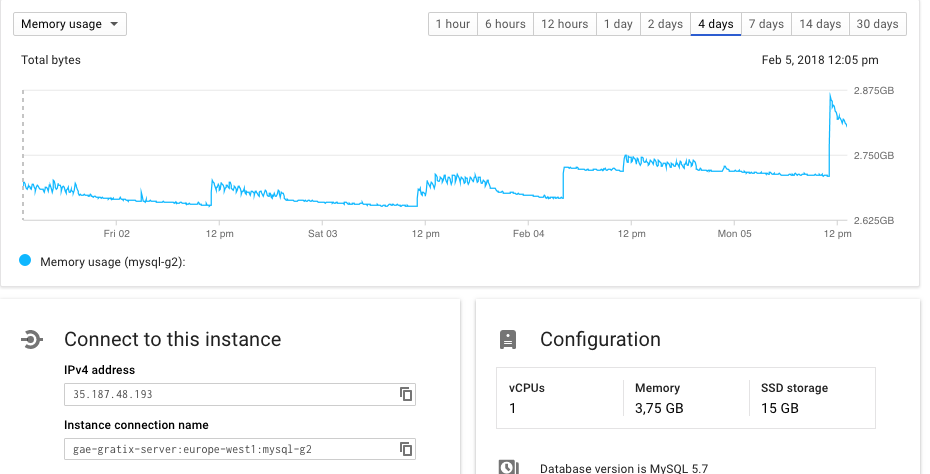
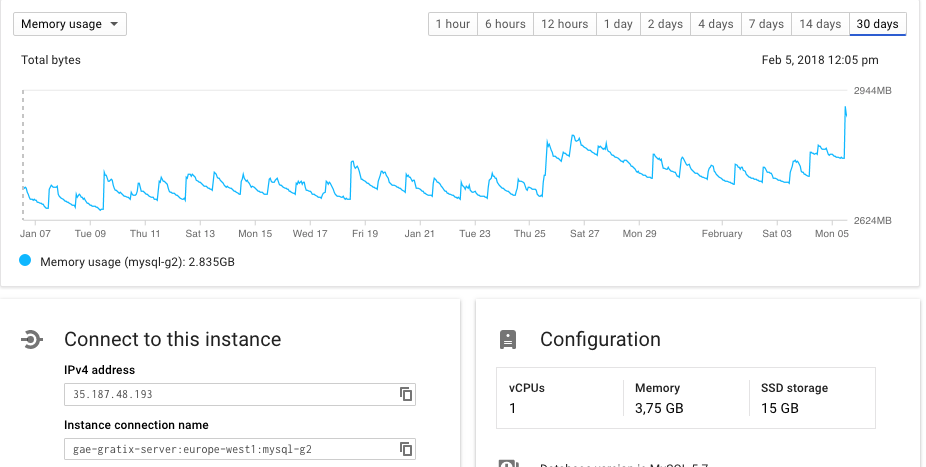
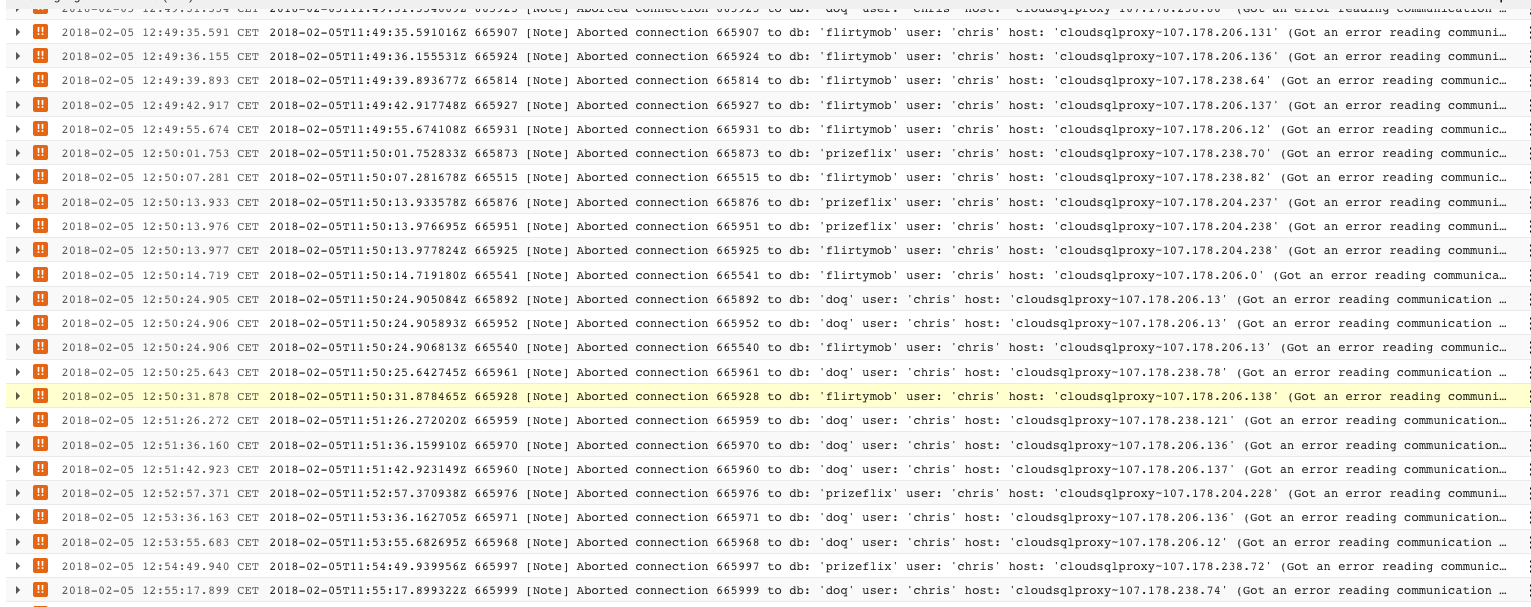
Hi @AthenaShi, I see many of these errors with memory usage continuously increasing... am attaching screenshots and reopen. Sorry if I am wrong but it looks like this issue again.
 christophelassus
on 5 Feb 2018
christophelassus
on 5 Feb 2018
Ya... unfortunately we found there're some other leaks still existing. The OOM speed is slower but we could reproduce the leak. Our developers are currently working on a fix, and there's currently no ETA for the fix now. :(
https://github.com/GoogleCloudPlatform/cloudsql-proxy/issues/126#issuecomment-345382485 to mitigate the issue.
AthenaShi
on 20 Feb 2018
@AthenaShi just wanted to add that a way to mitigate its effects on the application side (mysql server has gone away, etc) is to configure your connection with a really short pool recycle time/timeout. In my case that's sqlalchemy and the relevant config looks like:
SQLALCHEMY_POOL_RECYCLE = 10
SQLALCHEMY_POOL_TIMEOUT = 5
This is not ideal as the application is constantly reconnecting to the mysql server but it gets the job done...
bowd
on 21 Feb 2018
FYI, a Public Issue Tracker have been opened by my current Google Support contact to follow up the release of the Cloud SQL memory leak fix https://issuetracker.google.com/issues/73649904
 pdecat
on 26 Feb 2018
pdecat
on 26 Feb 2018
Hi, got this error when i try to update lots of records (10k) in a for loop on cloud sql (second gen). How is people handling this kind of common queries/scenario ? I guess try to throttle the qps or something or pooling, is there any hack to make it work even if it would take longer time to run. For now it is a show stopper =/
Thanks!
 lundin
on 29 Mar 2018
lundin
on 29 Mar 2018
That error is observed fir months already. What can help little bit to increase time beetween failures:
- Try to use persistent connections.
- Increase instance size of CloudSQL instances - min 7.5gb RAM
- Periodically restart CloudSQL proxy
 olostan
on 29 Mar 2018
olostan
on 29 Mar 2018
The error is still happening. I deployed a spring boot app (that uses spring cloud gcp mysql) and I noticed that the server was able to connect, but then it connection gets aborted abruptly.
 ramzimaalej
on 30 May 2018
ramzimaalej
on 30 May 2018
We're seeing similar issues which are causing production issues, I wonder what the best approach is since this is quite critical to always work.
 RobinUS2
on 6 Jun 2018
RobinUS2
on 6 Jun 2018
According to https://issuetracker.google.com/issues/73649904 this is marked as fixed as of 14th of May 2018 for them so yeah...
bowd
on 7 Jun 2018
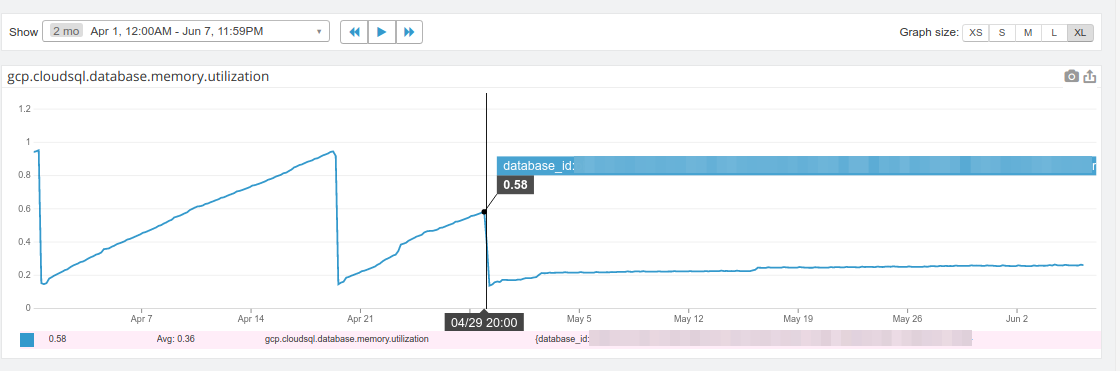
Hi, I just realized there may be some confusion about the issue discussed here.
Are the people still having issues talking about:
- CloudSQL MySQL server side memory leaks?
- CloudSQL-proxy client side memory leaks?
Aborted connectionerror messages without any memory leaks?
Note: I only ever was affected by the first one and it was fixed for us since 2018/04/29 in europe-west1 (the one tracked at https://issuetracker.google.com/issues/73649904).
pdecat
on 7 Jun 2018
I am seeing similar problem right now with cloud sql proxy, mysql is aborting connections and the error is
Got an error reading communication packets
 maxpaynestory
on 19 Jun 2018
maxpaynestory
on 19 Jun 2018
I appear to have this same error. I have a pretty simple API running on google app engine. When the api receives a request, it uses mysqldb (python) to open a connection, get some data, close the connection, and send the data back via the api. The API is hit about every minute, and I am seeing an aborted connection every minute. I double checked that I am closing the connection. I read something about maybe I have a pool of connections with a limit so everytime I create a new one some other connection is aborted. Maybe this is the issue? (I, obviously, am far from an expert in this). I also noticed the steadily increasing memory usage that others have mentioned above.
 willjhenry
on 20 Jun 2018
willjhenry
on 20 Jun 2018
We are seeing the same problem too.
Database: Google MySQL Cloud (2nd generation instance)
Version: 5.7.14-google
Region: europe-west1
Typically, the Storage usage increases without limit until we hit our 10TB limit.
When this happens the application stops working and we need to restart the database.
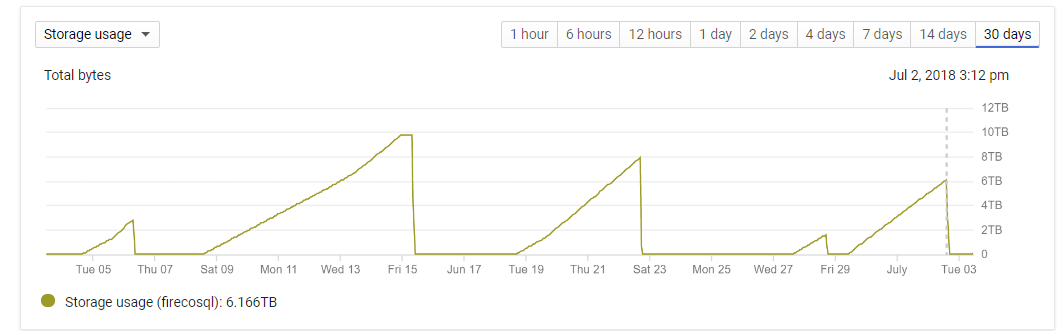
When the storage starts to increase we also see a large increase in the InnoDB engine Write pages/sec:
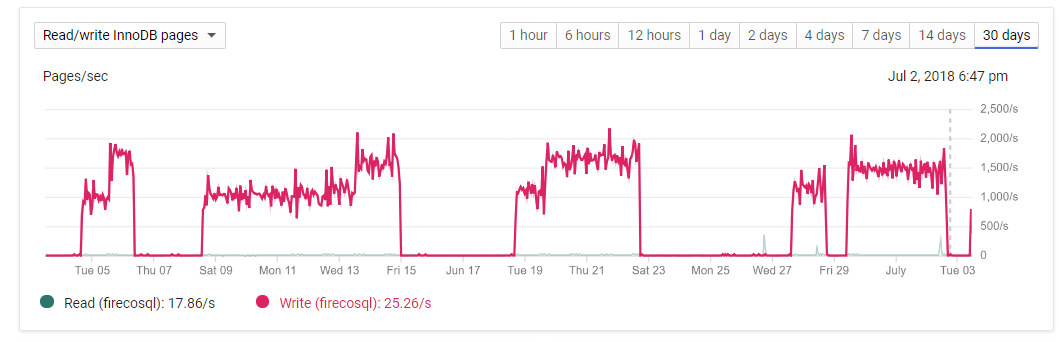
This may or may not be related, but we also observe large numbers of "Aborted connection" messages in the MySQL log at the same time:
"Aborted connection 12213 to db: ... host: 'cloudsqlproxy~173.194.92.35' (Got an error reading communication packets)"
Typically around 10 per minute.
We migrated to a Google Cloud 2nd generation MySQL instance on 4th Jan 2018.
Previously we had been using a 1st generation MySQL instance.
The 2nd generation MySQL instance worked fine until around the middle of May 2018 when we started noticing the rapid storage increase problem.
 FirecoAndyM
on 3 Jul 2018
FirecoAndyM
on 3 Jul 2018
@FirecoAndyM what about memory usage?
The storage usage increases here make me think of a big transactions that get rolled back when the instance is restarted.
pdecat
on 3 Jul 2018
Here is how the memory profile looks:
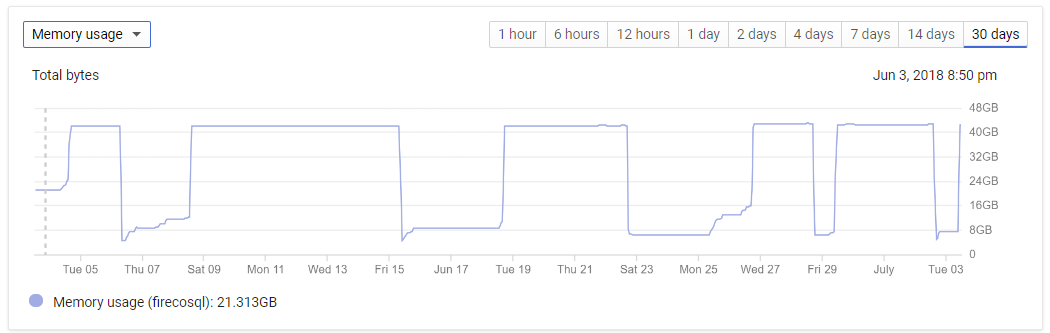
A typical entry from:
SHOW ENGINE INNODB STATUS
at a time of high storage usage:
BUFFER POOL AND MEMORY
Total large memory allocated 41778413568
Dictionary memory allocated 12302405
Buffer pool size 2490368
Free buffers 15854
Database pages 2473129
Old database pages 912769
Modified db pages 1508470
Pending reads 0
Pending writes: LRU 0, flush list 0, single page 0
Pages made young 265786, not young 23531382
0.00 youngs/s, 0.00 non-youngs/s
Pages read 1665766, created 396331461, written 395415732
0.00 reads/s, 1508.18 creates/s, 1820.77 writes/s
Not sure if that helps.
Do you have any suggestions as to how we might determine the root cause?
FirecoAndyM
on 3 Jul 2018
Your memory usage graph looks completely different from ours when we were facing the memory leak.
Our Cloud SQL MySQL process was killed as soon as it reached the instance maximum allocated memory.
Also, our storage usage was normal.
I'd search the processes list, it may either be a few large transactions or a lot of smaller ones.
pdecat
on 3 Jul 2018
Thanks for your suggestion pdecat. I shall do some further investigation...
FirecoAndyM
on 3 Jul 2018
@AthenaShi The public tracking bug is marked as resolved. Do you think this issue is still relevant, or can it be closed out?
 kurtisvg
on 16 Jul 2018
kurtisvg
on 16 Jul 2018
Hi Kurtis,
This issue has now been resolved and the ticket can be closed out now.
Thank you for your assistance with helping us to resolve this issue.
Kind Regards,
Andy Mason
On 16 July 2018 at 17:49, Kurtis Van Gent notifications@github.com wrote:
@AthenaShi https://github.com/AthenaShi The public tracking bug
https://b.corp.google.com/issues/73649904 is marked as resolved. Do you
think this issue is still relevant, or can it be closed out?—
You are receiving this because you were mentioned.
Reply to this email directly, view it on GitHub
https://github.com/GoogleCloudPlatform/cloudsql-proxy/issues/126#issuecomment-405312184,
or mute the thread
https://github.com/notifications/unsubscribe-auth/AVEuD1qyiy5DHOVby6POu6wLHw_ASdueks5uHMQugaJpZM4PzUs3
.
FirecoAndyM
on 17 Jul 2018
I believe I am witnessing a similar issue and am hoping there is an existing solution. Or if there is still a bug with GCP, that it can be resolved. My project at times sees extreme spikes in DB CPU (screen shot below)

and a similar rise and fall of memory usage as seen by previous posts in this thread (screen shot below)
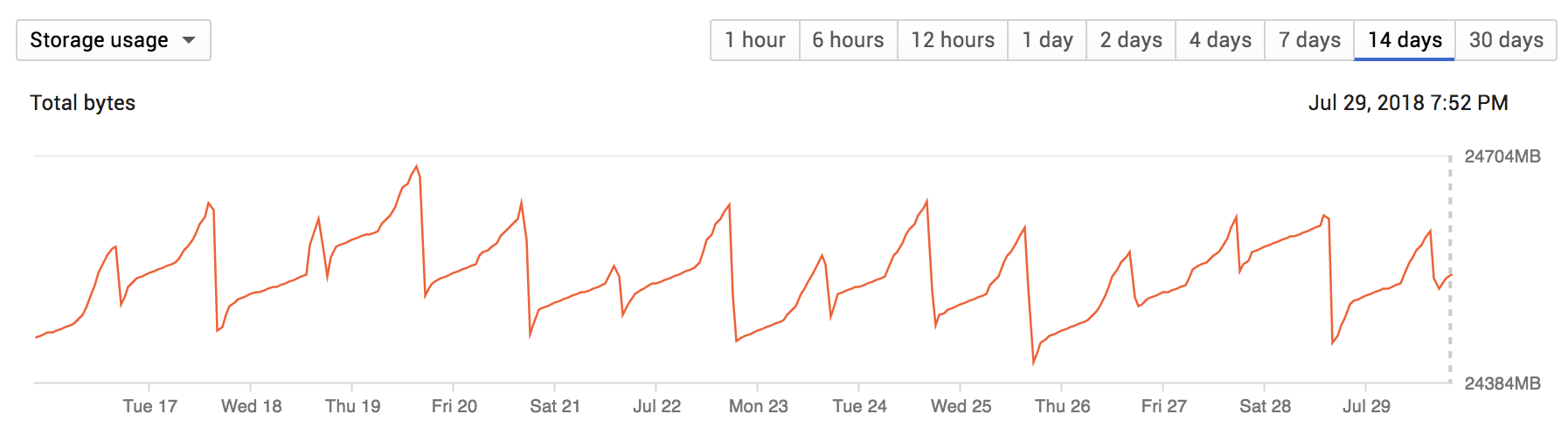
At the times of extreme CPU usage, there is an excessive amount of DB errors related to writing or reading. And even when the spikes are not occuring, I see pretty steady, albeit less frequent, of the same errors (seen below)
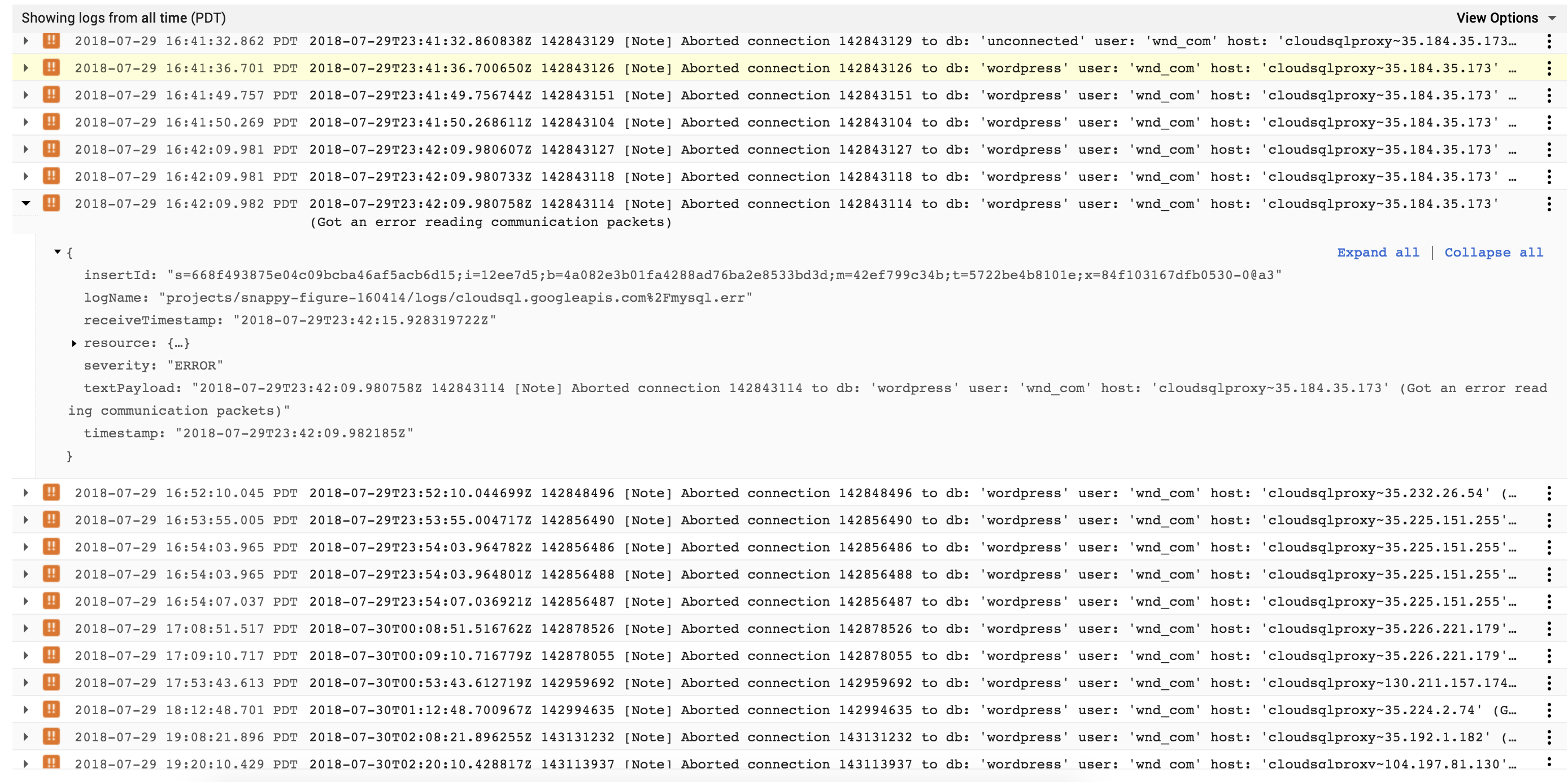
@AthenaShi any chance this is related to the same issue? Or is this the same issue and does the DB have to be reset and does my project have to incur a bit of downtime for the fixes mentioned in this thread to take effect?
Thank you in advance.
 zor
on 30 Jul 2018
zor
on 30 Jul 2018
Hi Senyo,
The problem you are seeing appears to be different from the one on our
original ticket.
In our case it turned out to be a rogue SQL query which was running for >
10,000 seconds.
This was holding transaction locks which eventually led to resource
exhaustion on the MySQL database server.
So as it turned out, this was not due to a "memory leak" on the database
server as we first thought.
We did see the same "Aborted connection" messages though.
We started to see these when the database was approaching resource
exhaustion,
and was dropping existing connections and refusing new ones.
Your storage usage graph shows that the storage is varying within quite a
narrow range 24,400 to 24,700MB.
Ours was varying in a straight line from about 50GB right the way up to
10TB at which point we had to restart the database server.
Restarting the database server killed the rogue query and reset the
situation.
Your CPU utilization chart looks quite spiky.
You need to try and find out what the database is actually doing during the
times of high CPU utilization.
This should guide you to the source of the problem.
Hope this helps.
Kind Regards,
Andy Mason
On 30 July 2018 at 04:59, Senyo Gault-Williams notifications@github.com
wrote:
I believe I am witnessing a similar issue and am hoping there is an
existing solution. Or if there is still a bug with GCP, that it can be
resolved. My project at times sees extreme spikes in DB CPU (screen shot
below)
[image: screen shot 2018-07-29 at 8 17 30 pm]
https://user-images.githubusercontent.com/563645/43376756-579a36de-9371-11e8-9289-3afd4c4a3a99.pngand a similar rise and fall of memory usage as seen by previous posts in
this thread (screen shot below)
[image: screen shot 2018-07-29 at 8 17 09 pm]
https://user-images.githubusercontent.com/563645/43376768-65084414-9371-11e8-97a2-cb4e328576eb.pngAt the times of extreme CPU usage, there is an excessive amount of DB
errors related to writing or reading. And even when the spikes are not
occuring, I see pretty steady, albeit less frequent, of the same errors
(seen below)
[image: screen shot 2018-07-29 at 8 42 40 pm]
https://user-images.githubusercontent.com/563645/43376869-f43c9bee-9371-11e8-8875-c34b9d6b08c4.png@AthenaShi https://github.com/AthenaShi any chance this is related to
the same issue? Or is this the same issue and does the DB have to be reset
and does my project have to incur a bit of downtime for the fixes mentioned
in this thread to take effect?Thank you in advance.
—
You are receiving this because you were mentioned.
Reply to this email directly, view it on GitHub
https://github.com/GoogleCloudPlatform/cloudsql-proxy/issues/126#issuecomment-408740056,
or mute the thread
https://github.com/notifications/unsubscribe-auth/AVEuD_78pa8aGkyPUR-PFgGo-OKhrWwcks5uLoSQgaJpZM4PzUs3
.
FirecoAndyM
on 30 Jul 2018
Hello All,
First thanks all for the great tips and instruction I spent a day debugging this and I was going nuts when I compared the working databases I had to the nonworking database. The tables in my instance that had no columns of Datatype of JSON worked fine and when I reverted the Datatype to VARCHAR all worked perfect. I have no idea why the cloud SQL is causing the error "Got an error reading communication packets" and according to the docs
JSON field types were added in MySQL version 5.7 and current version in Google Cloud SQL is MySQL MySQL 2nd Gen 5.7 I really dont see why.
The expected is that it connects and gets data first time but when I have columns of datatype JSON it never completes.
 Microenergymonitor
on 13 Jul 2019
Microenergymonitor
on 13 Jul 2019
This is still happening for me. Support has said time and time again "oh, you just need to close your connections!" and Ive sent our debug logs from our local instance, they don't care.
Can someone from Google help me?
 debugd
on 28 Mar 2020
debugd
on 28 Mar 2020
Same here!
 wittfabian
on 28 Mar 2020
wittfabian
on 28 Mar 2020
So we had this exact issue with cloudsql-proxy and mysql. It turned out that it was slow queries that was the root cause. We solved the issue by setting set MAX_EXECUTION_TIME=4000 (ms). This you have to do for each connection to the database. We actually ended up running it before each query. But then the only query we do is a LIKE-query with wildcard.
Matbj
on 28 Mar 2020
Hi @thebugzapper, @wittfabian - this issue has been closed since 2018, and the topic has diverged from the original issue. If you think you have found a bug with the Cloud SQL proxy, please open a new issue with detailing information about your environment and steps to reproduce so we can verify and debug the behavior. Thank you!
kurtisvg
on 29 Mar 2020
Related issues
 thijsterlouw
·
3Comments
thijsterlouw
·
3Comments
 mholyak
·
6Comments
mholyak
·
6Comments
 vochicong
·
7Comments
vochicong
·
7Comments
 mm-wang
·
4Comments
mm-wang
·
4Comments
 wayneashleyberry
·
8Comments
wayneashleyberry
·
8Comments
Most helpful comment
We're seeing similar issues which are causing production issues, I wonder what the best approach is since this is quite critical to always work.