Cloudformation-coverage-roadmap: AWS::CloudFront::CachePolicy and AWS::CloudFront::OriginRequestPolicy
1. Title
AWS::CloudFront::CachePolicy
AWS::CloudFront::OriginRequestPolicy
2. Scope of request
Last week, CloudFront introduced reusable cache policies and origin request policies and deprecated the previous way of specifying these behaviors through the distribution configuration. I imagine the CloudFormation team is already aware of this change since the corresponding documentation in in CloudFormation is already up to date.
3. Expected behavior
The required parameters should probably stick with what the CreateCachePolicy and CreateOriginRequestPolicy API calls require, I think there's not much room for discussion regarding this.
Both of these should somehow return their ID to use along with the AWS::CloudFront::Distribution resource, otherwise there would be no meaning in including these resources in the first place.
4. Suggest specific test cases
When creating a new distribution with AWS::CloudFront::Distribution you would probably want to specify its cache policy and origin request policy along with it, as most have done up until now with the legacy way of specifying these parameters.
It's not a very good practice to hard-code the IDs of the cache policy and origin request policy, especially since if you use the same stack for multi-account deployments you would want to avoid both hard-coded values and parameters altogether, and the only option you would be left with would be to create an AWS::AccountId-based mapping with each account's cache policy/origin request policy ID, which as I'm sure you're aware, can lead to problems if your AccountID starts with a zero and you have to package your template before deploying it (awscli team I'm looking at you).
5. Helpful Links to speed up research and evaluation
Relevant CloudFront developer guide documentation
Relevant CloudFront API documentation for cache policies (CreateCachePolicy, UpdateCachePolicy and DeleteCachePolicy)
Relevant CloudFront API documentation for origin request policies (CreateOriginRequestPolicy, UpdateOriginRequestPolicy and DeleteOriginRequestPolicy)
CloudFormation documentation page for AWS::CloudFront::Distribution DefaultCacheBehavior, which is already up to date regarding these changes.
6. Category
Networking & Content Delivery
 joaopenteado
All 41 comments
 PatMyron
on 10 Sep 2020
PatMyron
on 10 Sep 2020
I know this isn't a support channel (and I have a ticket open anyway) but I tried this today in eu-west-1 and us-east-1 and both times received an Invalid request provided message. Should this be working?
 bootc
on 10 Sep 2020
bootc
on 10 Sep 2020
Ditto ap-southeast-2.
2020-09-14T03:20:42.598000+00:00 CloudFrontCachePolicy CREATE_FAILED

    Invalid request provided: AWS::CloudFront::CachePolicy
    {"CachePolicyConfig":<snip>}
 timdawborn
on 14 Sep 2020
timdawborn
on 14 Sep 2020
I Just ran into the same issue (eu-central-1).
And while you're on it, please implement Brotli on the the AWS::CloudFront::CachePolicy ParametersInCacheKeyAndForwardedToOrigin type (EnableAcceptEncodingBrotli).
 henning-krause
on 21 Sep 2020
henning-krause
on 21 Sep 2020
Is there a workaround for this? cachepolicy is not working in ap-southeast-1
 thanakijwanavit
on 22 Sep 2020
thanakijwanavit
on 22 Sep 2020
Yep would like also to have EnableAcceptEncodingBrotli working 🙏
 yvele
on 23 Sep 2020
yvele
on 23 Sep 2020
For those experiencing the Invalid request provided error, one thing to try is to check the Name of the CachePolicy; remove any spaces or special characters, and keep it alphanumeric. That unblocked me.
 njlynch
on 6 Oct 2020
njlynch
on 6 Oct 2020
This seems to be fully supported and working now 👍
 Lanchez
on 7 Oct 2020
Lanchez
on 7 Oct 2020
I'm getting failure with the following policy on us-east-1:
  DefaultCachePolicy:
    Type: 'AWS::CloudFront::CachePolicy'
    Properties:
      CachePolicyConfig:
        DefaultTTL: 86400
        MaxTTL: 31536000
        MinTTL: 1
        Name: 'web-default-cache-policy'
        ParametersInCacheKeyAndForwardedToOrigin:
          CookiesConfig:
            CookieBehavior: 'none'
          EnableAcceptEncodingBrotli: true
          EnableAcceptEncodingGzip: true
          HeadersConfig:
            HeaderBehavior: 'none'
          QueryStringsConfig:
            QueryStringBehavior: 'none'
  AppCloudFrontDistribution:
    Type: 'AWS::CloudFront::Distribution'
    Properties:
      DistributionConfig:
        DefaultCacheBehavior:
          CachePolicyId: !Ref DefaultCachePolicy
          Compress: true
Does that look right? Is it a bug w/aws?
The error I get during change_set_execute is: Internal error reported from downstream service during operation

 burritoIand
on 7 Oct 2020
burritoIand
on 7 Oct 2020
I had the same error. Turned out that minTtl was larger than maxTtl, which caused the error. Also, defaultTtl must be larger than minTtl.
 spg
on 13 Oct 2020
spg
on 13 Oct 2020
I was getting Internal error reported from downstream service during operation 'AWS::CloudFront::CachePolicy' and solved it by making sure its Name was unique. If you have multiple distributions they each need a unique cache policy name or reference to a shared resource.
 gpoitch
on 13 Oct 2020
gpoitch
on 13 Oct 2020
@burritoIand Make sure you dont already have a policy with that name, take a look in CloudFront. I had encountered a similar error and I figure out I already had a policy with same name.
 BogdanDarius
on 14 Oct 2020
BogdanDarius
on 14 Oct 2020
@BogdanDarius thanks for the suggestion, I just checked and it only has the default policies. I also tried adding the stackname to the name param per @gpoitch but no dice!

burritoIand
on 14 Oct 2020
@burritoIand can you share your yaml file maybe?
BogdanDarius
on 14 Oct 2020
hey @BogdanDarius, will paste again:
  DefaultCachePolicy:
    Type: 'AWS::CloudFront::CachePolicy'
    Properties:
      CachePolicyConfig:
        DefaultTTL: 86400
        MaxTTL: 31536000
        MinTTL: 1
        Name: !Sub 'CachePolicy-${AWS::StackName}'
        ParametersInCacheKeyAndForwardedToOrigin:
          CookiesConfig:
            CookieBehavior: 'none'
          EnableAcceptEncodingBrotli: true
          EnableAcceptEncodingGzip: true
          HeadersConfig:
            HeaderBehavior: 'none'
          QueryStringsConfig:
            QueryStringBehavior: 'none'
When my build is running it successfully creates the changeset, but then fails during "CHANGE_SET_EXECUTE" with above error. I've been sort of background tinkering with this but I suppose I could try to create the policy using the cli and see if I get any more information on the error? Not sure how to get more info than "error reported downstream"
burritoIand
on 14 Oct 2020
It'd be great if Name could be omitted to autogenerate a name.
 jdub
on 20 Oct 2020
jdub
on 20 Oct 2020
Would love to find out if it there is indeed a bug preventing creating the cache policy with cloudformation...
burritoIand
on 22 Oct 2020
Hit another issue with OriginRequestPolicy. HeaderBehavior set to allViewerAndWhitelistCloudFront fails with "Invalid request provided". Other values seem to work.
https://docs.aws.amazon.com/AWSCloudFormation/latest/UserGuide/aws-properties-cloudfront-originrequestpolicy-headersconfig.html#cfn-cloudfront-originrequestpolicy-headersconfig-headerbehavior
gpoitch
on 26 Oct 2020
I also hit the Internal error reported from downstream service during operation 'AWS::CloudFront::OriginRequestPolicy' error.
Turns our I did not have the necessary cloudfront:CreateOriginRequestPolicy etc IAM rules in place.
 elgordino
on 28 Oct 2020
elgordino
on 28 Oct 2020
@elgordino that was it! thank you
burritoIand
on 29 Oct 2020
In my case that's not the problem, CloudFormation has AdministratorAccess but fails to create the OriginRequestPolicy.
Template:
```"
"Type": "AWS::CloudFront::OriginRequestPolicy",
"Properties": {
"OriginRequestPolicyConfig": {
"CookiesConfig": {
"CookieBehavior": "none"
},
"HeadersConfig": {
"HeaderBehavior": "whitelist",
"Headers": [
"Authorization"
]
},
"Name": "WorkspaceStackOriginRequestPolicy2554B3BD",
"QueryStringsConfig": {
"QueryStringBehavior": "none"
}
}
 stephankaag
on 29 Oct 2020
stephankaag
on 29 Oct 2020
For me the key was to use shorter Name-property. It seems that there's some kind of problem with long names that are valid through console but not cloudformation.
Didn't really validate this but longer name failed when shorter was just fine for exactly same policy.
Lanchez
on 29 Oct 2020
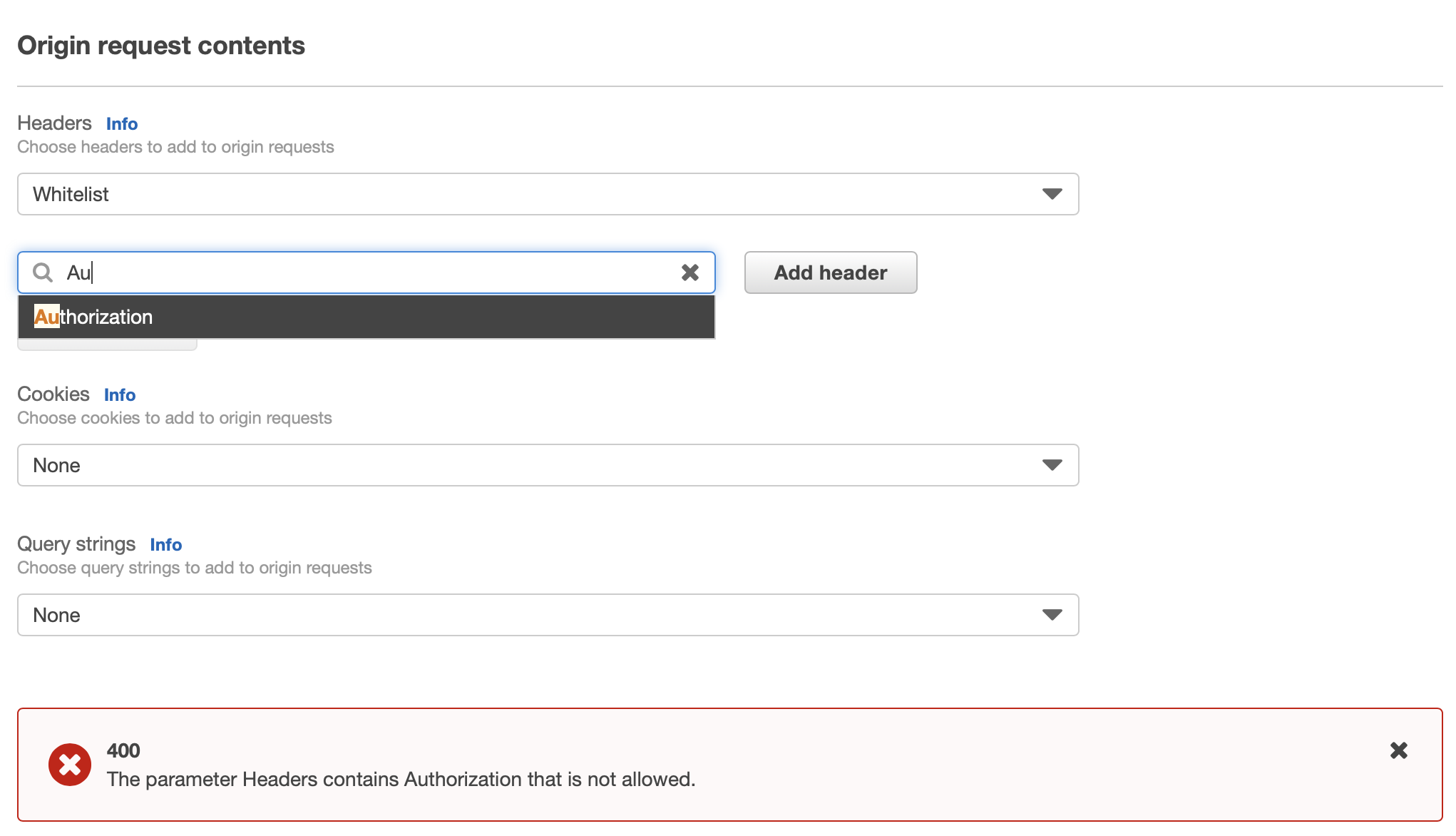
Looks like Authorization is not allowed as a header to forward. Bit weird that it is in the dropdown though.
stephankaag
on 29 Oct 2020

If you try to whitelist Accept-Encoding header and enable Gzip compression in CachePolicy an error is shown.
This was the reason my CloudFormation template failed with Invalid request provided: AWS::CloudFront::CachePolicy.
I can confirm the problem mentioned by @stephankaag in OriginRequestPolicy. The problem also exists for Accept-Encoding header.
 CNoetzel
on 29 Oct 2020
CNoetzel
on 29 Oct 2020
I can white-list the Authorization header via the UI but not via CloudFormation. That always gives me this error:
Invalid request provided: AWS::CloudFront::OriginRequestPolicy
I can white-list the Authorization header via the UI but not via CloudFormation. That always gives me this error:
Invalid request provided: AWS::CloudFront::OriginRequestPolicy
I am having the same problem just now.. not sure why.. would be great if someone could be of help! Thanks!
update:
I fixed the problem by changing the name from 'cloudfront origin request policy' to 'cloudfront-origin-request-policy' as @njlynch suggested above.
 zelongc
on 5 Nov 2020
zelongc
on 5 Nov 2020
Keeping this open in case you have not resolved your issues and want me to report back. It is shipped though.
 luiseduardocolon
on 10 Nov 2020
luiseduardocolon
on 10 Nov 2020
I'm unable to create a cache policy with min, default and max ttl all 0s. "invalid request provided" ... the error messages for CachePolicy could use some work.
 dound
on 14 Nov 2020
dound
on 14 Nov 2020
Error messages from CloudTrail are very usefull here. For example this is one.
"errorMessage": "The parameter EnableAcceptEncodingGzip cannot be set to true when accept-encoding header is whitelisted in cache policy."
But this error does not align with the documentation then.
A flag that can affect whether the Accept-Encoding HTTP header is included in the cache key and included in requests that CloudFront sends to the origin.

This field is related to the EnableAcceptEncodingBrotli field. If one or both of these fields is true and the viewer request includes the Accept-Encoding header, then CloudFront does the following:

Normalizes the value of the viewer’s Accept-Encoding header

Includes the normalized header in the cache key

Includes the normalized header in the request to the origin, if a request is necessary
Here is another failed attempt.
 "errorMessage": "The parameter CookieBehavior is invalid for policy with caching disabled.",
    "requestParameters": {
        "cachePolicyConfig": {
            "minTTL": 0,
            "name": "lambdabref",
            "defaultTTL": 0,
            "maxTTL": 0,
            "parametersInCacheKeyAndForwardedToOrigin": {
                "enableAcceptEncodingGzip": true,
                "headersConfig": {
                    "headerBehavior": "none"
                },
                "cookiesConfig": {
                    "cookieBehavior": "all"
                },
                "queryStringsConfig": {
                    "queryStringBehavior": "all"
                }
            }
        }
    },
 markotitel
on 16 Dec 2020
markotitel
on 16 Dec 2020
CloudTrail was a great way to see more errors. For me this was the error I found that caused this problem:
Another cache policy with the same name already exists within the aws account.
 jordie23
on 14 Jan 2021
jordie23
on 14 Jan 2021
I'm also getting Invalid request provided: AWS::CloudFront::OriginRequestPolicy.
Checked CloudTrail, says: The parameter Headers contains Authorization that is not allowed.
 petrgazarov
on 14 Feb 2021
petrgazarov
on 14 Feb 2021
@petrgazarov you should avoid adding the Authorization header (or any Auth related / user- identifying header) to the Origin Policy
According to the documentation adding a header to the Cache policy, should automatically forward it to the Origin (so that's where it should be added)
Last week there was an issue with doing that though, I'm not sure if that has been solved yet: https://twitter.com/donkersgood/status/1358547329381498880
 benbridts
on 14 Feb 2021
benbridts
on 14 Feb 2021
@benbridts You cannot forward header if you set default, min and max ttl to zero for api distribution. I have made issue for that
https://github.com/aws/aws-cdk/issues/13441
 apoorvmote
on 6 Mar 2021
apoorvmote
on 6 Mar 2021
Unfortunately, nothing that CloudFormation (or CDK) can do about that. It's a limitation of the CloudFront API (I recommend opening a support case / feature request if you can).
I still stand by the assertion that putting anything that is used to provide authorization or authentication in the OriginRequestPolicy is a bad idea.
That means that currently the options are:
- Use a non-zero maximum TTL (and make sure that every response from the origin contains the right cache/expiry headers)
- Use
Managed-CachingDisabledtogether withManaged-AllViewer - Don't use policies, but use the "deprecated" way of setting the ForwardValues
There is a slight difference in behaviour for some headers between all three:
- non-zero ttl will only forward headers defined in either policy
- All-Viewer / Caching Behaviour will forward all headers all the time
- The old way, follows this table: https://docs.aws.amazon.com/AmazonCloudFront/latest/DeveloperGuide/RequestAndResponseBehaviorCustomOrigin.html#request-custom-headers-behavior.
benbridts
on 6 Mar 2021
@benbridts My question is about security related. Lambda authorizer supports identity source.
https://docs.aws.amazon.com/cdk/api/latest/docs/@aws-cdk_aws-apigatewayv2-authorizers.UserPoolAuthorizerProps.html#identitysourcespan-classapi-icon-api-icon-experimental-titlethis-api-element-is-experimental-it-may-change-without-noticespan
So instead of $request.header.Authorization what if I sent via body $request.body.Authorization.
I know its very weird to send GET request with body. But is that compromising any security thing?
apoorvmote
on 6 Mar 2021
@benbridts Just for your information. You cannot forward all headers to the API gateway from cloudfront.
I did read the technical explanation but to this day I don't understand it.
If you do forward all headers then you get 403 forbidden on api endpoint. If you send none headers then it works perfectly. This from my testing.
So Managed-AllViewer is out of the question.
Also from my testing the min ttl default value is 1 second. And if I set the same 1 second for default ttl and max ttl then it forwards the header.
Not tried the older way.
apoorvmote
on 6 Mar 2021
Also from my testing the min ttl default value is 1 second. And if I set the same 1 second for default ttl and max ttl then it forwards the header.
You can set everything except maximum to 0 too:

You cannot forward all headers to the API gateway from cloudfront
Apologies, I didn't re-read the context.
The reason for that is the host header. If you don't forward the host header from CloudFront, API-GW will see the Origin DomainName ($ID.execute-api.$REGION.amazonaws.com). If you forward the Host header, API-GW will try to find an API that matched that domain (either dxxxyyzz.cloudfront.net or the alias that you're using). API-GW doesn't know about that domain so you get an error.
There is a trick that works with Regional API Gateways. If you define a domain-mapping as-if there wouldn't be a cloudfront in front of it, api-gw will find the right stage. It's not ideal (if you know the api-gw IP addresses, you could bypass CloudFront, but since you're not using CloudFront for caching that's probably not a big concern).
Here is a proof-of-concept template (you need to create acm certificates beforehand, and configure dns after deploying):
Transform: AWS::Serverless-2016-10-31
Parameters:
  DomainName:
    Type: String
    Description: DomainName to use
  RegionalCertificateArn:
    Type: String
    Description: ARN of a regional ACM certificate that contains the DomainName
    AllowedPattern: arn:aws:acm:[a-z0-9-]+:[0-9]{12}:certificate/[a-z0-9-]+
  GlobalCertificateArn:
    Type: String
    Description: ARN of a ACM certificate in us-east-1 that contains the DomainName
    AllowedPattern: arn:aws:acm:us-east-1:[0-9]{12}:certificate/[a-z0-9-]+
Mappings:
  Constants:
    ManagedPolicyIds:
      CachingDisabled: 4135ea2d-6df8-44a3-9df3-4b5a84be39ad
      AllViewer: 216adef6-5c7f-47e4-b989-5492eafa07d3
Resources:
  Distribution:
    Type: AWS::CloudFront::Distribution
    Properties:
      DistributionConfig:
        Comment: !Ref AWS::StackName
        Aliases: [!Ref DomainName]
        ViewerCertificate:
          AcmCertificateArn: !Ref GlobalCertificateArn
          SslSupportMethod: sni-only
        Origins:
          - Id: apigw
            # ApiEndpoint starts with https://
            DomainName: !Select [1, !Split ['https://', !GetAtt ServerlessHttpApi.ApiEndpoint]]
            CustomOriginConfig: {OriginProtocolPolicy: https-only}
        DefaultCacheBehavior:
          TargetOriginId: apigw
          ViewerProtocolPolicy: redirect-to-https
          AllowedMethods: [GET, HEAD, OPTIONS, PUT, PATCH, POST, DELETE]
          CachedMethods: [GET, HEAD, OPTIONS]
          Compress: True
          CachePolicyId: !FindInMap [Constants, ManagedPolicyIds, CachingDisabled]
          OriginRequestPolicyId: !FindInMap [Constants, ManagedPolicyIds, AllViewer]
        Enabled: true
        HttpVersion: http2
        IPV6Enabled: true
  ApiGatewayDomainName:
    Type: AWS::ApiGatewayV2::DomainName
    Properties:
      DomainName: !Ref DomainName
      DomainNameConfigurations:
      - CertificateArn: !Ref RegionalCertificateArn
        EndpointType: "REGIONAL"
  ApiGatewayMapping:
    Type: AWS::ApiGatewayV2::ApiMapping
    Properties:
      ApiId: !Ref ServerlessHttpApi
      DomainName: !Ref DomainName
      Stage: !Ref ServerlessHttpApiApiGatewayDefaultStage
  EchoFunction:
    # Implicitly creates ServerlessHttpApi and ServerlessHttpApiApiGatewayDefaultStage
    Type: AWS::Serverless::Function
    Properties:
      Description: !Sub "${AWS::StackName} Echo Function"
      Events:
        HttpApiEvent:
          Type: HttpApi
      Handler: index.handler
      InlineCode: |
        import json

        def handler(event, _):
          return {
            "statusCode": 200,
            "headers": {"Content-Type": "application/json"},
            "body": json.dumps(event, indent=4),
          }
      Runtime: python3.8
Outputs:
  CloudFrontDomainName:
    Value: !GetAtt  Distribution.DomainName
    Description: Configure this in DNS
  ApiEndpoint:
    Value: !GetAtt ServerlessHttpApi.ApiEndpoint
    Description: The API Gateway Endpoint
```
benbridts
on 6 Mar 2021
@benbridts
Thanks for the maximum ttl 1 second tip. That is next best solution.
About the big solution what is the domain name you are using?
The main reason for using cloudfront is so that I don't have to open CORS. I have web app at example.com and HTTP API at example.com/api/* this way if I don't open CORS then no CSRF problem and I really want everything at same domain NOT at api.example.com.
It is not clear what domain name you are trying to use.
apoorvmote
on 7 Mar 2021
I'm using the same domain name on the api-gateway as on CloudFront. Note that you don't actually point DNS to the API-Gateway. In your example, it would be example.com(and instead of the default behaviour you could have it with the /api/* path pattern).
benbridts
on 7 Mar 2021
Thanks but this solution really difficult to understand.
Mostly because I have working solution of having max 1 second and min and default ttl or 0 second. And my lambda authorizer is giving me identity claims inside lambda function. So I am happy.
And I don't understand difference between regional certificate and global certificate.
Also I never bothered to learn cloudformation instead done everything with CDK.
apoorvmote
on 8 Mar 2021
Thanks but this solution really difficult to understand.
The important parts are the AWS::ApiGatewayV2::DomainName and AWS::ApiGatewayV2::ApiMapping. I'm doing what's described on this documentation page, to make sure that API-Gateway does not have a problem if it sees the Host header.
Mostly because I have working solution of having max 1 second and min and default ttl or 0 second. And my lambda authorizer is giving me identity claims inside lambda function. So I am happy
That's great, personally, I prefer using the Cache Policy too, I would even raise the MaxTTL and take advantage of the Caching feature (if responses contains cache headers, so I'd leave the default at 0).
And I don't understand difference between regional certificate and global certificate.
If you use a regional api-gateway the ACM certificate that you use needs to exist in the same region as the API-GW For CloudFront and Edge-Optimized API-GW it needs to be in us-east-1 (source). If you're deploying in us-east-1, you can use the same ARN for both.
Also I never bothered to learn cloudformation instead done everything with CDK.
The same method should also work in the CDK, at least with L1 constructs. I don't know if there are L2 constructs that make this easier. Explaining CloudFormation will take a bit more time :)
benbridts
on 8 Mar 2021
Related issues
 JohnPreston
·
3Comments
JohnPreston
·
3Comments
 rclark
·
3Comments
rclark
·
3Comments
 kjpgit
·
4Comments
kjpgit
·
4Comments
 tortila
·
3Comments
tortila
·
3Comments
 seansummers
·
3Comments
seansummers
·
3Comments
Most helpful comment
For those experiencing the
Invalid request providederror, one thing to try is to check theNameof the CachePolicy; remove any spaces or special characters, and keep it alphanumeric. That unblocked me.