Cloud-on-k8s: Allow custom ES data paths
Creating this from an interesting use case @jordansissel raised out of band.
We should consider adding support for custom Elasticsearch data (and log?) paths. Some providers have a relatively small maximum size of some disks, but allow you to attach multiple disks. For instance, GCP local SSDs are 375GB max but you can have up to 8 on a machine. Elasticsearch allows multiple data paths, so we could provide ES with a list of disks to use. Currently we blacklist that setting and hardcode it though. If we allow it to be configurable we could enable the multiple disk use case.
Refs:
 anyasabo
All 9 comments
Asking around Elastic, the recommendation seemed to be: RAID/JBOD
I opened a support ticket with Google about how to raid/jbod on GKE. The answer is: don't do it.
After further investigation regarding your request, the way mentioned in the Compute Engine documentation is not possible to use in GKE as you are attempting.
I'm trying to dig deeper, but we may have to allow multiple data paths _or_ assume max storage per machine is ~375gb when using local ssds in order to be successful with local ssds on GKE.
 jordansissel
on 20 Sep 2019
jordansissel
on 20 Sep 2019
Following up with some news and a workaround.
After some additional diccussion with Google Support and doing some science:
- RAID is not currently easy to do on GKE, but it is possible.
- RAID0 is between 1.5-3x faster than single local SSDs (tested: 1 thread = 1.4x faster, 8 threads = 2.9x faster; 4 local disks)
- We can hack together RAID0 using a DaemonSet to ensure all nodes are correctly configured with a single, large SSD.
- We filed a feature request for GKE to support RAID: https://issuetracker.google.com/issues/141886722
In the meantime, I found a workaround to allow ECK to use multiple disks without RAID. The path.data config is forbidden, but we can tip-toe around that if we set it as an environment variable.
I have a GKE cluster with --local-ssd-disks=4 and Elasticsearch in ECK configured with a podTemplate with the following:
        volumes:
        - name: ssd0
          hostPath:
            path: /mnt/disks/ssd0
            type: Directory
        - name: ssd1
          hostPath:
            path: /mnt/disks/ssd1
            type: Directory
        - name: ssd2
          hostPath:
            path: /mnt/disks/ssd2
            type: Directory
        - name: ssd3
          hostPath:
            path: /mnt/disks/ssd3
            type: Directory
        containers:  &containers
        - name: elasticsearch
          image: docker.elastic.co/staging/elasticsearch:7.4.0-1d719509
          env:
          # Curl in the readinessProbe triggers a kernel memory accounting bug(feature?)
          # So we disable it that part of curl.
          # https://github.com/elastic/seceng/issues/651
          - name: NSS_SDB_USE_CACHE
            value: "no"
          - name: path.data
            value: "/mnt/disks/ssd0,/mnt/disks/ssd1,/mnt/disks/ssd2,/mnt/disks/ssd3"
          volumeMounts:
          - name: ssd0
            mountPath: /mnt/disks/ssd0
          - name: ssd1
            mountPath: /mnt/disks/ssd1
          - name: ssd2
            mountPath: /mnt/disks/ssd2
          - name: ssd3
            mountPath: /mnt/disks/ssd3
The env var path.data overrides the one provided (and forbidden) by ECK, which is nice.
Monitoring reports expected values (4 disks ✖️ 375gb == 1.5tb):
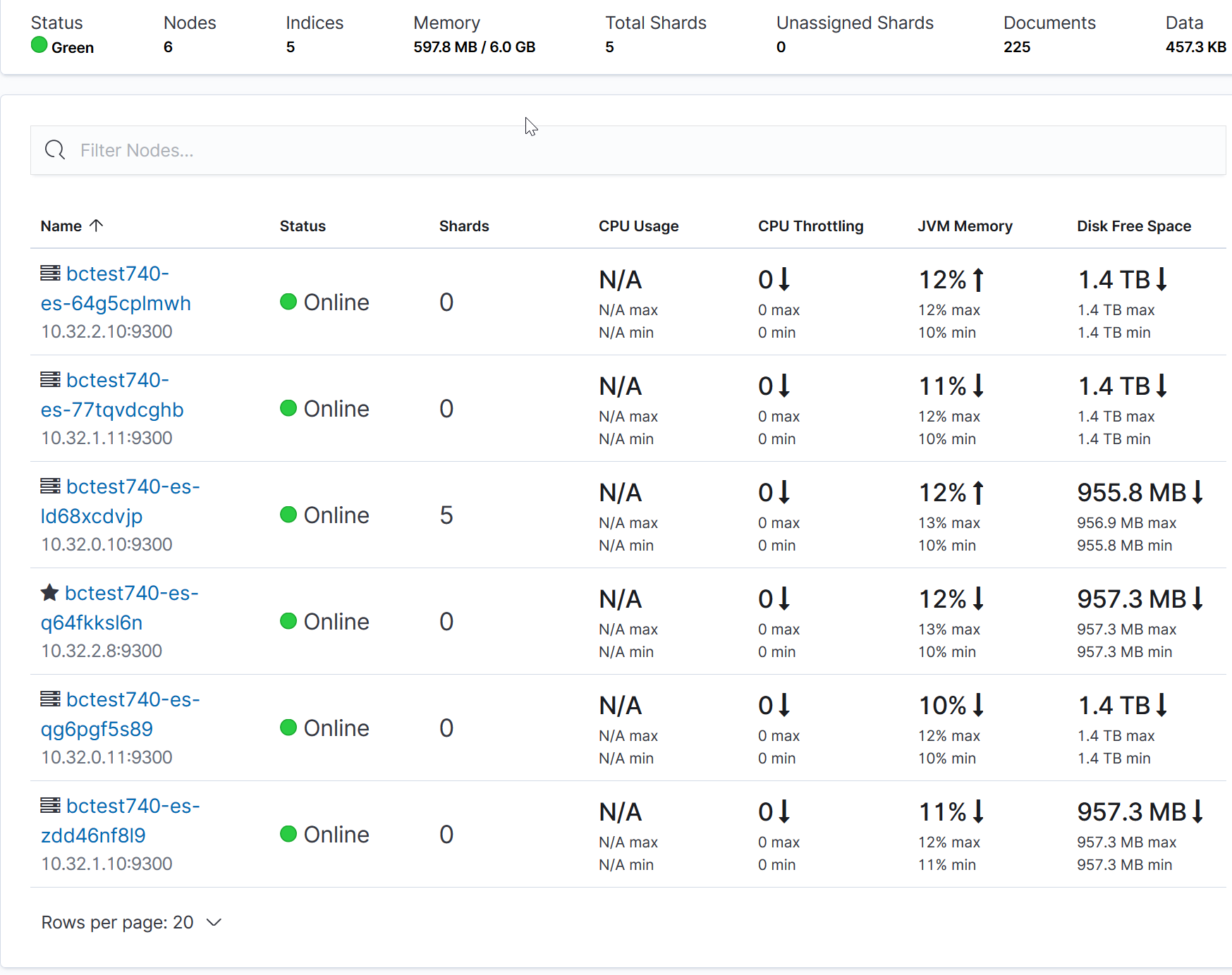
We may be able to use this configuration (hostPath mounts) to test performance of Google Persistent Disk SSD vs local ssd. Noting, however:
- using hostPath means that kubernetes scheduler is likely unaware of the locality of the storage, so a restarted pod may move to another GKE node causing 100% of the data to be effectively lost on the previous GKE node.
- individual disks is not a recommended configuration by Elasticsearch. Instead, RAID providing a single filesystem is preferable.
jordansissel
on 8 Oct 2019
why not simplify this workaround while we wait for GKE to (maybe someday) implement RAID? Even if they do implement RAID, I doubt GKE is the only platform this issue is relevant to.
 alice-sawatzky
on 21 Apr 2020
alice-sawatzky
on 21 Apr 2020
FWIW we removed the settings blacklist in ECK 1.0 so the woraround @jordansissel describes above should be possible now without resorting to environment variables to configure the data paths. https://github.com/elastic/cloud-on-k8s/pull/2162
 pebrc
on 21 Apr 2020
pebrc
on 21 Apr 2020
FWIW we removed the settings blacklist in ECK 1.0 so the woraround @jordansissel describes above should be possible now without resorting to environment variables to configure the data paths. #2162
@pebrc which version of the operator allows config.path ? I am running docker.elastic.co/eck/eck-operator:1.0.1 and I see
Elasticsearch manifest has warnings. Proceed at your own risk. [spec.nodeSets[0].config.path.data: Forbidden: Configuration setting is reserved for internal use. User-configured use is unsupported, spec.nodeSets[1].config.path.data: Forbidden: Configuration setting is reserved for internal use. User-configured use is unsupported, spec.nodeSets[2].config.path.data: Forbidden: Configuration setting is reserved for internal use. User-configured use is unsupported]
It works if we set the path.data environment variable.
 acondrat
on 20 May 2020
acondrat
on 20 May 2020
@acondrat this is just a warning. The setting should still go through.
 sebgl
on 20 May 2020
sebgl
on 20 May 2020
@sebgl for some reason it does not. I found another example that also uses env variables instead of config - https://github.com/elastic/cloud-on-k8s/issues/2575
acondrat
on 20 May 2020
@acondrat sorry about that, I just double checked and indeed it does not work in version 1.0.1. This is actually due to a bug that was fixed later on: https://github.com/elastic/cloud-on-k8s/issues/2573.
It definitely works as expected starting 1.1.0.
sebgl
on 20 May 2020
I think this is almost good to close. As of ECK Operator v1.1.0 the setting is no longer blacklisted. We still log the dramatic sounding warning and I think we could relax that a bit and remove that warning for data.path. Thoughts?
pebrc
on 15 Oct 2020
Related issues
 Pandoraemon
·
5Comments
Pandoraemon
·
5Comments
 barkbay
·
5Comments
pebrc
·
3Comments
barkbay
·
5Comments
pebrc
·
3Comments
 Sakib37
·
3Comments
Sakib37
·
3Comments
 spencergilbert
·
3Comments
spencergilbert
·
3Comments