Cloud-on-k8s: Running e2e tests on different versions of vanilla k8s
We will use https://github.com/kubernetes-sigs/kind to test ECK against different versions of vanilla k8s.
If we will go with kind:
- [x] Setup new build agent on CI, approx
n1-standard-16with 16 CPU and 60 GB RAM should be enough (details for setup: https://github.com/elastic/infra/blob/master/terraform/providers/gcp/env/elastic-apps/helm/values/gobld/devops-ci.yml) - [x] Build new image or simply download
kindbinary to existed one? - [x] Create new CI job (both JJBB yml and Jenkins pipeline)
If we will go with Ansible:
- Evaluate possibility of using Ansible playbook for bootstrapping K8s cluster
- Build Docker image to run Ansible
- How to handle SSH keys?
- Create new CI job (both JJBB yml and Jenkins pipeline)
 artemnikitin
All 28 comments
I'm doing some tests with Kind and it does not support a LoadBalancer service with a public IP (at least for the moment: https://github.com/kubernetes-sigs/kind/issues/702)
TestUpdateHTTPCertSAN is failing on Kind because of this.
I think that Services with a public IP are something that we can mostly find in the cloud, I'm not sure that we will be able to get it in all k8s deployments.
 barkbay
on 12 Aug 2019
barkbay
on 12 Aug 2019
Did some tests yesterday with Kind, just want to quickly share the caveats I had:
I had some different behaviors between MacOS and Linux depending on the version of the node image.
For example the node imagev1.13.4works fine on my MacBook but is failing on Linux. On the oppositev1.15.0works fine on Linux but is failing on my Mac 😞 Would be great if someone with a Mac can try to start Kind with a 1.15 node image.I/O problems, if you want to start 3 nodes on one server _(or your laptop)_ it means that there are 3 hosts on the same physical host and every time Kind is started:
- All the needed Docker images (Elasticsearch, Kibana...) must be either downloaded (network I/O) or imported (disk I/O) x3 times. Maybe we can improve that by building our own "Kind node" images.
- At some point my local Docker daemon was "stuck" for several seconds (I have a dedicated disk for Docker but it was overloaded)
TBH I'm still looking for an easy way to run our e2e tests _(without a VM, without a registry...)_, maybe Kind could be great to quickly run some light e2e tests:
- quickly start a 1 node cluster
- check that a controller is doing what we want by running a "light" e2e tests _(i.e. the ones that don't need 3 K8S nodes)_
- Drop the cluster
But I'm not sure it will help us in some situations where we need a 3 nodes cluster, especially if GKE can start them in only 5 minutes.
barkbay
on 13 Aug 2019
@barkbay I was able to run 1.15 k8s cluster in kind on MacOS and deploy 1 elasticsearch node like in quick start guide
artemnikitin
on 13 Aug 2019
I think it worked for me too (I ran out of resources though) what kind of error where you seeing on Mac OS @barkbay
 pebrc
on 13 Aug 2019
pebrc
on 13 Aug 2019
I think I ran into an issue because I was using the master branch. It's working with 0.4, sorry for the noise.
barkbay
on 13 Aug 2019
Just to share some results:
I managed to create a "all-in-one" image (1) that includes:
- Kubernetes _(from the K8S sources, it means that we can test the operator on any version of K8S)_
- The local path provisionner from Rancher
- All the Elastic Stack containers for version 6.8.1 and 7.3 (in case we want to test update from zen1 to zen2 for example)
ctr -n k8s.io images ls -q|grep elastic
docker.elastic.co/apm/apm-server:6.8.1
docker.elastic.co/apm/apm-server:7.3.0
docker.elastic.co/elasticsearch/elasticsearch:6.8.1
docker.elastic.co/elasticsearch/elasticsearch:7.3.0
docker.elastic.co/kibana/kibana:6.8.1
docker.elastic.co/kibana/kibana:7.3.0
Total image size is ~4GB...
1 node cluster
Once installed it takes ~2 minutes to build the operator image and start a 1 node K8S cluster:
> time make kind-with-operator-0 KIND_NODE_IMAGE=barkbay/node:v1.15.2_7.3
[....]
make kind-with-operator-0 KIND_NODE_IMAGE=barkbay/node:v1.15.2_7.3  12,37s user 6,74s system 14% cpu 2:08,51 total
A one node Elasticsearch and Kibana start in less than one minute, mostly because everything is already loaded in the image:
k get pods --all-namespaces
NAMESPACE                     NAME                                            READY   STATUS    RESTARTS   AGE
default                       elasticsearch-sample-es-default-0               1/1     Running   0          58s
default                       kibana-sample-kb-68ccfb9db-xl88h                1/1     Running   0          57s
elastic-namespace-operators   elastic-namespace-operator-0                    1/1     Running   0          2m42s
elastic-system                elastic-global-operator-0                       1/1     Running   1          2m42s
kube-system                   coredns-5c98db65d4-8bws9                        1/1     Running   0          2m52s
kube-system                   coredns-5c98db65d4-hkpmh                        1/1     Running   0          2m52s
kube-system                   etcd-eck-e2e-control-plane                      1/1     Running   0          2m
kube-system                   kindnet-nn82t                                   1/1     Running   0          2m52s
kube-system                   kube-apiserver-eck-e2e-control-plane            1/1     Running   0          119s
kube-system                   kube-controller-manager-eck-e2e-control-plane   1/1     Running   0          113s
kube-system                   kube-proxy-r99n2                                1/1     Running   0          2m52s
kube-system                   kube-scheduler-eck-e2e-control-plane            1/1     Running   0          107s
local-path-storage            local-path-provisioner-7b565f75b-zpjnk          1/1     Running   0          2m52s
3 nodes cluster (1 control plane + 3 worker)
For a 3 nodes cluster it takes an other minute to start the cluster:
> time make kind-with-operator-3 KIND_NODE_IMAGE=barkbay/node:v1.15.2_7.3
[...]
make kind-with-operator-3 KIND_NODE_IMAGE=barkbay/node:v1.15.2_7.3  13,78s user 8,83s system 12% cpu 2:58,09 total
>  k get nodes
NAME                    STATUS   ROLES    AGE     VERSION
eck-e2e-control-plane   Ready    master   2m52s   v1.15.2
eck-e2e-worker          Ready    <none>   2m18s   v1.15.2
eck-e2e-worker2         Ready    <none>   2m18s   v1.15.2
eck-e2e-worker3         Ready    <none>   2m18s   v1.15.2
And it takes a little bit more than 1 minute to have a fully running ES cluster on it:
> k get pods --all-namespaces
NAMESPACE                     NAME                                            READY   STATUS    RESTARTS   AGE
default                       elasticsearch-sample-es-default-0               1/1     Running   0          78s
default                       elasticsearch-sample-es-default-1               1/1     Running   0          78s
default                       elasticsearch-sample-es-default-2               1/1     Running   0          78s
default                       kibana-sample-kb-584f8ccdd5-sbqkv               1/1     Running   0          78s
elastic-namespace-operators   elastic-namespace-operator-0                    1/1     Running   0          4m5s
elastic-system                elastic-global-operator-0                       1/1     Running   1          4m5s
[...]
If you are interested to give it a try my branch is here: https://github.com/elastic/cloud-on-k8s/compare/master...barkbay:kind?expand=1
Just let me know if you think it's worth a PR.
(1) : I had to hack a little bit into the Kind image generator, I'm not sure about the best way to do that. I still need to work on it.
barkbay
on 14 Aug 2019
Nice work @barkbay So it sounds like both your concerns around kind are addressed with that.
- the Mac OS vs Linux issues were caused by using unreleased version of kind
- the I/O issues are addressed by your all-in-one image IIUC
That leaves us with the features like LoadBalancers we cannot test on kind, but for that we probably need some form of test flags/predicates to toggle certain tests for certain target platforms anyway.
All of which indicates that we can go with kind for the vanilla k8s tests (in which case a PR with your changes would be a good starting point)
pebrc
on 14 Aug 2019
I have a question about resources that we need to run e2e tests in kind. Default CI node is n1-standard-4: 4 vCPU and 15 GB RAM. As I understand, it's not enough for e2e tests.
Will n1-standard-16 with 16 vCPU and 60 GB RAM be enough? Or we need more, like n1-standard-32 with 32 vCPU and 120 GB RAM? @barkbay what do you think?
If we will decide to go with kind, then I can start working on adding bigger nodes for CI setup in parallel.
artemnikitin
on 14 Aug 2019
@artemnikitin I'm doing some tests to determine what resources are needed, I will update this issue with my findings.
barkbay
on 14 Aug 2019
All e2e tests passed (🎉) in less than 1 hour on a 8 cores / 30 GB server with a dedicated disk for Docker:
> time make kind-e2e KIND_NODE_IMAGE=barkbay/node:v1.15.2_Elastic7.3
[...]
2019-08-14T13:48:37.963Z    INFO    e2e-drmao   Cleaning up the scratch directory   {"directory": "/tmp/eck-e2e/e2e-drmao"}
make[1]: Leaving directory '/home/michael/go/src/github.com/elastic/cloud-on-k8s/operators'
make kind-e2e KIND_NODE_IMAGE=barkbay/node:v1.15.2_Elastic7.3  32.75s user 18.35s system 1% cpu 57:40.42 total
The question now is how to host and get the all-in-one image of 4GB onto the Jenkins server?
Ideally it could be downloaded from a server no so far from our CI and it could be downloaded in the background while the containers are build ?
barkbay
on 14 Aug 2019
The question now is how to host and get the all-in-one image of 4GB onto the Jenkins server?
2 ways essentially:
1) Host it somewhere and download
2) Include it in the base image for instances in cloud service. In this case image will be on node and there is no need for download at all
Second approach is better because we can include in the base image not only node image, but kind binary too. On the bad side of option 2, in the case of changes we will need to update base image. I think infra using Packer for managing base images, therefore it should be easy
artemnikitin
on 14 Aug 2019
I would lean toward option 2, would be great to have these images directly on the host. Do you know if we can manage these images ourselves ?
In the meantime I have opened an issue to see if an option can be added to Kind in order to add the stack images when the node image is built: https://github.com/kubernetes-sigs/kind/pull/777
barkbay
on 19 Aug 2019
Do you know if we can manage these images ourselves ?
I think yes, but to be sure I opened https://github.com/elastic/infra/issues/13910 to clarify technical details.
artemnikitin
on 19 Aug 2019
@barkbay I created https://github.com/elastic/cloud-on-k8s/pull/1598. In the future images for kind should be added to this file and they will be pre-loaded on CI
artemnikitin
on 20 Aug 2019
artemnikitin
on 31 Oct 2019
As far as I can see this has never run sucessfully.
pebrc
on 19 Nov 2019
Here is the error when the job fails:
Step 9/16 : RUN CGO_ENABLED=0 GOOS=linux GOARCH=amd64       go build             -mod readonly          -ldflags "$GO_LDFLAGS" -tags="$GO_TAGS" -a          -o elastic-operator github.com/elastic/cloud-on-k8s/cmd
---> Running in fbaada888f39

# github.com/elastic/cloud-on-k8s/pkg/controller/common/license
pkg/controller/common/license/check.go:35:22: undefined: publicKeyBytes

The command '/bin/sh -c CGO_ENABLED=0 GOOS=linux GOARCH=amd64       go build             -mod readonly          -ldflags "$GO_LDFLAGS" -tags="$GO_TAGS" -a          -o elastic-operator github.com/elastic/cloud-on-k8s/cmd' returned a non-zero code: 2
Makefile:319: recipe for target 'docker-build' failed
build/ci/e2e/vanilla_k8s.jenkinsfile calls the kind-e2e make target which calls set-kind-e2e-image which calls docker-build.
During the Docker build, the go binary build fails because the variable publicKeyBytes is not defined.
This variable is not defined because go generate -tags='$(GO_TAGS)' ./pkg/... ./cmd/... has not yet been executed.
We can add (duplicate) the go generate command directly in the Dockerfile or call the generate-crds target in the set-kind-e2e-image target. Not sure what is the best. First option seems to me a little better as this go generate is part of the build at a same level as go mod or go build and should never been forgotten.
 thbkrkr
on 24 Jan 2020
thbkrkr
on 24 Jan 2020
Last build went a little further:
[2020-01-29T14:39:39.310Z] + kind -v 1 create cluster --name=eck-e2e --config /tmp/cluster.yml --retain --image kindest/node:v1.15.3
[2020-01-29T14:39:39.310Z] Error: unknown shorthand flag: 'v' in -v
We forgot to update the kind version when we updated the kind setup in #2295.
thbkrkr
on 29 Jan 2020
Last job failure is due to a compilation error: publicKeyBytes redeclared in this block.
# github.com/elastic/cloud-on-k8s/pkg/controller/common/license
21:18:18  pkg/controller/common/license/zz_generated.pubkey.go:7:5: publicKeyBytes redeclared in this block
21:18:18    previous declaration at pkg/controller/common/license/pubkey_dev.go:9:5
21:18:40  FAIL  github.com/elastic/cloud-on-k8s/test/e2e [build failed]
Reproduced it in local, this is the output of the job that runs:
E2E_JSON=json test/e2e/run.sh -run ^Test -args -testContextPath ./testcontext.json- =>
go test -v -failfast -timeout=4h -tags=e2e -p=1 github.com/elastic/cloud-on-k8s/test/e2e -run '^Test' -args -testContextPath ./testcontext.json
The compilation failed because we did not clean (rm .../zz_generated.pubkey.go) before executing e2e-run like this is done in the e2e target.
thbkrkr
on 3 Feb 2020
I misunderstood how to fix the error. publicKeyBytes redeclared indicates that the .../license/zz_generated.pubkey.go file (generated during the operator build) is present in the Docker container used to run the e2e job. This container uses the image built with e2e-docker-build.
So, we need to call clean before e2e-docker-build and not before e2e-run.
The worst part is that I ran it locally and it worked (at least once). Since, I ran it again and it failed like in CI. I think it's because I temporarly changed set-kind-e2e-image to pull the operator image and not rebuild it again to save time and bandwidth.
thbkrkr
on 4 Feb 2020
Last job was able to run the TestSmoke E2E test \o/,
but it failed because of pod has unbound immediate PersistentVolumeClaims.
12:13:39 --- FAIL: TestSmoke/All_expected_Pods_should_eventually_be_ready (900.00s)
12:13:39 utils.go:83:
12:13:39 Error Trace: utils.go:83
12:13:39 Error: Received unexpected error:
12:13:39 pod es-apm-sample-zp2v-es-default-0 is not Ready.
12:13:39 Status:{
12:13:39 "phase": "Pending",
12:13:39 "conditions": [
12:13:39 {
12:13:39 "type": "PodScheduled",
12:13:39 "status": "False",
12:13:39 "lastProbeTime": null,
12:13:39 "lastTransitionTime": "2020-02-04T11:57:50Z",
12:13:39 "reason": "Unschedulable",
12:13:39 "message": "error while running \"VolumeBinding\" filter plugin for pod \"es-apm-sample-zp2v-es-default-0\": pod has unbound immediate PersistentVolumeClaims"
12:13:39 }
12:13:39 ],
12:13:39 "qosClass": "Burstable"
12:13:39 }
12:13:39 Test: TestSmoke/All_expected_Pods_should_eventually_be_ready
12:13:39
12:13:39 === [31mFAIL[0m: test/e2e TestSmoke (906.64s)
it failed because of pod has unbound immediate PersistentVolumeClaims.
Claims can't been satisfied because the e2e-default storage class, which is defined for them, does not exist.
> k get pvc -n e2e-mercury
NAME                                                 STATUS   VOLUME                                     CAPACITY   ACCESS MODES   STORAGECLASS   AGE
elasticsearch-data-es-apm-sample-6q7f-es-default-0   Bound    pvc-45d72ad6-bccd-4264-b9c2-73efd47a4565   1Gi        RWO            e2e-default    6s
elasticsearch-data-es-apm-sample-6q7f-es-default-1   Bound    pvc-77b46ea1-954b-45dd-bea7-80877b93e4a9   1Gi        RWO            e2e-default    6s
elasticsearch-data-es-apm-sample-6q7f-es-default-2   Bound    pvc-7f95dcc1-15ec-478c-8e9d-f212aeb7bfe1   1Gi        RWO            e2e-default    6s

> k get sc
NAME                   PROVISIONER             RECLAIMPOLICY   VOLUMEBINDINGMODE      ALLOWVOLUMEEXPANSION   AGE
local-path (default)   rancher.io/local-path   Delete          WaitForFirstConsumer   false                  163m
The fix seems pretty easy since we are creating the storage class, and therefore controlling its name:
https://github.com/elastic/cloud-on-k8s/blob/4ad5d7f79b30d1384ad111693a6121c9abe8c7ff/hack/kind/kind.sh#L100
thbkrkr
on 5 Feb 2020
Last run executed 48/64 tests before failing:
# Run tests on different versions of vanilla K8s - 1.16.4
es.TestVersionUpgrade3Nodes68xTo73x/All_expected_Pods_should_eventually_be_ready#01
# Run tests on different versions of vanilla K8s - 1.17.0
kb.TestVersionUpgrade/Kibana_deployment_be_rolled_out
# Run tests on different versions of vanilla K8s - 1.12.10
es.TestVersionUpgrade3Nodes68xTo73x/All_expected_Pods_should_eventually_be_ready#01
ES logs are full of disk watermark messages:
# e2e-bzrbe/e2e-bzrbe-mercury/pod/test-version-up-3-68x-to-73x-cp5q-es-masterdata-1/logs.txt
[2020-02-05T20:41:53,624][INFO ][o.e.c.r.a.DiskThresholdMonitor] [test-version-up-3-68x-to-73x-cp5q-es-masterdata-1]
 low disk watermark [85%] exceeded on [d0w045IxSPm_a1ZF47Q2ag][test-version-up-3-68x-to-73x-cp5q-es-masterdata-1][/usr/share/elasticsearch/data/nodes/0] free: 7.7gb[13.2%],
 replicas will not be assigned to this node

# e2e-jcedf/e2e-jcedf-mercury/pod/test-version-up-3-68x-to-73x-8q96-es-masterdata-0/logs.txt
[2020-02-05T20:18:46,662][INFO ][o.e.c.r.a.DiskThresholdMonitor] [test-version-up-3-68x-to-73x-8q96-es-masterdata-0]
 low disk watermark [85%] exceeded on [mSRxsAjqRlK_vwKHO5IwMQ][test-version-up-3-68x-to-73x-8q96-es-masterdata-2][/usr/share/elasticsearch/data/nodes/0] free: 8.2gb[14.1%],
 replicas will not be assigned to this node

# e2e-y4gss/e2e-y4gss-mercury/pod/test-version-upgrade-5gm7-es-masterdata-0/logs.txt
{
    "type": "server",
    "timestamp": "2020-02-05T20:39:43,786Z",
    "level": "WARN",
    "component": "o.e.c.r.a.DiskThresholdMonitor",
    "cluster.name": "test-version-upgrade-5gm7",
    "node.name": "test-version-upgrade-5gm7-es-masterdata-0",
    "message": "flood stage disk watermark [95%] exceeded on [2bOswlooSTKHSZ47tz7wcg][test-version-upgrade-5gm7-es-masterdata-0][/usr/share/elasticsearch/data/nodes/0] free: 759.8mb[1.2%], all indices on this node will be marked read-only",
    "cluster.uuid": "TOF8lPhWQIy-awGddaxr9A",
    "node.id": "2bOswlooSTKHSZ47tz7wcg"
}
It seems very likely that Jenkins workers disks have been filled.
thbkrkr
on 6 Feb 2020
TL;DR Jenkins workers have 60GB disks. When running E2E tests with kind we pull multiple images that weighing more than 60GB.
I monitored the disk usage when running E2E tests with kind and observed that /var/lib/docker took up most of the space, especially /var/lib/docker/volumes.
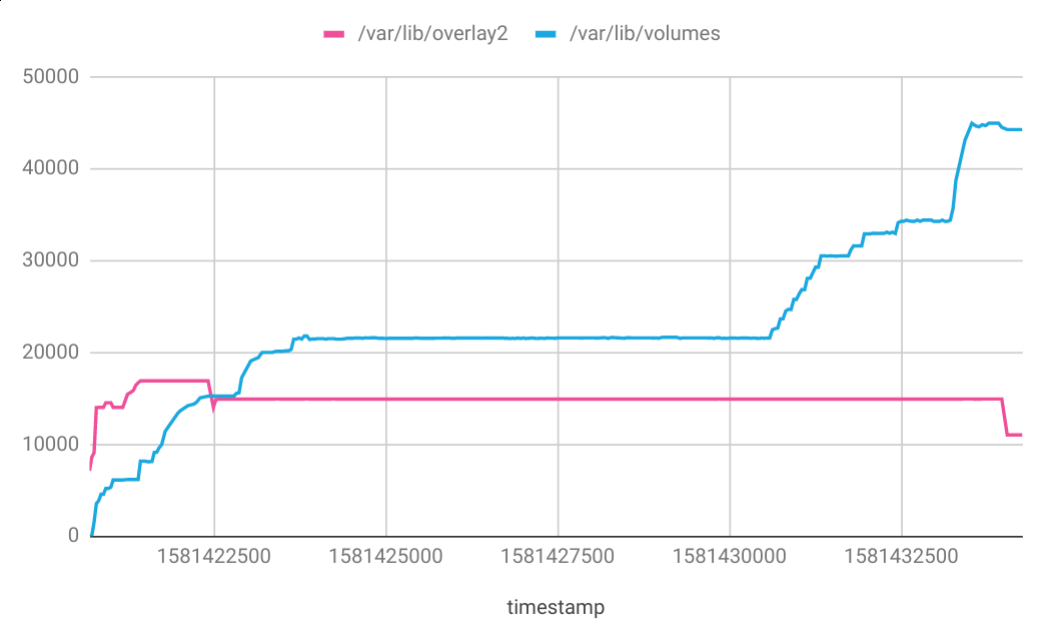
/var/lib/docker/overlay2 is filled by the base Docker image layers pulled before starting the tests:
golang:1.13803MBdocker.elastic.co/eck/eck-ci:09b92.75GBdocker.elastic.co/eck-snapshots/eck-operator:1.0.0-2020-02-10-54683c9253MBkindest/node:v1.16.41.28GBeu.gcr.io/elastic-cloud-dev/eck-operator-ci-e2e-tests:f9a02e1.44GB
/var/lib/docker/volumes is filled by the Docker image layers pulled during the tests by containerd on each kind node:
docker.elastic.co/elasticsearch/elasticsearch:${stack_version}790MBdocker.elastic.co/kibana/kibana:${stack_version}1.01GBdocker.elastic.co/apm/apm-server:${stack_version}379MB
Different versions of these images are pulled to test, especially for upgrade scenarios. These images are pulled on each kind node when a test manipulates an ES or Kibana cluster of 3 nodes.
For one execution of all the E2E tests, we pull:
- 1 APM: ${stack_version}
- 3 KB images: 7.4.0, 7.4.2, ${stack_version}
- 7 ES: 6.8.5, 7.1.0, 7.3.0, 7.3.2, 7.4.0, 7.4.2, 7.6.0, (+ ${stack_version} which is often already in the list, exception for 7.1.1 and 7.2.1)
Once the images are pulled, they are decompressed and take up a little more space:
- APM Server (380 MB) 500 MB
- Kibana (1 GB) 1458 MB
- Elasticsearch (790 MB) 1079 MB
So, in the worst scenario, it gives a total of:
(500 + 1458 * 3 + 1079 * 7) * 3 = 12427 * 3 = 37GB
   7GB  # for the os `/dev/sda1          69423  6706     62702  10% /`.
+  7GB  # to pull the initial images (go, ci, operator, e2e-test)
+ 15GB  # to setup Kind
+ 37GB  # to run the E2E tests
= 66GB
_Note: numbers are a bit rough._
The E2E tests run on Jenkins worker with 60GB disk. This is not enough and explain why the Elasticsearch disk watermark is not happy.
We can bump a little the disk space but I think we should also decrease the number of different versions of the stack used during all the tests.
The low watermark for disk usage is set by default to 85%. To be comfortable, we need workers with 80-90GB disk (66GB*100/85=77GB).
thbkrkr
on 13 Feb 2020
Bumping disk size should be easy. You will need to add it to https://github.com/elastic/infra/blob/master/terraform/providers/gcp/env/elastic-apps/helm/values/gobld/devops-ci.yml#L41
artemnikitin
on 13 Feb 2020
Increasing the disk size made the job worked for k8s 1.12.
However it still fails for k8s 1.15 and 1.16 due to https://github.com/elastic/cloud-on-k8s/issues/2576#issuecomment-588307478.
thbkrkr
on 20 Feb 2020
Last runs almost succeed. The post action failed because the e2e-tests.json is not present:
cat: e2e-tests.json: No such file or directory.
thbkrkr
on 26 Feb 2020
We had a succesfull build \o/

I am closing this issue which is already quite long and will open a new issue for the next failure.
thbkrkr
on 28 Feb 2020
Related issues
 SebastianCaceresUltra
·
3Comments
SebastianCaceresUltra
·
3Comments
 sebgl
·
5Comments
sebgl
·
5Comments
 nkvoll
·
4Comments
sebgl
·
3Comments
thbkrkr
·
5Comments
nkvoll
·
4Comments
sebgl
·
3Comments
thbkrkr
·
5Comments