Cloud-builders: Docker builder fails to access GCP Cloud Source Repos
The Docker builder uses the Cloud Build Service Account which in turn should have sufficient rights to _fetch code from your project's Cloud Source Repository_.
But when specifying RUN pip install git+https://source.developers.go... in Dockerfile the resulting git clone -q ... fails in the logs with error code 128 and previously claiming the following:
_fatal: could not read Username for 'https://source.developers.google.com': No such device or address_
Using GitHub with token instead of GCP Cloud Source Repositories works successful in this way. A self-maintained repo within GCP as well.
 YaguraStation
All 11 comments
Try adding --network=cloudbuild to your docker build step args. That should pipe the builder service account creds into the Docker build environment.
 imjasonh
on 22 Aug 2018
imjasonh
on 22 Aug 2018
Thanks for the quick answer. I just tested it now and checked in the console's Build History log that --network=cloudbuild was picked up as argument. Which it did, but it errored out in the same fashion
Collecting git+https://source.developers.google.com/p/labs-honigwachs-de/r/co
Cloning https://source.developers.google.com/p/labs-honigwachs-de/r/co to /tmp/pip-req-build-QyyVeD
fatal: could not read Username for 'https://source.developers.google.com': No such device or address
Command "git clone -q https://source.developers.google.com/p/labs-honigwachs-de/r/co /tmp/pip-req-build-QyyVeD" failed with error code 128 in None
The command '/bin/sh -c pip install git+https://source.developers.google.com/p/labs-honigwachs-de/r/co' returned a non-zero code: 1
ERROR
ERROR: build step 0 "gcr.io/cloud-builders/docker" failed: exit status 1
The docker builder doesn't install the Git credential helper, which is installed through gcloud. It sounds like you're building and using an image FROM gcr.io/cloud-builders/docker that also installs pip and git, since neither are installed in the docker image by default. You should probably install and setup the credential helper too, like we do in the git builder.
imjasonh
on 22 Aug 2018
From the tests, both things seem to be necessary: (1) setting up the credential helper, and (2) using --network=cloudbuild as an argument. We can now interact with the GCP Cloud Source Repo.
Thanks for your help! And it might be useful to have this info in one the articles linked in my initial filing.
YaguraStation
on 22 Aug 2018
Building the dockerfile locally gave me the following error:

In Cloud Build, is the gcloud automatically initiated, i.e. credentials are already obtained?
```bash
Image containing Cloud SDK and GCP deps
FROM gcr.io/cloud-builders/gcloud
Configure git to pass on username. Works in Cloud Build
only when using --network=cloudbuild which passes on
Cloud Build Service Account as creds.
RUN git config --system credential.helper gcloud.sh
gcloud image has Python, but not setuptools
RUN apt-get update && apt-get install -y python-setuptools
RUN pip install git+https://source.developers.google.com/p/..../r/...../@r1.0#egg=.......==1.0.0
 jankrynauw
on 24 Aug 2018
jankrynauw
on 24 Aug 2018
So, from my earlier research only when using --network=cloudbuild in _cloudbuild.yaml_ as a build argument, the credentials of the Cloud Build Service Account within the project will be used. In turn that service account is already by inheritance of its role allowed to read the GCP project Cloud Source Repositories.
In short I believe your error will vanish when using --network=cloudbuild.
YaguraStation
on 24 Aug 2018
Unless I'm not understanding, _cloudbuild.yaml_ does't play a role in local testing environment. Therefore not sure how --network=cloudbuild will assist with local testing.
I guess one way is to, if running locally, to pass the local credentials manually:
docker run --rm -it -v ~/.config/gcloud:/.config/gcloud google/cloud-sdk
Its just not a super elegant way to test locally.
jankrynauw
on 24 Aug 2018
--network=cloudbuild is a build argument for building the Docker image with docker build in Cloud Build. Docker image builds triggered within Cloud Build (or with gcloud builds) respect the additional arguments in _cloudbuild.yaml_. In general, outside of GCP, docker build --network sets the networking mode for the RUN instructions during build.
The _Dockerfile_ includes instructions for the build process itself, including the pip install git+ .... In Cloud Build, when using the above mentioned argument in the following manner, the service account is used as expected and documented. Without, auth has to be configured.
steps:
- name: gcr.io/cloud-builders/docker
  args: ['build', '--network=cloudbuild', ...
So once Cloud Build has built the Docker image including the Python package from Cloud Repositories and stored the image in Google Container Registry (gcr.io), then one can use docker run to run a container based on that image... in GCP or locally.
To have the local Docker installation interact with GCR for testing purposes, you'd need to gcloud auth configure-docker first. After that, specifying images from gcr.io with docker pull and docker run should work.
YaguraStation
on 25 Aug 2018
excellent, thank you this makes sense
jankrynauw
on 25 Aug 2018
From the tests, both things seem to be necessary: (1) setting up the credential helper, and (2) using
--network=cloudbuildas an argument. We can now interact with the GCP Cloud Source Repo.Thanks for your help! And it might be useful to have this info in one the articles linked in my initial filing.
Hi, I'm trying to build the image in the cloud, the same way @YaguraStation you did, and for me the '--network=cloudbuild' is already in place.
But I'm not sure how to install and setup the credential helper part, in the git builder - how @imjasonh said.
I tried adding the commands in the Dockerfile as ,
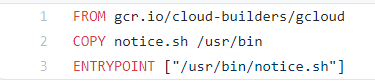
but I get the below error,

can anyone show an example of how this is to be done?
Thanks
Aravind
 Aravinviju
on 17 May 2021
Aravinviju
on 17 May 2021
From the tests, both things seem to be necessary: (1) setting up the credential helper, and (2) using
--network=cloudbuildas an argument. We can now interact with the GCP Cloud Source Repo.
Thanks for your help! And it might be useful to have this info in one the articles linked in my initial filing.Hi, I'm trying to build the image in the cloud, the same way @YaguraStation you did, and for me the '--network=cloudbuild' is already in place.
But I'm not sure how to install and setup the credential helper part, in the git builder - how @imjasonh said.
I tried adding the commands in the Dockerfile as ,
but I get the below error,
can anyone show an example of how this is to be done?
Thanks
Aravind
Hi
Just for an update,
this build worked fine for me after adding,
FROM gcr.io/cloud-builders/gcloud
RUN git config --system credential.helper gcloud.sh
This initially gave an python version incompatible error as the first command gets python 2.7 and I needed python 3.6.
then I installed gcloud from scratch using the folloing command and the used the credential.helper command, this worked:
RUN echo "deb [signed-by=/usr/share/keyrings/cloud.google.gpg] http://packages.cloud.google.com/apt cloud-sdk main" | tee -a /etc/apt/sources.list.d/google-cloud-sdk.list && curl https://packages.cloud.google.com/apt/doc/apt-key.gpg | apt-key --keyring /usr/share/keyrings/cloud.google.gpg  add - && apt-get update -y && apt-get install google-cloud-sdk -y

RUN git config --system credential.helper gcloud.sh
I also gave additional permissions to my cloud build SA:
- Cloud Source Repositories Service Agent
- Custom Source Repository Writer
Not sure, if that could ve made some changes too which made the build to work. I would suggest experimenting this if the above doesn't work.
Thnaks
Arav
Aravinviju
on 18 May 2021
Related issues
 DazWilkin
·
3Comments
DazWilkin
·
3Comments
 acasademont
·
4Comments
acasademont
·
4Comments
 mbana
·
6Comments
mbana
·
6Comments
 ewhauser
·
4Comments
ewhauser
·
4Comments
 maxpaynestory
·
7Comments
maxpaynestory
·
7Comments
Most helpful comment
The docker builder doesn't install the Git credential helper, which is installed through gcloud. It sounds like you're building and using an image
FROM gcr.io/cloud-builders/dockerthat also installspipandgit, since neither are installed in the docker image by default. You should probably install and setup the credential helper too, like we do in thegitbuilder.