Clipboard.js: Name conflict on chrome 61+
Chrome version 61 has added a Clipboard object, i still can't find any documentation on this new object:
on the console:
window.Clipboard
ƒ Clipboard() { [native code] }
Now when this plugin is loaded on a page it overwrittes de original definition of Chrome
I don't know if it has any impact yet, may be this plugin could take a new name to avoid conflicts?
 ealarcong
All 38 comments
I'm having the same issue.
Uncaught TypeError: Illegal constructor
When calling new Clipboard
Only happens on Chrome 61
 SimplyCorey
on 11 Sep 2017
SimplyCorey
on 11 Sep 2017
Has anyone heard anything about what Chrome's window.Clipboard is/does?
 mAAdhaTTah
on 12 Sep 2017
mAAdhaTTah
on 12 Sep 2017
@mAAdhaTTah I think it's part of the Asynchronous Clipboard API. navigator.clipboard is supposed to return a Clipboard object (though it doesn't work currently AFAICT. I think Chrome has started implementing it.
 Golmote
on 13 Sep 2017
Golmote
on 13 Sep 2017
Any have idea of this change? Some of my functions of Clipboard stop of works correctly. I test in preview version of chrome(57) and i dont have problem
 Hideiki
on 16 Sep 2017
Hideiki
on 16 Sep 2017
@Hideiki , I'm currently facing the same problem. As a temporary solution I ended up creating a custom version of the library by replacing the name of Clipboard to another non-conflicting name with Chrome.
 xxswingxx
on 17 Sep 2017
xxswingxx
on 17 Sep 2017
Do any of you have a simple code sample that demonstrates the issue? Personally I don't experience this issue...
 Ruffio
on 17 Sep 2017
Ruffio
on 17 Sep 2017
@Ruffio The issue is that the existence of Clipboard.js can not be tested by checking window.Clipboard in Chrome 61+, because this variable natively exists now.
Golmote
on 17 Sep 2017
I understand the issue, I just can't reproduce it and therefore I ask for a sample code.
Ruffio
on 17 Sep 2017
@Ruffio ok. Here you go: https://jsfiddle.net/1Lcf7cdz/1/
Error is thrown in Chrome 61+. No error thrown in Firefox 55.
Golmote
on 17 Sep 2017
Hmm. So @zenorocha should consider to change it to ClipboardJS or simular. @zenorocha do you want a PR for this?
Ruffio
on 17 Sep 2017
For backward compatibility, you could make both variables available (Clipboard and ClipboardJS for example). Pushing the idea forward, you could even add a method to restore the original Clipboard value after initialisation. Like jQuery.noConflict() does, restoring the initial value of $ and still being accessible with jQuery.
EDIT: Underscore.js provides the same utility: http://underscorejs.org/#noConflict. So does Lodash: https://lodash.com/docs/#noConflict.
Golmote
on 17 Sep 2017
I tried to implement a noConflict, but the problem is really that if we change the global from Clipboard -> ClipboardJS, that's a breaking change, and browserify doesn't have a way to create a standalone build with two globals.
@Golmote For us, we need to be able to check whether a global exists that isn't already built into the browser. Otherwise, we can't know whether clipboard.js has been loaded or not.
mAAdhaTTah
on 13 Oct 2017
One note to help reproduce this -- it looks like Chrome only defines a "window.Clipboard" object when the page is loaded via HTTPS, but not HTTP. This seems to match the w3c spec, which marks the object as requiring a "SecureContext"..
 eli-collins
on 7 Nov 2017
eli-collins
on 7 Nov 2017
Shouldn't this result in a 2.0 release? You can't overwrite window.Clipboard if Chrome provides a native implementation because the interfaces are not compatible. You also can't just do nothing since doing so breaks anyone's code who depends on clipboard.js. Both these approaches lead to breakage. I think moving forward, yes, the name of the constructor absolutely should be changed to something else (e.g. ClipboardJS).
 armw4
on 10 Nov 2017
armw4
on 10 Nov 2017
@Golmote isn't my-lib.noConflict() contingent upon the fact that two interfaces must be fully compatible with one another (e.g. lodash and underscore)? Otherwise you can't just do a 1:1 hot-swap at runtime (I would not think so at least).
armw4
on 10 Nov 2017
@armw4 Not necessarily; currently, Clipboard.js is already clobbering the global. What this would do is restore the global back to its previous value. The interfaces are already not compatible and are already replacing each other. A noConflict would return the globals back to what they were before the global was clobbers.
mAAdhaTTah
on 10 Nov 2017
@mAAdhaTTah So we mean restoring the native Clipboard back to the one inside userland (e.g. clipboard.js)? Does this mean when you use this option you know you're opting out of the native Clipboard construct and into the one provided by clipboard.js?
armw4
on 10 Nov 2017
Does this mean when you use this option you know you're opting out of the native Clipboard construct and into the one provided by clipboard.js?
No; when you include Clipboard.js currently, that's when you "opt-out" of the native Clipboard (although not intentionally; it just overwrites it cuz that's what it does). noConflict would/should reverse this.
mAAdhaTTah
on 10 Nov 2017
No; when you include Clipboard.js currently, that's when you "opt-out" of the native Clipboard (although not intentionally; it just overwrites it cuz that's what it does). noConflict would/should reverse this.
Just by merely including clipboard.js still points window.Clipboard to the native Clipboard provided by Chrome though. It does not just immediately point you to the userland clipboard. Isn't that the actual issue here. noConflict seems to imply that you are properly pointed to userland code initially (which I do not believe is currently the case) but then want to opt-out and revert back to native code.
armw4
on 10 Nov 2017
Unless we are saying as apart of providing noConflict it will actually run a heuristic to check the native implementation and swap it accordingly? Maybe I'm getting caught up on the fact that it does not do this currently, but it would indeed do so as apart of recommended patch?
armw4
on 10 Nov 2017
Just by merely including clipboard.js still points window.Clipboard to the native Clipboard provided by Chrome though.
Depends how you use it; if you include the UMD build w/ a script tag, by default, it clobbers the built-in window.Clipboard. Look at the first post in this issue:
Now when this plugin is loaded on a page it overwrittes de original definition of Chrome. I don't know if it has any impact yet, may be this plugin could take a new name to avoid conflicts?
mAAdhaTTah
on 10 Nov 2017
Depends how you use it; if you include the UMD build w/ a script tag, by default, it clobbers the built-in window.Clipboard.
You mean like this?
<script src="https://cdnjs.cloudflare.com/ajax/libs/clipboard.js/1.7.1/clipboard.min.js" />
We are running into this issue even when including as script tag (it's pointing to native Clipboard and gives illegal constructor).
armw4
on 10 Nov 2017
Yeah, basically: https://jsfiddle.net/osac2n1w/1/ I didn't set up the whole thing, but the error in the console there is Clipboard.js-related, not "Illegal Constructor". Can you provide a repro example?
mAAdhaTTah
on 10 Nov 2017
Yeah, basically: https://jsfiddle.net/osac2n1w/1/ I didn't set up the whole thing, but the error in the console there is Clipboard.js-related, not "Illegal Constructor". Can you provide a repro example?
Sure, so I think that works most the time, but there seems to be some edge case that triggers it even for UMD builds (where it does not actually overwrite the native implementation). I do not have an publicly available example where this outright fails, but we are using the UMD build and received this alert via sentry this morning:
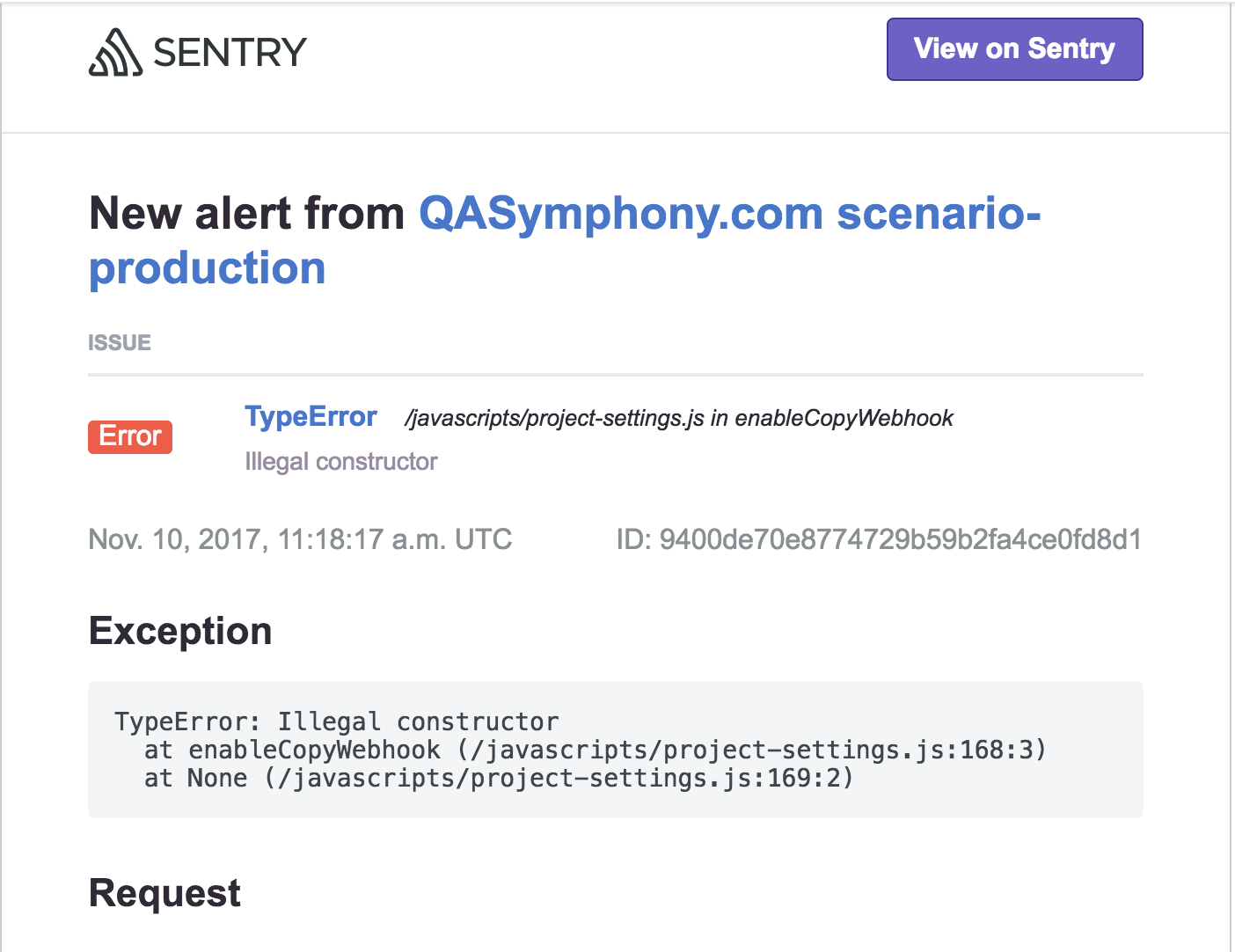
armw4
on 10 Nov 2017
We are running our code inside and iframe though (maybe that shakes things up a bit).
armw4
on 10 Nov 2017
Without looking at your code, I'm skeptical the problem is intermittent due to the implementation. My suspicion is you're loading the UMD build async and having timing issues.
Regardless, to get back on track, if we're going to implement a noConflict method, we should proceed doing so assuming it's clobbering the global by default in the UMD build. I took a look @ Handlebars' noConflict method, which I think we can mostly borrow, so I'm going to look into implementing that. However, we can't really proceed without @zenorocha weighing in here.
We are running our code inside and iframe though (maybe that shakes things up a bit).
or that, yeah. Cross-realm issues, the scripts applying to the iframe only, or the parent only, or something of that nature.
mAAdhaTTah
on 10 Nov 2017
I'm also leaning towards clipboard.js possibly failing to load from the CDN for that user. That would trigger as well. Then it comes down to whether or not you think "Uncaught ReferenceError: ClipboardJS is not defined" is better than seeing "Uncaught TypeError: Illegal constructor" (re: breaking changes vs no conflict approach).
armw4
on 10 Nov 2017
I don't have a preference between the two approaches, which is why we need the developer to weigh in.
mAAdhaTTah
on 10 Nov 2017
I can confirm this for Chrome Version 62.0.3202.94 (Official Build) (64-bit)
 LucitheR
on 14 Nov 2017
LucitheR
on 14 Nov 2017
I got around the issue by doing a find and replace on all instances of the string "Clipboard" with "ClipboardJS" in the clipboard.js file. Obviously not ideal, but it works! Should be noted I haven't tested anything other than the basic functionality as that is all I need for now.
 benm-eras
on 5 Dec 2017
benm-eras
on 5 Dec 2017
Yeah it's completely unusable in latest Chrome versions due to the name clash,
 pokonski
on 12 Jan 2018
pokonski
on 12 Jan 2018
Any timeline on this? Running into the same issue.
 dyeje
on 27 Jan 2018
dyeje
on 27 Jan 2018
In the meanwhile, you can install a modified, working copy from my fork...
[ClipboardJS v2.0.1 CDN] @ https://cdn.rawgit.com/rivy/js.ClipboardJS/021e74439d7d64da9e44bbfb488850ed7a4dadf4/dist/clipboard.min.js
It's labeled as "v2.0.1" because it's a breaking change, renaming all instances of "Clipboard" and
"ClipboardAction" to "ClipboardJS" and "ClipboardJSAction", respectively. Change your code accordingly and it should be working correctly again, even in the most recent browser versions.
 rivy
on 11 Feb 2018
rivy
on 11 Feb 2018
Hey everybody,
Sorry for taking so long to fix this. A 2.0.0 release has been published with the proper fix.
https://github.com/zenorocha/clipboard.js/releases/tag/v2.0.0
Unfortunately this is a breaking change that is not backwards compatible.
 zenorocha
on 1 Mar 2018
zenorocha
on 1 Mar 2018
I am using the latest CDN (https://cdnjs.cloudflare.com/ajax/libs/clipboard.js/2.0.0/clipboard.min.js) and still seeing the Illegal constructor error...
Running latest Chrome: Version 64.0.3282.186 (Official Build) (64-bit)
Could old versions be cached or something?
 ajmccann11t
on 5 Mar 2018
ajmccann11t
on 5 Mar 2018
@jimcaven You're probably still doing new Clipboard in ur code; you need new ClipboardJS with the new version.
mAAdhaTTah
on 5 Mar 2018
THANK YOU!
ajmccann11t
on 5 Mar 2018
@jimcaven You're probably still doing new Clipboard in ur code; you need new ClipboardJS with the new version.
There are still the old docs on npm.
 DanielRuf
on 3 Apr 2018
DanielRuf
on 3 Apr 2018
Related issues
 seanrco
·
4Comments
seanrco
·
4Comments
 XZZsr
·
5Comments
XZZsr
·
5Comments
 aussiechief
·
3Comments
aussiechief
·
3Comments
 han8435762
·
3Comments
han8435762
·
3Comments
 gunnarmorling
·
6Comments
gunnarmorling
·
6Comments
Most helpful comment
For backward compatibility, you could make both variables available (
ClipboardandClipboardJSfor example). Pushing the idea forward, you could even add a method to restore the originalClipboardvalue after initialisation. LikejQuery.noConflict()does, restoring the initial value of$and still being accessible withjQuery.EDIT: Underscore.js provides the same utility: http://underscorejs.org/#noConflict. So does Lodash: https://lodash.com/docs/#noConflict.