Client: Default windows installer path on c:
Expected behaviour
The installation should install owncloud into the already existing directory or at least offer c:Program Files\ownCloud as default.
Actual behaviour
The installer, be it the auto updater or the one downloaded one from the website, defaults to c:. When manually installing it, this isn't that big of a deal, but the auto update, which cannot be disabled, installs the new verstion directly onto the c:\ drive. No subfolder, nothing. The pain to manually find and delete the correct files/dirs and not either miss or accidentally delete the wrong ones is high.
Steps to reproduce
- Download the installer
- Install it and see what default installation destination he selects
or - Wait for an autoupdate
Client configuration
Client version: Latest version 2.7.3 build 2877
Operating system: Windows 10, latest patch 20H2
OS language: German
Installation path of client: Usually C:Program Files\ownCloud
 Jisagi
All 6 comments
Tested in win10 20H2 v2
- Client 2.6.3 was installed under c:Program Files (x86)\ownCloud
- Inspect the file owncloud.exe there: Size 2.374.872 bytes, Created: Frida, June 12, 2020, 10:29:20 AM
- Wait until there is an update notification for owncloud 2.7.3
- Go to the general page, the same is reported there. Click on
Restart & Update - The user is not asked any questions, the client updates.
- The installation in C:Program Files (x86)\ownCloud now has an updated owncloud.exe: 2.142.936 bytes, Created: Friday, December 11, 2020, 7:21:54 AM
- Windows search does not find anything outside C:Program Files (x86)
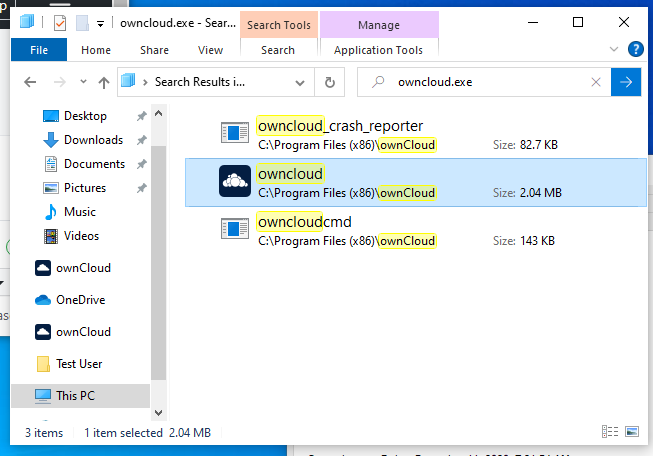
I cannot reproduce the issue here. For me it uses the same subfolder that the previous install used.
 jnweiger
on 13 Dec 2020
jnweiger
on 13 Dec 2020
Hello people! I had the same issue when automatically updated
FROM Client version: ownCloud-2.7.2.2626.x64
TO Client version: Latest version 2.7.3 build 2877 ### x86 ###
running Windows10.
I think this issue resides mostly in the auto update bringing an x86 version, coming from x64.
Hope this helps.
I've manually uninstalled, downloaded the x64 version, and then reinstalled it correctly.
Best regards and keep safe!
 EstebanSalpeter
on 14 Dec 2020
EstebanSalpeter
on 14 Dec 2020
Our auto updater will provide 64bit updates for platforms supporting it later today.
 TheOneRing
on 15 Dec 2020
TheOneRing
on 15 Dec 2020
The auto updater now provides 64bit updates for 64bit clients, we are not (yet - tbd) upgrading clients to 64bit automatically.
 dschmidt
on 15 Dec 2020
dschmidt
on 15 Dec 2020
Next daily will fallback to %ProgramFiles%/ownCloud when INSTALLDIR has been set to ROOTDRIVE automatically because of a Win64 to Win32 downgrade. Fix will be in 2.7.4.
dschmidt
on 15 Dec 2020
Closing, feel free to reopen should the problem remain.
dschmidt
on 15 Dec 2020
Related issues
 vco1
·
3Comments
vco1
·
3Comments
 dartcafe
·
4Comments
dartcafe
·
4Comments
 mcastroSG
·
5Comments
mcastroSG
·
5Comments
 guruz
·
4Comments
guruz
·
4Comments
 cdhowie
·
4Comments
cdhowie
·
4Comments
Most helpful comment
The auto updater now provides 64bit updates for 64bit clients, we are not (yet - tbd) upgrading clients to 64bit automatically.