Client: Error signing into new account on Mac desktop client
Keybase GUI Version: 4.1.0-20190612165948+952fee6c59
When trying to sign into a new Keybase profile on the Mac desktop client, I'm getting this error:
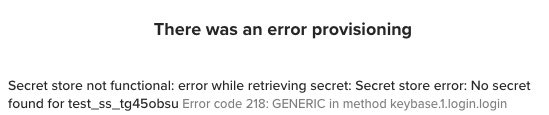
THERE WAS AN ERROR PROVISIONING
Secret store not functional: error while retrieving secret: Secret store error: No secret found for test_ss_tg45obsu Error code 218: GENERIC in method keybase.1.login.login
Each time, the 8 symbols after "test_ss_" are different. There is one account my computer remembers, which is unrecoverable, and I seemingly can't add my new account, so I'm unable to use the desktop client at all. I have tried deleting the app and reinstalling a few times.
 Aidan-Cook
All 12 comments
Could you send a log please?
keybase log send
from the terminal.
 heronhaye
on 3 Jul 2019
heronhaye
on 3 Jul 2019
I think I just sent a log. I'm just a keybase user, I don't know how to figure out what my log ID was...
Aidan-Cook
on 3 Jul 2019
Hm, I don't see anything...did you provide any feedback? It should have told you the Log ID after you submitted it. Something like
$ keybase log send
...
------------
Success! Your log ID is:

  73aadc7107e3096bb010a71c
...
Ok there it goes: a33993265a5e4a8305ef3c1c
Thanks!
Aidan-Cook
on 3 Jul 2019
Thanks, we'll take a look.
heronhaye
on 8 Jul 2019
FYI, I just updated mac OS from 10.10 to 10.14 and it solved this problem, so I'm now good.
Aidan-Cook
on 20 Jul 2019
I'm on 10.10, with no option to upgrade on my current hardware, and seeing an error that I think is equivalent. I'm hitting it on a new install when I try to run keybase login.
Should I start a new issue, or is it ok to repurpose this one? :)
I'll send the logs, just in case. EDIT: log id: 1eb1aa3f5cce188466ca361c
 patcon
on 18 Sep 2019
patcon
on 18 Sep 2019
Going to suggest this be the canonical issue for this problem described as:
- Having this error at login, using either UI or CLI
keybase login(after typing username for either), some version of this error:
Secret store not functional: error while retrieving secret: Secret store error: No secret found for test_ss_** Error code 218: GENERIC in method keybase.1.login.login
- affects keybase desktop client on Mac OSX 10.10 (https://github.com/keybase/client/issues/19423#issue-491766326) and likely below this as well, and likely up to 10.13.x (https://github.com/keybase/client/issues/19469#issue-492075683), but resolved on 10.14+ (https://github.com/keybase/client/issues/18257#issuecomment-513491060)
- first reported on OSX Apr 27, 2019 (v3.2.2, apr 12, release notes) https://github.com/keybase/client/issues/17201 (seemingly related android edge-case issue on same day, occurring on linux terminal emulator app https://github.com/keybase/client/issues/17203)
If this applied to you, please react with :+1: to origin message above 🙂 Thanks!
patcon
on 20 Sep 2019
Great news! @Nock-zz found a solution in https://github.com/keybase/client/issues/19233#issuecomment-527363158! 🎉
To restate:
- Quit keybase UI (so that it's service is 100% not running)
- on terminal, run
KEYBASE_SECRET_STORE_FILE=1 keybase service(to run a headless service with the fix) - You should now be able to either:
- run
keybase loginfrom another terminal (i.e. leave the other process running in the first terminal, or background it if you know how) - open to keybase UI (which will use your fixed service that's already running from terminal)
- run
- Use keybase as usual!
There might be a better way to have this perma-fixed, as you'll need to ensure your fixed keybase service is running in advance each time you restart.
patcon
on 20 Sep 2019
Some changes related to secret were introduced right before this release was cut, including some logic related to isIOS and IsMobileAppType
go/libkb/secret_store_darwin.go
v3.2.1...v3.2.2 diff
https://github.com/keybase/client/compare/v3.2.1..v3.2.2#diff-6660f87d48194f1cd4f146f862423586
current HEAD of master (unchanged)
go/engine/scankeys.go
v3.2.1...v3.2.2 diff
https://github.com/keybase/client/compare/v3.2.1..v3.2.2#diff-3d7fa26459fc2d7c00d0b9b0845f2db1
current HEAD of master (unchanged)
To anyone with insight into this area of codebase (and the apparent workaround fix), do these look like candidates for something interesting?
Thanks for any attention anyone can give this! 🙌
patcon
on 20 Sep 2019
Hm. I thought I found a lead for a more permanent fix by editing the launchd file to tell it to run with an envvar like so from terminal:
$ defaults write ~/Library/LaunchAgents/keybase.service.plist EnvironmentVariables -dict-add KEYBASE_SECRET_STORE_FILE 1
But turns out that keybase app generates plist files each run and cleans them up during shutdown :/
The best fix?
BUT turns out we can set a global envvar for all services by running:
$ launchctl setenv KEYBASE_SECRET_STORE_FILE 1
This only works until a restart, but to get it working perpetually, use this instruction to create something like ~/Library/LaunchAgents/keybase.bugfix.plist that will set the envvar for all services on each reboot
https://support.shotgunsoftware.com/hc/en-us/articles/219042108-Setting-global-environment-variables-on-OS-X
(with this no need for anything in ~/.bashrc or any other terminal loading spots)
patcon
on 20 Sep 2019
I found another way to set the environment variable (because I couldn't get the .plist to work):
- create a new file in a text editor.
- paste the line 'launchctl setenv KEYBASE_SECRET_STORE_FILE 1'
- save the file without a filename extension.
- in Terminal, go to the folder that contains the new file.
- Run the command chmod 700 filename to change the file to an executable.
- Add the file to your login items.
This will set the environment variable when you log in.
 Hobbes0011
on 11 Feb 2020
Hobbes0011
on 11 Feb 2020
Related issues
 Magi1053
·
3Comments
Magi1053
·
3Comments
 veddermatic
·
3Comments
veddermatic
·
3Comments
 heartwithyou
·
3Comments
heartwithyou
·
3Comments
 eki
·
4Comments
eki
·
4Comments
 iqballher
·
3Comments
iqballher
·
3Comments
Most helpful comment
I found another way to set the environment variable (because I couldn't get the .plist to work):
This will set the environment variable when you log in.