Client: Clarify "Apply manual changes" when asking user about large folders
Client: 2.6.0-daily20190522 (build 11801)
Server: 10.2.0
OS: Mojave 10.14.5
Steps to recreate:
- After completing an initial sync, log out the client
- Upload an additional folder to the server that exceeds the limit beyond which the client asks for confirmation if folders larger than that should be synced (Advanced Setting in General tab)
- Log in the client to the server
- Select "Apply manual changes" in the warning message
Expected result: Not really sure. Maybe the client should offer a selection which files inside that folder should be synced?
Actual result: The folder is not synced. Basically identical behaviour as 'Synchronize none' button. If the behaviour is really the same, then there is no need for 'Apply manual changes' button
 HanaGemela
All 15 comments
Indeed, if you make no changes to the selective sync list "Apply manual changes" will be the same as "Synchronize none". Possibly we could disable "Apply manual changes" until the user has actually made a change.
 ckamm
on 7 Jun 2019
ckamm
on 7 Jun 2019
@ckamm What should I do to see the difference between these two buttons?
HanaGemela
on 7 Jun 2019
@HanaGemela When the "new large folder" ui state is activated you should be seeing some sync folder's subfolders pop up. Each has a checkbox for its current selective sync state. The new large folders are unchecked by default. You could have two new large folders, check only one and use "Apply manual changes" to confirm your manual choice (instead of syncing both or neither).
ckamm
on 7 Jun 2019
The same when syncing External storages
HanaGemela
on 7 Jun 2019
@HanaGemela Please test
 guruz
on 16 Jun 2019
guruz
on 16 Jun 2019
Behavior change is that now the "Apply manual changes" button only becomes enabled when a change was made.
ckamm
on 16 Jun 2019
@ckamm Does it mean I'll see the button when there are two large folder to be synced?
Are the below steps to recreate correct?
- After completing an initial sync, select only some folders to be synced, log out the client
- Upload an additional folder to the server that exceeds the limit
- Log in the client to the server
Expected result: the button is shown
HanaGemela
on 17 Jun 2019
@HanaGemela When you do these steps the button will be shown (as before), but it will be disabled (new). It will become enabled when you change the checked status of at least one subfolder checkbox.
ckamm
on 17 Jun 2019
@ckamm I've checked with macOS 2.6.0-daily20190616 (build 11930), I run exactly the steps described above and the button is enabled.
And what subfolder do you mean?
HanaGemela
on 24 Jun 2019
@HanaGemela This is what I see when there's a new "big" folder:
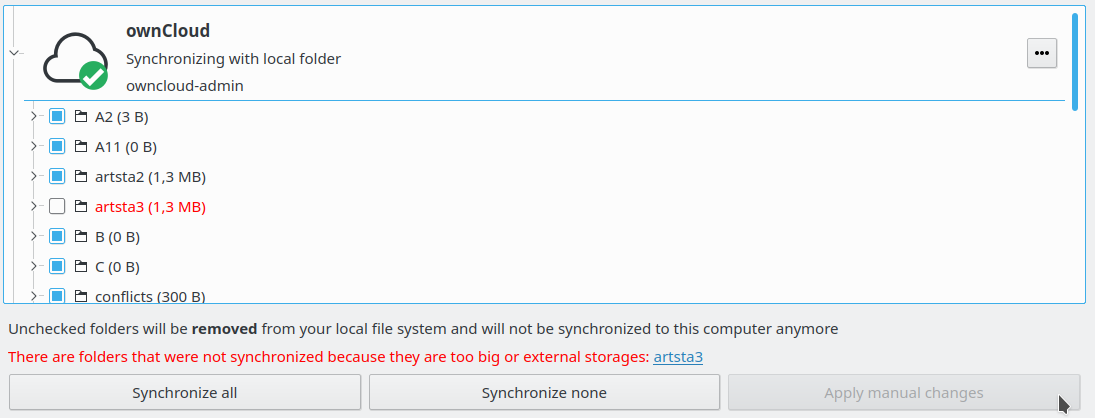
And "Apply manual changes" becomes enabled when I change the state of any of the checkboxes in front of the folders.
ckamm
on 24 Jun 2019
@ckamm my button is not disabled
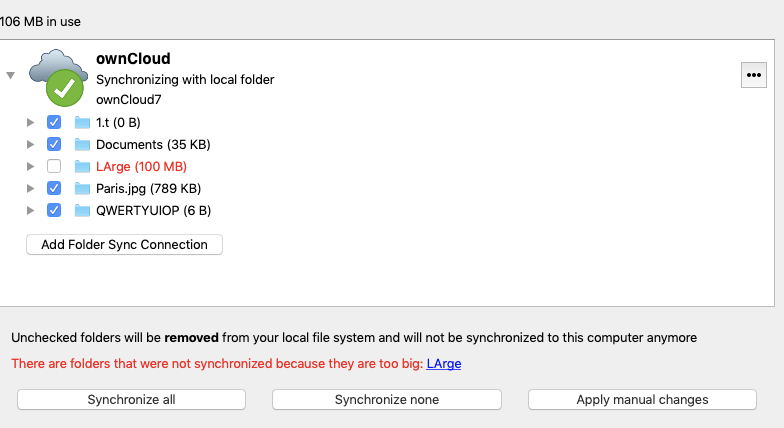
HanaGemela
on 24 Jun 2019
@ckamm this still does not work
HanaGemela
on 2 Jul 2019
Weird. Since it's an unimportant change I'm moving further investigation to 2.6.1.
ckamm
on 8 Jul 2019
@HanaGemela I've tried to reproduce this again but am still unsuccessful.
Scenario 1:
- Set big folder threshold to 1 MB
- Have a folder on the server with contents > 1MB
- Create a new account with that folder
- The selective sync ui comes up an the "apply manual changes" button starts out disabled
Scenario 2:
- Set big folder threshold to 1 MB
- Have an existing sync folder fully synced
- Pause sync
- Add a new folder on the server with contents >1MB
- Resume sync
- The selective sync ui comes up an the "apply manual changes" button starts out disabled
ckamm
on 2 Aug 2019
Works as expected in 2.6.0rc1 (build 12411), mac 10.14.6
HanaGemela
on 9 Sep 2019
Related issues
 etamme
·
77Comments
ckamm
·
65Comments
etamme
·
77Comments
ckamm
·
65Comments
 martinKupec
·
129Comments
martinKupec
·
129Comments
 joholm2
·
81Comments
joholm2
·
81Comments
 dragotin
·
51Comments
dragotin
·
51Comments