Client: macOS Catalina fails to mount the Keybase KBFS mount
While this is completely expected for a development beta, I wished to bring to attention that the KBFS mount point will not successfully mount on Catalina at this time.
my log id: b4fa03217e812a2c628d5a1c
 InternalLoss
All 30 comments
The Helper is probably 32bit which isn't supported in Catalina.
 agsimeonov
on 6 Jun 2019
agsimeonov
on 6 Jun 2019
I don't get the usual "32 bit apps are no longer supported in Catalina" error, nor did I get a warning about it being 32-bit; if you have commands for me to run I can happily send their output c:
InternalLoss
on 7 Jun 2019
Same, my log id 5b8bfad9ff4c7c70b4eca61c
 dconroy
on 10 Jun 2019
dconroy
on 10 Jun 2019
17835
 jgreever
on 11 Jun 2019
jgreever
on 11 Jun 2019
18074 as well
 ukd1
on 26 Jun 2019
ukd1
on 26 Jun 2019
This is due to Catalia's read only system. When trying to manually create a folder at /keybase, terminal prompts mkdir: /keybase: Read-only file system even with sudo.
 mitchell931993
on 26 Jun 2019
mitchell931993
on 26 Jun 2019
This is due to Catalia's read only system. When trying to manually create a folder at /keybase, terminal prompts
mkdir: /keybase: Read-only file systemeven with sudo.
I'm not so sure. I think I have SIP disabled, but when I did sudo mount -uw / to mount / as RW I was able to create a /keybase folder in Terminal, and Keybase made one but still won't start complaining about the same issue.
I think there's something else at hand.
 b-
on 27 Jun 2019
b-
on 27 Jun 2019
This appears to be because Keybase does not have a kext for 10.15 yet.
If we navigate to /Library/Filesystems/kbfuse.fs/Contents/Extensions, we can
see that the older macOS versions just use the 10.11 directory (via symlink).
If you create a similar symlink for 10.15, it works just fine.
$ cd /Library/Filesystems/kbfuse.fs/Contents/Extensions
$ sudo ln -s 10.11 10.15
This is not super thoroughly tested, there may be other changes in 10.15 that
will require a newer kext made just for it. For now though, this seems to be
working well enough for me. I can access and manipulate my files in kbfs.
 zachbr
on 30 Jun 2019
zachbr
on 30 Jun 2019
Just a word of warning: while the symlink seems to work, this is usually not a good idea...
The kernel-API/ABI is not stable and KEXTs may (and do!) suffer from silent corruption, e.g. if a struct gets a field removed and your KEXT misinterprets the subsequent fields (which additionally results in an OOB-r/w).
The results may be harmless (invalid timestamps etc.), but this can also affect really serious stuff like byte offsets – resulting in silent data corruption or corrupted kernel memory.
tl;dr: don't use it until you have backups of all potentially affected files (→ your entire KBFS and Mac) 😊
 KizzyCode
on 11 Aug 2019
KizzyCode
on 11 Aug 2019
After symlinking extension I get another error:
We were unable to load the part of Keybase that lets you access your files in your file system. You should be able to do so if you wait a few minutes and restart Keybase.
Please run
keybase log sendto report the error.
 arvenil
on 21 Aug 2019
arvenil
on 21 Aug 2019
I have a few questions regarding this bug:
- Is Keybase using osxfuse?
- If so, is there a possibility to use an installed version instead of the bundled version? This would fix this bug immediately and would remove the necessity for the devs to manage this dependency manually.
- Since Catalina will probably be out in less than a month, is there a beta version which can be tested?
KizzyCode
on 21 Aug 2019
Catalina support will be arriving in the next release, hopefully out next week sometime.
 strib
on 22 Aug 2019
strib
on 22 Aug 2019
Keybase 4.4.0 (out today) has better file system support for Catalina now. Please let us know if you have more problems with it. Note that the /keybase mount point is no longer viable on fresh installs of Catalina due to macOS namespace restrictions, so now we mount at /Volumes/Keybase if /keybase does not already exist.
strib
on 4 Sep 2019
After a fresh install of Catalina this pops up continuously now after trying to enable Finder integration.

edit: Keybase version Version 4.6.0-20191010081014+134c2d892b
 cpressland
on 12 Oct 2019
cpressland
on 12 Oct 2019
We had the same issue of mkdir: /keybase: Read-only file system and we have gone through the man page and it has to do with /etc/synthetic.conf configuration file.
Try this: echo -e 'Keybase\t/Volumes/Keybase' | sudo tee -a /etc/synthetic.conf and reboot, it will work. We tested it out on Catalina 10.15.1
 uttej-zero
on 6 Nov 2019
uttej-zero
on 6 Nov 2019
Similarly, I'm unable to dismiss this regardless of how many times I click 'Open Anyway'

Version 5.0.0-20191114182642+f73f97dac6 (5.0.0-20191114182642+f73f97dac6)
Mac OS X 10.15.1 (19B2106)
 alancwoo
on 19 Nov 2019
alancwoo
on 19 Nov 2019
With
$ keybase version
Client:  5.1.1-20191211223249+15bbb94c23
Service: 5.1.1-20191211223249+15bbb94c23
I also have the issue with the kbfuse.fs dialog opening. Manually navigating to system preferences and clicking "Open Anyway" results in this same issue--the button clicks but no effect is observed.
 scolby33
on 13 Dec 2019
scolby33
on 13 Dec 2019
I'm having the same issue as @scolby33 with the same version of keybase on Catalina 10.15.2. The update of /etc/synthetic.conf and reboot did not help.
My log ID is f63465f55e5a7a32f5799e1c
 kaneplusplus
on 21 Dec 2019
kaneplusplus
on 21 Dec 2019
Got it working using the following steps:
- Switch to "App Store" from "Allow apps downloaded from" in Security & Privacy. The message about kbfuse.fs should go away.
- Completely remove keybase including configuration files left after uninstalling.
- Reboot.
- Open and unlock Security & Privacy.
- Reinstall keybase.
- Reboot.
- When asked if you'd like to be able to run keybase even though it's not verified:
- Make sure Security & Privacy is still unlocked
- Open keybase.
It's not clear to me if it was the complete reinstall, or step 1, or both that did it. Also, note that I do not have an /etc/synthetic.conf file on my machine.
kaneplusplus
on 21 Dec 2019
Are there any updates on this? Is kaneplusplus' procedure from above the proper solution?
scolby33
on 10 Feb 2020
same problem log id: f5dfdc121a3fbaabf89d0d1c
 TheRojam
on 11 Mar 2020
TheRojam
on 11 Mar 2020
same problem log id: 0a9f84327d79562cdc0e9f1c
@kaneplusplus solution did not work for me :(
Update: added Keybase /Volumes/Keybase to /etc/synthetic.conf, rebooted, and managed to get fuse filesystem mounted, so it appears the issue _was_ related to synthetic.conf in my case.
 taylorbanks
on 12 Mar 2020
taylorbanks
on 12 Mar 2020
Some points if you are editing /etc/synthetic.conf :
- The file does not exist, you need to create it (the command above will do that).
- You need to be super user to make the file.
- The resulting file contents should look like this:
Keybase /Volumes/Keybase - If you used 'sudo' to get permissions to write the file, then it probably added this to the file:
-e Keybase\t/Volumes/Keybase - The easiest fix for this is probably to edit the file with:
sudo vim /etc/synthetic.conf
and fix it by hand.
 mikegchambers
on 2 Apr 2020
mikegchambers
on 2 Apr 2020
Same problem for me. I was running Catalina before and Keybase was already installed from my Mojave days. No problem at all. Today due to another problem I had to reinstall the os from scratch and straight installed Catalina and now struggling to install Keybase.
What I have done so far:
Created /etc/synthetic.conf and added Keybase /Volumes/Keybase but didn't seem to work.
Installed Keybase from both homebrew and official website.
here is the first error while trying to install fuse.

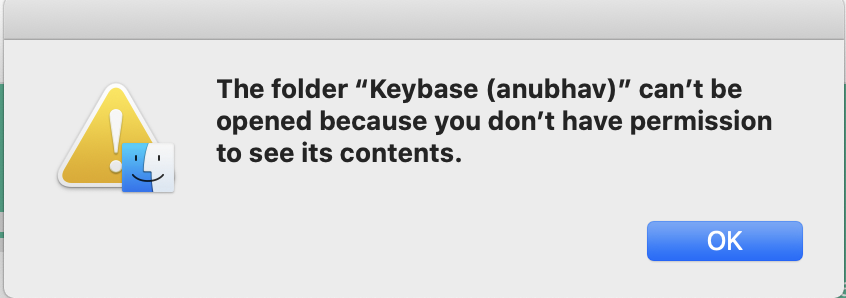
Here is the second screenshot while trying to open my files from the finder integration.
Also, this error in system preferences doesn't seem to go away. No matter what I do. I even deleted Keybase from my MacBook but still this persists. Also tried what @kaneplusplus recommended in his point one:
- Switch to "App Store" from "Allow apps downloaded from" in Security & Privacy. The message about kbfuse.fs should go away.

 anubhavcodes
on 14 Apr 2020
anubhavcodes
on 14 Apr 2020
Also, this error in system preferences doesn't seem to go away. No matter what I do. I even deleted Keybase from my MacBook but still this persists. Also tried what @kaneplusplus recommended in his point one:
- Switch to "App Store" from "Allow apps downloaded from" in Security & Privacy. The message about kbfuse.fs should go away.
I had a similar problem. With my app download settings set on "App Store and and identified developers", what I did was:
brew reinstall keybase
...and this time choosing open (which I could) when the alert window from kubefuse.fs showed up, and then "allow". The installation succeeded and my mounted volume can now be opened.
In your case, choose "open anyway" and then allow if you get the question, and you'll be able to finish the install.
 Amaris7
on 20 Apr 2020
Amaris7
on 20 Apr 2020
Working! Thank you @Amaris7.
After much messing around I tried your 'reinstall' method and it's working.
Here's what I did:
1) Uninstalled KeyBase
2) Installed using brew cask reinstall keybase
3) Answered positively to all prompts.
4) Reinstalled using brew cask reinstall keybase
5) Answered positively to all prompts.
6) Tested, and file mount was working.
7) Rebooted.
8) Was prompted to be ok with main KeyBase application running from Internet. (OK)
9) Still working.
10) Rebooted again (testing)
11) Still working.
Yay.
Thanks again @Amaris7 for the 'reinstall' trick.
mikegchambers
on 21 Apr 2020
Can confirm
brew cask reinstall keybase
worked for me too. 👍🏼
anubhavcodes
on 21 Apr 2020
It's broken again for me. The reinstall trick is no longer working.
mikegchambers
on 21 Jun 2020
Just try to run after integration with finder this sudo xattr -rd com.apple.quarantine /Library/Filesystems/kbfuse.fs/ (maybe you need to do it with osxfuse.fs on the same path) and then restart the keybase.
It worked for me.
 g0ddest
on 22 Jun 2020
g0ddest
on 22 Jun 2020
I can confirm that @mikegchambers solution is working for me after having the same kbfuse.fs issue on Catalina 10.15.5 and 10.15.6.
I should add that I installed both FUSE for OSX and Keybase via Homebrew. I installed FUSE prior to installing Keybase under the rationale that maybe Keybase would use a system installed version as opposed to attempting to install its own.
 miquelbrazil
on 17 Aug 2020
miquelbrazil
on 17 Aug 2020
Related issues
 Alexendoo
·
3Comments
Alexendoo
·
3Comments
 caronni
·
3Comments
caronni
·
3Comments
 k2trf
·
3Comments
k2trf
·
3Comments
 ATCUSA
·
4Comments
ATCUSA
·
4Comments
 Magi1053
·
3Comments
Magi1053
·
3Comments
Most helpful comment
This appears to be because Keybase does not have a kext for 10.15 yet.
If we navigate to
/Library/Filesystems/kbfuse.fs/Contents/Extensions, we cansee that the older macOS versions just use the
10.11directory (via symlink).If you create a similar symlink for 10.15, it works just fine.
This is not super thoroughly tested, there may be other changes in 10.15 that
will require a newer kext made just for it. For now though, this seems to be
working well enough for me. I can access and manipulate my files in kbfs.