I'd get high CPU usage, up to 100% on 1 core at a time (with the core switching every 1-2 seconds). It rendered the system unusable and a few minutes ago made everything unresponsive so I had to hard reboot.
Just to confirm this was keybase, I turned off all applications and killed any processes that wasnt needed by the OS, the problem still occurred.
Both kbfsfuse and keybase processes had high CPU usage.
my log id: 31511a100ca0b04853edb61c
 y4my4my4m
All 2 comments
I am also facing similar issue where keybase starts taking more than 30% cpu usage on linux
 armujahid
on 7 Dec 2019
armujahid
on 7 Dec 2019
@armujahid I was starting to suspect keybase was mining stellar coins on my computer...lol
But it seems to be an issue with their kbfsfuse process...Not sure about the details though.
I think updating to the latest version, and once everything is properly synchronized the issue disappears. But it shouldn't take 100% CPU when syncing..
There's also a memory issue...
Dormant, kbfsfuse uses 420mb of RAM (out of 16gb)
Plus the keybase default processes:
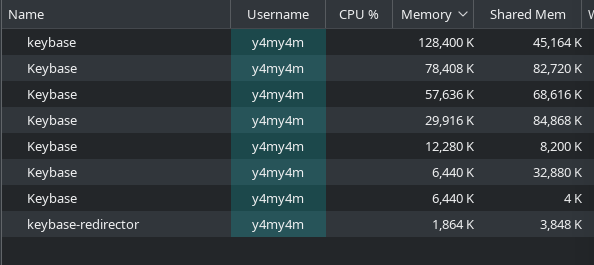
(What are they all? And why is one lowercase?)
y4my4my4m
on 8 Dec 2019
Related issues
 qntmpkts
·
3Comments
qntmpkts
·
3Comments
 eki
·
4Comments
eki
·
4Comments
 daothanhphap
·
3Comments
daothanhphap
·
3Comments
 pipermerriam
·
4Comments
pipermerriam
·
4Comments
 lukefrasera
·
3Comments
lukefrasera
·
3Comments
Most helpful comment
@armujahid I was starting to suspect keybase was mining stellar coins on my computer...lol
But it seems to be an issue with their kbfsfuse process...Not sure about the details though.
I think updating to the latest version, and once everything is properly synchronized the issue disappears. But it shouldn't take 100% CPU when syncing..
There's also a memory issue...

Dormant, kbfsfuse uses 420mb of RAM (out of 16gb)
Plus the keybase default processes:
(What are they all? And why is one lowercase?)