Client: 2.5.4 not working on macOS 10.11
The desktop client version 2.5.4 does not work anymore on macOS 10.11.
I get the following error:
Sorry, "owncloud" can not be run on this version of macOS. Qt requires macOS 10.12.0 or later, you have macOS 10.11.6.
Thank you!
 s1a3ti
All 21 comments
@s1a3ti Thanks for reporting. We'll discuss internally how we can bring builds with the old Qt (and possibly old build machine) back as additional download options.
 guruz
on 25 Mar 2019
guruz
on 25 Mar 2019
Hi, same issue/same OS here but no error message, except in the log:
29.03.19 12:26:40.333 pkd[493]: enabling pid=481 for plug-in com.owncloud.desktopclient.FinderSyncExt(1.0) 8AAF8C6D-CFDE-4BCC-A662-C912268552BF /Applications/owncloud.app/Contents/PlugIns/FinderSyncExt.appex
29.03.19 12:29:36.187 com.apple.xpc.launchd[1]: (com.owncloud.desktopclient.133792[1182]) Service exited with abnormal code: 1
The app does not launch at all. Previous version 2.5.2 (build 11198) was fine…
Best,
Eric
 sbgraphic
on 29 Mar 2019
sbgraphic
on 29 Mar 2019
I'm seeing the same issue with the same version (2.5.4) on the same OS after accepting an update dialog box from the previous version. I'm on a Mac Pro Early 2008, which is still a plenty awesome fast productive machine, but Apple doesn't support anything newer then El Capitan/10.11 on it, so I'm stuck with the Web UI for now. I would love to see support for the desktop client on 10.11 fixed.
In the meantime, a few suggestions:
The desktop app should not offer to install an update that will not run on the current OS.
If run from the terminal as
/Applications/owncloud.app/Contents/MacOS$ owncloudthe desktop app does print the message "Sorry, "owncloud" can not be run on this version of macOS. Qt requires macOS 10.12.0 or later, you have macOS 10.11.6." However the message should be logged to the Mac console too (as @sbgraphic noted, this is not the case; the console message is not helpful), and very preferably shown in a popup dialog when the user starts the app.Even though the desktop app doesn't run, Activity Monitor shows ownCloud Extensions is running, but it doesn't appear to be doing anything useful; it certainly isn't synchronizing my local folder with the server. If the desktop app isn't going to run, it doesn't seem like the Extensions should be running either. Maybe disable them on boot/have the desktop client stop them after showing the "Cannot run on 10.11..." message?
Best,
Shaun
 warmsocks
on 3 Apr 2019
warmsocks
on 3 Apr 2019
http://download.owncloud.com/desktop/daily/testpilotcloud-qt5.10.1-2.5.5.11542-daily20190404.pkg
was built with an older qt version. This might work. on macOS 10.11.6 -- cannot test myself.
 jnweiger
on 4 Apr 2019
jnweiger
on 4 Apr 2019
@jnweiger,
http://download.owncloud.com/desktop/daily/testpilotcloud-qt5.10.1-2.5.5.11542-daily20190404.pkg
was built with an older qt version. This might work. on macOS 10.11.6 -- cannot test myself.
I tried it on Mac 10.11.6 and it worked perfectly--connected to our server and synced my files immediately. Very nice!
warmsocks
on 4 Apr 2019
I am wondering what the influence of the environment variable DEPLOYMENT_TARGET=10.10
is. With client version 2.6.x this will be DEPLOYMENT_TARGET=10.12
Would that again exclude El Capitan users?
jnweiger
on 4 Apr 2019
@jnweiger I tested the following version:
testpilotcloud-2.6.0.11546-daily20190404.pkg
It installs fine, but I get the following error in the terminal:
VM-El-Capitan:~ ch$ /Applications/testpilotcloud.app/Contents/MacOS/testpilotcloud
Sorry, "testpilotcloud" can not be run on this version of macOS. Qt requires macOS 10.12.0 or later, you have macOS 10.11.6.
Could you provide a build with qt5.10?
s1a3ti
on 4 Apr 2019
Upcoming daily builds could have two distinct deliverables. the normal one, and the ElCapitan compatibility build (using qt-5.10.1) How about this:
SSH: put [testpilotcloud-2.6.0.11548-daily20190404.pkg]
SSH: put [testpilotcloud-2.6.0.11548-daily20190404.pkg.tbz]
SSH: put [testpilotcloud-2.6.0.11548-daily20190404.pkg.tbz.sig]
SSH: put [testpilotcloud-osx10.11-2.6.0.11548-daily20190404.pkg]
SSH: put [testpilotcloud-osx10.11-2.6.0.11548-daily20190404.pkg.tbz]
SSH: put [testpilotcloud-osx10.11-2.6.0.11548-daily20190404.pkg.tbz.sig]
jnweiger
on 4 Apr 2019
@s1a3ti that is the one for you: https://download.owncloud.com/desktop/daily/testpilotcloud-osx10.11-2.6.0.11548-daily20190404.pkg
jnweiger
on 4 Apr 2019
@jnweiger Here is the result:
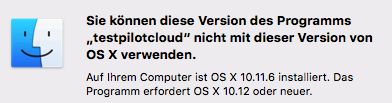
I guess, DEPLOYMENT_TARGET does matter.
However, starting from command line works fine. No idea why. The program logo has a crossed out overlay, but everything seems to be working.
s1a3ti
on 4 Apr 2019
Thanks for testing! 'starting from command line' means starting the normal gui client from a shell? Or is that about the testpilotcloudcmd client?
@guruz , what do you think, can we set DEVELOPMENT_TARGET=10.10 for a 2.6.x legacy build?
Do we have other dependencies in the new code that would break on 10.11?
jnweiger
on 4 Apr 2019
@jnweiger I'm starting the gui client from the terminal app:
VM-El-Capitan:Contents ch$ /Applications/testpilotcloud.app/Contents/MacOS/testpilotcloud
m_crashReporterChar: /Applications/testpilotcloud.app/Contents/MacOS/testpilotcloud_crash_reporter
And I found the following in the Info.plist:
s1a3ti
on 4 Apr 2019
@dschmidt Can you jump in here?
Do you need to adapt the build scripts to set the DEVELOPMENT_TARGET variable too (not only the Qt configuration)?
guruz
on 15 Apr 2019
Yes, I can take care.
Probably yes. Setting the target based on the qt version.
 dschmidt
on 15 Apr 2019
dschmidt
on 15 Apr 2019
Here's the 2.5.4 build for OS X 10.10 and 10.11:
https://download.owncloud.com/desktop/stable/ownCloud-osx10.11-2.5.4.11669.pkg
 michaelstingl
on 25 Apr 2019
michaelstingl
on 25 Apr 2019
@michaelstingl Works fine on my 10.11. machines. Thank you!
s1a3ti
on 26 Apr 2019
The version offered for download at the website doesn't seem to differentiate between a version for 10.10 and 10.11, and a version for 10.12+: https://owncloud.org/download/#owncloud-desktop-client-macos Does that version work on 10.11 and 10.10? If not, shouldn't the version requirement ("Mac OS X 10.10+ (64-bit only)") be changed accordingly?
 RobFog
on 26 Apr 2019
RobFog
on 26 Apr 2019
@RobFog Thanks for the hint!
System requirements updated.
We need to restructure the download page somewhat, so that it reflects the two builds that we have properly. @hurradieweltgehtunter can you please have a look?
Meanwhile, I misused the 'technical preview' entry to publish the link for the osx1.11 build.

jnweiger
on 26 Apr 2019
You're welcome. :-)
There's a typo in the screenshot, "osc-10.11".
RobFog
on 26 Apr 2019
@jnweiger The DEPLOYMENT_TARGET specifies the minimum OS version the binary will run on.
So, if it is set to 10.12, it won't run on 10.11.
 tessus
on 1 May 2019
tessus
on 1 May 2019
ownCloud desktop sync client or macOS 10.10 and 10.11 is available on the website:
https://owncloud.org/download/#owncloud-desktop-client
(only text is wrong)
michaelstingl
on 5 Aug 2019
Related issues
 JKawohl
·
5Comments
JKawohl
·
5Comments
 ohnemich
·
5Comments
michaelstingl
·
4Comments
ohnemich
·
5Comments
michaelstingl
·
4Comments
 mcastroSG
·
5Comments
mcastroSG
·
5Comments
 ctrlbru
·
5Comments
ctrlbru
·
5Comments
Most helpful comment
@RobFog Thanks for the hint!
System requirements updated.
We need to restructure the download page somewhat, so that it reflects the two builds that we have properly. @hurradieweltgehtunter can you please have a look?
Meanwhile, I misused the 'technical preview' entry to publish the link for the osx1.11 build.
