Client: Version 2.5: A HTTP transmission error happened. : The server file discovery reply is missing data.
Expected behaviour
It should sync with server (Webservice works as expected)
Actual behaviour

Steps to reproduce
- start owncloud version 2.5.3 or 2.5.4
Server configuration
Web server: https://owncloud.tuwien.ac.at/index.php/login
Details: https://www.it.tuwien.ac.at/owncloud (Version 9.1.1 10.1, see https://owncloud.tuwien.ac.at/status.php)
Client configuration
Client version: 2.5.3.(Win) and 2.5.4 (Linux)
Operating system: Windows 10 and Ubuntu 18.04
OS language: German (Win) and English (Linux)
Workaround
Downgrade to 2.4.3, see
https://help.nextcloud.com/t/http-transmission-error/41620/14
Linux: https://software.opensuse.org/download/package?project=isv:ownCloud:desktop:client-2.4.3&package=owncloud-client
Windows: https://download.owncloud.com/desktop/stable/ownCloud-2.4.3.10188-setup.exe
 JoKalliauer
All 18 comments
@JoKalliauer Does it work with 2.5.4? (Which has HTTP2 disabled, maybe that's related)
https://github.com/owncloud/client/releases/tag/v2.5.4
 guruz
on 21 Mar 2019
guruz
on 21 Mar 2019
@guruz : I wrote Client version: 2.5.3.(Win) and 2.5.4 (Linux)
Therefore it did not work with 2.5.4 on Ubuntu. (I did not try on Windows.)
JoKalliauer
on 21 Mar 2019
In my case, I use external authorization via imap (external_users). With every major update nextloud I have this problem until I log in. Then accounts with external authorization disappear. And shared catalogs disappear with them. Logging in with clients via imap restores the user again and the shared directories.
There is a chance to get around it somehow? because it starts to be tiring with more users.
 cyryllo
on 25 Mar 2019
cyryllo
on 25 Mar 2019
With every major update nextloud I have this problem until I log in.
@cyryllo This is the ownCloud repo 😉
 michaelstingl
on 25 Mar 2019
michaelstingl
on 25 Mar 2019
@JoKalliauer @cyryllo The error happens when the server does not send all data that is required for the sync client to work correctly. The size, permissions, etag or fileid are missing.
Note that the ownCloud Desktop client is not tested against nextcloud servers. Use a matching client-server pair!
 ckamm
on 25 Mar 2019
ckamm
on 25 Mar 2019
@ckamm
I use a matching client-server pair.
But the server seems to use owncloud?
https://owncloud.tuwien.ac.at/index.php/login
https://www.it.tuwien.ac.at/owncloud
Die Open Source Software ownCloud (derzeit Version
9.1.110.1) läuft auf TU.it-Servern
Text is german and means: The Open Source Software ownCloud (currently version 9.1.1 10.1) runs at TU.it-Servers
Therfore I do not understand your last sentence.
JoKalliauer
on 25 Mar 2019
@JoKalliauer Looks like a server problem that can't be solved in the client. Please check with your admin.
michaelstingl
on 25 Mar 2019
@JoKalliauer Ah, I mixed up the two reports then, sorry. You can figure out what data is missing exactly by looking at the "Missing properties" line in your client log file (https://doc.owncloud.org/desktop/2.5/troubleshooting.html#obtaining-the-client-log-file).
ckamm
on 25 Mar 2019
@ckamm :
I updated on Microsoft Windows [Version 10.0.17763.379] to owncloud-client 2.5.4:
And got this log-files:
20190325_2137_owncloud.log.0.gz
JoKalliauer
on 25 Mar 2019
@JoKalliauer "Dropbox" and "DropboxTU" have no etag. Maybe reuploading, deleting or editing will fix the server data - otherwise you'll need to contact your server admin.
ckamm
on 26 Mar 2019
@ckamm
How can I remove external storage?

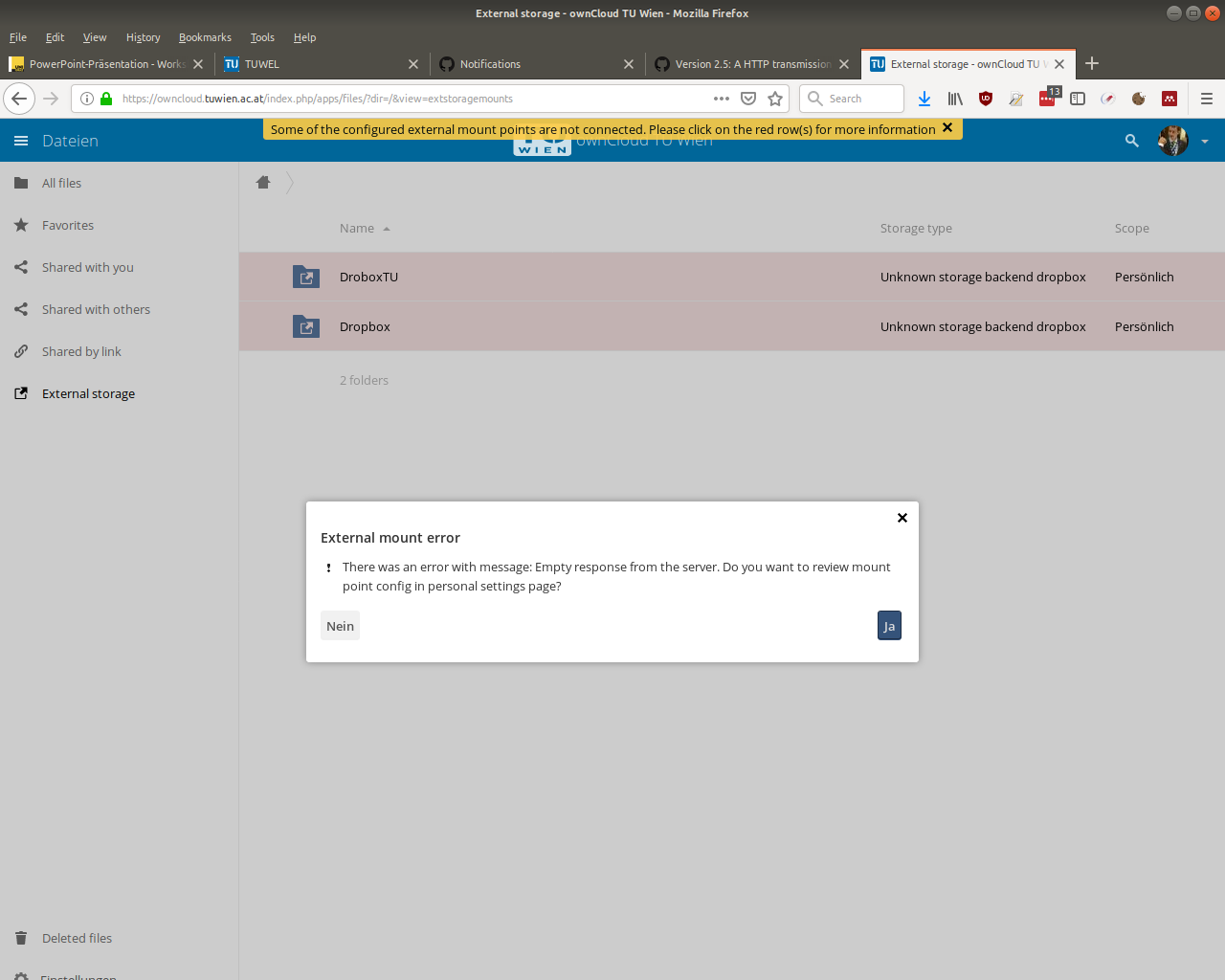

I looked at
- https://doc.owncloud.com/server/admin_manual/configuration/files/external_storage_configuration_gui.html
- https://www.howtoforge.com/tutorial/how-to-add-external-storage-to-owncloud-9/
but my preferences/settings do look different.
JoKalliauer
on 26 Mar 2019
@JoKalliauer I don't know. Potentially a server configuration issue? Server admin can probably help.
ckamm
on 26 Mar 2019
@JoKalliauer "Dropbox" and "DropboxTU" have no etag.
Maybe this is fixed with a newer version of https://github.com/owncloud/files_external_dropbox/ ?
ownCloud 9 is also not very current anymore..
guruz
on 28 Mar 2019
I think the homepage is outdated, and we have a newer owncloud-version.
https://owncloud.tuwien.ac.at/status.php
|
-- | --
installed | true
maintenance | false
needsDbUpgrade | false
version | "10.1.0.4"
versionstring | "10.1.0"
edition | "Enterprise"
productname | "ownCloud TU Wien"
I did not get any E-Mail reply till now from the help-desk of my university (=server-administrator). I might call/visit them.
JoKalliauer
on 30 Mar 2019
The Service Center of the University removed the external mounts and everything works fine now. Thanks!
JoKalliauer
on 5 Apr 2019
@JoKalliauer glad to hear – have a great weekend!
michaelstingl
on 5 Apr 2019
Searching for a resolution to my issue I ended up here, I am setting up Nextcloud 16.0.5 to use external SMB resources, I was trying out different settings and mounts and now I am completely unable to add any SMB external resources that can sync with Nextcloud Client Version 2.6.0stable, the moment i add an external SMB resource - it shows up in a web browser fine but the Nextcloud Client always fails with the above error... removing the external SMB resource removes the error and the NC Client can sync again... adding new different named SMB External resources all have the same effect.
 ashleydrees
on 27 Oct 2019
ashleydrees
on 27 Oct 2019
After reading a lot more about it and trying to get it working for some hours. I tried the OC Client 2.5.4 build 11456, which does not have an issue with the external SMB mounted drive but does complain about the "Server version 16.0.5.1-nextcloud is unsupported! proceed at your own risk" well i did and it now works... I will drop back to the NextCLOUD client and see if that is still broken. - it is, i'll drop back to OC client for now.
ashleydrees
on 28 Oct 2019
Related issues
 ohnemich
·
5Comments
ohnemich
·
5Comments
 ctrlbru
·
5Comments
ctrlbru
·
5Comments
 JKawohl
·
5Comments
JKawohl
·
5Comments
 xmana
·
5Comments
xmana
·
5Comments
 codesmaker
·
4Comments
codesmaker
·
4Comments
Most helpful comment
@JoKalliauer Ah, I mixed up the two reports then, sorry. You can figure out what data is missing exactly by looking at the "Missing properties" line in your client log file (https://doc.owncloud.org/desktop/2.5/troubleshooting.html#obtaining-the-client-log-file).