Client: Popup menu from tray icon underlaps Windows task bar when task bar is vertical on left
Keybase GUI Version: 1.0.47-20180402192353+19ebebe
On Windows 10 professional, about half of the popup menu launched by the KB tray icon is obscured by the dock area / task bar when the task bar is positions vertically on the left side of the desktop.

 spiralmike
All 15 comments
Thanks for the report. Tracked internally with DESKTOP-4129.
 zanderz
on 3 Apr 2018
zanderz
on 3 Apr 2018
Its the same in Win7 if that's interesting.
 TheQue42
on 24 Apr 2018
TheQue42
on 24 Apr 2018
There have been some changes to improve this, which you will see in an upcoming release:
https://github.com/keybase/client/pull/11262
Here's a preview:

Generally, Windows is just not good at this - look what the OneDrive popup looks like when the taskbar is on the left:

zanderz
on 24 Apr 2018
Is the upcoming release really upcoming? Here's what I see. I just installed Keybase very recently.
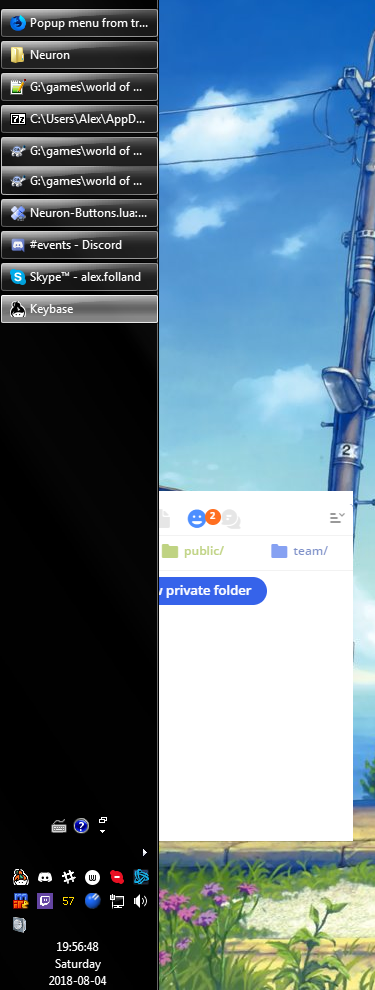
 AlexFolland
on 5 Aug 2018
AlexFolland
on 5 Aug 2018
I just got a Keybase update (can't find the version number) and the issue in my previous post is still present.
AlexFolland
on 8 Aug 2018
This is an annoyance that drastically damages user experience. I've always found it that keeping the taskbar pinned to the left is optimal for a multitude of reasons and it's silly that Keybase has always been simply incompatible. I wouldn't be surprised if your user retention on Windows was taking a hit because of such a tiny bug. Can we please get a quick and simple fix?
 apkd
on 23 Sep 2018
apkd
on 23 Sep 2018
cc @zanderz
 maxtaco
on 24 Sep 2018
maxtaco
on 24 Sep 2018
I'll step in here to bump this issue.
Using keybase for a while now and tend to put my taskbar on my windows system on the right side of the mainscreen.
This results in the keybase popup to be partially covered by the taskbar and the menu-button is not clickable thus I'm unable to quit keybase other than manually changing the taskbar location or killing the keybase process.
It would be great if the UI gets a bit more attention regarding usability and these little but very annoying things (e.g. why is there no real "quit" menu item in the file-menu when I have the chat window opened?)
 TobiasPott
on 8 Feb 2019
TobiasPott
on 8 Feb 2019
Right now, the popup position is based on the location of the Keybase icon in the tray. If it opens in a cumbersome place, you can drag the Keybase icon further to the left in the overflow area:
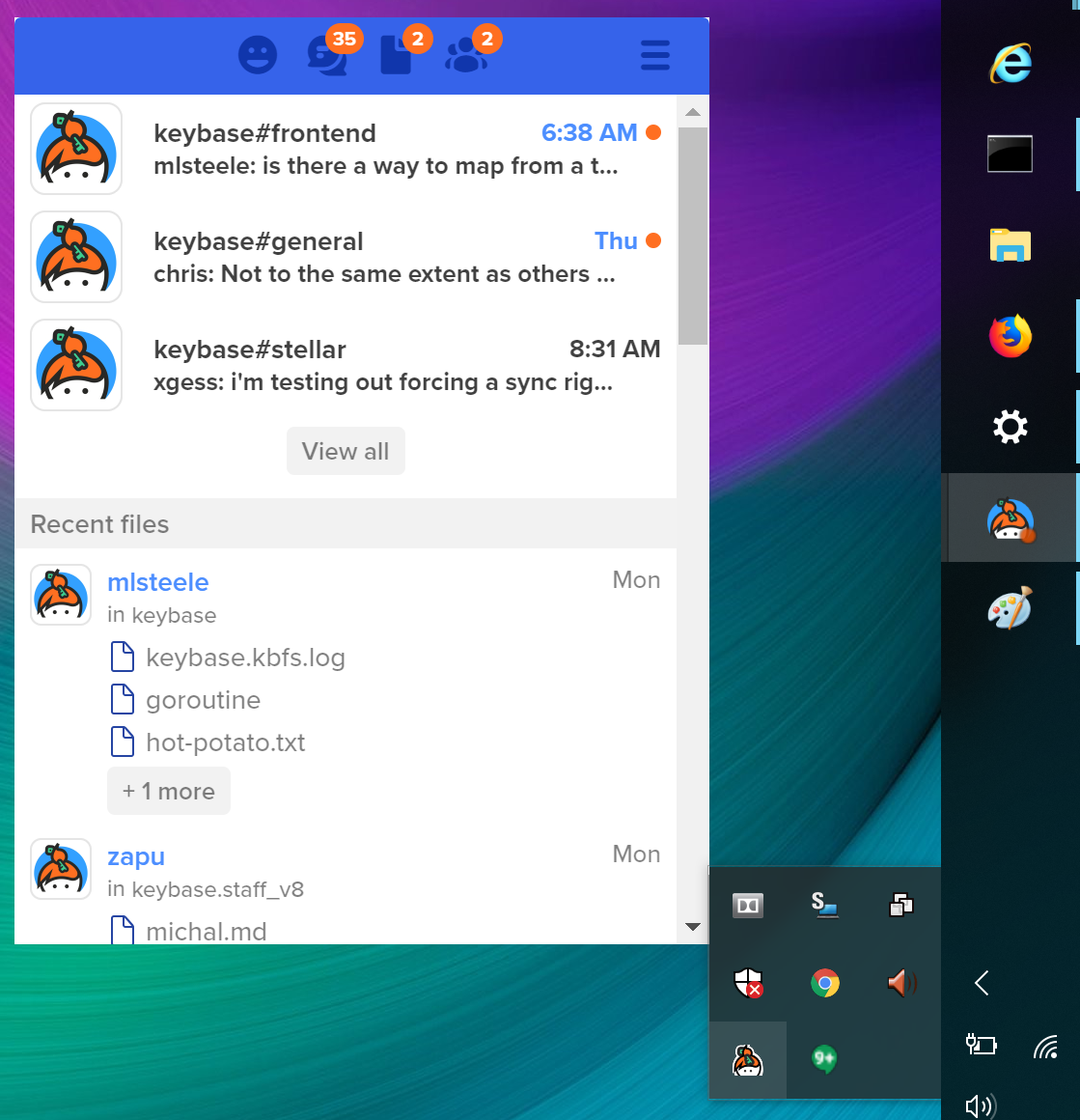
zanderz
on 8 Feb 2019
This issue is for the taskbar on the left, not the right.
Still, though, it should not require any movement of the tray icon to work properly in any configuration. No other program I've ever used has done anything but open a context menu when right-clicking the tray icon. Keybase is wrong to do something other than open a context menu when right-clicking the tray icon. I just right-clicked each of my 28 tray icons and Keybase was the only one that did something other than opening a context menu.
AlexFolland
on 8 Feb 2019
I don't use the overflow area. Even if I did, there's no guarantee that Keybase would end up in it.
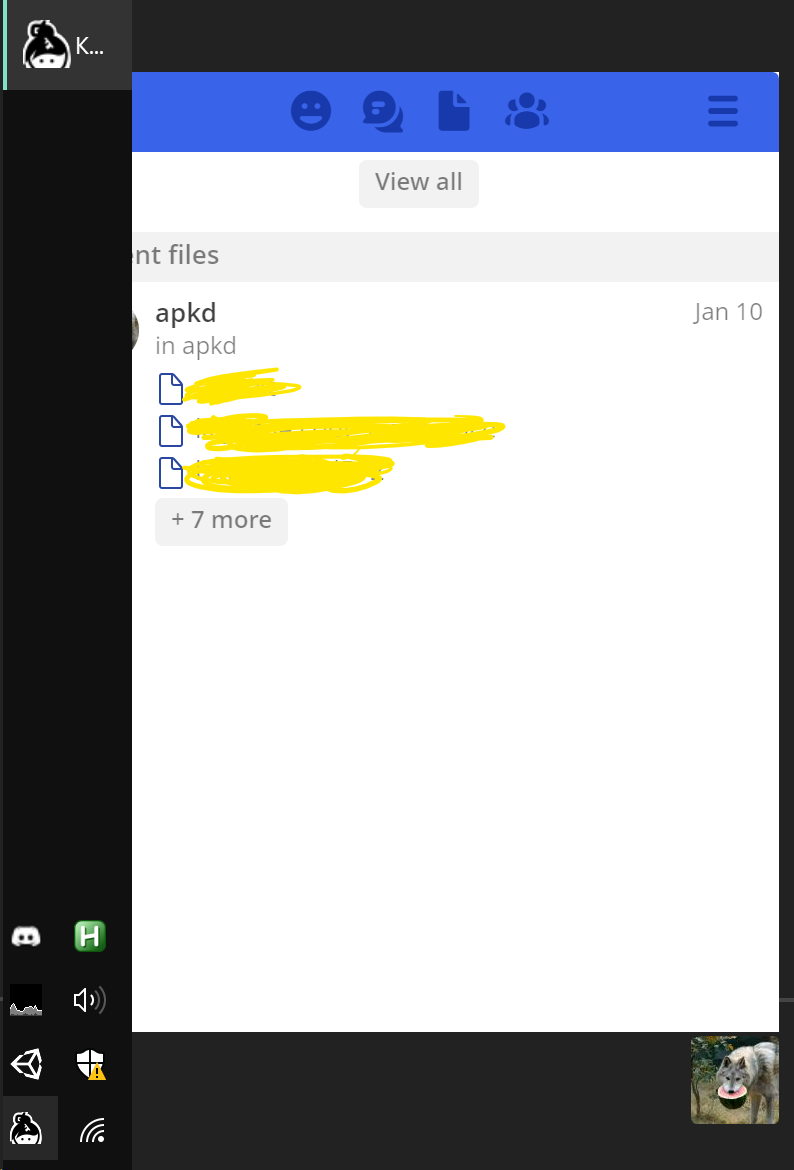
apkd
on 8 Feb 2019
@cecileboucheron
zanderz
on 12 Feb 2019
Quick update 11 month after the last comment: This issue still exists for me. Running Windows 10 Pro and Keybase 5.x.
 philippgille
on 3 Jan 2020
philippgille
on 3 Jan 2020
Same. Why?
AlexFolland
on 3 Jan 2020

Guys, please, it's been years
apkd
on 6 Jan 2020
Related issues
 pipermerriam
·
4Comments
pipermerriam
·
4Comments
 caronni
·
3Comments
caronni
·
3Comments
 iqballher
·
3Comments
iqballher
·
3Comments
 Magi1053
·
3Comments
Magi1053
·
3Comments
 kurianjacob
·
4Comments
kurianjacob
·
4Comments
Most helpful comment
Guys, please, it's been years