Client: Feature request: allow to change the font size
Hi,
The font size that is used by the desktop Keybase client is too small to my taste and I didn't find an option that allows to increase it. It's not a big problem, but it would be great to add such an option in the next release.
 afiskon
All 15 comments
If you are on Windows 10, Keybase app respects desktop scaling.
This has been also asked for in https://github.com/keybase/client/issues/5797 and this proposal is tracked internally and might be added, but it's low priority. There is a workaround (mentioned in the issue linked) of using --force-device-scale-factor=1.25 argument, but I've never tried it myself.
 zapu
on 25 Sep 2017
zapu
on 25 Sep 2017
If you are on Windows 10, Keybase app respects desktop scaling.
No, I'm afraid I'm using Arch Linux.
afiskon
on 25 Sep 2017
I am using Windows 10 with Desktopscaling but the font size is still too small. I really would love some kind of font size managemant or the possibilty to zoom the whole GUI like Chrome does, please.
 michaelvolz
on 1 Oct 2017
michaelvolz
on 1 Oct 2017
@zapu Your tipp to change the scale-factor using a commandline switch did the trick for me. Didn't understand exactly what you meant at first. Thanks.
I have 1.25 default for my system and used --force-device-scale-factor=150
Much better now.
michaelvolz
on 1 Oct 2017
Where would that command line switch be added under MacOS? I seem to only have a Keybase.app file in my Applications folder.
 zzeligg
on 2 Oct 2017
zzeligg
on 2 Oct 2017
Same as #5797 and #8820
 cfoster
on 18 Oct 2017
cfoster
on 18 Oct 2017
@zapu please raise the priority on this feature request. Not all of us have eagle vision. Accessibility-first!
The command-line switch is a start but really unfriendly if we want to get similarly-disabled non-tech people to communicate with us with these tools.
 jacksonrayhamilton
on 19 Nov 2017
jacksonrayhamilton
on 19 Nov 2017
BTW, I just started using these clients and am really enjoying them. Would be happy to help contribute this improvement. Would you have a specific direction in mind for this feature, or would you like me to figure it out myself?
jacksonrayhamilton
on 19 Nov 2017
Yes, having the device scaling factor configurable would be awesome. Look how Telegram does it:
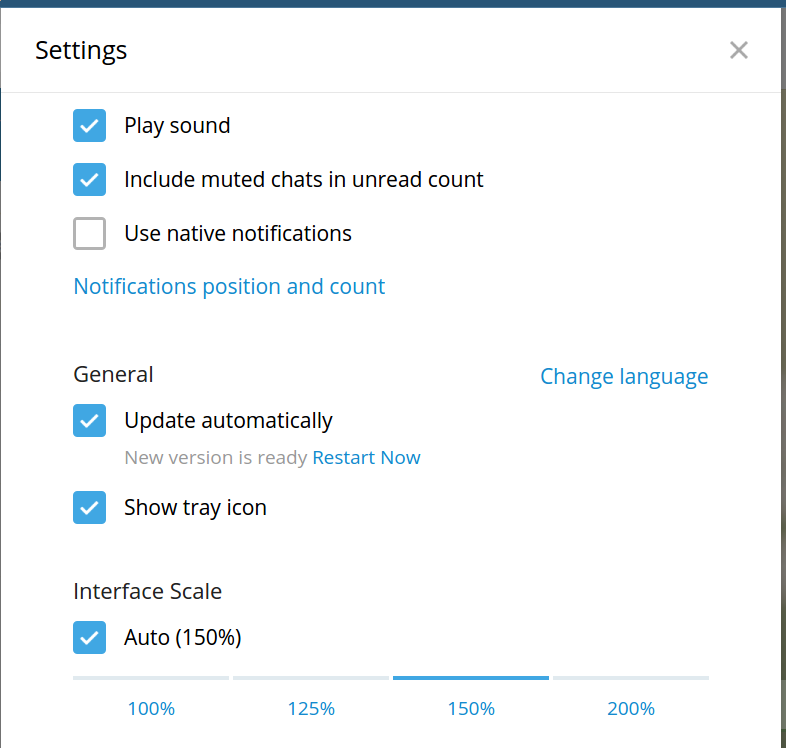
The best scaling factor for my machine is 1.5 (or 150%); somehow Telegram even detects it automatically. Would be really nice if Keybase supported it as well.
 netvl
on 20 Dec 2017
netvl
on 20 Dec 2017
+1 I love the app but I have to really concentrate to read the small text (especially since the color scheme is also not that read friendly).
 tstrijdhorst
on 15 Jan 2018
tstrijdhorst
on 15 Jan 2018
I disagree that this is not a big problem. On my 14" screen with a 2560x1440 native resolution, the text is unreadably small.
 egypt
on 29 Jan 2018
egypt
on 29 Jan 2018
Hey maintainers (@patrickxb / @maxtaco / @cjb), do you have a specific direction in mind for this feature, or would you like me to figure it out myself?
jacksonrayhamilton
on 29 Jan 2018
Is there any progress on this?
 denibertovic
on 14 Mar 2018
denibertovic
on 14 Mar 2018
There could be. All the maintainers need to do is respond to us saying “yes, please work on it.” That’s it! What are they waiting for? Free code coming your way, all you need to do is acknowledge that you would like this and will review it if we put it forward.
jacksonrayhamilton
on 14 Mar 2018
It seems Keybase guys do not care if you can read the text in their app or not. Lucky they do not have a chat application, it would suck.
 l1x
on 9 Oct 2020
l1x
on 9 Oct 2020
Related issues
 hkjels
·
4Comments
hkjels
·
4Comments
 caronni
·
3Comments
caronni
·
3Comments
 Magi1053
·
3Comments
Magi1053
·
3Comments
 k2trf
·
3Comments
k2trf
·
3Comments
 daothanhphap
·
3Comments
daothanhphap
·
3Comments