Client: no way to disable launch on startup?
Keybase GUI Version: 1.0.16-20160803190018+268b023
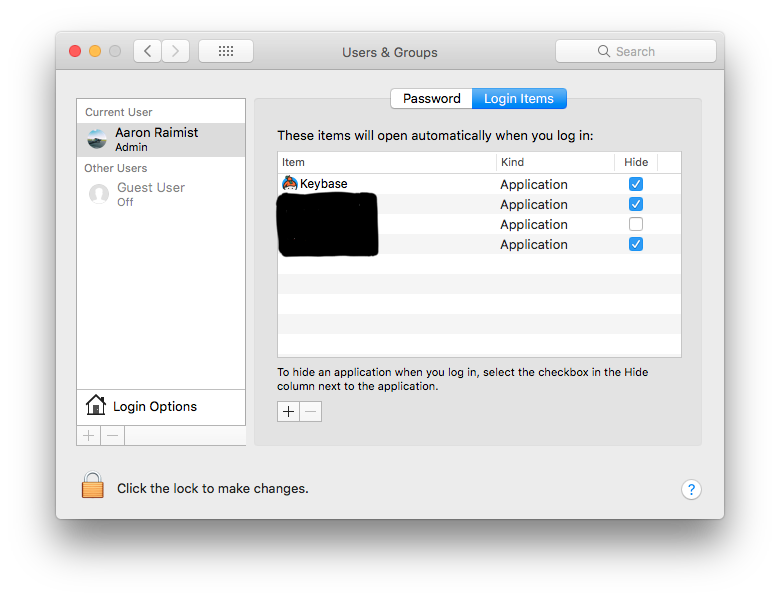
I can find no way to disable Keybase from launching on computer startup / account login. The normal method of auto-starting — addition in the "Users & Groups" control panel / Login Items tab, doesn't seem to be used here. Additionally, there's no preference for not autostarting.
on OSX
 huzzam
All 16 comments
Open finder and press cmd+shift+g then type in ~/Library/LaunchAgents and press enter.

You will find three files in this directory that you will need to remove. (see below)

Restart computer and keybase should not be running at startup.
For more information about launchd visit: http://launchd.info/
 afaur
on 20 Aug 2016
afaur
on 20 Aug 2016
thank you! will this also disable my ability to use keybase when i want to?
On Aug 20, 2016, at 3:45, Adam Faur [email protected] wrote:
Open finder and press cmd+shift+g then type in ~/Library/LaunchAgents and press enter.
https://cloud.githubusercontent.com/assets/898523/17827592/fa0257b4-6644-11e6-935e-44b47441b7ae.png
You will find three files in this directory that you will need to remove. (see below)
https://cloud.githubusercontent.com/assets/898523/17827608/46d2864a-6645-11e6-9ca6-80a5a100fd43.png
Restart computer and keybase should not be running at startup.For more information about launchd visit: http://launchd.info/ http://launchd.info/
—
You are receiving this because you authored the thread.
Reply to this email directly, view it on GitHub https://github.com/keybase/client/issues/3904#issuecomment-241167214, or mute the thread https://github.com/notifications/unsubscribe-auth/AGvbSAIICaLmf7KhSRRaoq1pFfb9G46Gks5qhk5EgaJpZM4Jll_r.
huzzam
on 21 Aug 2016
Very good question. I honestly am not sure, I just tried running again and looks like it will prompt you to try and reinstall some things. I did this myself because I figured if it didn't work next time I use it I would just reinstall, and that would be less annoying since I don't use it often.
afaur
on 21 Aug 2016
@afaur Yes, that works.
I am guessing the developers intend to provide a "Launch at Login" option in the apps preferences. Even still, the app should use System Preferences > Users & Groups > Login Items. That way ordinary users can easily control Keybase launch behaviour.
 lukejanicke
on 25 Aug 2016
lukejanicke
on 25 Aug 2016
@lukejanicke this! Login items should always be used for this kind of thing.
 derekhardwick
on 29 Aug 2016
derekhardwick
on 29 Aug 2016
It would be really great if the GUI would not pop on login as well. While I don't spend a lot of time logging out or in from restarts or otherwise... it is not always a preferable matter to let unintended viewers of your screen to know what you are running or using actively. Nor is it enjoyable having to close the keybase window upon every login. Workflow or initial login becomes a nuisance. Please provide an option to only load the status bar icon instead.
 jHackenthal
on 9 Sep 2016
jHackenthal
on 9 Sep 2016
For others looking to disable key base launch options please see ( keybase help launchd )...
$ keybase launchd list
keybase.service: Running (pid=416) [Keybase]
keybase.kbfs: Running (pid=427) [KBFS]
keybase.updater: Running (pid=407) [Updater]
$ keybase launchd uninstall keybase.service
etc...
jHackenthal
on 9 Sep 2016
Just realized there is no option. INSTANT UNINSTALL. Let me know when your marketing strategies grow up.
 phlebotinum
on 24 Nov 2016
phlebotinum
on 24 Nov 2016
Same on Debian. Of course I can delete ~/.config/autostart/keybase_autostart.desktop, but everytime I start the Keybase Client, the autostart file was created again. Quite annoying.
 ffflorian
on 12 Feb 2017
ffflorian
on 12 Feb 2017
@ffflorian this file has following lines
# Uncomment the following line to disable Keybase autostart:
# Hidden=true
I guess uncommenting this may help.
 uapasha
on 13 Apr 2017
uapasha
on 13 Apr 2017
@uapasha Thanks, good idea.
ffflorian
on 13 Apr 2017
This is a problem for me too. Now that Keybase has a mobile client, I'd prefer to not have the mac client taking space on my menu bar, when I'm going to get push notifications on my phone of changes anyway.
 noaho
on 2 Sep 2017
noaho
on 2 Sep 2017
Not sure when it changed but it is definitely in the Login Items settings as of version 1.0.34-20171027003854+8e989533a. You can close this issue.
 aaronraimist
on 11 Nov 2017
aaronraimist
on 11 Nov 2017
The update here is that we've found a race-condition that sometimes prevents the setting from sticking. We'll hopefully fix it in the next release. Thanks for your patience!
cc: @patrickxb
 maxtaco
on 13 Nov 2017
maxtaco
on 13 Nov 2017
Even after disabling Keybase in Login Items it re-adds itself after a restart. Very annoying. Uninstalling unit this issue is fixed.
 olivercaine
on 13 Oct 2019
olivercaine
on 13 Oct 2019
@olivercaine on mac, please disable Keybase autostart from within the app in Settings->Advanced.
 heronhaye
on 22 Nov 2019
heronhaye
on 22 Nov 2019
Related issues
 lukefrasera
·
3Comments
lukefrasera
·
3Comments
 shadowfacts
·
4Comments
shadowfacts
·
4Comments
 heartwithyou
·
3Comments
heartwithyou
·
3Comments
 k2trf
·
3Comments
k2trf
·
3Comments
 hkjels
·
4Comments
hkjels
·
4Comments
Most helpful comment
@afaur Yes, that works.
I am guessing the developers intend to provide a "Launch at Login" option in the apps preferences. Even still, the app should use System Preferences > Users & Groups > Login Items. That way ordinary users can easily control Keybase launch behaviour.