Client: Quitting Keybase doesn't kill the keybase process
The title really says it all in this one. You have to kill or pkill the process with a signal of SIGKILL to actually kill it.
 JohnMH
All 39 comments
I wouldn't consider this an issue as it is commonplace in software these days. If you're worried about it, make a shell script to terminate the necessary processes with killall.
 ghost
on 10 Aug 2016
ghost
on 10 Aug 2016
It's not at all common. It'd be one thing if I were talking about the "Close" option, but I'm talking about the separate "Quit' option.
On August 9, 2016 11:13:43 PM EDT, J R [email protected] wrote:
I wouldn't consider this an issue as it is commonplace in software
these days. If you're worried about it, make a shell script to
terminate the necessary processes withkillall.
You are receiving this because you authored the thread.
Reply to this email directly or view it on GitHub:
https://github.com/keybase/client/issues/3773#issuecomment-238754770
John M. Harris, Jr.
PGP Key: f2ea233509f192f98464c2e94f8f03c64bb38ffd
Sent from my Android device. Please excuse my brevity.
JohnMH
on 10 Aug 2016
try calling keybase ctl stop
that makes the background process stop.
 zander
on 12 Aug 2016
zander
on 12 Aug 2016
@zander I've just tested that, it does nothing unless the GUI is open, in which case the GUI crashes with SIGSEGV.
JohnMH
on 14 Aug 2016
6447 is the same issue.
 ariddell
on 25 May 2017
ariddell
on 25 May 2017
We have a PR upcoming on this. Cc @zanderz
 maxtaco
on 25 May 2017
maxtaco
on 25 May 2017
@maxtaco any progress on this?
 denibertovic
on 4 Sep 2017
denibertovic
on 4 Sep 2017
Thought it was fixed --- @zanderz?
maxtaco
on 4 Sep 2017
The services are stopped if you choose "Quit" from the tray icon menu, which is a different action from closing the GUI window. Afterwards, on macOS there is still something running called keybase.Helper, and on Windows there is still a keybase.exe process that doesn't do anything (latter tracked internally with CORE-3563).
One interesting issue we hadn't thought of is that on Windows, kbfsdokan.exe is stopped by accessing the mount, but if there is no mounted filesystem, we don't stop it on app exit. Do we have a graceful way to stop it without a filemount @taruti ?
 zanderz
on 5 Sep 2017
zanderz
on 5 Sep 2017
@zanderz How do we get "Quit" to stop this helper? And what is it called on GNU/Linux systems?
JohnMH
on 6 Sep 2017
@zanderz hm? That's not what I observed a moment ago. See https://github.com/keybase/client/issues/6447#issuecomment-336574032.
(Also, someone please merge these two Issues.)
 daveloyall
on 13 Oct 2017
daveloyall
on 13 Oct 2017
I don't think it stops the services when I click "Quit". I still see /usr/bin/keybase and /usr/bin/kbfsfuse running.
denibertovic
on 15 Jan 2018
This made me uninstall Keybase. I expect a software to quit when I choose 'Quit' :thinking:
 bjesus
on 16 Jul 2018
bjesus
on 16 Jul 2018
@bjesus what platform? We can hunt it down, it sounds like a bug to me!
maxtaco
on 16 Jul 2018
I'm on Arch Linux, using the latest official package. Quitting the client leaves quite a few processes running, including kbsfsfuse and even electron.
bjesus
on 17 Jul 2018
idk.
when I close mysql workbench I don't expect it to kill mysqld...
keybase daemon staying up doesn't seem unreasonable.
electron staying up does tho.
 dabura667
on 17 Jul 2018
dabura667
on 17 Jul 2018
@dabura667 One would expect mysqld would be on a remote server you're temporarily connecting to to manage. Keybase is a much different scenario. When you close it, you expect it to stop running.
JohnMH
on 17 Jul 2018
Quitting the client leaves quite a few processes running, including kbsfsfuse and even electron.
Well yes, "quitting" the client should leave it running in the background as a system tray icon. I know lots of software that does that.
Unless I'm misinterpreting what you said?
 eli-schwartz
on 17 Jul 2018
eli-schwartz
on 17 Jul 2018
@eli-schwartz You mean.. Just closing the window, right? Not actually selecting Quit?
JohnMH
on 17 Jul 2018
As far as I can tell there's no difference between the two.
Either one leaves the icon sitting in the system tray.
...
This is without getting into the fact that currently even killing the electron process entirely does not also quit the systemd-managed keybase and kbfsfuse daemons which got auto-spawned in the process.
But then again, keybase is hardly alone in doing this, you should see how many lingering processes are created by the average gtk application after you quit the X11 server. :p
eli-schwartz
on 17 Jul 2018
When you close it, you expect it to stop running.
So you expect me to keep my Keybase Electron app running (even if I don't want to) so that I can save files in my /keybase/private/junderwood/awesomestuff folder?
kbfsfuse and the keybase app should be separate processes, and clicking quit or Exit or whatever on the chat window should not destroy my workflow imo.
If I want to stop fuse, I pop a terminal and kill it, literally 2 second job... but if I want to get things back up after accidentally clicking quit on chat and thinking "oh oops can't save my file anymore!" then futz around with saveAs and re-copy after I restart Keybase, and now I have chat open though I didn't want it open and then I pull my hair out (I have one, don't judge) because clicking "quit" on a chat app destroyed my filesystem (fuse (kbfsfuse) being a virtual filesystem I rely on)...
I agree with @dabura667 that the current behavior makes sense to me...
idk, maybe most people are just irked by the fact that they didn't know ahead of time... so when you click the quit button maybe ask "Would you like to keep the /keybase folder active in the background?" and "Would you like to keep your keybase commands in the terminal available in the background?" so anyone hitting Quit will, best-case: tons of choice, worst-case: be nagged all the time.
 junderw
on 17 Jul 2018
junderw
on 17 Jul 2018
@eli-schwartz That's certainly not a good thing, and really needs to be fixed, in my opinion. If you know of any GTK or Qt applications that do this, please inform them of the issues with their code as well!
JohnMH
on 17 Jul 2018
It's not the application, it's somewhere deep in the fundamental design underpinnings of the entire gtk/gvfs toolkit.
You can complain to the gnome people I guess, but they consider the dozens of helper processes to be, in general, "a feature".
Qt is very different and does not do this. Because Qt is not developed by the developers of the Gnome desktop...
eli-schwartz
on 17 Jul 2018
Software should definitely not obscure what it does from the user. If a user chooses to "Quit" an application, they obviously want it to quit running. If they close the window? Sure, close the window and keep running in the system tray. That's fine, and a lot of excellent software does that.
My favourite example would be Konversation, which even informs you the first time you close the window that the default behaviour is to keep running in the system tray. However, when you go to File → Quit in Konversation, that does indeed cause the process to exit.
JohnMH
on 17 Jul 2018
@eli-schwartz The fact that they don't stop running when gnome-shell or even Xorg is killed is definitely a bug then! You should report that, to ensure quality software for our systems.
JohnMH
on 17 Jul 2018
@dabura667 I don't use MySQL Workbench, but I doubt that it started Mysqld in first place. That's not the case for keybase-gui. Is spawns all the daemons, and thus you'd expect it to close them too, or at the very least have an option to quit them.
@junderw If what you want is to have your directory always syncing, then you probably didn't need to start the GUI in first place. Just make sure you have kbfsfuse starting and forget about it. How can you refer to the two processes as separate ones when one starts the other without telling you even? Without an option not to turn the other one on?
I honestly don't know what are people talking about when they refer to this as common behavior. I can't come up with other apps that behave this way.
My usage pattern for Keybase is simple - I fire it up, send some messages, then quit it expecting I'm back to the state I was before launching it. I'm not using kbfsfuse, and even if I would, I would expect it to stop syncing when I close the app that started syncing, just like my Torrent app does, my Soulseek app does, my... everything does.
bjesus
on 17 Jul 2018
@bjesus I can't think of any other apps that do it either, but I don't use a lot of the apps most users seem to, so I'm forced to ignore my anecdotal experiences.
JohnMH
on 17 Jul 2018
I can't believe there is any disagreement on this.
I've got a new question: how do I properly quit/exit/shutdown keybase, so that none of it is running? No daemons, no clients. (keybase doesn't start automatically on my machine, nor should it.)
daveloyall
on 18 Jul 2018
By quitting all three components:
- The electron-based gui (either
/usr/bin/electron /usr/share/keybase-appor/opt/keybase/Keybasedepending on whether you use the Arch Linux package with system electron) - The keybase command-line daemon (
/usr/bin/keybase) - The kbfsfuse command-line daemon (
/usr/bin/kbfsfuse)
Most likely it will be getting started through systemd, so you can do this with:
systemctl --user disable --now kbfs keybase keybase.gui
Then make sure you don't have an autostart entry telling the GUI to start up anyway.
eli-schwartz
on 18 Jul 2018
Please fix. Quit should stop all software related to keybase. Close minimize to system try. Thanks.
Platform: Linux Mint 19.
Currently: Close minimizes to systray. Quit minimizes to systray.
 gb-ckedzierski
on 2 Oct 2018
gb-ckedzierski
on 2 Oct 2018
Please provide separate commands to (a) only exit the GUI client and (b) terminate all Keybase processes. Even a small shell script here in github will suffice, so long as it is kept updated so it always works.
Also it would be nice to have a checkbox in the GUI client [ ] start Keybase automatically when user logs in.
 fortran77
on 6 Feb 2019
fortran77
on 6 Feb 2019
(On Linux)
After the latest update, run_keybase -k will shut down all Keybase processes unconditionally (service, kbfs, gui, redirector).
If you're using systemd (check with systemctl --user status keybase), you can use it to stop and start the four units independently.
systemctl --user stop keybase.gui
just stops the gui. The other ones are keybase, kbfs, and keybase-redirector.
Additionally, if you're using a graphical DE and you want to turn autostart off, you can do this in your DE settings or in
keybase ctl autostart --disable
There's more information available at https://keybase.io/docs/linux-user-guide. Let me know if these features aren't working for you or if you have a question or suggestion.
 heronhaye
on 6 Feb 2019
heronhaye
on 6 Feb 2019
Thank-you, on Ubuntu 16.04.5 LTS after today's Keybase update run_keybase -k work nicely.
I was also able to use
systemctl --user stop keybase.gui keybase kbfs keybase-redirector
to terminate everything.
One thing that is not clear is what happens if an operation was in progress. I.e., do we end up with half-uploaded files, lost chat sends, etc. Ideally all operations should be atomic and queued for a retry but maybe not while we are still in beta.
fortran77
on 7 Feb 2019
Uhh guys, but why _File->Quit (Ctrl+q)_ still doesn't work in GUI. As I understand there are two options in menu. Close and Quit. Close should minimise to tray and Quit should do similar operation to run_keybase -k. But whatever I choose it always minimise to tray.
 h0ek
on 6 Apr 2019
h0ek
on 6 Apr 2019
+1 to having quit actually quit the app. Just spent a few minutes killing off a pile of keybase processes. Would also really prefer it not fire up a bunch of random helper processes, fuse filesystem, etc.
 swetland
on 16 Apr 2019
swetland
on 16 Apr 2019
We're working on the gui part: https://github.com/keybase/client/pull/16949. In the meantime run_keybase -k will shutdown everything (let us know if it doesn't).
heronhaye
on 16 Apr 2019
Keybase 4.0 has a Quit Keybase button in the main app in the GUI.
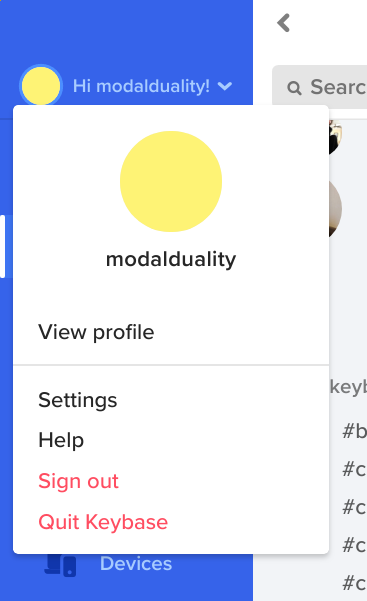
Also, keybase ctl stop should work as expected on Linux.
heronhaye
on 8 May 2019
Works perfect, thank you. Whole client looks much better. Great job!
I am not sure it's just me or not, but Settings button from the screen doesn't do anything.
h0ek
on 9 May 2019
Glad it works. Fix for settings issue is at https://github.com/keybase/client/pull/17450.
heronhaye
on 9 May 2019
Related issues
 nikolayhg
·
3Comments
nikolayhg
·
3Comments
 caronni
·
3Comments
caronni
·
3Comments
 pipermerriam
·
4Comments
pipermerriam
·
4Comments
 shadowfacts
·
4Comments
shadowfacts
·
4Comments
 martindevans
·
4Comments
martindevans
·
4Comments
Most helpful comment
This made me uninstall Keybase. I expect a software to quit when I choose 'Quit' :thinking: