Clickhouse: max_execution_time ignored on non-system tables.
Setting max_execution_time seemingly only works on the system.numbers table, which is the only table that the setting is tested on.
A simple test can be done on one of our access log tables.
$ clickhouse-client -t --max_execution_time 1 -q 'SELECT uniq(_date) FROM clicktail.access_log WHERE _date = today()';
1
4.445
$ clickhouse-client -t --max_execution_time 1 -q 'SELECT count() from system.numbers';
Received exception from server (version 19.17.6):
Code: 159. DB::Exception: Received from localhost:9000. DB::Exception: Timeout exceeded: elapsed 1.000091896 seconds, maximum: 1.
0.998
This has been tested on both 19.17.6.36 and 19.17.4.11.
Let me know if you need any additional information.
 JTCunning
All 12 comments
It is not ignored, but it kills queries 'gracefully'.
I.e. it just set a flag "it's enough" and that flag is checked at some moments of query execution by working threads.
 filimonov
on 8 Jan 2020
filimonov
on 8 Jan 2020
@filimonov No, it's a real issue
create table X (A Int64) Engine=MergeTree order by tuple();
insert into X select cityHash64(number) from numbers(10000000000);
19.4.5.35.
time cl --max_execution_time 1 -q 'select count() from X where A=1'
Received exception from server (version 19.4.5):
Code: 159. DB::Exception: Received from localhost:9000, ::1. DB::Exception: Timeout exceeded: elapsed 1.003994507 seconds, maximum: 1.

real    0m1.041s
user    0m0.009s
sys 0m0.009s


19.16.9.37
time cl --max_execution_time=1 -q 'select count() from X where A=1'
Received exception from server (version 19.16.9):
Code: 159. DB::Exception: Received from localhost:9000. DB::Exception: Timeout exceeded: elapsed 1.00399474 seconds, maximum: 1.

real    0m1.040s
user    0m0.000s
sys 0m0.014s
19.17.5.18

time cl --max_execution_time 1 -q 'select count() from X where A=1'

real    0m31.997s
user    0m0.003s
sys 0m0.025s
No Timeout error!!!
 den-crane
on 8 Jan 2020
den-crane
on 8 Jan 2020
Same problem
 jackpgao
on 18 Feb 2020
jackpgao
on 18 Feb 2020
same problem.Here is my test result.
First picture is the old version(1.1.54380)'s test result.
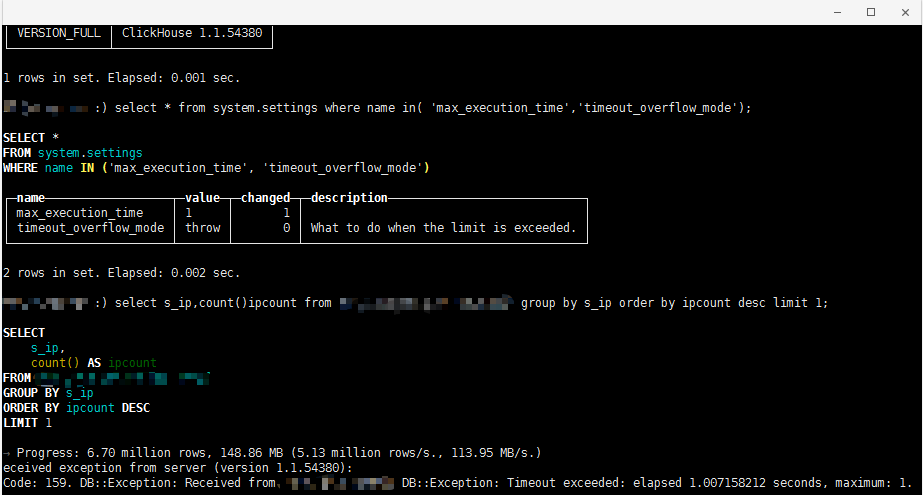
Second picture is the new version(19.17.6.36)'s test result

 weiyongyuan
on 18 Feb 2020
weiyongyuan
on 18 Feb 2020
@weiyongyuan you put pictures in the wrong order
den-crane
on 19 Feb 2020
@weiyongyuan you put pictures in the wrong order
oh sorry,I already put them correctly
weiyongyuan
on 19 Feb 2020
It works now in master and was accidentally fixed after #7796. So I have just backported #7796 back to 19.17 and 20.1. And added a test for MergeTree.
 KochetovNicolai
on 26 Feb 2020
KochetovNicolai
on 26 Feb 2020
- The most recent version still have the problem.
xxx :) set max_execution_time = 1 ;

SET max_execution_time = 1

Ok.

0 rows in set. Elapsed: 0.001 sec.

xxx :)
xxx :) select sleep(3);

SELECT sleep(3)

┌─sleep(3)─┐
│        0 │
└──────────┘

1 rows in set. Elapsed: 3.001 sec.

xxx :) select version();

SELECT version()

┌─version()─┐
│ 20.4.3.16 │
└───────────┘
@jackpgao it works as expected. Timeout check happens in between blocks. You need more blocks
set max_execution_time = 1 ;
select sleep(1) from numbers(10) settings max_block_size=1;

Code: 159. DB::Exception: Received from localhost:9000. DB::Exception: Timeout exceeded: elapsed 1.999990824 seconds, maximum: 1
@jackpgao it works as expected. Timeout check happens in between blocks. You need more blocks
set max_execution_time = 1 ;
select sleep(1) from numbers(10) settings max_block_size=1;

Code: 159. DB::Exception: Received from localhost:9000. DB::Exception: Timeout exceeded: elapsed 1.999990824 seconds, maximum: 1
SELECT *
FROM system.settings
WHERE name LIKE '%max_block_size%'

┌─name───────────┬─value─┬─changed─┬─description────────────────────┬─min──┬─max──┬─readonly─┐
│ max_block_size │ 65536 │       0 │ Maximum block size for reading │ ᴺᵁᴸᴸ │ ᴺᵁᴸᴸ │        0 │
└────────────────┴───────┴─────────┴────────────────────────────────┴──────┴──────┴──────────┘
- actually some of my query will execute exceed the
max_execution_timesetting in users.xml
jackpgao
on 31 May 2020
actually some of my query will execute exceed the max_execution_time
All queries always execute longer than max_execution_time.
set max_execution_time = 1 ;
select sleepEachRow(3) from numbers(1000) settings max_block_size=20;
DB::Exception: Timeout exceeded: elapsed 59.999714133 seconds, maximum: 1
The first block executes for 60 seconds (20rows * 3 sec). Then the max_execution_time check happens.
den-crane
on 1 Jun 2020
actually some of my query will execute exceed the max_execution_time
All queries always execute longer than max_execution_time.
set max_execution_time = 1 ;
select sleepEachRow(3) from numbers(1000) settings max_block_size=20;
DB::Exception: Timeout exceeded: elapsed 59.999714133 seconds, maximum: 1The first block executes for 60 seconds (20rows * 3 sec). Then the
max_execution_timecheck happens.
Sorry, my fault. It indeed works.
My testing way is not correct.
jackpgao
on 1 Jun 2020
Related issues
 atk91
·
3Comments
atk91
·
3Comments
 healiseu
·
3Comments
healiseu
·
3Comments
 lttPo
·
3Comments
lttPo
·
3Comments
 igor-sh8
·
3Comments
igor-sh8
·
3Comments
 hatarist
·
3Comments
hatarist
·
3Comments