Clickhouse: Server won't start after moving to multiple block devices
This is going to be a long one, so I apologize in advance...
I have ClickHouse 19.16.2 running in AWS, with a 15TiB data volume mounted on /data and it is already 90% full. I wanted to add another volume and let ClickHouse move some of the data to the new volume. So I mounted a new volume on /data-2 and added a default storage policy to config.xml like this:
    <path>/data/</path>

    <storage_configuration>
        <disks>
            <data_1>
                <path>/data/</path>
            </data_1>
            <data_2>
                <path>/data-2/</path>
            </data_2>
        </disks>

        <policies>
            <default>
                <volumes>
                    <data_vol_1>
                        <disk>data_1</disk>
                    </data_vol_1>
                    <data_vol_2>
                        <disk>data_2</disk>
                    </data_vol_2>
                </volumes>
                <move_factor>0.2</move_factor>
            </default>
        </policies>
    </storage_configuration>
After restarting ClickHouse, I saw that it started moving parts from /data to /data-2 as I expected. For example in the server log:
2019.11.06 11:35:30.812657 [ 19 ] {} <Trace> MergeTreePartsMover: Part 20180201_20180207_29916_29966_2 was cloned to /data-2/data/mydbname/mytablename/detached/20180201_20180207_29916_29966_2/
2019.11.06 11:35:30.813436 [ 19 ] {} <Trace> MergeTreePartsMover: Part 20180201_20180207_29916_29966_2 was moved to /data-2/data/mydbname/mytablename/20180201_20180207_29916_29966_2/
Something that looked a little suspicious: the free space on /data was going down very slowly, a lot slower than the speed in which /data-2 was getting filled. So it looked like ClickHouse was not deleting the moved parts from /data, but I thought that perhaps it happens later, in the background.
After moving about 780GB of data, the server log started showing lots of errors like this one:
2019.11.06 11:53:11.145040 [ 98 ] {233b4c12-6322-40c1-bf63-32e5e93bb2bd} <Error> HTTPHandler: Code: 252, e.displayText() = DB::Exception: Too many parts (300). Merges are processing significantly slower than inserts., Stack trace:

0. 0x564653cf17b0 StackTrace::StackTrace() /usr/bin/clickhouse
1. 0x564653cf1585 DB::Exception::Exception(std::__cxx11::basic_string<char, std::char_traits<char>, std::allocator<char> > const&, int) /usr/bin/clickhouse
2. 0x564653a7a072 ? /usr/bin/clickhouse
3. 0x564657359674 DB::MergeTreeBlockOutputStream::write(DB::Block const&) /usr/bin/clickhouse
4. 0x564657675601 DB::PushingToViewsBlockOutputStream::write(DB::Block const&) /usr/bin/clickhouse
5. 0x56465767f9a3 DB::SquashingBlockOutputStream::finalize() /usr/bin/clickhouse
6. 0x56465767fbd1 DB::SquashingBlockOutputStream::writeSuffix() /usr/bin/clickhouse
7. 0x56465783f162 DB::StorageBuffer::writeBlockToDestination(DB::Block const&, std::shared_ptr<DB::IStorage>) /usr/bin/clickhouse
8. 0x56465783f8c5 DB::StorageBuffer::flushBuffer(DB::StorageBuffer::Buffer&, bool, bool) /usr/bin/clickhouse
9. 0x564657844dce DB::BufferBlockOutputStream::insertIntoBuffer(DB::Block const&, DB::StorageBuffer::Buffer&) /usr/bin/clickhouse
10. 0x564657845590 DB::BufferBlockOutputStream::write(DB::Block const&) /usr/bin/clickhouse
11. 0x564657675601 DB::PushingToViewsBlockOutputStream::write(DB::Block const&) /usr/bin/clickhouse
12. 0x56465767f9a3 DB::SquashingBlockOutputStream::finalize() /usr/bin/clickhouse
13. 0x56465767fbd1 DB::SquashingBlockOutputStream::writeSuffix() /usr/bin/clickhouse
14. 0x564656f21df7 DB::copyData(DB::IBlockInputStream&, DB::IBlockOutputStream&, std::atomic<bool>*) /usr/bin/clickhouse
15. 0x56465704d495 DB::NullAndDoCopyBlockInputStream::readImpl() /usr/bin/clickhouse
16. 0x564656f047f7 DB::IBlockInputStream::read() /usr/bin/clickhouse
17. 0x564656f2175b DB::copyData(DB::IBlockInputStream&, DB::IBlockOutputStream&, std::atomic<bool>*) /usr/bin/clickhouse
18. 0x564657198657 DB::executeQuery(DB::ReadBuffer&, DB::WriteBuffer&, bool, DB::Context&, std::function<void (std::__cxx11::basic_string<char, std::char_traits<char>, std::allocator<char> > const&)>, std::function<void (std::__cxx11::basic_string<char, std::char_traits<char>, std::allocator<char> > const&)>) /usr/bin/clickhouse
19. 0x564653d858ae DB::HTTPHandler::processQuery(Poco::Net::HTTPServerRequest&, HTMLForm&, Poco::Net::HTTPServerResponse&, DB::HTTPHandler::Output&) /usr/bin/clickhouse
20. 0x564653d87c29 DB::HTTPHandler::handleRequest(Poco::Net::HTTPServerRequest&, Poco::Net::HTTPServerResponse&) /usr/bin/clickhouse
21. 0x564657c16a69 Poco::Net::HTTPServerConnection::run() /usr/bin/clickhouse
22. 0x564657c12fe0 Poco::Net::TCPServerConnection::start() /usr/bin/clickhouse
23. 0x564657c136fd Poco::Net::TCPServerDispatcher::run() /usr/bin/clickhouse
24. 0x5646592e98d1 Poco::PooledThread::run() /usr/bin/clickhouse
25. 0x5646592e767c Poco::ThreadImpl::runnableEntry(void*) /usr/bin/clickhouse
26. 0x564659a591e0 ? /usr/bin/clickhouse
27. 0x7f2018cdb6ba start_thread /lib/x86_64-linux-gnu/libpthread-2.23.so
28. 0x7f201860541d __clone /lib/x86_64-linux-gnu/libc-2.23.so
 (version 19.16.2.2 (official build))
I stopped all inserts into the database, and tried to restart it, hoping that it will be able to recover. But the server crashed, complaining about duplicate parts. For example:
2019.11.06 13:05:43.323415 [ 1 ] {} <Error> Application: Caught exception while loading metadata: Code: 132, e.displayText() = DB::Exception: Cannot create table from metadata file /data/metadata/mydbname//mytablename.sql, error: DB::Exception: Part 201902_111733_112037_4_371552 already exists, stack trace:
0. 0x55f1fac127b0 StackTrace::StackTrace() /usr/bin/clickhouse
1. 0x55f1fac12585 DB::Exception::Exception(std::__cxx11::basic_string<char, std::char_traits<char>, std::allocator<char> > const&, int) /usr/bin/clickhouse
2. 0x55f1fa99f327 ? /usr/bin/clickhouse
3. 0x55f1fac5f28e ThreadPoolImpl<ThreadFromGlobalPool>::worker(std::_List_iterator<ThreadFromGlobalPool>) /usr/bin/clickhouse
4. 0x55f1fac5f89e ThreadFromGlobalPool::ThreadFromGlobalPool<ThreadPoolImpl<ThreadFromGlobalPool>::scheduleImpl<void>(std::function<void ()>, int, std::optional<unsigned long>)::{lambda()#3}>(ThreadPoolImpl<ThreadFromGlobalPool>::scheduleImpl<void>(std::function<void ()>, int, std::optional<unsigned long>)::{lambda()#3}&&)::{lambda()#1}::operator()() const /usr/bin/clickhouse
5. 0x55f1fac5cd5c ThreadPoolImpl<std::thread>::worker(std::_List_iterator<std::thread>) /usr/bin/clickhouse
6. 0x55f20097a1e0 ? /usr/bin/clickhouse
7. 0x7f22fe71b6ba start_thread /lib/x86_64-linux-gnu/libpthread-2.23.so
8. 0x7f22fe04541d __clone /lib/x86_64-linux-gnu/libc-2.23.so
, Stack trace:

0. 0x55f1fac127b0 StackTrace::StackTrace() /usr/bin/clickhouse
1. 0x55f1fac12585 DB::Exception::Exception(std::__cxx11::basic_string<char, std::char_traits<char>, std::allocator<char> > const&, int) /usr/bin/clickhouse
2. 0x55f1faa21ca3 ? /usr/bin/clickhouse
3. 0x55f1fe5d6636 ? /usr/bin/clickhouse
4. 0x55f1fac5f28e ThreadPoolImpl<ThreadFromGlobalPool>::worker(std::_List_iterator<ThreadFromGlobalPool>) /usr/bin/clickhouse
5. 0x55f1fac5f89e ThreadFromGlobalPool::ThreadFromGlobalPool<ThreadPoolImpl<ThreadFromGlobalPool>::scheduleImpl<void>(std::function<void ()>, int, std::optional<unsigned long>)::{lambda()#3}>(ThreadPoolImpl<ThreadFromGlobalPool>::scheduleImpl<void>(std::function<void ()>, int, std::optional<unsigned long>)::{lambda()#3}&&)::{lambda()#1}::operator()() const /usr/bin/clickhouse
6. 0x55f1fac5cd5c ThreadPoolImpl<std::thread>::worker(std::_List_iterator<std::thread>) /usr/bin/clickhouse
7. 0x55f20097a1e0 ? /usr/bin/clickhouse
8. 0x7f22fe71b6ba start_thread /lib/x86_64-linux-gnu/libpthread-2.23.so
9. 0x7f22fe04541d __clone /lib/x86_64-linux-gnu/libc-2.23.so
 (version 19.16.2.2 (official build))
2019.11.06 13:05:43.323485 [ 1 ] {} <Information> Application: Shutting down storages.
2019.11.06 13:05:43.328743 [ 1 ] {} <Debug> Application: Shutted down storages.
2019.11.06 13:05:43.329416 [ 1 ] {} <Debug> Application: Destroyed global context.
It seems that ClickHouse finds parts that exist both under /data and /data-2, because they were moved to /data-2 but not deleted from /data .
Please advise.
 ishirav
All 11 comments
There are 2 problems here:
1) for some reason parts were not removed from the old location - that can happen if some long-running query still reading old parts, and locking them. We will recheck that part.
2) when the same part exists on one (or more) disk - that can happen when the source data part was not removed for some reason, the server can't start. We know about that problem and it will be fixed soon.
Right now you need to remove/rename duplicate parts manually.
/cc @excitoon
 filimonov
on 6 Nov 2019
filimonov
on 6 Nov 2019
Thank you for your reply.
1 - I don't believe this was due to a long-running query - our queries are usually very short (a few seconds or less). Could there be another reason? Maybe it's related to our use of buffer tables in front of each MergeTree table?
2 - that seems to match what I saw in the log. A fix for this bug would be appreciated.
What about the "too many parts" problem? Could it be caused by the migration of parts to another volume?
ishirav
on 6 Nov 2019
And how many parts (including / excluding duplicates) do you have in that table? (You can just count the folders)
Can you explain a bit you data pipeline? It looks like some MV & Buffer tables were involved.
filimonov
on 6 Nov 2019
@filimonov the problem was not specific to a single table, there were duplicates in many tables.
We have 24 tables, some have only a few parts while the largest 5 tables have 150 to 250 parts. Across all table there are ~1500 parts.
Interestingly, if I look at the parts that ClickHouse moved to the /data-2 volume, there are more parts there - about 2000 (even though they cover only a fraction of the whole dataset). Perhaps these are parts that the database didn't have a chance to merge yet?
As for the pipeline, for each of the 24 tables we have a buffer table, because we insert data many times per second. The buffer is flushed after 10 minutes or 100,000 records, whichever comes first.
I don't know what you mean by MV.
ishirav
on 6 Nov 2019
@ishirav Can you share I/O utilization statistics of disks during move?
 excitoon
on 6 Nov 2019
excitoon
on 6 Nov 2019
I don't know what you mean by MV.
So rather you don't use that :) Materialized views.
filimonov
on 6 Nov 2019
@filimonov - ahh, materialized views. We don't currently use them.
@excitoon - good idea. Here are the OPS of the two EBS volumes:
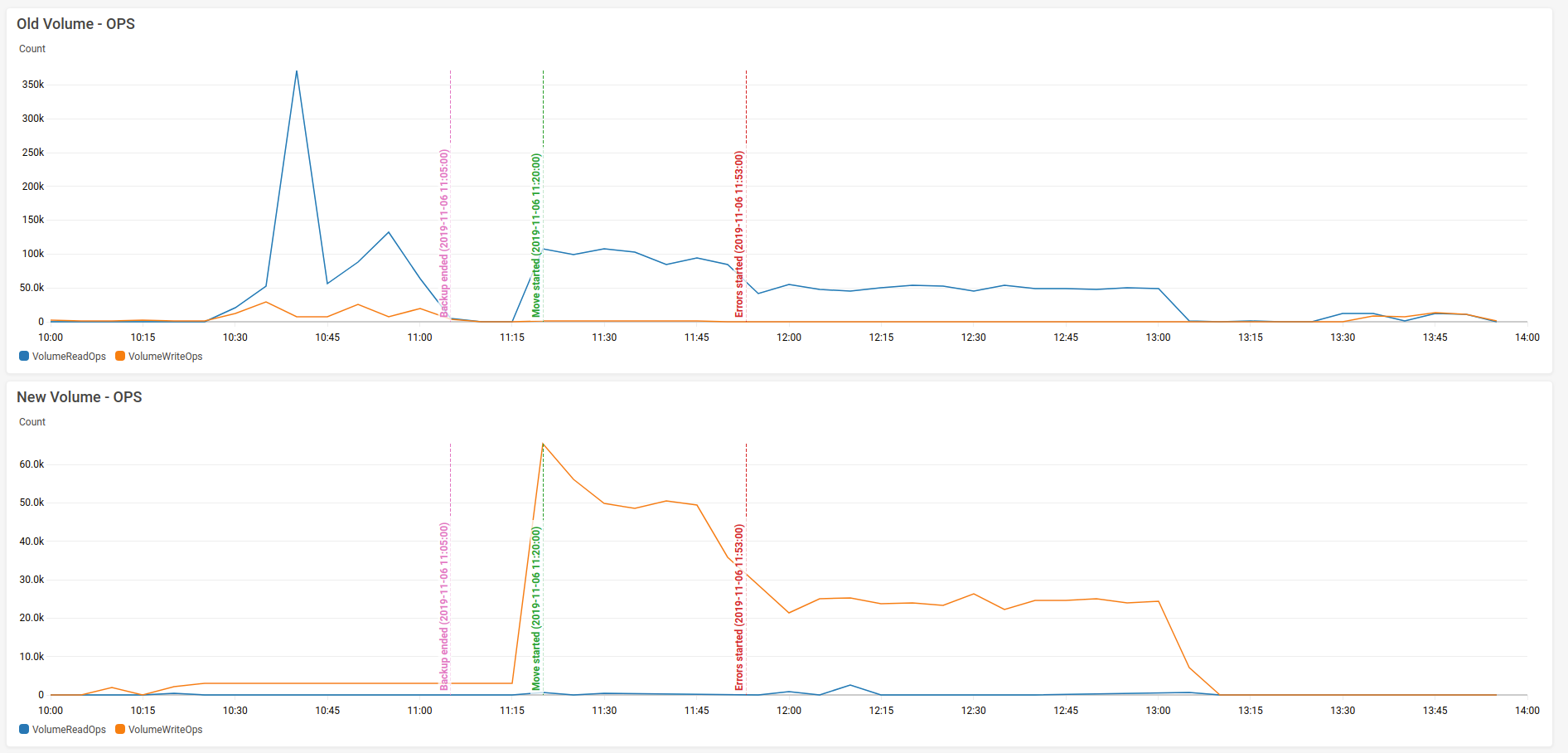
Here is their throughput:
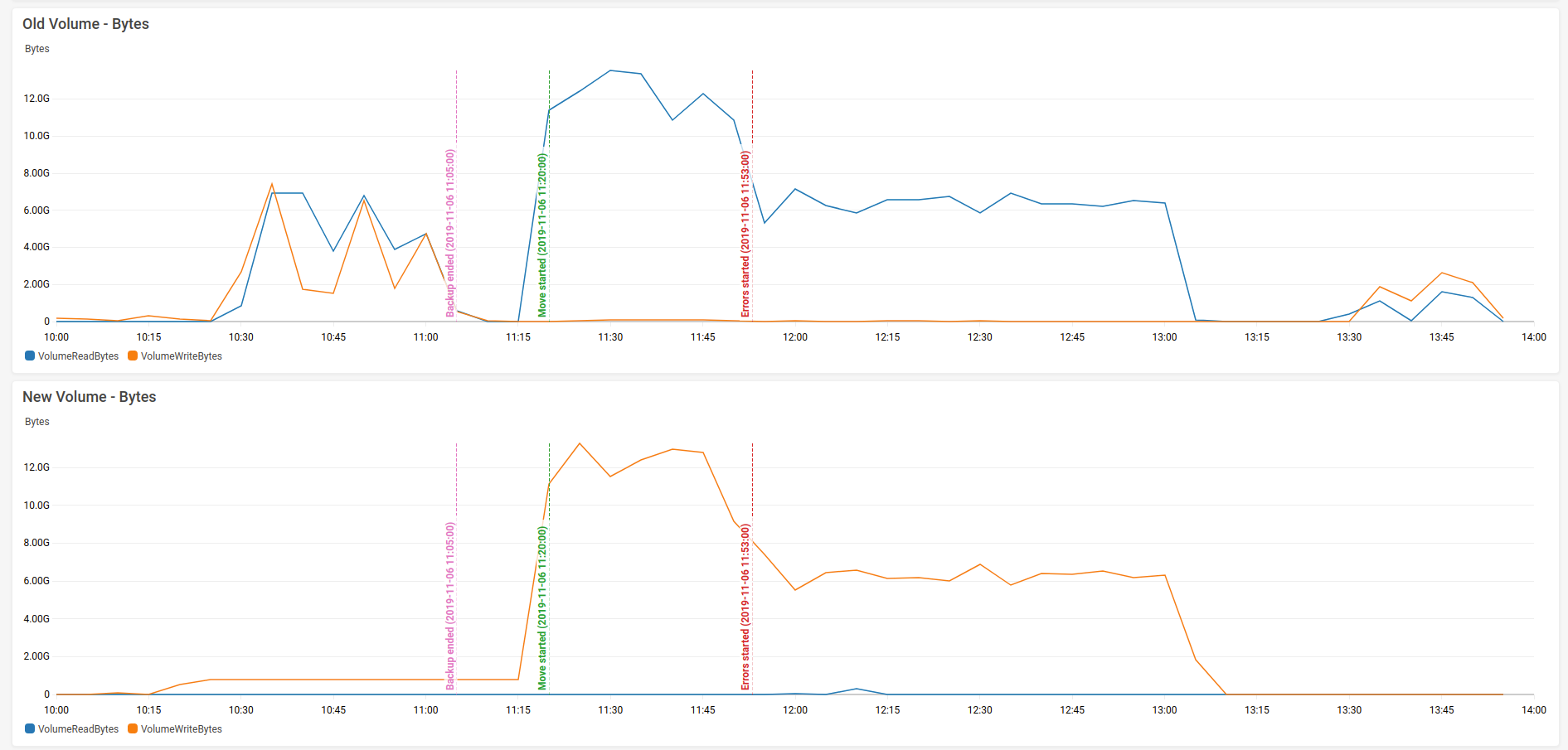
And the most interesting graph:
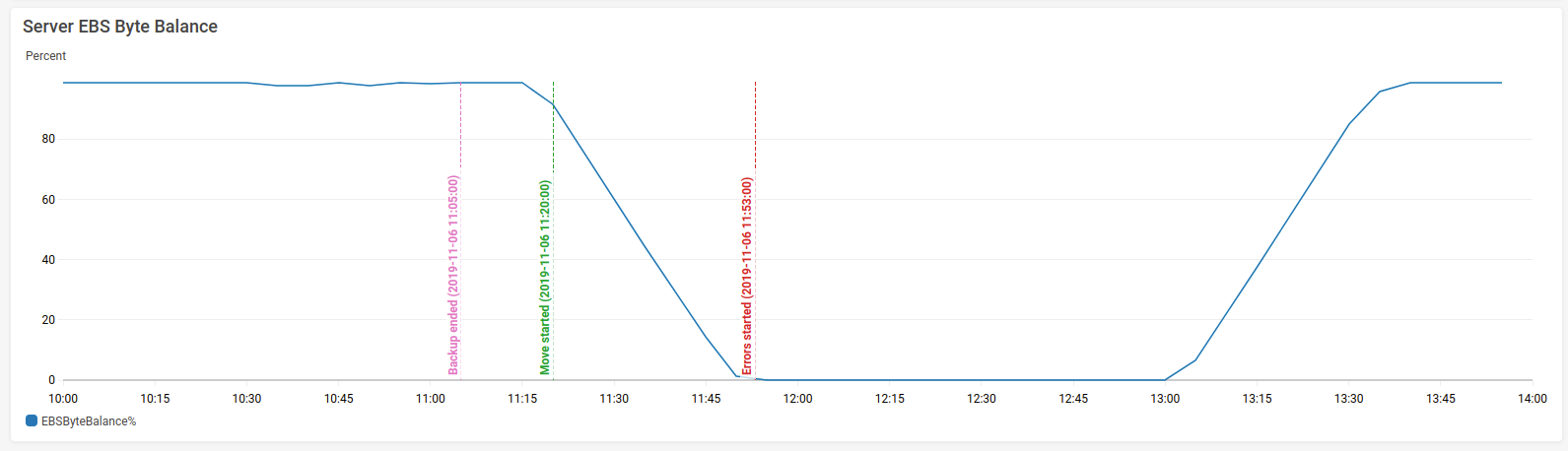
Some AWS instances have "burst IO" ability, where they can get a better IO rate than their nominal rate. This is controlled by a credit system, and it's very clear that the moving of data between disks depleted the server's credits. So the IO rate dropped, and this caused the "too many parts" problem. I don't know if this also explains the duplicate parts problem.
I think there are 3 takeaways from this:
- MergeTreePartsMover should probably be paused when the server reaches a "too many parts" state. The log shows that it was still moving parts around while the server was rejecting inserts.
- There should be a way to throttle the MergeTreePartsMover, perhaps a configuration settings of maximum megabytes that can be moved per second. This can ensure that the MergeTreePartsMover doesn't consume too many resources that are needed for higher priority tasks, such as inserts and merges.
- The server must be able to cope with duplicate parts, since obviously it's a problem that can occur, and should not require manual intervention.
ishirav
on 7 Nov 2019
Hi @ishirav
We were not able to reproduce the problem when parts were not removed from the original location in synthetic tests. :\ So if it happens in your case - maybe it is caused by some specific queries, or by some kind of race conditions.
Can you help us to create some reproducible example?
What can help: enable query_log and part_log, and try moving some parts to another disk (you can also do that with ALTER ... MOVE PART ... TO DISK ... command). After copying, if you see that original part was not removed - check that no long-running queries use the table, and check (in query_log) what queries was started just before part movement, and during that.
filimonov
on 13 Nov 2019
@filimonov Isn't it fixed?
 alexey-milovidov
on 4 Jul 2020
alexey-milovidov
on 4 Jul 2020
@excitoon No answer?
alexey-milovidov
on 19 Jul 2020
@filimonov Isn't it fixed?
It was fixed in #8402
excitoon
on 20 Jul 2020
Related issues
 jangorecki
·
3Comments
jangorecki
·
3Comments
 hatarist
·
3Comments
hatarist
·
3Comments
 zhicwu
·
3Comments
zhicwu
·
3Comments
 jimmykuo
·
3Comments
jimmykuo
·
3Comments
 healiseu
·
3Comments
healiseu
·
3Comments
Most helpful comment
@filimonov - ahh, materialized views. We don't currently use them.
@excitoon - good idea. Here are the OPS of the two EBS volumes:
Here is their throughput:
And the most interesting graph:
Some AWS instances have "burst IO" ability, where they can get a better IO rate than their nominal rate. This is controlled by a credit system, and it's very clear that the moving of data between disks depleted the server's credits. So the IO rate dropped, and this caused the "too many parts" problem. I don't know if this also explains the duplicate parts problem.
I think there are 3 takeaways from this: