Clickhouse: Zookeeper node replica host value did not change after changing the config.xml replica host value
Problem
I'm trying to solve the known DNS problem when running Clickhouse replicas as containers (Kubernetes). My solution is to use a ClusterIP service for each of my replicas so that the IP address will be static. This ClusterIP services will replace the current Kubernetes Headless Service that I use.
The DNS issue
The IP address shown in the logs is the old IP address of a Clickhouse Pod/Container replica and SYSTEM DROP DNS CACHE does not fix it.
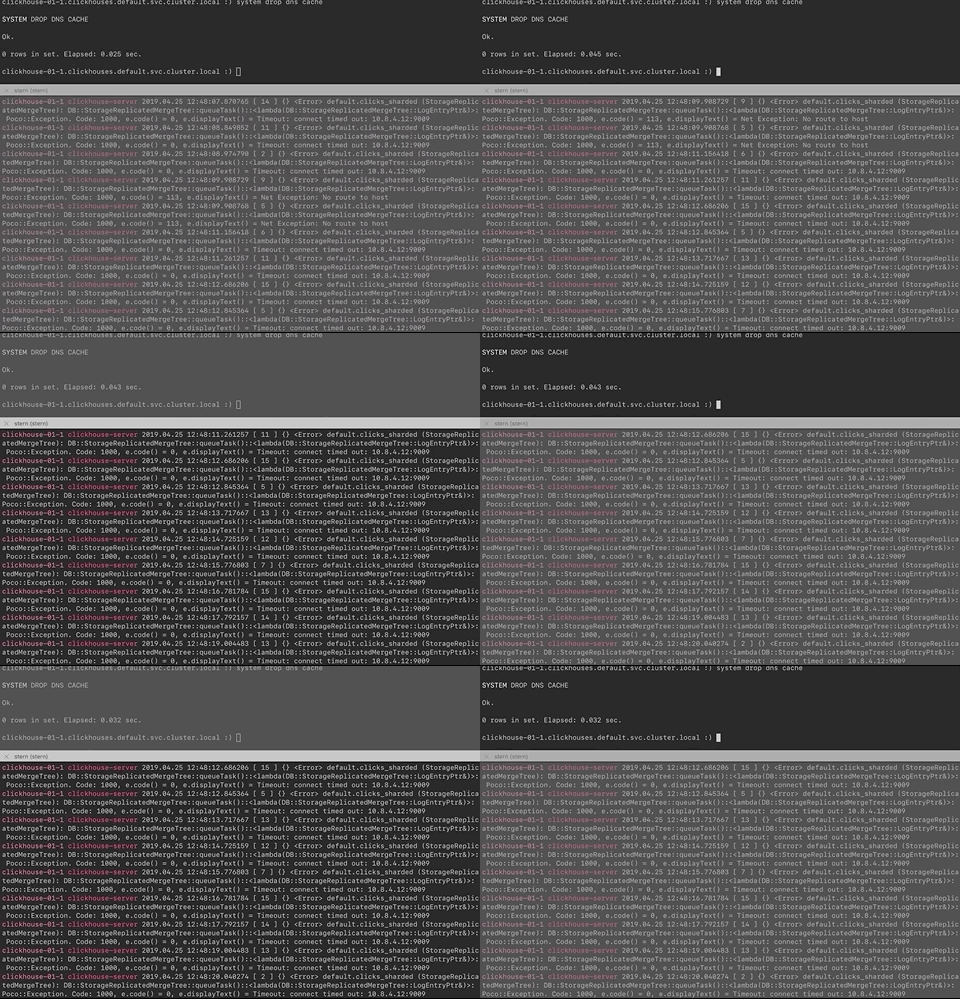
So this is what I changed:
Old Headless service hostname | New ClusterIP service hostname
--- | ---
clickhouse-01-0.clickhouses.default.svc.cluster.local | ch-01-0.default.svc.cluster.local
clickhouse-01-1.clickhouses.default.svc.cluster.local | ch-01-1.default.svc.cluster.local
I validated that the change took effect by running this query:
select cluster, shard_num, replica_num, host_name, host_address from system.clusters where cluster='my_cluster' FORMAT Vertical
Row 1:
──────
cluster:      my_cluster
shard_num:    1
replica_num:  1
host_name:    ch-01-0.default.svc.cluster.local
host_address: 10.11.252.3

Row 2:
──────
cluster:      my_cluster
shard_num:    1
replica_num:  2
host_name:    ch-01-1.default.svc.cluster.local
host_address: 10.11.240.166
What I did
I have updated the config.xml to use a different hostname and then restarted my deployments (Kubernetes Pods).
    <yandex>
        <remote_servers incl="clickhouse_remote_servers">
          <clicks_cluster>
            <shard>
              <internal_replication>true</internal_replication>
              <replica>
                  <default_database>default</default_database>
                  <host>ch-01-0.default.svc.cluster.local</host>
                  <port>9000</port>
              </replica>
              <replica>
                  <default_database>default</default_database>
                  <host>ch-01-1.default.svc.cluster.local</host>
                  <port>9000</port>
              </replica>
            </shard>
            <shard>
              <internal_replication>true</internal_replication>
              <replica>
                  <default_database>default</default_database>
                  <host>ch-02-0.default.svc.cluster.local</host>
                  <port>9000</port>
              </replica>
              <replica>
                  <default_database>default</default_database>
                  <host>ch-02-1.default.svc.cluster.local</host>
                  <port>9000</port>
              </replica>
            </shard>
          </clicks_cluster>
        </remote_servers>
    </yandex>
Everything works fine but eventually, a Pod will again produce that known DNS error.
In zookeeper, I still see that the replica host did not change:
[zk: localhost:2181(CONNECTED) 16] get /clickhouse/tables/01/default/my_table/replicas/clickhouse-01-0/host
host: clickhouse-01-0.clickhouses.default.svc.cluster.local
port: 9009
tcp_port: 9000
database: default
table: my_table
scheme: http

cZxid = 0x100000010
ctime = Fri Apr 12 11:51:30 UTC 2019
mZxid = 0x500000028
mtime = Wed Apr 24 14:58:36 UTC 2019
pZxid = 0x100000010
Is it dangerous if I updated the value manually?
clickhouse-01-0.clickhouses.default.svc.cluster.local was already replaced with ch-01-0.default.svc.cluster.local from the config.xml.
The known DNS problem is this:
2019.04.24 15:09:25.173016 [ 12 ] {} <Error> default.my_table (StorageReplicatedMergeTree): DB::StorageReplicatedMergeTree::queueTask()::<lambda(DB::StorageReplicatedMergeTree::LogEntryPtr&)>: Poco::Exception. Code: 1000, e.code() = 113, e.displayText() = Net Exception: No route to host
My temporary solution to make the replication work is to kill the Pod that throws this error.
Update
When using a replica clickhouse-client, I see that it's still using the headless service name clickhouse-01-1.clickhouses.default.svc.cluster.local.
kubectl exec -it clickhouse-01-1 -- clickhouse-client
ClickHouse client version 19.4.1.3.
Connecting to localhost:9000 as user default.
Connected to ClickHouse server version 19.4.1 revision 54416.

clickhouse-01-1.clickhouses.default.svc.cluster.local :)
This is my Kubernetes services.
NAME            TYPE        CLUSTER-IP      EXTERNAL-IP   PORT(S)                      AGE
ch-01-0         ClusterIP   10.11.252.3     <none>        9000/TCP,8123/TCP,9009/TCP   178m
ch-01-1         ClusterIP   10.11.240.166   <none>        9000/TCP,8123/TCP,9009/TCP   177m
ch-02-0         ClusterIP   10.11.248.216   <none>        9000/TCP,8123/TCP,9009/TCP   3h3m
ch-02-1         ClusterIP   10.11.246.167   <none>        9000/TCP,8123/TCP,9009/TCP   3h3m
clickhouses     ClusterIP   None            <none>        9000/TCP,8123/TCP,9009/TCP   12d
I tried deleting the headless service and the following error came up:
<Error> default.my_table (StorageReplicatedMergeTree): DB::StorageReplicatedMergeTree::queueTask()::<lambda(DB::StorageReplicatedMergeTree::LogEntryPtr&)>: Poco::Exception. Code: 1000, e.code() = 0, e.displayText() = Host not found: clickhouse-01-0.clickhouses.default.svc.cluster.local
Update 2
I also noticed that this error came up after I changed the config.xml.
Couldn't start replication: Replica /clickhouse/tables/01/default/my_table/replicas/clickhouse-01-0 appears to be already active. If you're sure it's not, try again in a minute or remove znode /clickhouse/tables/01/default/my_table/replicas/clickhouse-01-0/is_active manually, DB::Exception: Replica /clickhouse/tables/01/default/my_table/replicas/clickhouse-01-0 appears to be already active. If you're sure it's not, try again in a minute or remove znode /clickhouse/tables/01/default/my_table/replicas/clickhouse-01-0/is_active
 bzon
bzon
All 5 comments
interserver_http_host -> host_name: ch-01-1.default.svc.cluster.local
    <!-- Hostname that is used by other replicas to request this server.
         If not specified, than it is determined analoguous to 'hostname -f' command.
         This setting could be used to switch replication to another network interface.
      -->
    <!--
    <interserver_http_host>example.yandex.ru</interserver_http_host>
    -->
hostname in ZK has no relation to remote_servers
remote_servers is used by Distributed engine not by Replicated (ZK)
 den-crane
on 25 Apr 2019
den-crane
on 25 Apr 2019
@den-crane thanks for the answer. I ran the command and I got the following.
# hostname -f
clickhouse-01-1.clickhouses.default.svc.cluster.local
So you probably better to specify interserver_http_host in config.xml though I am not sure it will work without CH restart than guessing what hostname -f is applied in CH unix process.
den-crane
on 25 Apr 2019
I'm now changing my Clickhouse Docker entrypoint script to make the interserver_http_host dynamically configurable upon the Pod runtime. I will update this thread for the result.
bzon
on 25 Apr 2019
@den-crane it worked! 🎉
For each Kubernetes Pod replica, the docker_related_config.xml now looks like:
<yandex>
    <!-- Listen wildcard address to allow accepting connections from other containers and host network. -->
    <listen_host>::</listen_host>
    <listen_host>0.0.0.0</listen_host>
    <listen_try>1</listen_try>
    <!-- Related to https://github.com/yandex/ClickHouse/issues/2228 -->
    <listen_reuse_port>1</listen_reuse_port>

    <logger>
        <level>error</level>
        <console>1</console>
    </logger>
    <!-- Related to https://github.com/yandex/ClickHouse/issues/4047 -->
    <keep_alive_timeout>8</keep_alive_timeout>

    <!-- Related to https://github.com/yandex/ClickHouse/issues/5101 -->
    <interserver_http_host>ch-01-0.default.svc.cluster.local</interserver_http_host>
</yandex>
I checked zookeeper and it's now using the interserver_http_host.
[zk: localhost:2181(CONNECTED) 4] get /clickhouse/tables/01/default/my_table/replicas/clickhouse-01-0/host
host: ch-01-0.default.svc.cluster.local
port: 9009
tcp_port: 9000
database: default
table: clicks_sharded
scheme: http
I've also now removed the Kubernetes headless service.
I'm closing this issue now. Thanks for the support! 🍻
bzon
on 25 Apr 2019
Related issues
 SaltTan
·
3Comments
SaltTan
·
3Comments
 bseng
·
3Comments
bseng
·
3Comments
 opavader
·
3Comments
opavader
·
3Comments
 healiseu
·
3Comments
healiseu
·
3Comments
 innerr
·
3Comments
innerr
·
3Comments