Clickhouse: Can't start clickhouse --help
os: Ubuntu 16.04.3 LTS n l
clickhouse version: 1.1.54342
I use " sudo service clickhouse-server start" . but not start.
so I use "systemctl status clickhouse-server.service" show message:
● clickhouse-server.service - ClickHouse Server (analytic DBMS for big data)
Loaded: loaded (/etc/systemd/system/clickhouse-server.service; enabled; vendor preset: enabled)
Active: activating (auto-restart) (Result: exit-code) since Thu 2018-03-01 22:31:55 CST; 21s ago
Process: 16057 ExecStart=/usr/bin/clickhouse-server --config=/etc/clickhouse-server/config.xml (code=exited, status=232/ADDRESS_FAMILIES)
Main PID: 16057 (code=exited, status=232/ADDRESS_FAMILIES)
Mar 01 22:31:55 ubuntu163 systemd[1]: clickhouse-server.service: Unit entered failed state.
Mar 01 22:31:55 ubuntu163 systemd[1]: clickhouse-server.service: Failed with result 'exit-code'.
 jgshzy
All 15 comments
Конфиг в студию!
Sho me Your config
 godjil
on 1 Mar 2018
godjil
on 1 Mar 2018
I am seeing this too in testing. ClickHouse worked with all the defaults after installing with apt-get on Debian 9, but then I saw this error when I changed the location of the logs.
        <log>/mnt/resource/chdata/clickhouse-server.log</log>
        <errorlog>/mnt/resource/chdata/clickhouse-server.err.log</errorlog>
 derekperkins
on 17 Mar 2018
derekperkins
on 17 Mar 2018
ADDRESS_FAMILIES means that this is related to IPv4 vs IPv6 addresses in configuration.
Typical Linux system have support both for IPv4 and IPv6 and you can use :: wildcard address in config to listen.
But sometimes (in some cloud providers) they have a kernel with explicitly disabled IPv4 or IPv6.
In this case you have to edit the configuration (look at both config.xml and users.xml) to use only supported address families.
 alexey-milovidov
on 6 Apr 2018
alexey-milovidov
on 6 Apr 2018
I saw this error when I changed the location of the logs
Probably you have different error, could you please show it?
alexey-milovidov
on 6 Apr 2018
I figured it out, it was just a permissions error, but it also shows that error if the directory doesn't exist. I had to run chown clickhouse:clickhouse to fix it.
derekperkins
on 6 Apr 2018
I am seeing this too. What I do wrong?
lickhouse-server.service - ClickHouse Server (analytic DBMS for big data)
   Loaded: loaded (/etc/systemd/system/clickhouse-server.service; enabled; vendor preset: enabled)
   Active: activating (auto-restart) (Result: exit-code) since Thu 2018-08-09 13:35:27 UTC; 18s ago
  Process: 6945 ExecStart=/usr/bin/clickhouse-server --config=/etc/clickhouse-server/config.xml (code=exited, status=70)
  Process: 6941 ExecStartPre=/bin/chown clickhouse:clickhouse -R /etc/clickhouse-server (code=exited, status=0/SUCCESS)
  Process: 6938 ExecStartPre=/usr/bin/chown clickhouse:clickhouse -R /etc/clickhouse-server (code=exited, status=0/SUCCESS)
 Main PID: 6945 (code=exited, status=70)
 PolinaIP
on 9 Aug 2018
PolinaIP
on 9 Aug 2018
the problem is solved! I just had to change the user to root
in /etc/systemd/system/clickhouse-server.service
PolinaIP
on 10 Aug 2018
I got the same problem with @jgshzy, but for a different reason. The first time I installed clickhouse the service started without any error. But then I decided to move clickhouse data repository to an SSD disk. I modified paths at
/etc/clickhouse-server/config.xml
<!-- Path to data directory, with trailing slash. -->
    <path>/dbstore/clickhouse/</path>

    <!-- Path to temporary data for processing hard queries. -->
    <tmp_path>/dbstore/clickhouse/tmp/</tmp_path>

    <!-- Directory with user provided files that are accessible by 'file' table function. -->
    <user_files_path>/dbstore/clickhouse/user_files/</user_files_path>
then I restarted the server and I got
sudo service clickhouse-server status
● clickhouse-server.service - ClickHouse Server (analytic DBMS for big data)
   Loaded: loaded (/etc/systemd/system/clickhouse-server.service; enabled; vendor preset: enabled)
   Active: activating (auto-restart) (Result: exit-code) since Thu 2018-09-27 21:04:14 EEST; 4s ago
  Process: 7774 ExecStart=/usr/bin/clickhouse-server --config=/etc/clickhouse-server/config.xml (code=exited, status=203/EXEC)
  Process: 7770 ExecStartPre=/bin/chown clickhouse:clickhouse -R /etc/clickhouse-server (code=exited, status=0/SUCCESS)
  Process: 7767 ExecStartPre=/usr/bin/chown clickhouse:clickhouse -R /etc/clickhouse-server (code=exited, status=203/EXEC)
 Main PID: 7774 (code=exited, status=203/EXEC)

Sep 27 21:04:14 Tornado systemd[1]: clickhouse-server.service: Unit entered failed state.
Sep 27 21:04:14 Tornado systemd[1]: clickhouse-server.service: Failed with result 'exit-code'
Then I tried several things with permissions, users, etc and eventually it was messed up completely so I decided to remove it and re-install it. I removed all clickhouse* directories first with mlocate and installed it again according to your quick start guide. But I noticed warnings and failure of something, see below
The following NEW packages will be installed
  clickhouse-client clickhouse-server
0 to upgrade, 2 to newly install, 0 to remove and 356 not to upgrade.
Need to get 0 B/18,4 kB of archives.
After this operation, 99,3 kB of additional disk space will be used.
Selecting previously unselected package clickhouse-client.
dpkg: warning: files list file for package 'clickhouse-common-static' missing; assuming package has no files currently installed
(Reading database ... 333742 files and directories currently installed.)
Preparing to unpack .../clickhouse-client_18.12.17_all.deb ...
Unpacking clickhouse-client (18.12.17) ...
Selecting previously unselected package clickhouse-server.
Preparing to unpack .../clickhouse-server_18.12.17_all.deb ...
Unpacking clickhouse-server (18.12.17) ...
Processing triggers for systemd (229-4ubuntu21.2) ...
Processing triggers for ureadahead (0.100.0-19) ...
ureadahead will be reprofiled on next reboot
Setting up clickhouse-client (18.12.17) ...
Setting up clickhouse-server (18.12.17) ...
ClickHouse init script has migrated to systemd. Please manually stop old server and restart the service: sudo killall clickhouse-server && sleep 5 && sudo service clickhouse-server restart
Synchronizing state of clickhouse-server.service with SysV init with /lib/systemd/systemd-sysv-install...
Executing /lib/systemd/systemd-sysv-install enable clickhouse-server
Failed to set capabilities on file `/usr/bin/clickhouse' (Invalid argument)
The value of the capability argument is not permitted for a file. Or the file is not a regular (non-symlink) file
Cannot set 'net_admin' capability for clickhouse binary. This is optional. Taskstats accounting will be disabled. To enable taskstats accounting you may add the required capability later manually.
Processing triggers for systemd (229-4ubuntu21.2) ...
Processing triggers for ureadahead (0.100.0-19) ...
Then I did
sudo service clickhouse-server start
and unfortunately I got the same error, can you help please ?
I also noticed that all binaries /usr/bin/clickhouse-* point to clickhouse and I cannot find clickhouse. It looks like the clickhouse package is not installed correctly
PS: It will also help others if you write a guide with instructions on how to move safely data to another filesystem e.g. mounted on an SSD.
 healiseu
on 27 Sep 2018
healiseu
on 27 Sep 2018
Faulty package installation was corrected by running again the quick start commands
Then I modified /etc/clickhouse-server/config.xml again and
BINGO
The clickhouse server started ok and the location of clickhouse/data changed to my SSD
There is one thing left. How to bring back the tables from the old server.
I kept a copy of the old data folder but I am not sure if I can restore them this way ?
For example I tried
ATTACH TABLE Floats
and I got back an exception
Exception: There is no metadata file for table Floats.
OK I created/copied the needed metadata at clickhouse/medatada and repeated the ATTACH command. That worked but I got back
0 rows in set
OK I have just discovered the "Recovery After Complete Data Loss" part of the documentation that explains how to do this
The easy way is to run the command
sudo -u clickhouse touch /var/lib/clickhouse/flags/force_restore_data
That's it, hope this hands-on failure/recovery experience of mine will be helpful for others.
healiseu
on 27 Sep 2018
More about uninstalling and installing again clickhouse
I noticed that
apt purge clickhouse-server
apt purge clickhouse-client
are not enough you need also
apt autoremove
But even with these in place there is leftover of clickhouse from previous installation
So I also did several
rm -rf .../clickhouse*
and then installed again, otherwise it's quite possible that clickhouse-server will fail to start as it happened in my case.
healiseu
on 6 Oct 2018
!!start the service after making changes to the config !!!
--note the ranking--
To install official packages add the Yandex repository in /etc/apt/sources.list or in a separate,
/etc/apt/sources.list.d/clickhouse.list file:
1- deb http://repo.yandex.ru/clickhouse/deb/stable/ main/
2- sudo apt-key adv --keyserver keyserver.ubuntu.com --recv E0C56BD4
3- sudo apt-get update
4- sudo apt-get install clickhouse-client clickhouse-server
5- start the service after making changes to the config (if necessary)
6- choown clickhouse:clickhouse clickhouse/
7- sudo -R chmod 755 clickhouse/
8- sudo service clickhouse-server start
done :)
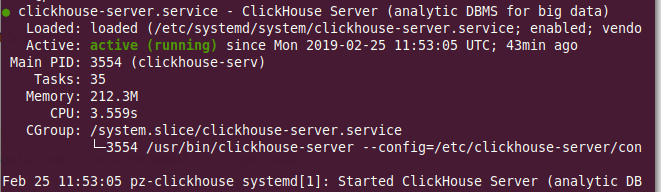
 sevketozturk
on 25 Feb 2019
sevketozturk
on 25 Feb 2019
Also had such error. In logs I had:
It was easy to fix - I updated the password for default user - set it without special symbols, just 0-9a-Z.
 lexerom
on 5 Nov 2019
lexerom
on 5 Nov 2019
@lexerom You can also use sha256 password.
alexey-milovidov
on 5 Nov 2019
I was deleted the error log file manually with user ubuntu and created it myself, so the permission got changed to ubuntu. /var/log/clickhouse and the files inside it should be chowned to clickhouse:clickhouse. That fixed the error.
 depyronick
on 24 Apr 2020
depyronick
on 24 Apr 2020
Odd. I have the same error after the config was changed and log level node was left empty. syslog has a correct message:
Sep 8 09:11:00 ip-172-16-8-5 clickhouse-server[3774]: Poco::Exception. Code: 1000, e.code() = 0, e.displayText() = Invalid argument: Not a valid log level, Stack trace (when copying this message, always include the lines below):
No idea how it translates into status=232/ADDRESS_FAMILIES
 kreuzerkrieg
on 8 Sep 2020
kreuzerkrieg
on 8 Sep 2020
Related issues
 atk91
·
3Comments
atk91
·
3Comments
 greenx
·
3Comments
greenx
·
3Comments
 vvp83
·
3Comments
vvp83
·
3Comments
 igor-sh8
·
3Comments
igor-sh8
·
3Comments
 amonakhov
·
3Comments
amonakhov
·
3Comments
Most helpful comment
I figured it out, it was just a permissions error, but it also shows that error if the directory doesn't exist. I had to run
chown clickhouse:clickhouseto fix it.