The help text of some options seems to be wrapped arbitrarily and in a very ugly way. I’m not sure if this is a bug or my fault:
$ mpw --help
Usage: mpw [OPTIONS] SITE

  Calculate a site password based on your master password.

Options:
  -u TEXT     Full name of the user.
  -t TEXT     The password template to use:
              - max     20 characters, contains
              symbols
              - long    14 characters, contains symbols
              - medium  8
              characters, contains symbols
              - basic   8 characters, no symbols
              - short   4 characters, no symbols
              - pin     4 numbers
  -c INTEGER  The value for the counter.
  --help      Show this message and exit.
Obviously, the text fits into the line (see the line - long 14 ....) but other lines are wrapped.
The code to reproduce it:
import click


@click.command()
@click.option('-u', 'user',
              help='Full name of the user.')
@click.option('-t', 'pwd_type', default='long',
              help="""The password template to use:
                        - max     20 characters, contains symbols
                        - long    14 characters, contains symbols
                        - medium  8 characters, contains symbols
                        - basic   8 characters, no symbols
                        - short   4 characters, no symbols
                        - pin     4 numbers""")
@click.option('-c', 'counter', default=1,
              help='The value for the counter.')
@click.argument('site')
def main(site, user, pwd_type, counter):
    """Calculate a site password based on your master password."""
    click.echo(site)
    click.echo(user)
    click.echo(pwd_type)
    click.echo(counter)


if __name__ == '__main__':
    main()
click 3.1
Python 3.4.1
OS X Mavericks
 sscherfke
All 9 comments
The parameter part of options gets rewrapped to fit the terminal size. I would not try to be super clever with formatting on a per parameter basis. That said, maybe it would make sense to have a mode to disable rewrapping or to control it better.
 mitsuhiko
on 21 Aug 2014
mitsuhiko
on 21 Aug 2014
Yes, that would be useful. :-)
Until then, I’ll move the list to main’s docstring and prepend a \b.
sscherfke
on 21 Aug 2014
Maybe accept a "list of lines" and wrap each of them individually?
 untitaker
on 21 Aug 2014
untitaker
on 21 Aug 2014
Depending on the length of the actual file name the help output of the following script can get pretty weird:
@click.command()
@click.argument('input_file_name')
@click.argument('output_file_name')
def cli(input_file_name, output_file_name):
    pass

if __name__ == '__main__':
    cli()
$ very-very-long-command-name.py --help
Usage: very-very-long-command-name.py [OPTIONS] INPUT_FILE_NAME
                                      OUT
                                      PUT
                                      _FI
                                      LE_
                                      NAM
                                      E

Options:
  --help  Show this message and exit.
Obviously the second argument would fit on the second line unwrapped.
 lubomir
on 12 Jan 2015
lubomir
on 12 Jan 2015
As mentioned in issue #441, you can control the wrapping-width by setting max_content_width in the context_settings dict parameter of click.command, e.g.
@click.command(context_settings=dict(max_content_width=120))
 timstaley
on 2 Jan 2017
timstaley
on 2 Jan 2017
Closing this, timstaley's answer lets you set the wrapping-width.
If you need to do extra formatting on the help text https://github.com/pallets/click/issues/255 has an example.
 jcrotts
on 15 May 2018
jcrotts
on 15 May 2018
Hi,
It does not work for me...
The help text of some options is still wrapped arbitrarily (I see an impact when I fix max_content_width with a value lower than 80, however no change with a value greater than the default one.
I use :
click-7.0
Python 3.6.6 :: Anaconda custom (64-bit)
Mac El Capitan 10.11.6
Any suggestion ?
Thanks in advance
Aurélie
 reberac
on 15 Oct 2018
reberac
on 15 Oct 2018
@reberac +1
It does not work for me.
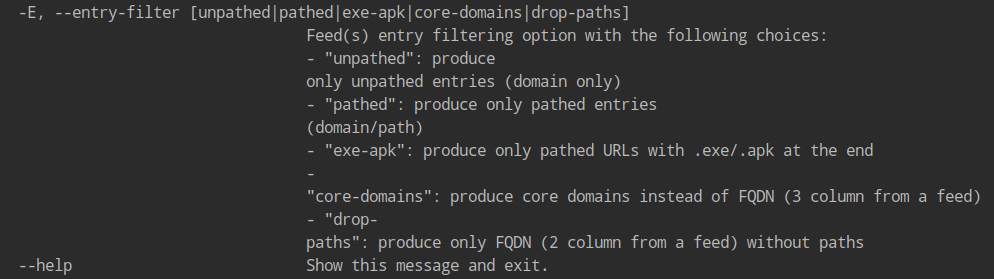
@click.command(context_settings=dict(max_content_width=500))
@click.option('-E', '--entry-filter', type=click.Choice(FILTER_CHOICES), default=None,
              help=(
                  'Feed(s) entry filtering option with the following choices:\n'
                  '- "unpathed": produce only unpathed entries (domain only)\n'
                  '- "pathed": produce only pathed entries (domain/path)\n'
                  '- "exe-apk": produce only pathed URLs with .exe/.apk at the end\n'
                  '- "core-domains": produce core domains instead of FQDN (3 column from a feed)\n'
                  '- "drop-paths": produce only FQDN (2 column from a feed) without paths'
              ))
@jcrotts
Closing this, timstaley's answer lets you set the wrapping-width.
It does not work in all cases. Currently, I cannot control how parameter help text will be formatted.
 espdev
on 28 Nov 2019
espdev
on 28 Nov 2019
I got uncontrolled linebreaks too.
Just like in the example from @espdev with the "drop-paths"
Increasing the max_content_width did not solve the problem for me.
Has anyone one found already a solution ?
 JeCarl
on 8 Jan 2020
JeCarl
on 8 Jan 2020
Related issues
 Diaoul
·
27Comments
Diaoul
·
27Comments
 mahmoudimus
·
25Comments
mahmoudimus
·
25Comments
 omribahumi
·
14Comments
omribahumi
·
14Comments
 pombreda
·
25Comments
pombreda
·
25Comments
 gibiansky
·
12Comments
gibiansky
·
12Comments
Most helpful comment
As mentioned in issue #441, you can control the wrapping-width by setting
max_content_widthin thecontext_settingsdict parameter of click.command, e.g.