Cli: Scratch org disappears from list after generating password
Summary
When I generate a password for a scratch org, the scratch org disappears from force:org:list and force:org:list --all. It remains accessible via its alias, but doesn't appear in any lists.
Steps To Reproduce:
- Create a scratch org
- Run
force:org:listand see the scratch org listed - Reset the password
sfdx force:user:password:generate --targetusername MyAlias --targetdevhubusername MyDevHub - Run
force:org:listand see the scratch org no longer present
Expected result
Password reset in scratch org, remains in list
Actual result
Scratch org disappears from list
Workaround:
Find the JSON file generated for the scratch org. Remove the properties userId and password, and save. See the scratch org reappear in force:org:list
Additional information
SFDX CLI Version(to find the version of the CLI engine run sfdx --version):
sfdx-cli/7.92.0-88320113e7 win32-x64 node-v14.15.4
SFDX plugin Version(to find the version of the CLI plugin run sfdx plugins --core)
@oclif/plugin-autocomplete 0.3.0 (core)
@oclif/plugin-commands 1.3.0 (core)
@oclif/plugin-help 3.2.2 (core)
@oclif/plugin-not-found 1.2.4 (core)
@oclif/plugin-plugins 1.10.0 (core)
@oclif/plugin-update 1.4.0-2 (core)
@oclif/plugin-warn-if-update-available 1.7.0 (core)
@oclif/plugin-which 1.0.3 (core)
@salesforce/sfdx-trust 3.6.0 (core)
alias 1.1.8 (core)
auth 1.4.10 (core)
config 1.2.6 (core)
generator 1.1.5 (core)
salesforcedx 51.4.0 (core)
├─ limits 1.0.4 (core)
├─ schema 1.0.4 (core)
├─ apex 0.1.4 (core)
├─ custom-metadata 1.0.11 (core)
├─ org 1.3.3 (core)
├─ templates 51.3.0 (core)
├─ user 1.2.0 (core)
├─ @salesforce/sfdx-plugin-lwc-test 0.1.7 (core)
└─ salesforce-alm 51.4.0 (core)
sfdx-cli 7.92.0 (core)
telemetry 1.1.1 (core)
OS and version:
Windows 10 Pro x64 20H2
 jamesmelville
All 14 comments
Thank you for filing this issue. We appreciate your feedback and will review the issue as soon as possible. Remember, however, that GitHub isn't a mechanism for receiving support under any agreement or SLA. If you require immediate assistance, contact Salesforce Customer Support.
![github-actions[bot] picture](https://avatars.githubusercontent.com/in/15368?v=4&s=40) github-actions[bot]
on 23 Mar 2021
github-actions[bot]
on 23 Mar 2021
Sorry - just spotted #933 which I think might be related
jamesmelville
on 23 Mar 2021
Yep, I think it's the same issue and I think your diagnosis is correct.
 mshanemc
on 23 Mar 2021
mshanemc
on 23 Mar 2021
This issue has been linked to a new work item: W-9042306
 uip-robot
on 23 Mar 2021
uip-robot
on 23 Mar 2021
Thank you for filing this issue. We appreciate your feedback and will review the issue as soon as possible. Remember, however, that GitHub isn't a mechanism for receiving support under any agreement or SLA. If you require immediate assistance, contact Salesforce Customer Support.
github-actions[bot]
on 23 Mar 2021
This is not the same issue. I did not use the command to generate a new password to my playground, I did not even know that was possible for Sandboxes....
 AllanOricil
on 23 Mar 2021
AllanOricil
on 23 Mar 2021
it's fixed in plugin-org 1.6.0. You can get it early by running sfdx plugins:install org and help confirm that it's working.
@AllanOricil can you humor me and give the new version a try? It's possible that sandboxes are some other special issue, but it's likely the same underlying problem of how I was filtering the org list.
mshanemc
on 25 Mar 2021
@mshanemc I cant install the plugin
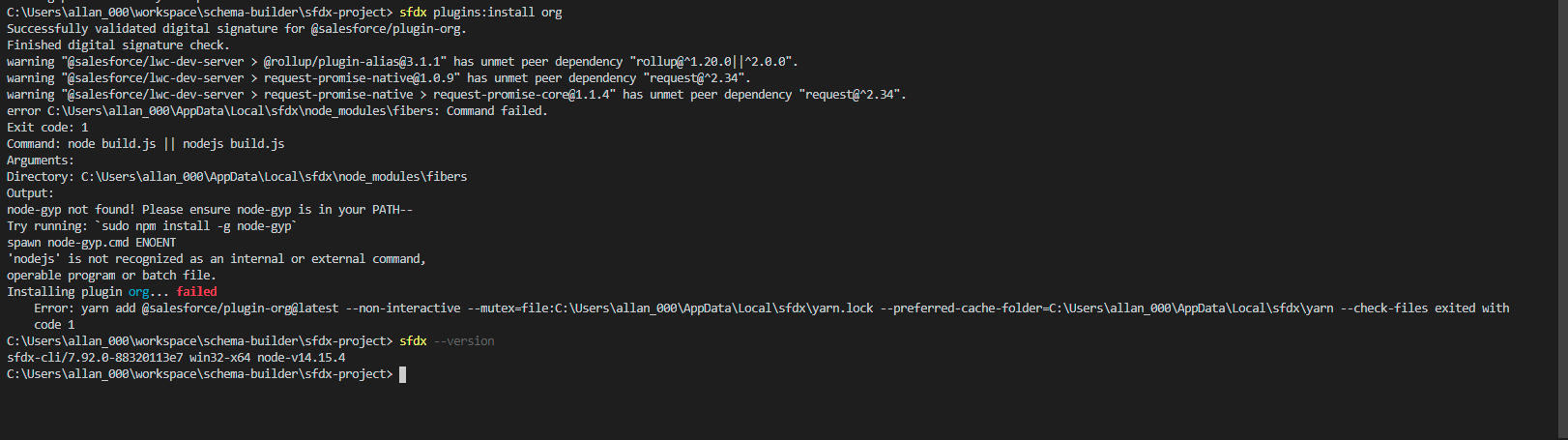
AllanOricil
on 25 Mar 2021
I have installed the plugin-org plugin as recommended.
After running this I see three scratch orgs that I had but were not being listed. Pretty sure all 3 had passwords generated for them.
 toddhalfpenny
on 25 Mar 2021
toddhalfpenny
on 25 Mar 2021
@AllanOricil that's...not right. Do you get the same error installing any plugin or just that one?
You could try sfdx plugins:install @salesforce/plugin-org (the more formal npm name).
mshanemc
on 26 Mar 2021
@toddhalfpenny put yourself a reminder to plugins:uninstall org once the fix ships on (sometime on 4/1) so you get back to "normal"
mshanemc
on 26 Mar 2021
I just hit this also. All of my scratch orgs that I generated a password for are missing.
installing org 1.6 fixes it.
 yippie
on 26 Mar 2021
yippie
on 26 Mar 2021
@mshanemc I was able to install the plugin, but only using sfdx plugins:install @salesforce/plugin-org
And the Sandbox is now showing up. But I will repeat, somehow a password was generated to my Sandbox without me knowing about it. As I'm always using the VS Code button to login into the sandbox I never needed to generate a password to my Sandbox.
AllanOricil
on 26 Mar 2021
Thanks for the fix @mshanemc - all good now for me with the updated plugin
jamesmelville
on 26 Mar 2021
Related issues
 manisfdcsfdx
·
5Comments
manisfdcsfdx
·
5Comments
 JosephAllen
·
3Comments
JosephAllen
·
3Comments
 pozil
·
3Comments
pozil
·
3Comments
 benahm
·
4Comments
benahm
·
4Comments
 OscarScholten
·
5Comments
OscarScholten
·
5Comments
Most helpful comment
@toddhalfpenny put yourself a reminder to
plugins:uninstall orgonce the fix ships on (sometime on 4/1) so you get back to "normal"