Cli: Authorize an org runs indefinitely in browser
Summary
Running "Authorize an org" does not work. After logging in the browser the page loads infinitely.
Steps To Reproduce:
- In VS Code Cmd: SFDX: "Authorize an org" or via cli "sfdx force:auth:web:login -r https://(customerurl)--dev1.my.salesforce.com"
- Firefox 83.0 opens and I log in
- Infinite loop
Expected result
Successful authorization
Actual result
Infinite loop
Additional information
I've checked with two orgs where I have never been authorized so far. I've also tried Chromium, same behaviour. It used to work.
SFDX CLI Version:
sfdx-cli/7.82.1-0 linux-x64 node-v14.15.1
SFDX plugin Version(to find the version of the CLI plugin run sfdx plugins --core)
@oclif/plugin-autocomplete 0.1.5 (core)
@oclif/plugin-commands 1.3.0 (core)
@oclif/plugin-help 3.2.0 (core)
@oclif/plugin-not-found 1.2.4 (core)
@oclif/plugin-plugins 1.9.4 (core)
@oclif/plugin-update 1.3.10 (core)
@oclif/plugin-warn-if-update-available 1.7.0 (core)
@oclif/plugin-which 1.0.3 (core)
@salesforce/sfdx-diff 0.0.6
@salesforce/sfdx-trust 3.6.0 (core)
alias 1.1.3 (core)
analytics 1.12.1 (core)
auth 1.4.5 (core)
config 1.2.1 (core)
generator 1.1.3 (core)
salesforcedx 50.7.1 (core)
├─ schema 1.0.2 (core)
├─ templates 50.1.0 (core)
├─ custom-metadata 1.0.10 (core)
├─ apex 0.1.4 (core)
├─ salesforce-alm 50.7.1 (core)
└─ @salesforce/sfdx-plugin-lwc-test 0.1.7 (core)
sfdx-cli 7.82.1-0 (core)
OS and version:
Ubuntu 20.10
 HerrX2000
All 31 comments
Thank you for filing this issue. We appreciate your feedback and will review the issue as soon as possible. Remember, however, that GitHub isn't a mechanism for receiving support under any agreement or SLA. If you require immediate assistance, contact Salesforce Customer Support.
![github-actions[bot] picture](https://avatars.githubusercontent.com/in/15368?v=4&s=40) github-actions[bot]
on 14 Dec 2020
github-actions[bot]
on 14 Dec 2020
I don't yet understand why but it worked on a different network.
HerrX2000
on 16 Dec 2020
Got it to work once but now got the issue again.
I've check with sudo lsof -i -P -n | grep LISTEN the node instance is listening to the port and the Request is send with the query params code and state but the listen process does not react.
HerrX2000
on 16 Dec 2020
I experienced the same issue on Linux Mint 20
$ sfdx-cli --version
sfdx-cli/7.82.1-0 linux-x64 node-v8.11.3
I was able to work around this issue by installing an older version (7.74.1).
 mannykary
on 17 Dec 2020
mannykary
on 17 Dec 2020
I have just moved temporarily to ubuntu 20.04 and had exact same thing, it was driving me crazy, I switched browsers, reinstalled extensions but nothing worked.
Eventually I've removed the sfdx-cli npm package and installed from the tarball and everything started working. I noticed that when waiting for the authorization (post-login) the browser showed "Waiting for localhost"
I suppose the issue is related to node setup that gets incorrect redirect.
Either way, if you are having an issue, the tarball works.
 alechko
on 4 Jan 2021
alechko
on 4 Jan 2021
Eventually I've removed the sfdx-cli npm package and installed from the tarball and everything started working.
Thanks, with the tarball it is working.
HerrX2000
on 5 Jan 2021
@HerrX2000 glad it worked!
I suppose that it's node related issue. The tarball comes with node v12.18.3 in the package, while the default node in ubuntu 20.04 is 15.5.0.
I didn't try to install node 12 system-wide, so I cannot say for sure if the issue is version only or the config of pre-packaged vs os-installed node, but it's most likely coming from that direction.
alechko
on 5 Jan 2021
I've got this issue with node 10.19.0 on ubuntu 20.04. I haven't tried changing node versions yet. the force:auth:device:login does work though (for those who may be stuck)
 adamerstelle
on 13 Jan 2021
adamerstelle
on 13 Jan 2021
I haven't had the time to set up the ubuntu 20 vm yet. Can someone with --dev-debug and upload it to a gist? I'm hoping that will narrow it down a little.
 amphro
on 14 Jan 2021
amphro
on 14 Jan 2021
I have had the same issue on Manjaro Linux since the beginning of October (that's when I noticed the issue for the first time). Yesterday I did a fresh install of Pop! OS and I'm having the same issue. Both machines used the version pulled from npm.
Using the --dev-debug flag does not seem to help, here's what's happening at the end of the log:
  sfdx:core TRACE Setup child 'WebOAuthServer' logger instance +2ms
  sfdx:core TRACE Setup child 'SfdxProjectJson' logger instance +1ms
  sfdx:core TRACE Setup child 'WebServer' logger instance +0ms
  sfdx:WebServer DEBUG Starting web server +0ms
  sfdx:WebServer DEBUG Nothing listening on host: localhost port: 1717 - good! +4ms
  sfdx:WebServer DEBUG socket connection initialized from 127.0.0.1 +22s
The full log can be found here.
Like mentioned before, the page to authenticate (username and password input) shows up, but after clicking "log in" the page goes blank, and the browser keeps waiting for localhost. This part, I presume, is where the browser should contact the local server spawned to get the access token.
A couple of things I've tried so far:
- Running with
sudodoes not work. - Enabling port 1717 on the firewall does not work.
- Trying both 1 and 2 does not work.
- Running the sfdx-cli binary from the local
node_modulesfolder does not work.
For now, the auth:device:login flow seems to be enough to authorize new orgs.
Edit: this same issue happens with the tarball install. I did not change the node version, so it really might be related to how Node 15 (15.5.1) works.
This line:
sfdx:WebServer DEBUG socket connection initialized from 127.0.0.1 +9s
Only shows up after the browser tries to connect to the local server. I think the local server is receiving the connection, but is unable to handle the request somehow.
 renatoliveira
on 15 Jan 2021
renatoliveira
on 15 Jan 2021
I'm running into the same issue in my WSL2 (based on Ubuntu 20) with sfdx installed via npm.
$ sfdx --version
sfdx-cli/7.85.0 wsl-x64 node-v14.15.4
I don't think this is node version related. I've tested it with the following versions without success:
- 12.20.1
- 14.15.4
- 15.6.0
I did verify that port 1717 was available before and listening during the test. The output during the test looked like this each time:
$ sudo lsof -i -P -n | grep LISTEN
node    1075 jastend   18u  IPv6  81814      0t0  TCP *:46243 (LISTEN)
node    2677 jastend   20u  IPv4 106120      0t0  TCP 127.0.0.1:1717 (LISTEN)
You can find the full output of running sfdx force:auth:web:login --setalias prod --instanceurl https://login.salesforce.com --setdefaultusername --dev-debug here: https://gist.github.com/jastend/7eea71854b1bddb5f6eb231818bb041d
 jastend
on 20 Jan 2021
jastend
on 20 Jan 2021
My team and I got the same issue since friday 22 january. We are not able to perform an authorize of our org anymore. It keeps on looping on the localhost:1717.
Tried an old version of sfdx-cli but still the same issue.
Any idea how we can resolve this? we are not able to carry on our work.
 kevanmoothien
on 26 Jan 2021
kevanmoothien
on 26 Jan 2021
My team and I got the same issue since friday 22 january. We are not able to perform an authorize of our org anymore. It keeps on looping on the localhost:1717.
Tried an old version of sfdx-cli but still the same issue.
Any idea how we can resolve this? we are not able to carry on our work.
For now you can use an alternative authorization flow with force:auth:device:login.
renatoliveira
on 26 Jan 2021
@renatoliveira At least in my case, that didn't help for VSCode, since the extension is expecting an authenticated org.
@kevanmoothien As an immediate solution, going back to version 7.74.1 (as mentioned by @mannykary) worked for me.
Since I'm using the npm registry version, I downgraded by executing:
$ sudo npm -g i [email protected]
jastend
on 26 Jan 2021
@renatoliveira At least in my case, that didn't help for VSCode, since the extension is expecting an authenticated org.
@kevanmoothien As an immediate solution, going back to version 7.74.1 (as mentioned by @mannykary) worked for me.
Since I'm using the npm registry version, I downgraded by executing:
$ sudo npm -g i [email protected]
What do you mean? The auth:device:login is a command to authorize an org. You can use it to register with your production/dev/sandbox org as usual. From then on, you just need to reference the org's alias on the other commands. With this command I didn't need to downgrade at all.
renatoliveira
on 26 Jan 2021
In my case I was able to downgrade to 7.76 and authentication works again in Linux.
I have a Salesforce Support Case open for this, and it was also noticed that this happens on 7.76 if the new Auth plugin is installed. Seems tied to the refactoring that was completed in the fall.
NEW: As part of open-sourcing Salesforce CLI, we've broken out the source for the authorization commands, such as force:auth:jwt:grant, into their own GitHub repo. These commands are now in the auth namespace. For example:
$ sfdx auth:jwt:grant -u [email protected] -f ./server.key -i 345234
As we broke out the commands, we took the opportunity to also refactor the code. We’re keeping the current force:auth:* commands based on the original code. Test out the new commands and let us know if they behave differently or unexpectedly.
Test out the new commands and let us know if they behave differently or unexpectedly.
I think they are behaving unexpectedly.
 mrichmon12
on 30 Jan 2021
mrichmon12
on 30 Jan 2021
783 appears to be a duplicate of this
mrichmon12
on 30 Jan 2021
I am also affected by this issue.
$ sfdx --version
sfdx-cli/7.84.2-a2868a68d5 linux-x64 node-v12.18.3
Thanks @renatoliveira for the workaround. I didn't know about force:auth:device:login
 SebastianLechCloudity
on 1 Feb 2021
SebastianLechCloudity
on 1 Feb 2021
Installing the tarball version 7.82 works for me on linux. npm version is not working at all.
kevanmoothien
on 9 Feb 2021
Duplicate of https://github.com/forcedotcom/cli/issues/783
 mdonnalley
on 16 Feb 2021
mdonnalley
on 16 Feb 2021
Even I am facing the same issue and with force:auth:device:login I was able to authenticate prod orgs but force:auth:device:login -r https://test.salesforce.com doesn't work giving error Value is not a string.
sfdx force:auth:device:login -r https://test.salesforce.com
ERROR running auth:device:login: Value is not a string
CLI version - latest version: 7.89.2-d1d2614d02
Using Windows 10
 theayushimehrotra04
on 26 Feb 2021
theayushimehrotra04
on 26 Feb 2021
Even I am facing the same issue and with force:auth:device:login I was able to authenticate prod orgs but force:auth:device:login -r https://test.salesforce.com doesn't work giving error Value is not a string.
sfdx force:auth:device:login -r https://test.salesforce.com
ERROR running auth:device:login: Value is not a stringCLI version - latest version: 7.89.2-d1d2614d02
Using Windows 10
same thing happens to me on Ubuntu 20.04, i couldn't authorize a sandbox in any way because of this
 mateushonorato
on 26 Feb 2021
mateushonorato
on 26 Feb 2021
I have this problem too, really annoying. I'm using the npm version, because I'm on NixOS and don't feel like packaging the tarball myself, but if I knew how I might give it a try...
Anyway here's what the request looks like in the browser, just sticks at (pending) indefinitely:
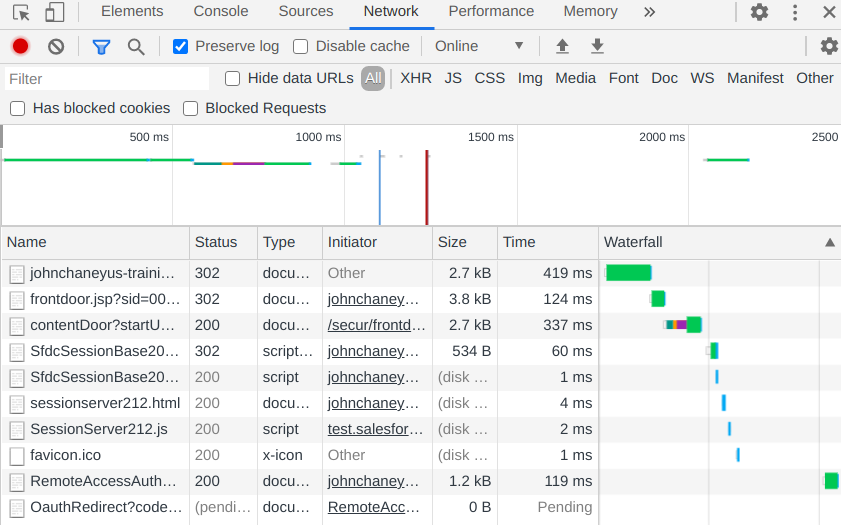
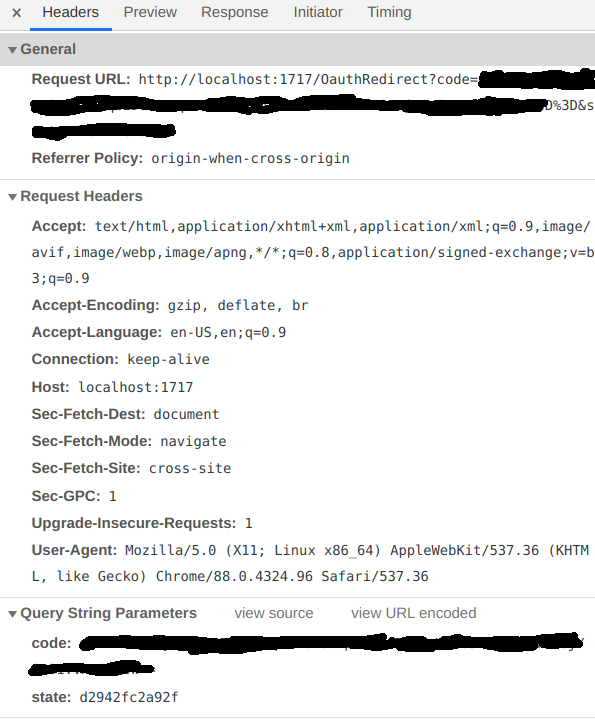
And the last lines of sfdx auth:web:login --setalias vscodeOrg --instanceurl https://<username>-trainingorg--dev.my.salesforce.com/ --setdefaultusername --dev-debug (same thing with force:auth:web:login instead) are:
  sfdx:core TRACE Setup child 'WebServer' logger instance +11ms
  sfdx:WebServer DEBUG Starting web server +0ms
  sfdx:WebServer DEBUG Nothing listening on host: localhost port: 1717 - good! +4ms
  sfdx:WebServer DEBUG socket connection initialized from 127.0.0.1 +12s
Tried a bunch of different versions of npm, sfdx-cli package, the auth plugin, etc. Nothing works. Really aggravating, I had a similar issue for a while on my Mac and it didn't make almost any sense, there was no rhyme or reason to why it kept failing. I'm almost certain it's sfdx's fault, or maybe possibly something with how npm works and interfaces to the system with its webserver or whatever... because it looks like everything authenticates fine in the browser itself. Just that, as someone else mentioned, it seems like the program just doesn't react or respond in any way.
 jdnixx
on 26 Feb 2021
jdnixx
on 26 Feb 2021
I have this problem too, really annoying. I'm using the npm version, because I'm on NixOS and don't feel like packaging the tarball myself, but if I knew how I might give it a try...
Tried a bunch of different versions of npm, sfdx-cli package, theauthplugin, etc. Nothing works. Really aggravating, I had a similar issue for a while on my Mac and it didn't make almost any sense, there was no rhyme or reason to why it kept failing. I'm almost certain it's sfdx's fault, or maybe possibly something with how npm works and interfaces to the system with its webserver or whatever... because it looks like everything authenticates fine in the browser itself. Just that, as someone else mentioned, it seems like the program just doesn't react or respond in any way.
I use the tarball version, you don't need to package anything, just extract the archive and run the install script with sudo. But the problem is also present on the tarball version, not related only to the npm version.
mateushonorato
on 26 Feb 2021
I use the tarball version, you don't need to package anything, just extract the archive and run the install script with sudo. But the problem is also present on the tarball version, not related only to the npm version.
I know, nixos does things differently though, everything is declarative so you're not supposed to directly change system stuff with sudo. Should make an explicit packaging script for everything you want to install but I'm still bad with the nix language so it's a bit of a challenge for me lol. But yeah you're right doesn't matter much bc it seems the issue isn't due to which version of the cli tools are being used.
Btw I forgot to redact my code in the URL in the screenshot I posted, I updated my comment but you beat me to it with your comment lol, not sure if that info is actually compromising or not but would you mind editing yours to take out the old screenshot?
jdnixx
on 26 Feb 2021
Btw I forgot to redact my code in the URL in the screenshot I posted, I updated my comment but you beat me to it with your comment lol, not sure if that info is actually compromising or not but would you mind editing yours to take out the old screenshot?
It's edited now
mateushonorato
on 26 Feb 2021
Same issue here on sfdx version 7.89.2.
Was able to auth to one of my sandboxes just fine with auth:device, but trying to auth a second one seems only re-auth the first one again.
 troveryor
on 1 Mar 2021
troveryor
on 1 Mar 2021
I have the same problem using sfdx in ubuntu
sfdx --version
sfdx-cli/7.89.2-d1d2614d02 wsl-x64 node-v14.15.4
 felparodi
on 2 Mar 2021
felparodi
on 2 Mar 2021
None of the solutions online worked for me.
Great that this has been picked up.
In the meantime this works:
sfdx auth:device:login -a MyAlias -r https://--.my.salesforce.com -s
This issue has a work item. I assume they are the same issue:
https://github.com/forcedotcom/cli/issues/890#issuecomment-789117014_
 qwikag
on 2 Mar 2021
qwikag
on 2 Mar 2021
7.91.0-6a6ed69ebe fixed this issue for me – thank you!
 HeikoKramer
on 17 Mar 2021
HeikoKramer
on 17 Mar 2021
7.91.0-6a6ed69ebe fixed this issue for me – thank you!
Can confirm for sfdx-cli/7.92.0 win32-x64 node-v12.20.1 too
 gearsetdave
on 22 Mar 2021
gearsetdave
on 22 Mar 2021
Related issues
 pozil
·
3Comments
pozil
·
3Comments
 cceremuga
·
5Comments
cceremuga
·
5Comments
 FabienTaillon
·
3Comments
FabienTaillon
·
3Comments
 Julian88Tex
·
4Comments
Julian88Tex
·
4Comments
 AllanOricil
·
3Comments
AllanOricil
·
3Comments
Most helpful comment
I experienced the same issue on Linux Mint 20
I was able to work around this issue by installing an older version (7.74.1).