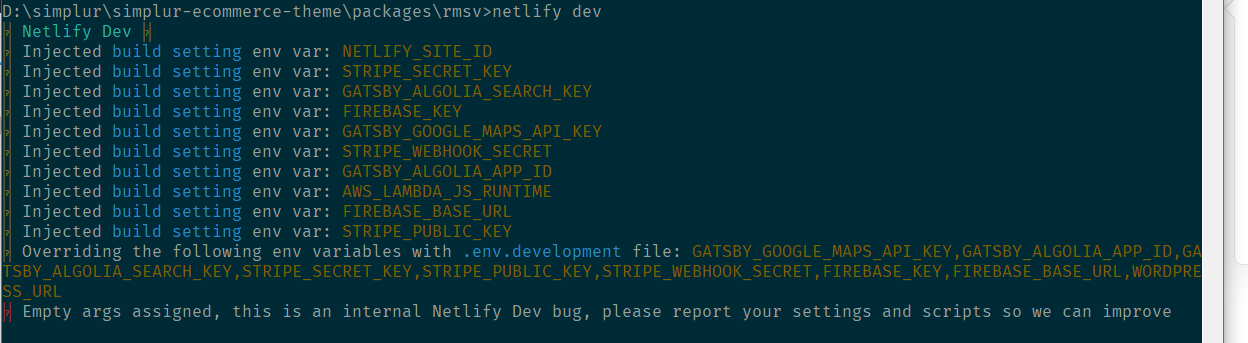
Cli: Empty args assigned, this is an internal Netlify Dev bug, please report your settings and scripts so we can improve
Describe the bug
Netlify dev doesn't work with latest version netlify-cli/2.64.1 win32-x64 node-v12.13.1
Configuration
netlify.toml:
[dev]
  functions = "src/lambda_functions"
  port = 4000 #port netlify dev runs on
  command = 'yarn develop'
package.json:
{
  "name": "rmsv",
  "version": "1.0.0",
  "main": "index.js",
  "license": "MIT",
  "scripts": {
    "develop": "netlify dev",
    "build": "gatsby build",
    "clean": "gatsby clean",
    "format": "prettier --write src/**/*.{js,jsx}",
    "serve": "gatsby serve",
    "test": "echo \"Write tests! -> https://gatsby.dev/unit-testing\""
  },
  "dependencies": {
    "@simplur/micro-site": "1.0.4",
    "gatsby": "^2.24.63",
    "netlify-lambda": "^2.0.1",
    "react": "^16.13.1",
    "react-dom": "^16.13.1"
  }
}
System:
    OS: Windows 10 10.0.18363
    CPU: (8) x64 Intel(R) Core(TM) i7-8550U CPU @ 1.80GHz
    Memory: 4.89 GB / 15.89 GB
  Binaries:
    Node: 12.13.1 - C:\Program Files\nodejs\node.EXE
    Yarn: 1.22.5 - C:\Program Files (x86)\Yarn\bin\yarn.CMD
    npm: 6.12.1 - C:\Program Files\nodejs\npm.CMD
Expected behavior
Netlify Dev should run locally.
CLI Output
bug
 Nisfan
👍1
All 5 comments
Same for netlify-cli/2.64.1 darwin-x64 node-v12.18.4
 heldr
on 28 Sep 2020
heldr
on 28 Sep 2020
I have fixed the issue by adding "start": "gatsby develop", into package.json and set netlify command to yarn start
Nisfan
on 29 Sep 2020
👍2
❤1
Yeap, the issue is that command args are empty here https://github.com/netlify/cli/blob/master/src/utils/detect-server.js#L211
wrapping command in a npm task is a workaround and also worked for me. Thanks!
heldr
on 29 Sep 2020
Any update on a fix for this?
 zwallacedev
on 6 Oct 2020
zwallacedev
on 6 Oct 2020
@zwallacedev as the original issue was closed, do you mind opening a new one with your configuration?
 erezrokah
on 6 Oct 2020
erezrokah
on 6 Oct 2020
Was this page helpful?
0 / 5 - 0 ratings
Related issues
 RaeesBhatti
·
4Comments
RaeesBhatti
·
4Comments
 bendg25
·
5Comments
bendg25
·
5Comments
 jasikpark
·
5Comments
jasikpark
·
5Comments
 rabbah
·
3Comments
rabbah
·
3Comments
 sw-yx
·
4Comments
sw-yx
·
4Comments
Most helpful comment
I have fixed the issue by adding
"start": "gatsby develop",intopackage.jsonand set netlify command toyarn start