Cli: sfdx force:source:deploy is not deploying the custom fields.
Summary
sfdx force:source:deploy is not deploying the custom fields and skipping custom fields when bundled with any other metadata.
Steps To Reproduce:
Repository to reproduce: https://github.com/ar-srinivas/SFDX_CustomFields.git
Branch: Dev
- Clone the "Dev" branch source
- Run the following command from source folder. sfdx force:source:deploy -x package.xml -u
--apiversion=49.0 -w 0 --json
Expected result
The two custom fields from the source structure should be deployed to the target org. CLI should return deployment ID and status. The behavior should remain same when we pass -x package.xml or -m "CustomField"
Actual result
Result is shown as below
{
"status": 0,
"result": {
"outboundFiles": [],
"deploys": []
}
}
Additional information
It is failing to deploy custom fields when I add -x package.xml but when I replace it with -m "CustomField" the deployment is processed succesfuly.
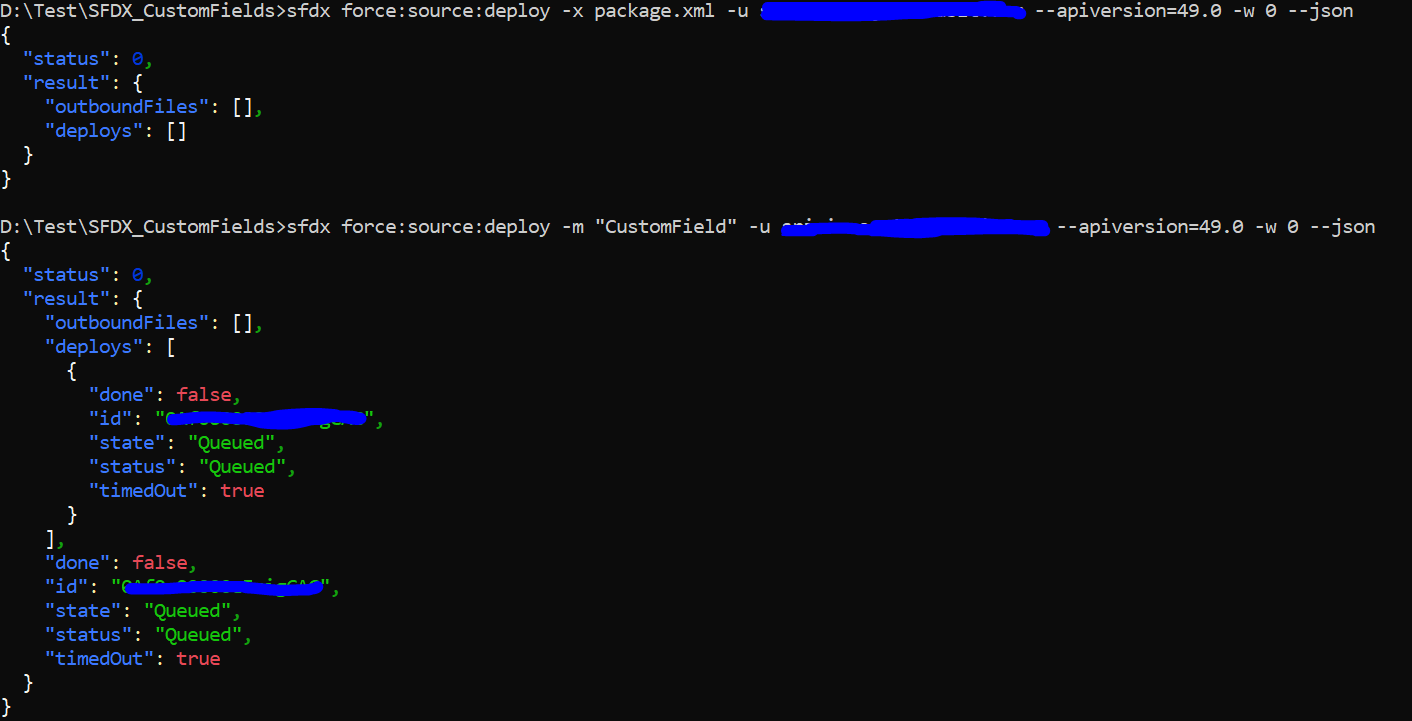
Also skipping the custom fields when included any other metadata.
SFDX CLI Version(to find the version of the CLI engine run sfdx --version): sfdx-cli/7.74.1-32db2396ed win32-x64 node-v12.18.3
SFDX plugin Version(to find the version of the CLI plugin run sfdx plugins --core)
OS and version: Windows 10
 ar-srinivas
All 18 comments
This is actively being worked on and the fix will be included in the next patch release.
 shetzel
on 23 Sep 2020
shetzel
on 23 Sep 2020
Until the patch is released (Oct. 1st), a working workaround is to change the salesforcedx version using:
sfdx plugins:install [email protected]
Special thanks to @alanjaouen
 nabondance
on 28 Sep 2020
nabondance
on 28 Sep 2020
Is this fixed ?
I dont want to change salesforcedx version.
I am still getting the same issue
 engineerakki
on 7 Oct 2020
engineerakki
on 7 Oct 2020
I have encountered this in my development as well, the problem: not creating custom fields, seems to follow the latest cli version - 7.75.0
earlier versions always created the fields, I was using 7.63.0.
 vnehess
on 7 Oct 2020
vnehess
on 7 Oct 2020
I can also confirm this issue in versions 7.75.0 and 7.75.1
 FinnArild
on 14 Oct 2020
FinnArild
on 14 Oct 2020
This issue is still not resolved, facing this in 7.75.0 as well
 akashpunera
on 16 Oct 2020
akashpunera
on 16 Oct 2020
7.75.1 - when deploying a new custom field alongside a new dependent picklist, the dependent picklist fails to deploy.
Error: In field: controllingField - no CustomField named field_name__c found
Both fields are in the
 1ktribble
on 16 Oct 2020
1ktribble
on 16 Oct 2020
I am also facing the same issue from last two weeks. I have 8 new custom fields from one object, added them in package.xml, but it deployed only first field from the list. Even i tried adding CustomObject section in the package.xml, but result is still same. This is happening on production instance, its working fine on sandboxes though.
 girasedinesh
on 20 Oct 2020
girasedinesh
on 20 Oct 2020
@girasedinesh
If the output of sfdx plugins --core doesn't match this then you probably don't have the fix. The code works the same regardless of production versus sandbox versus scratch org.
@oclif/plugin-autocomplete 0.1.5 (core)
@oclif/plugin-commands 1.3.0 (core)
@oclif/plugin-help 3.2.0 (core)
@oclif/plugin-not-found 1.2.4 (core)
@oclif/plugin-plugins 1.9.1 (core)
@oclif/plugin-update 1.3.10 (core)
@oclif/plugin-warn-if-update-available 1.7.0 (core)
@oclif/plugin-which 1.0.3 (core)
@salesforce/sfdx-trust 3.4.3 (core)
alias 1.1.2 (core)
analytics 1.12.1 (core)
config 1.1.9 (core)
generator 1.1.3 (core)
salesforcedx 50.1.1 (core)
├─ apex 0.1.1 (core)
├─ custom-metadata 1.0.10 (core)
├─ templates 50.1.0 (core)
├─ @salesforce/sfdx-plugin-lwc-test 0.1.7 (core)
└─ salesforce-alm 50.1.1 (core)
sfdx-cli 7.76.1 (core)
If your plugins match this then provide steps to reproduce since it's working properly for me and others.
shetzel
on 20 Oct 2020
This is what i am getting
@oclif/plugin-autocomplete 0.1.5 (core)
@oclif/plugin-commands 1.3.0 (core)
@oclif/plugin-help 3.2.0 (core)
@oclif/plugin-not-found 1.2.4 (core)
@oclif/plugin-plugins 1.9.1 (core)
@oclif/plugin-update 1.3.10 (core)
@oclif/plugin-warn-if-update-available 1.7.0 (core)
@oclif/plugin-which 1.0.3 (core)
@salesforce/sfdx-trust 3.4.3 (core)
alias 1.1.2 (core)
analytics 1.12.1 (core)
config 1.1.9 (core)
generator 1.1.3 (core)
salesforcedx 50.1.1 (core)
├─ templates 50.1.0 (core)
├─ @salesforce/sfdx-plugin-lwc-test 0.1.7 (core)
├─ custom-metadata 1.0.10 (core)
├─ salesforce-alm 50.1.1 (core)
└─ apex 0.1.1 (core)
sfdx-cli 7.76.1 (core)
girasedinesh
on 20 Oct 2020
I am using similar package.xml in the manifest folder for deployment
"
girasedinesh
on 20 Oct 2020

girasedinesh
on 20 Oct 2020
@girasedinesh - I would try uninstalling the CLI and reinstalling to the latest.
shetzel
on 20 Oct 2020
Its resolved now. Docker image from our yml file was not picking the latest version, now it started picking the latest version. Thanks all for your valuable suggestions.
girasedinesh
on 20 Oct 2020
@girasedinesh - Glad you got it working! 👍
shetzel
on 20 Oct 2020
I see the same problem with Workflow* types.
 ravishankar-peri
on 5 Nov 2020
ravishankar-peri
on 5 Nov 2020
@oclif/plugin-autocomplete 0.1.5 (core)
@oclif/plugin-commands 1.3.0 (core)
@oclif/plugin-help 3.2.0 (core)
@oclif/plugin-not-found 1.2.4 (core)
@oclif/plugin-plugins 1.9.1 (core)
@oclif/plugin-update 1.3.10 (core)
@oclif/plugin-warn-if-update-available 1.7.0 (core)
@oclif/plugin-which 1.0.3 (core)
@salesforce/sfdx-trust 3.4.3 (core)
alias 1.1.2 (core)
analytics 1.12.1 (core)
config 1.1.9 (core)
generator 1.1.3 (core)
salesforcedx 50.1.1 (core)
├─ apex 0.1.4 (core)
├─ custom-metadata 1.0.10 (core)
├─ templates 50.1.0 (core)
├─ @salesforce/sfdx-plugin-lwc-test 0.1.7 (core)
└─ salesforce-alm 50.1.1 (core)
sfdx-cli 7.82.1-0 (core)
I have this , still I am not able to deploy the custom field, is this bug RESOLVED in this version of SFDX - sfdx-cli 7.82.1-0
 jitendrabhagatdevops
on 4 Dec 2020
jitendrabhagatdevops
on 4 Dec 2020
@jitendrabhagatdevops - I don't know how you have salesforcedx 50.1.1 (core) with sfdx-cli 7.82.1 (core) but that is the problem. You should be on version 50.7.1 of the salesforcedx plugin. Please run sfdx update
shetzel
on 7 Dec 2020
Related issues
 FabienTaillon
·
3Comments
FabienTaillon
·
3Comments
 loganm
·
4Comments
loganm
·
4Comments
 Julian88Tex
·
4Comments
Julian88Tex
·
4Comments
 pozil
·
3Comments
pozil
·
3Comments
 nickytorstensson
·
5Comments
nickytorstensson
·
5Comments
Most helpful comment
Until the patch is released (Oct. 1st), a working workaround is to change the salesforcedx version using:
sfdx plugins:install [email protected]Special thanks to @alanjaouen