Cli: Docker Context Import/Export Commands Missing
Description
My Docker for Mac (Edge) upgraded to 2.3.2.0 (46268), which includes Docker 19.03.12. For some reason, the docker context import and export commands are missing.
$ docker --version
Docker version 19.03.12, build 48a66213fe
$ docker version
Client: Docker Engine - Community
 Azure integration  0.1.4
 Version:           19.03.12
 API version:       1.40
 Go version:        go1.13.10
 Git commit:        48a66213fe
 Built:             Mon Jun 22 15:41:33 2020
 OS/Arch:           darwin/amd64
 Experimental:      true

Server: Docker Engine - Community
 Engine:
  Version:          19.03.12
  API version:      1.40 (minimum version 1.12)
  Go version:       go1.13.10
  Git commit:       48a66213fe
  Built:            Mon Jun 22 15:49:27 2020
  OS/Arch:          linux/amd64
  Experimental:     true
 containerd:
  Version:          v1.2.13
  GitCommit:        7ad184331fa3e55e52b890ea95e65ba581ae3429
 runc:
  Version:          1.0.0-rc10
  GitCommit:        dc9208a3303feef5b3839f4323d9beb36df0a9dd
 docker-init:
  Version:          0.18.0
  GitCommit:        fec3683
$ docker context --help
Manage contexts

Usage:
  docker context [command]

Available Commands:
  create      Create new context
  inspect     Display detailed information on one or more contexts
  list        List available contexts
  rm          Remove one or more contexts
  show        Print the current context
  use         Set the default context

Flags:
  -h, --help   help for context

Global Flags:
      --config DIRECTORY   Location of the client config files DIRECTORY (default "/Users/king/.docker")
  -c, --context string     context
  -D, --debug              enable debug output in the logs
  -H, --host string        Daemon socket(s) to connect to

Use "docker context [command] --help" for more information about a command.
Steps to reproduce the issue:
- Install Docker for Mac 2.3.2.0 (46268) on the edge channel.
- Attempt to import or export Docker contexts.
Describe the results you received:
The docker context import and docker context export commands no longer exist.
Describe the results you expected:
Be able to import/export contexts.
Additional information you deem important (e.g. issue happens only occasionally):
Output of docker version:
Docker version 19.03.12, build 48a66213fe
Output of docker info:
Skipped.
Additional environment details (AWS, VirtualBox, physical, etc.):
My issue exists on Docker for Mac 2.3.2.0 (46268) on the edge channel. If I use the docker:19.03.12 image and run a container, the context import/export commands exist. The build shows the same hash.
$ docker container run -it --rm -v /var/run/docker.sock:/var/run/docker.sock docker:19.03.12 ash
/ # docker --version
Docker version 19.03.12, build 48a66213fe
/ # docker version
Client: Docker Engine - Community
 Version:           19.03.12
 API version:       1.40
 Go version:        go1.13.10
 Git commit:        48a66213fe
 Built:             Mon Jun 22 15:42:53 2020
 OS/Arch:           linux/amd64
 Experimental:      false

Server: Docker Engine - Community
 Engine:
  Version:          19.03.12
  API version:      1.40 (minimum version 1.12)
  Go version:       go1.13.10
  Git commit:       48a66213fe
  Built:            Mon Jun 22 15:49:27 2020
  OS/Arch:          linux/amd64
  Experimental:     true
 containerd:
  Version:          v1.2.13
  GitCommit:        7ad184331fa3e55e52b890ea95e65ba581ae3429
 runc:
  Version:          1.0.0-rc10
  GitCommit:        dc9208a3303feef5b3839f4323d9beb36df0a9dd
 docker-init:
  Version:          0.18.0
  GitCommit:        fec3683
/ # docker context --help

Usage:  docker context COMMAND

Manage contexts

Commands:
  create      Create a context
  export      Export a context to a tar or kubeconfig file
  import      Import a context from a tar or zip file
  inspect     Display detailed information on one or more contexts
  ls          List contexts
  rm          Remove one or more contexts
  update      Update a context
  use         Set the current docker context

Run 'docker context COMMAND --help' for more information on a command.
 kinghuang
All 4 comments
Hm, interesting, I see the same 🤔
I don't see any compile-time options to enable/disable these commands, so I wonder what caused that.
 thaJeztah
on 3 Jul 2020
thaJeztah
on 3 Jul 2020
oh, actually, I realise this is on edge only; this probably is related to the Azure integration preview
As a workaround, you can use the com.docker.cli binary for those commands;
com.docker.cli context --help

Usage:  docker context COMMAND

Manage contexts

Commands:
  create      Create a context
  export      Export a context to a tar or kubeconfig file
  import      Import a context from a tar or zip file
  inspect     Display detailed information on one or more contexts
  ls          List contexts
  rm          Remove one or more contexts
  update      Update a context
  use         Set the current docker context

Run 'docker context COMMAND --help' for more information on a command.
I'll inform the Docker Desktop team about this. Thanks for reporting!
thaJeztah
on 3 Jul 2020
Let me close this one in favour of https://github.com/docker/for-mac/issues/4729, because this bug is not in this codebase. Feel free to continue the conversation though
thaJeztah
on 3 Jul 2020
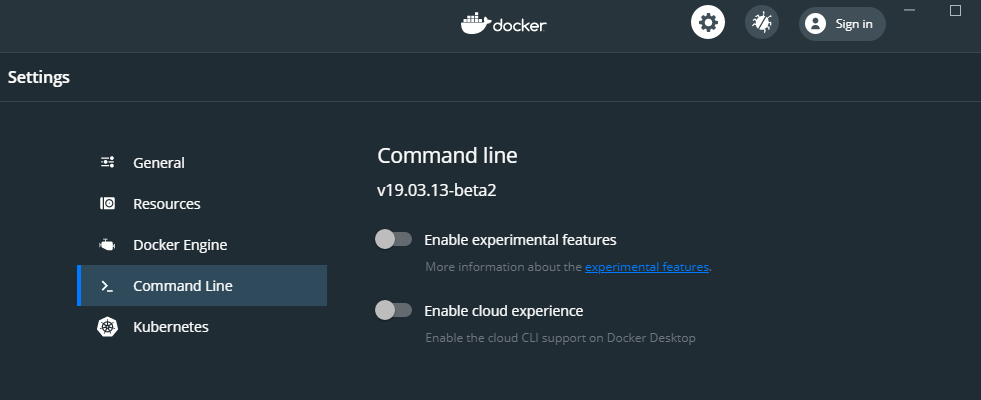
I ran into this problem as well on Docker Desktop and found a simple workaround:
Open the docker dashboard and navigate to the Command Line settings. Turn off Enable cloud experience and apply the changes.
 Darnesey
on 2 Sep 2020
Darnesey
on 2 Sep 2020
Related issues
 farmdawgnation
·
3Comments
farmdawgnation
·
3Comments
 bossmc
·
4Comments
bossmc
·
4Comments
 dnephin
·
3Comments
dnephin
·
3Comments
 nanomosfet
·
4Comments
nanomosfet
·
4Comments
 bryanhuntesl
·
3Comments
bryanhuntesl
·
3Comments