The netlify deploy command used to deploy one of my sites has stopped working in [email protected]
The command netlify deploy fails with a "Base directory does not exist" error.
> netlify deploy -p --dir public

Base directory does not exist: /Users/davidwells/David/analytics-project/analytics/site/main/site
Was something changed recently with the netlify deploy command?
This is the site in question: https://github.com/DavidWells/analytics/tree/master/site/main and the previously working deploy script is here: https://github.com/DavidWells/analytics/blob/master/site/main/package.json#L14
 DavidWells
All 36 comments
It looks like this is an error coming from netlify/config https://github.com/netlify/build/blob/b6006915061ecd890a7d4f8b857cddc22e778f1a/packages/config/src/files.js#L65 cc @ehmicky
DavidWells
on 27 Apr 2020
Reverting to [email protected] fixes this error
DavidWells
on 27 Apr 2020
Just to confirm, I think the error message should be
Base directory does not exist: /Users/davidwells/David/analytics-project/analytics/site/main/public, not
Base directory does not exist: /Users/davidwells/David/analytics-project/analytics/site/main/site if you passed --dir public, please confirm if that's not the case.
It looks like the issue is that the public directory does not exist and you're trying to deploy it. Did you run npm run build first? I just tried cloning your repository, ran npm install && npm run build && npm run deploy, and it seemed to work.
 ehmicky
on 27 Apr 2020
ehmicky
on 27 Apr 2020
The build folder is there locally. This is a regression in how the CLI works. Possibly related to how this site uses yarn workspaces? IDK
netlify deploy -p --dir public should deploy my site, instead it results in "Base directory does not exist: /xyz/site" Error with latest versions of CLI
Reverting to [email protected] the netlify deploy -p --dir public command works as expected & the site deploys
Additional context:
Error from running build command using yarn workspaces
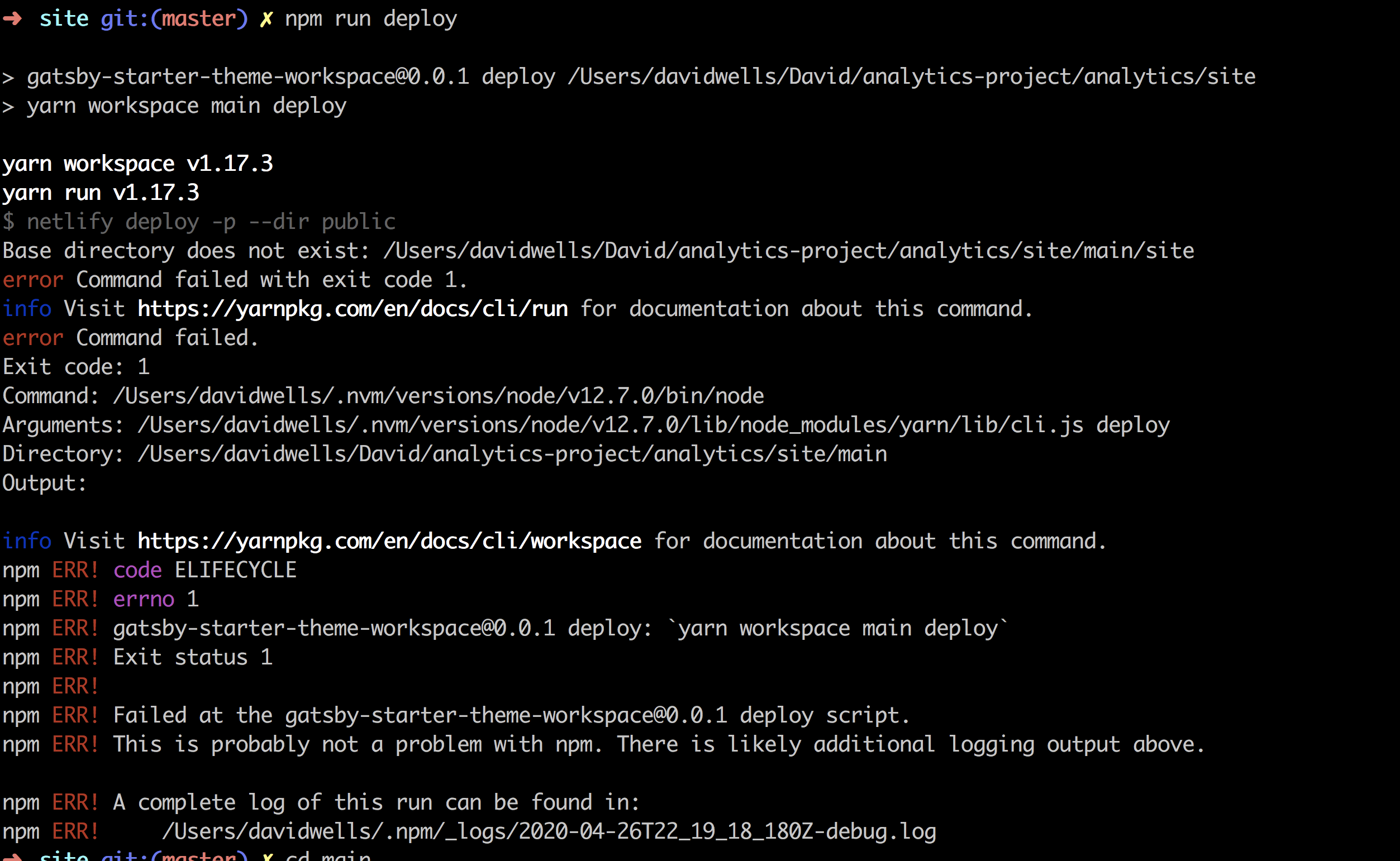
Error from the site folder running npm run build command without yarn workspaces

Reverting to previous versions my deploys work as expected
DavidWells
on 27 Apr 2020
I am having issues reproducing this problem. When I make sure npm run build has been run first, npm run deploy seems to work fine for me with the latest version of netlify-cli. @RaeesBhatti Do you manage to reproduce this issue?
ehmicky
on 27 Apr 2020
Possibly related https://github.com/netlify/cli/issues/862
DavidWells
on 28 Apr 2020
@DavidWells Can you try the following branch! see if you can still reproduce this issue there: https://github.com/netlify/cli/pull/843
 RaeesBhatti
on 29 Apr 2020
RaeesBhatti
on 29 Apr 2020
I'm also hitting this now. Did not occur in 2.41.0, does occur in 2.42.0 and later. I'm also using yarn workspaces with this repository, in case that helps, since @DavidWells mentioned he is as well.
 timchambers
on 30 Apr 2020
timchambers
on 30 Apr 2020
I'm having this issue too on version 2.47.0. I'm using yarn workspaces with two netlify projects and a wrapper bash script to handle the deploy logic.
I don't have the issue when I'm calling the cli directly from the shell, but when executing it via a bash script it appears to be interpreting the path wrong.
When calling the script from the /web directory in my workspace and passing the directory to deploy as /build the CLI is assuming I want to deploy the build located at /web/web/build rather than /web/build.
Reverting to version 2.40.0 resolved the issue
 zacaytion
on 4 May 2020
zacaytion
on 4 May 2020
Any updates on this one?
I am having to uninstall the latest CLI and install the old version to successfully deploy my site. 😢
DavidWells
on 22 May 2020
Hardcoding [email protected] into my project for right now and using the local dependency is how I'm "solving this" currently.
  "scripts": {
    "deploy": "./node_modules/.bin/netlify deploy -p --dir public",
  }
^ for anyone else experiencing this issue
DavidWells
on 22 May 2020
Not yet. I haven't been able to reproduce it locally. It seems like a problem specific with yarn workspaces setup. @DavidWells If you can write down step-by-step instructions to reproduce this, that will be greatly appreciated!
RaeesBhatti
on 22 May 2020
- Clone down https://github.com/DavidWells/analytics
- Cd into https://github.com/DavidWells/analytics/tree/master/site
- Run yarn to install deps
npm install netlify-cli -g- Build the site
npm run build - Attempt to deploy site
npm run deploy - This fails unless on
[email protected]or lower
DavidWells
on 22 May 2020
Using
yarn --version
1.17.3
node --version
v12.7.0
Not sure what's going on but I was able to deploy the site successfully following your instructions exactly!
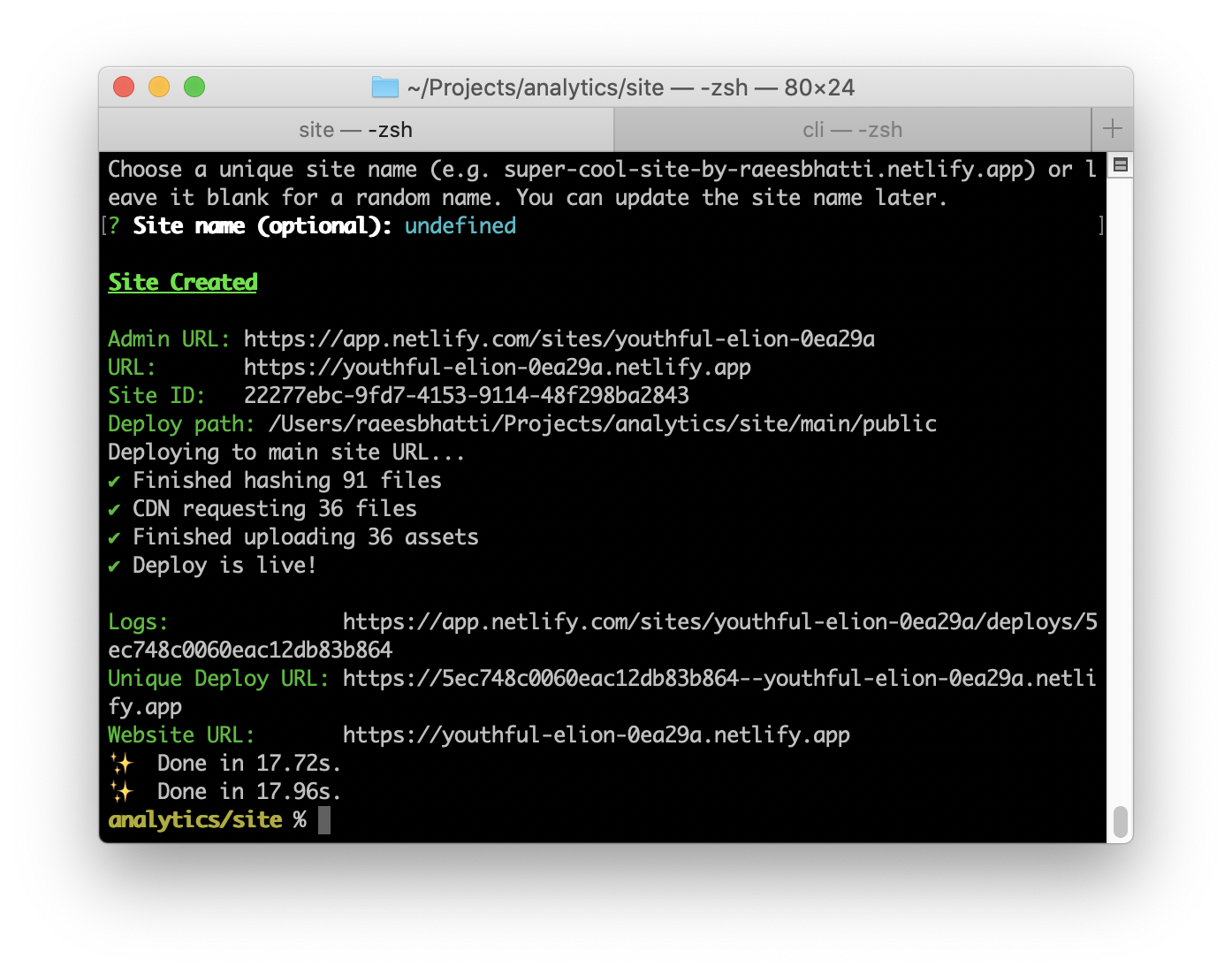
% yarn --version
1.17.3
% node --version
v12.16.3
% netlify --version
netlify-cli/2.51.0 darwin-x64 node-v12.16.3
@DavidWells Are you able to reproduce it when you clone the repo in different directory and start from scratch?
RaeesBhatti
on 22 May 2020
I had a similar issue with netlify dev >2.41.0 and fixed it by adding the following to my netlify.toml:
base = "./"
reference: https://docs.netlify.com/configure-builds/file-based-configuration/#sample-file
Edit: That fails to build on Netlify but I worked out what's going on:
I have a manager package in my yarn workspaces monorepo which is setup under a manager site in Netlify.
The manager Netlify site is setup with base = "packages/manager".
Inside packages/manager I have my netlify.toml.
When I run netlify dev it picks says:
Base directory does not exist: /[omitted]/packages/manager/packages/manager
And the reason it says that is because it grabs the base config from the site and interprets that as relative to the netlify.toml which isn't correct.
The solution is to add the following to netlify.toml for local development only.
base = "./"
That overrides the site config, which is correct locally, but isn't correct when building on Netlify.
I'm guessing this behaviour changed after 2.41.0.
The only other thing I had to do to get this working is cd up to the workspace root, run yarn, which then runs my prepare command which builds all the other packages so they can be used.
In packages/manager my netlify.toml looks like this:
[build]
    command = "cd ../.. && yarn && cd packages/manager && yarn build"
    publish = "build"
    functions = "built-lambda"
And yes I needed a blank yarn.lock file in my packages/manager folder.
 cadbox1
on 2 Jun 2020
cadbox1
on 2 Jun 2020
I thought this was a mono repo issue but it appears its happening on other sites as well 😢
Here is another example. https://github.com/DavidWells/awesome-stoicism/blob/master/site/package.json#L11
With any CLI version above [email protected] the deploy script fails with the same message: Base directory does not exist: /Users/123/xyz/repos/folder/site/site. The site/site is incorrect and should be resolving to Users/123/xyz/repos/folder/site/.
Running the command netlify deploy --prod --dir out inside the /site directory from the global latest Netlify CLI should correctly deploy the site. This is not the case.
To reproduce:
- Clone https://github.com/DavidWells/awesome-stoicism
2a. Change the deploy script to global latest netlify CLI here https://github.com/DavidWells/awesome-stoicism/blob/master/site/package.json#L11 (e.g.netlify deploy --prod --dir out)
2b. Or change the local version version to anything above version2.41.0 - Try to deploy and witness the
Base directory does not existerror
To "fix" this I've had to instead the Netlify CLI as a dev dependency at version 2.41.0. Using [email protected] the deploy script succeeds as expected.
DavidWells
on 11 Jun 2020
Based on the clues from @cadbox1's comment, I suspect the repro attempts might not be working because the sites they're creating differ from @DavidWells's original failing sites in one of two ways:
- The failing sites might have a base directory set in the UI.
- The failing sites might have been created before October 2019, when the introduction of monorepo support changed how base and publish directories are handled.
Neither of those things would be true of the new sites being created for repro testing.
 verythorough
on 11 Jun 2020
verythorough
on 11 Jun 2020
I was able to reproduce this issue based on https://github.com/netlify/cli/issues/859#issuecomment-642387765 and https://github.com/netlify/cli/issues/859#issuecomment-642394874
Looks like this reproduces if you set a base directory in the UI:
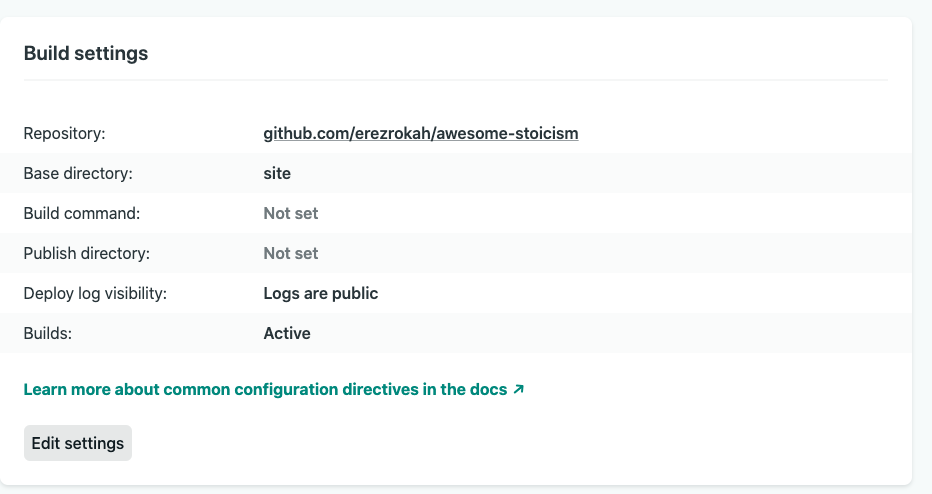
Netlify build tries to resolve the configuration before the --dir flag is even read.
Resolving the config happens here:
https://github.com/netlify/cli/blob/2ddcff30c64c4ab8329214d59fb261f1213dc494/src/utils/command.js#L76
While evaluating the --dir flag happens here:
https://github.com/netlify/cli/blob/2ddcff30c64c4ab8329214d59fb261f1213dc494/src/commands/deploy.js#L105
The CLI reports a repository root of <repo>/site since it looks for ['.netlify', 'netlify.toml', '.git'] when searching for the root:
https://github.com/netlify/cli/blob/2ddcff30c64c4ab8329214d59fb261f1213dc494/src/utils/command.js#L28
https://github.com/netlify/cli/blob/2ddcff30c64c4ab8329214d59fb261f1213dc494/src/utils/find-root/index.js#L14
and build will resolve the build directory based on the site settings to <repo>/site/site
I can solve this by removing repositoryRoot: projectRoot here:
https://github.com/netlify/cli/blob/2ddcff30c64c4ab8329214d59fb261f1213dc494/src/utils/command.js#L79
and let build find the root of the project (it has logic to do so and only relies on searching for .git).
Or we can let the CLI pass additional information to build on how to resolve the base directory.
@ehmicky, @RaeesBhatti thoughts?
 erezrokah
on 24 Jun 2020
erezrokah
on 24 Jun 2020
@netlify/config needs to know the repositoryRoot for several reasons inside the configuration resolution logic (including base directory resolution).
There is some mismatch between how @netlify/config and @netlify/cli compute the repository root.
The default value for repositoryRoot in @netlify/config:
- Looks for the nearest
.git, fromcwdup. - Or defaults to
cwd. @netlify/clihas a--cwdCLI flag to overridecwd, which is passed to@netlify/config.
The projectRoot variable in @netlify/cli:
- As @erezrokah mentioned: looks up for the nearest
.git,.netlifyornetlify.toml, fromcwdup (using the samecwdas above). I think this might be reasonable for some setups that do not usegit. - Or defaults to
cwd. - If
projectRootis the home directory, it usescwdinstead. This is probably because the global configuration is set in~/.netlify/config.json. - The
_projectRootvariable overrides it, but is alwaysundefined. It probably is meant for unit testing, but does not appear used at the moment.
When it comes to the --dir CLI flag, which basically overrides build.publish, I think this should be passed as input to @netlify/config since it is responsible for resolving the configuration, which includes build.publish. For example, @netlify/cli is currently defaulting that flag to build.publish then to the UI Publish directory (build_settings.dir), but @netlify/cli is already doing this. This means we are duplicating logic and API requests. netlify deploy could then use the returned build.publish for its logic.
The configuration resolution logic is quite intricate. For example, the current logic in @netlify/cli for build.publish is not taking into account contexts (like context.production.publish). Consolidating this logic inside @netlify/config would help prevent problems.
This goes for other potential flags. For example, I see the netlify deploy has a --alias CLI flag. If this corresponds to the notion of build contexts (context or branch), then this should be passed to @netlify/config context option. Otherwise the resolved configuration will not be applied context-specific configuration during netlify deploy.
Same goes with the --functions and --site flag.
@netlify/config could add:
- The logic to look for
.netlifyandnetlify.toml. This should not be a problem in production since the buildbot passes an explicitrepositoryRootflag. - The home directory logic as well.
- Returning the resolved
repositoryRootfrom@netlify/config - Once the items above are done,
@netlify/clican:
- Not pass any
repositoryRootCLI flag from@netlify/clito@netlify/config. - Use the
repositoryRootreturned by@netlify/configas theprojectRoot. - Remove the logic to resolve
projectRootfrom@netlify/cli, since@netlify/configwould now handle it.
- Not pass any
@netlify/cli could be:
- Passing the
--dirCLI flag (netlify deployandnetlify devcommands) to@netlify/config, and using thebuild.publishreturned by@netlify/configinstead in those commands - Passing the
--functionsCLI flag (netlify deployandnetlify devcommands) to@netlify/config, and using the returnedbuild.functionsinstead. - Passing the
--siteCLI flag (netlify deployandnetlify opencommands) to@netlify/config, and using the returnedsiteInfoinstead. - If the
--aliasCLI flag (netlify deploycommand) is the build context (context or branch), pass it to@netlify/config, and use the returnedcontextinstead.
What do you think?
I have started the @netlify/config-related items at https://github.com/netlify/build/pull/1579, https://github.com/netlify/build/pull/1580 and https://github.com/netlify/cli/pull/953.
ehmicky
on 24 Jun 2020
@ehmicky that's is a great analysis and there is some work to be done on consolidation.
We would first need to map out different use cases and make sure they are covered by tests.
To be more focused on this issue with the base directory - I would expect that when running from the CLI we would always ignore the UI/config settings for base and resolve the build directory using the current working directory.
More specifically running netlify deploy --prod --dir out should work when invoked from repo/site and netlify deploy --prod --dir site/out should work from invoked from repo (in the latter the CLI should not ask to link to a site if site/.netlify exists).
That should work for multiple sites under the same repo as well (e.g. netlify deploy --prod --dir site1/out, netlify deploy --prod --dir site2/out).
erezrokah
on 25 Jun 2020
We just discussed with @erezrokah and went with the following solution, which should solve this bug:
- In
@netlify/config, ifcwdis a subdirectory ofrepositoryRoot, tries to find if any directory (that is>= cwd && < repositoryRootin the tree structure) that has a.netlifyornetlify.toml. If one exists, this is used asbuild.base, regardless of what base is set in UI build settings. - Since
build.baseis used to computebuildDir,@netlify/clican now use thebuildDirreturned by@netlify/configas itsprojectDir/projectRoot/site.rootwhich is used to find.netlify/state.jsonand resolvepublish,functions,.env,_headers,_redirects, etc. - Do not pass any
repositoryRootflag from@netlify/clito@netlify/config. Instead, let@netlify/configcompute it by looking up.gitfromcwd
For the CLI flags (--dir, --functions, --site, --alias), I still think those should be fixed to re-use the logic from @netlify/config. They currently do not account for many use cases (properties case-insensitivity, contexts, etc.). We can create separate issues/bugs for each of those, separately from this issue though.
ehmicky
on 25 Jun 2020
Thanks to both of you for digging into this!
 erquhart
on 25 Jun 2020
erquhart
on 25 Jun 2020
First part (@netlify/config base behavior) done in https://github.com/netlify/build/pull/1581
Second and last part done by re-writing https://github.com/netlify/cli/pull/953
I am now trying to connect both PRs to see if this works.
ehmicky
on 25 Jun 2020
The buildDir returned by @netlify/config cannot be used to find .netlify/state.json. This is because there is a cycle:
.netlify/state.jsonis located atbuildDirbuildDiris computed frombuild.basebuild.baseis partially computed from the UI build setting "Base directory"- That build setting is retrieved using the
getSiteendpoint - The
getSiteendpoint needs thesiteId - The
siteIdis read from.netlify/state.json
I solved this in the above PRs by taking on @erezrokah advice:
Looks like we should separate concerns between evaluating the repository root and finding the location of
state.json
So, while still using buildDir to resolve most file paths, the .netlify/state.json can be located using some separate CLI-specific logic: simply looking from a .netlify/state.json up from cwd.
.netlify/state.json only contains siteId at the moment, and is highly CLI-specific anyway. Separating those concerns actually helps out reduce the size of the changes needed for this problem.
ehmicky
on 25 Jun 2020
I have added the following issues for the CLI flags problems mentioned above since those are separate from this issue's problem:
- Avoid calling
getSitetwice: https://github.com/netlify/cli/issues/958 - Pass the
--siteCLI flag to@netlify/config: https://github.com/netlify/cli/issues/959 - Pass the
--functionsCLI flag to@netlify/config: https://github.com/netlify/cli/issues/960 - Pass the
--dirCLI flag to@netlify/config: https://github.com/netlify/cli/issues/961 - Rename
aliasto context: https://github.com/netlify/cli/issues/962 - Pass the
--aliasCLI flag to@netlify/config: https://github.com/netlify/cli/issues/963
https://github.com/netlify/build/pull/1581 is merged and released to npm.
@erezrokah Would it be possible for you to test https://github.com/netlify/cli/pull/953 and see whether the problem that you reproduced is now fixed?
ehmicky
on 25 Jun 2020
Ran into another example of this.
- With latest CLI, build fails with
Base directory does not exist: /Users/xyz/site/frontend/siteerror - After reverting to
[email protected]the deployment proceeds.
These are the logs:
  site git:(master) ✗ npm run deploy

  > [email protected] deploy /Users/xyz/site
  > netlify deploy --prod --dir out

  Base directory does not exist: /Users/xyz/site/frontend/site
  npm ERR! code ELIFECYCLE
  npm ERR! errno 1
  npm ERR! [email protected] deploy: `netlify deploy --prod --dir out`
  npm ERR! Exit status 1
  npm ERR!
  npm ERR! Failed at the [email protected] deploy script.
  npm ERR! This is probably not a problem with npm. There is likely additional logging output above.

  npm ERR! A complete log of this run can be found in:
  npm ERR!     /Users/davidwells/.npm/_logs/2020-06-27T02_18_38_177Z-debug.log
  ➜  site git:(master) ✗ npm i [email protected] --save-dev

  > [email protected] postinstall /Users/xyz/site/node_modules/netlify-cli
  > node ./scripts/postinstall.js


  Success! Netlify CLI has been installed!

  Your device is now configured to use Netlify CLI to deploy and manage your Netlify sites.

  Next steps:

    netlify init     Connect or create a Netlify site from current directory
    netlify deploy   Deploy the latest changes to your Netlify site

  For more information on the CLI run netlify help
  Or visit the docs at https://cli.netlify.com

  + [email protected]
  added 34 packages from 17 contributors, removed 49 packages, updated 20 packages, moved 11 packages and audited 2033 packages in 26.379s
  found 1 moderate severity vulnerability
    run `npm audit fix` to fix them, or `npm audit` for details
  ➜  site git:(master) ✗ npm run deploy

  > [email protected] deploy /Users/xyz/site
  > netlify deploy --prod --dir out

  Deploy path:        /Users/xyz/site/out
  Functions path:     /Users/xyz/site/functions
  Configuration path: /Users/xyz/site/netlify.toml
  Deploying to live site URL...
  ✔ Finished hashing 39 files and 1 functions
  ✔ CDN requesting 16 files and 1 functions
  ✔ Finished uploading 17 assets
  ✔ Deploy is live!

  Logs:              https://app.netlify.com/sites/xyz/deploys/123123
  Unique Deploy URL: https://12312312323--xyz-site.netlify.app
  Live URL:          https://xyz-site.netlify.app
Hi everyone,
This bug should be fixed with [email protected].
If the problem persists, please add the --debug CLI flag and share the full output of the CLI command (including the command itself). Please also show the output of the following command:
npx envinfo --system --binaries --npmPackages @netlify/build,@netlify/config,@netlify/git-utils,@netlify/cache-utils,@netlify/functions-utils,@netlify/run-utils,netlify-cli --npmGlobalPackages @netlify/build,netlify-cli
If the bug is fixed by upgrading to [email protected], please let us know as well, so we can close this issue. Thanks!
ehmicky
on 30 Jun 2020
netlify dev is now working for me on [email protected].
No need to add a temporary base property to my netlify.toml anymore.
Thanks! 👍
cadbox1
on 2 Jul 2020
What are the changes needs to do to mitigate this issue? I'm also having monorepo setup and for new netlify-cli version build fails it get publish directory from root and netlify.toml from the internal project.
Deploy path:        /builds/abc/pqr/project/build
Configuration path: /builds/abc/pqr/project/packages/internal-package/netlify.toml
And my netlify.toml is like
[build]
  base = "."
  publish = "./build/"
  command = "yarn build"
[[redirects]]
  from = "/*"
  to = "/index.html"
  status = 200
 iamchathu
on 13 Jul 2020
iamchathu
on 13 Jul 2020
Hi @iamchathu,
Could you please print (except for confidential values):
- Your logs when running the Netlify CLI (with the proper current directory), with the environment variable
NETLIFY_BUILD_DEBUGset totrue - The output of
netlify --versionand./node_modules/.bin/netlify-config --version. - Your full
netlify.toml - Any build settings you might have set in the Netlify app UI
Thanks!
ehmicky
on 15 Jul 2020
Seems that the fix to this broke things with my config, when using my monorepo setup. I recently updated past 2.56.0 (2.54.0 -> 2.59.1)
I feel like I could work around this but I would expect that the CLI would respect the the current working directory, unless I tell the CLI otherwise with dir.
Directory Structure
> <root>/
  > node_modules/
  > portal-partner/   # Command is run in this directory
    > dist/
    > netlify.toml
    > package.json
  > package.json
Debug output
> ../node_modules/.bin/netlify "deploy" "--debug"
❯ Initial build environment
cwd: <reporoot>/portal-partner
mode: cli
siteId: d8e0dab1-504b-43b5-950e-102d920c0475
❯ UI build settings
build:
base: portal-partner
❯ Resolved build environment
branch: master
buildDir: <reporoot>/portal-partner
configPath: <reporoot>/portal-partner/netlify.toml
context: production
❯ Resolved config
build:
base: <reporoot>/portal-partner
publish: <reporoot>/dist
redirects:
- from: /*
status: 200
to: /index.html
Deploy path: <reporoot>/dist
Configuration path: <reporoot>/portal-partner/netlify.toml
Error: ENOENT: no such file or directory, stat '<reporoot>/dist'
Code: ENOENT
In my case publish and deploy path should be <reporoot>/portal-partner/dist.
Versions
> netlify-config --version
2.1.0
> netlify --version
netlify-cli/2.59.1 linux-x64 node-v14.3.0
Config
[build]
  publish = "dist"

[[redirects]]
  from = "/*"
  to = "/index.html"
  status = 200
The following change makes things work, but seems incorrect given other third party tools work correctly within our mono repo setup:
 [build]
-  publish = "dist"
+  publish = "portal-partner/dist"

 [[redirects]]
 squirly
on 22 Aug 2020
squirly
on 22 Aug 2020
Hi @squirly,
Thanks a lot for this information.
I have created a PR at https://github.com/netlify/build/pull/1770 which should solve this problem.
ehmicky
on 25 Aug 2020
@netlify/[email protected] has been published, which should solve your problem.
To get the new version, you will need to regenerate your package-lock.json or yarn.lock. To confirm you're using the right version, please run netlify-config --version and make sure the output is at least 2.1.2.
@squirly and @iamchathu, could you please use the new version of @netlify/config as described above, try again, and confirm this is solving the issue?
If the issue is still there, could you please include the output with the --debug flag? Thanks!
ehmicky
on 26 Aug 2020
@ehmicky Rad! This fix worked for me. Thanks for the quick response!
squirly
on 27 Aug 2020
Great! Closing this issue.
The fix will be available in the next release of netlify-cli. In the meantime, regenerating your lock file and ensuring @netlify/config is >= 2.1.2 should do the trick. Thanks!
ehmicky
on 27 Aug 2020
Related issues
 sw-yx
·
3Comments
sw-yx
·
3Comments
 KazakovKirill
·
4Comments
KazakovKirill
·
4Comments
 mrlubos
·
5Comments
mrlubos
·
5Comments
 iamskok
·
3Comments
iamskok
·
3Comments
 cco3
·
4Comments
cco3
·
4Comments
Most helpful comment
netlify devis now working for me on[email protected].No need to add a temporary
baseproperty to mynetlify.tomlanymore.Thanks! 👍