Cli: Duplicate classes from different packageDirectories getting overwritten without a warning
Summary
We extensively use packageDirectories to separate concerns and split package into smaller, more understandable pieces.
However, I've recently discovered that duplicate file names (tests in particular) would get overwritten (I think by the order specified in packageDirectories) without producing error or even warning.
Steps To Reproduce:
Consider this sfdx-project.json:
{
  "packageDirectories": [
    {
      "path": "myns",
      "default": true
    },
    {
      "path": "test_files"
    }
  ],
  "namespace": "MyNS",
  "sourceApiVersion": "45.0"
}
sfdx force:apex:class:create -t ApexUnitTest -n TestA -d myns/main/default/classes/sfdx force:apex:class:create -t ApexUnitTest -n TestA -d test_files/main/default/classes/- Rename one of the methods from to
myUnitTest1 sfdx force:source:pushsfdx force:apex:test:run -w 2 -t TestA.myUnitTest1,TestA.myUnitTest
Expected result
Error when pushing.
Actual result
Push succeeds, step 5 produces:
TEST NAME          OUTCOME  MESSAGE                                                                          RUNTIME (MS)
─────────────────  ───────  ───────────────────────────────────────────────────────────────────────────────  ────────────
TestA.myUnitTest   Skip     Method myUnitTest does not exist in the the apex class with Id :01pS0000005lLQp
TestA.myUnitTest1  Pass                                                                                      22
Additional information
Latest catalina and sfdx
 sjurgis
All 10 comments
@sjurgis We are currently working on improvements to the CLI that will improve the experience with having multiple package directories in one project. This work is being tracked internally and is currently in progress. We expect to have something released in spring if not sooner. I am going to close this issue, thank you for reaching out
 clairebianchi
on 14 Jan 2020
clairebianchi
on 14 Jan 2020
@clairebianchi unsure why you are closing the issue if it's not resolved...
sjurgis
on 14 Jan 2020
This is quite serious defect too...
sjurgis
on 14 Jan 2020
I agree with OP. This is a VERY serious problem with the CLI! 🚨
Whenever you retrieve metadata from an org, the CLI saves the downloaded source in {defaultPath}/main/default . And if you happen to save your source in a path anything different than that, there's a considerable chance that you might save duplicate metadata.
Basically the only thing that would warn you about something wrong in the deployment caused by this would be a compile error, which might not happen, really. 🤷♂️ The tests also might not pass and give you that hint, but then again, OP's tests were overwritten, so...
 MuriloKakazu
on 17 Jul 2020
MuriloKakazu
on 17 Jul 2020
We dealt with this by not using force-app/main/default for anything, all files are stored in different subdirectories. We have a Git Hook and CI job that ensure that directory does not exist. It was a significant cause of problems for us but since adding those rules/checks we've been much happier.
Rather than Apex we saw more issues with part of the object definition being pulled down here and preventing other directories from contributing to the object definition which would break things as it wouldn't compile the correct Custom Object or suppress changes, depending on the type of org we were working with.
 aheber
on 17 Jul 2020
aheber
on 17 Jul 2020
@aheber Yeah, we'll probably end up checking and failing the CI job if Salesforce CLI's default dir is present in the source code...
But still, this would not solve the issue. the problem still persists if one has a source structure with different dirs. And then create class A in ./src/main/classes/domain/DomainA/ClassA.cls and ./src/main/classes/domain/DomainB/ClassA.cls, and one of them will be silently overwritten during a deployment... 😞
MuriloKakazu
on 17 Jul 2020
FYI, this (Multiple Package Directories) issue should now be fixed.
See here: https://developer.salesforce.com/docs/atlas.en-us.sfdx_dev.meta/sfdx_dev/sfdx_dev_ws_mpd.htm
Also here: https://github.com/forcedotcom/cli/issues/379
Please update to the latest CLI and let us know if you're still running into any issues with this.
Thanks!
 rvwatch
on 17 Jul 2020
rvwatch
on 17 Jul 2020
@rvwatch I had sfdx-cli/7.65.4 darwin-x64, updated 3 days ago. Updated to the lastest (as of now, version 7.65.6) and this still persists. Important to notice I'm not using multiple packages directories. The use case I tested is grouping classes in different directories for a single-packaged project, which is different from OP's use case. The problem he faced though is the same.
I made a simple test project to show what I mean. I have my source like so:
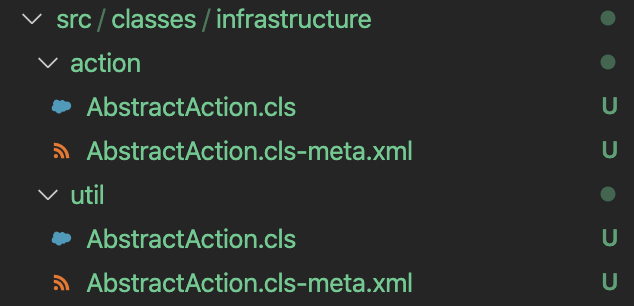
And @ sfdx-project.json:
{
  "packageDirectories": [
    {
      "path": "src",
      "default": true
    }
  ],
  "namespace": "",
  "sfdcLoginUrl": "https://login.salesforce.com",
  "sourceApiVersion": "48.0"
}
When running sfdx force:source:deploy -c -u dev56 -w 10 -p ./src (deploying to a sandbox. no scratch environments involved):
Job ID | [REDACTED]
SOURCE PROGRESS | ████████████████████████████████████████ | 1/1 Components
Successfully validated the deployment
Although classes are duplicated, no warnings nor errors are shown. It also shows only a single metadata was deployed. The command finished succesfully... Not sure how it chooses which of the two classes is deployed. And even if the duped classes have different implementations, one of them is deployed, and the other is ignored 🤔
MuriloKakazu
on 17 Jul 2020
Not sure if under the hood the CLI converts the source code to the mdapi format before deploying, but I found out that if I run sfdx force:source:convert -p ./src -d ./mdapi-format in this project, no errors nor warnings are thrown regarding the duplicate metadata, and I end up with 1 class as well:
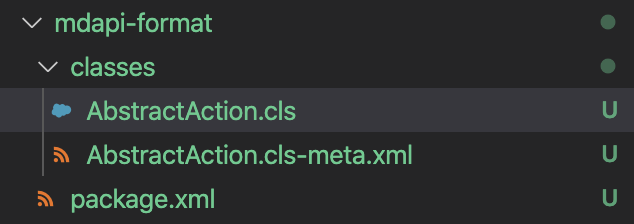
MuriloKakazu
on 17 Jul 2020
Yeah I did notice there's a warning now when using multiple packageDirectories, but @MuriloKakazu use case should be solved as well.
cc @rvwatch @clairebianchi
sjurgis
on 20 Jul 2020
Related issues
 erocheleau
·
4Comments
erocheleau
·
4Comments
 pozil
·
3Comments
pozil
·
3Comments
 benahm
·
4Comments
benahm
·
4Comments
 mshanemc
·
4Comments
mshanemc
·
4Comments
 loganm
·
4Comments
loganm
·
4Comments