Cli: Netlify-cli warn, "return promise from createPages", localhost:8888 not showing up
So, I'm cross-posting this from the gatsby-cli repo, because I'm not sure if netlify dev or gatsby develop is effecting the things I'm describing below. The first part is the relevant part, but I'm going to leave it all up in-case someone can help me:
- Local Environment Information
  System:
    OS: macOS 10.15.2
    CPU: (12) x64 Intel(R) Core(TM) i7-8850H CPU @ 2.60GHz
  Binaries:
    Node: 10.16.2 - ~/.nvm/versions/node/v10.16.2/bin/node
    npm: 6.13.2 - ~/.nvm/versions/node/v10.16.2/bin/npm
  Browsers:
    Chrome: 79.0.3945.79
    Safari: 13.0.4

────────────────────┐
 Netlify Site Info  │
────────────────────┘
Current site: junocollege
Netlify TOML: /Users/tris/Sites/work/juno-website/netlify.toml
Admin URL:    https://app.netlify.com/sites/junocollege
Site URL:     https://junocollege.com
Site Id:      (deleted just in-case?)
Summary
I'm working with another developer, and he's getting the localhost:8888 to show up after running netlify-dev, but I'm not. I'm pretty certain it's because he's using an older version of gatsby-cli. I'm on 2.8.18 (just updated and tested 2.8.19 as well) and he's on an older one (I can check tm). I see these In Progress bars that don't finish, but he doesn't. Here's a comparison, and we're on the same master.
My terminal:

His terminal:
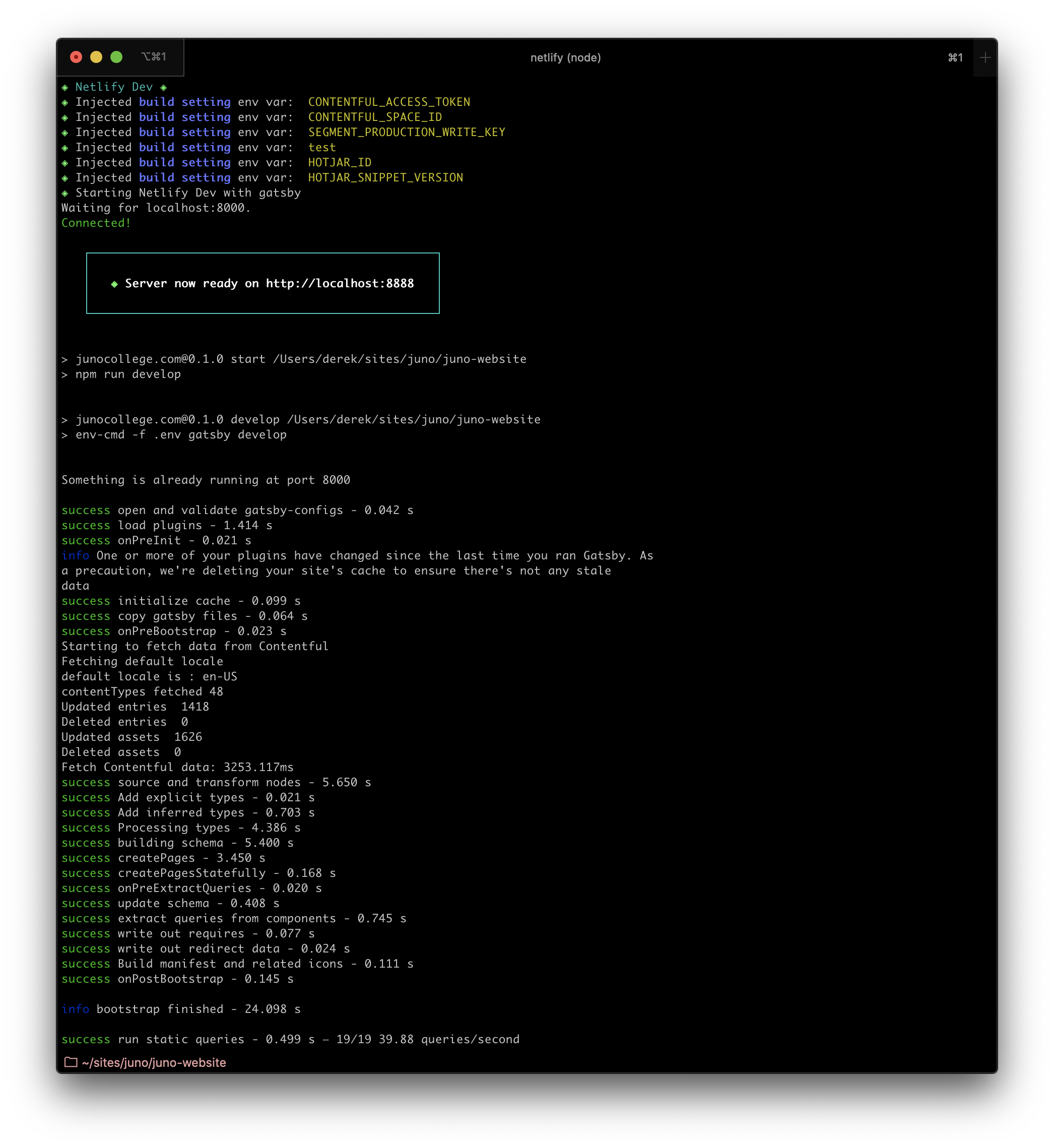
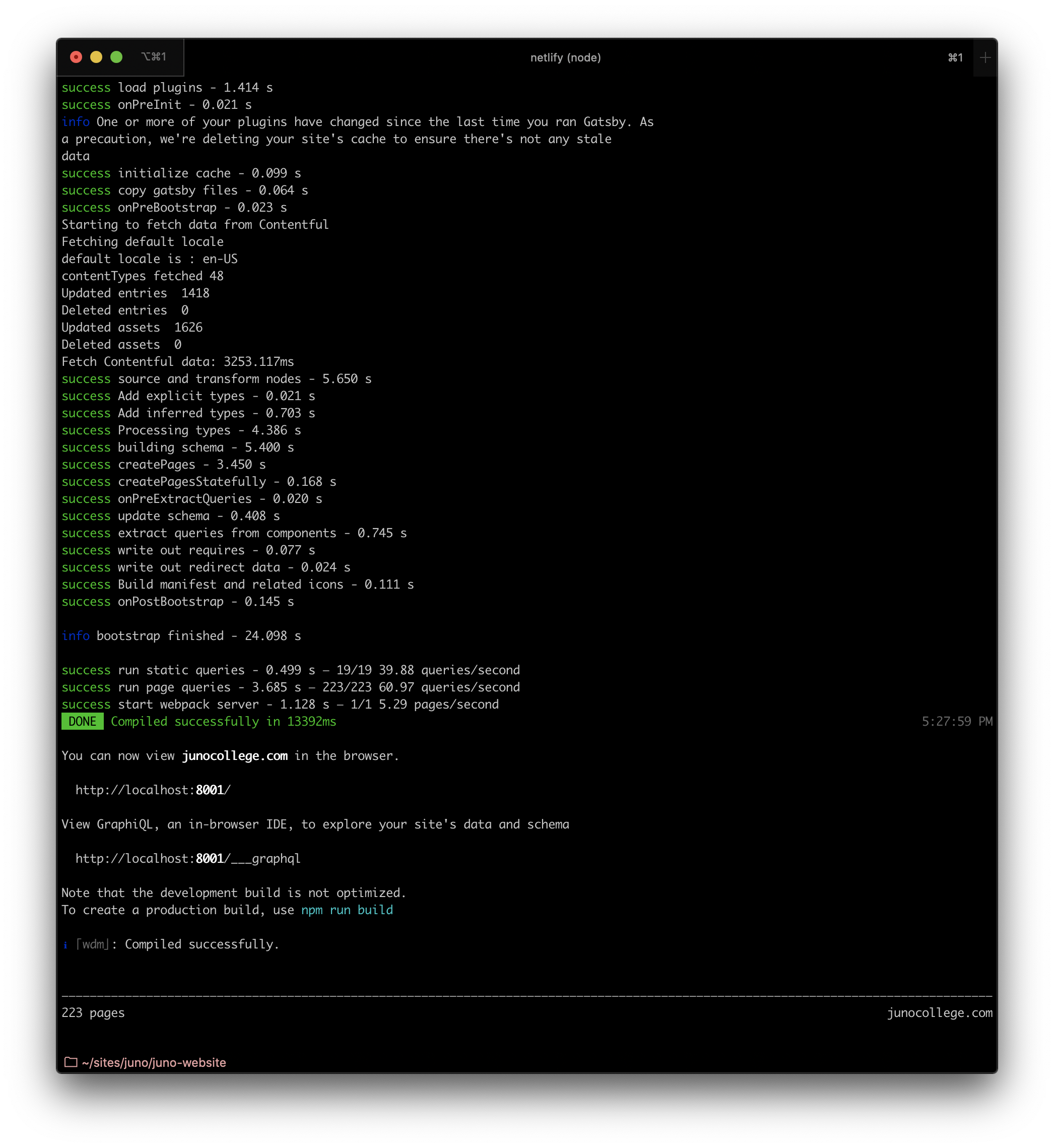
Now, I don't know if this is netlify's cli or gatsby's that is bringing up the new warnings, but I can't check a plain gatsby develop because I'm injected environment variables with netlify-dev which then calls gatsby-develop right after they're injected. So I'm wondering where these new UI updates with the progress bars and createPages warnings are from ?
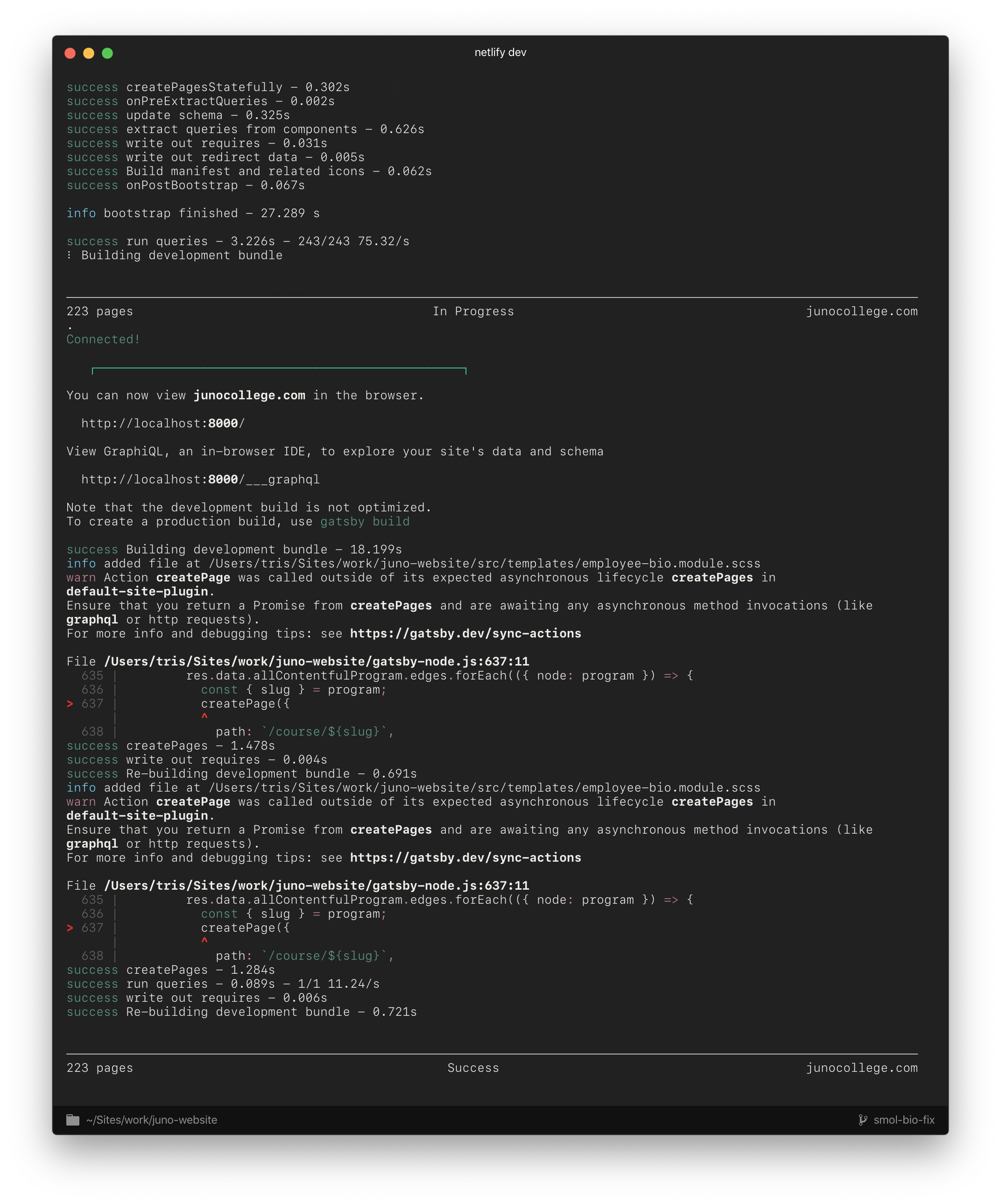
My second problem I'm also hoping someone can lead me to the right direction of fixing this warning that only shows up sometimes? It's about returning a promise. I had a look at sync-actions from the gatsby docs in which the warning led me, but we seem to have used a different method for our creating pages and I can't use the same fix. Can someone help explain what I can do to fix this? Screenshot is below, and gatsby-node.js code is at the very bottom. Thanks
Environment (if relevant)
  System:
    OS: macOS 10.15.2
    CPU: (12) x64 Intel(R) Core(TM) i7-8850H CPU @ 2.60GHz
    Shell: 5.7.1 - /bin/zsh
  Binaries:
    Node: 10.16.2 - ~/.nvm/versions/node/v10.16.2/bin/node
    npm: 6.13.2 - ~/.nvm/versions/node/v10.16.2/bin/npm
  Languages:
    Python: 2.7.16 - /usr/bin/python
  Browsers:
    Chrome: 79.0.3945.79
    Safari: 13.0.4
  npmPackages:
    gatsby: ^2.15.6 => 2.18.11
    gatsby-image: ^2.2.17 => 2.2.36
    gatsby-plugin-catch-links: ^2.1.8 => 2.1.21
    gatsby-plugin-hotjar: ^1.0.1 => 1.0.1
    gatsby-plugin-manifest: ^2.2.13 => 2.2.33
    gatsby-plugin-netlify: ^2.1.11 => 2.1.30
    gatsby-plugin-offline: ^3.0.2 => 3.0.29
    gatsby-plugin-react-helmet: ^3.1.6 => 3.1.18
    gatsby-plugin-robots-txt: ^1.5.0 => 1.5.0
    gatsby-plugin-sass: ^2.1.13 => 2.1.26
    gatsby-plugin-segment-js: ^3.0.1 => 3.1.0
    gatsby-plugin-sharp: ^2.2.19 => 2.3.7
    gatsby-plugin-sitemap: ^2.2.13 => 2.2.24
    gatsby-remark-images: ^3.1.20 => 3.1.37
    gatsby-remark-relative-images: ^0.2.3 => 0.2.3
    gatsby-source-contentful: ^2.1.32 => 2.1.69
    gatsby-source-filesystem: ^2.1.21 => 2.1.42
    gatsby-transformer-remark: ^2.6.21 => 2.6.42
    gatsby-transformer-sharp: ^2.2.13 => 2.3.9
  npmGlobalPackages:
    gatsby-cli: 2.8.19
File contents (if changed)
gatsby-node.js:
I took out all the extra queries but it's too much code. The warning shows only for the course section anyway. But this paints a good picture.
const path = require('path');

exports.createPages = ({ graphql, actions }) => {
  const { createPage } = actions;
  return new Promise((resolve, reject) => {
    const BlogTemplate = path.resolve('src/templates/blog.jsx');
    const BlogPostTemplate = path.resolve('src/templates/blog-post.jsx');
    const BlogJourneyTemplate = path.resolve('src/templates/blog-post-journey.jsx');
    const BlogPartnerTemplate = path.resolve('src/templates/blog-post-partner.jsx');
    const BlogCategoryTemplate = path.resolve('src/templates/blog-category.jsx');
    const CourseDetailsTemplate = path.resolve('src/templates/course-details.jsx');
    const AlumniTemplate = path.resolve('src/templates/alumni.jsx');
    const EmployeeTemplate = path.resolve('src/templates/employee-bio.jsx');
    const LegaleseTemplate = path.resolve('src/templates/legalese.jsx');

    // Course pages
    resolve(
      graphql(`
        query {
          allContentfulProgram(filter: { programCategory: { ne: "Immersive Course" } }) {
            edges {
              node {
                programCategory
                id
                slug
                programName
                metaImageLarge {
                  fluid(maxWidth: 1200, quality: 90) {
                    aspectRatio
                    src
                    srcSet
                    sizes
                    srcWebp
                    srcSetWebp
                  }
                }
                isAccelerated
                partTimeCourseDuration
                partTimeCourseDescription {
                  partTimeCourseDescription
                }
                acceleratedCourseDuration
                acceleratedCourseDescription {
                  acceleratedCourseDescription
                }
                coursePrice
                coursePriceDescription {
                  coursePriceDescription
                }
                courseLinksTitle
                courseLinks {
                  contentful_id
                  text
                  url
                }
                signupUrl
                acceleratedSignupUrl
                signupLinkText
                programDescription {
                  programDescription
                }
                heroImage {
                  fluid(maxHeight: 1200, quality: 100) {
                    aspectRatio
                    src
                    srcSet
                    sizes
                    srcWebp
                    srcSetWebp
                  }
                  description
                }
                whatYoullLearn {
                  whatYoullLearn
                }
                whatYoullLearnList {
                  whatYoullLearnList
                }
                syllabusLink
                syllabusLinkText
                overview {
                  overview
                }
                coursePackageTitle
                coursePackageButtonText
                coursePackageLink
                coursePackageText {
                  coursePackageText
                }
                coursePackageImage {
                  fluid(quality: 100) {
                    aspectRatio
                    src
                    srcSet
                    sizes
                    srcWebp
                    srcSetWebp
                  }
                  description
                }
                studentExperienceSectionTitle
                studentExperienceSectionDescription {
                  studentExperienceSectionDescription
                }
                studentExperienceSectionImage {
                  fluid(maxWidth: 500, quality: 100) {
                    aspectRatio
                    src
                    srcSet
                    sizes
                    srcWebp
                    srcSetWebp
                  }
                }
                bulletPoints {
                  bulletPoints
                }
                projects {
                  studentName
                  projectTitle
                  projectUrl
                  projectDescription {
                    projectDescription
                  }
                  id
                  projectImage {
                    fluid(maxWidth: 600, quality: 100) {
                      aspectRatio
                      src
                      srcSet
                      sizes
                      srcWebp
                      srcSetWebp
                    }
                  }
                }
                testimonials {
                  id
                  quotation {
                    quotation
                  }
                  person {
                    name
                    jobCurrent
                    jobCurrentCompany
                    jobAfterHY
                    headshotLegacy {
                      fluid(maxWidth: 300, quality: 100) {
                        aspectRatio
                        src
                        srcSet
                        sizes
                        srcWebp
                        srcSetWebp
                      }
                    }
                    headshotPortrait {
                      fluid(maxWidth: 300, quality: 100) {
                        aspectRatio
                        src
                        srcSet
                        sizes
                        srcWebp
                        srcSetWebp
                      }
                    }
                  }
                }
                instructors {
                  name
                  jobCurrentCompanyLink
                  jobCurrentCompany
                  jobCurrent
                  jobAfterHY
                  website
                  twitter
                  linkedin
                  github
                  id
                  bio {
                    bio
                  }
                  headshotLegacy {
                    fluid(maxWidth: 300, quality: 100) {
                      aspectRatio
                      src
                      srcSet
                      sizes
                      srcWebp
                      srcSetWebp
                    }
                  }
                  headshotPortrait {
                    fluid(maxWidth: 300, quality: 100) {
                      aspectRatio
                      src
                      srcSet
                      sizes
                      srcWebp
                      srcSetWebp
                    }
                  }
                }
                frequentlyAskedQuestions {
                  id
                  question
                  answer {
                    answer
                  }
                }
                course {
                  id
                  startDate
                  endDate
                  isAccelerated
                  courseDays
                  courseTimes
                  location
                  programType {
                    programType
                    programName
                  }
                  courseInstructor {
                    name
                    headshotLegacy {
                      fluid(maxWidth: 100, quality: 100) {
                        aspectRatio
                        src
                        srcSet
                        sizes
                        srcWebp
                        srcSetWebp
                      }
                    }
                    headshotPortrait {
                      fluid(maxWidth: 100, quality: 100) {
                        aspectRatio
                        src
                        srcSet
                        sizes
                        srcWebp
                        srcSetWebp
                      }
                    }
                  }
                }
              }
            }
          }
        }
      `).then(res => {
        if (res.errors) {
          reject(res.errors);
        }
        res.data.allContentfulProgram.edges.forEach(({ node: program }) => {
          const { slug } = program;
          createPage({
            path: `/course/${slug}`,
            component: CourseDetailsTemplate,
            id: program.id,
            context: {
              course: program
            }
          });
        });
      })
    );
  });
};
 tr1s
tr1s
All 9 comments
X-posting my comment from my similar Gatsby repo issue.
Is my netlify-cli issues / changes expected behaviour?
Here's the other developers gatsby-info:
System:
    OS: macOS 10.15.1
    CPU: (8) x64 Intel(R) Core(TM) i7-7700HQ CPU @ 2.80GHz
    Shell: 5.7.1 - /bin/zsh
  Binaries:
    Node: 10.16.0 - /usr/local/bin/node
    npm: 6.9.0 - /usr/local/bin/npm
  Languages:
    Python: 2.7.16 - /usr/local/bin/python
  Browsers:
    Chrome: 79.0.3945.79
    Safari: 13.0.3
  npmPackages:
    gatsby: ^2.15.6 => 2.15.6
    gatsby-image: ^2.2.17 => 2.2.17
    gatsby-plugin-catch-links: ^2.1.8 => 2.1.8
    gatsby-plugin-hotjar: ^1.0.1 => 1.0.1
    gatsby-plugin-manifest: ^2.2.13 => 2.2.13
    gatsby-plugin-netlify: ^2.1.11 => 2.1.11
    gatsby-plugin-offline: ^3.0.2 => 3.0.2
    gatsby-plugin-react-helmet: ^3.1.6 => 3.1.6
    gatsby-plugin-robots-txt: ^1.5.0 => 1.5.0
    gatsby-plugin-sass: ^2.1.13 => 2.1.13
    gatsby-plugin-segment-js: ^3.0.1 => 3.0.1
    gatsby-plugin-sharp: ^2.2.19 => 2.2.19
    gatsby-plugin-sitemap: ^2.2.13 => 2.2.13
    gatsby-remark-images: ^3.1.20 => 3.1.20
    gatsby-remark-relative-images: ^0.2.3 => 0.2.3
    gatsby-source-contentful: ^2.1.32 => 2.1.32
    gatsby-source-filesystem: ^2.1.21 => 2.1.21
    gatsby-transformer-remark: ^2.6.21 => 2.6.21
    gatsby-transformer-sharp: ^2.2.13 => 2.2.13
  npmGlobalPackages:
    gatsby-cli: 2.7.7
His netlify-cli: netlify-cli/2.11.23 darwin-x64 node-v10.16.0
Secondly... the act of rolling back to 2.11.23 fixed the weird progress bar issues and I can fully see the localhost:8888. I don't see the error about returning promises either.
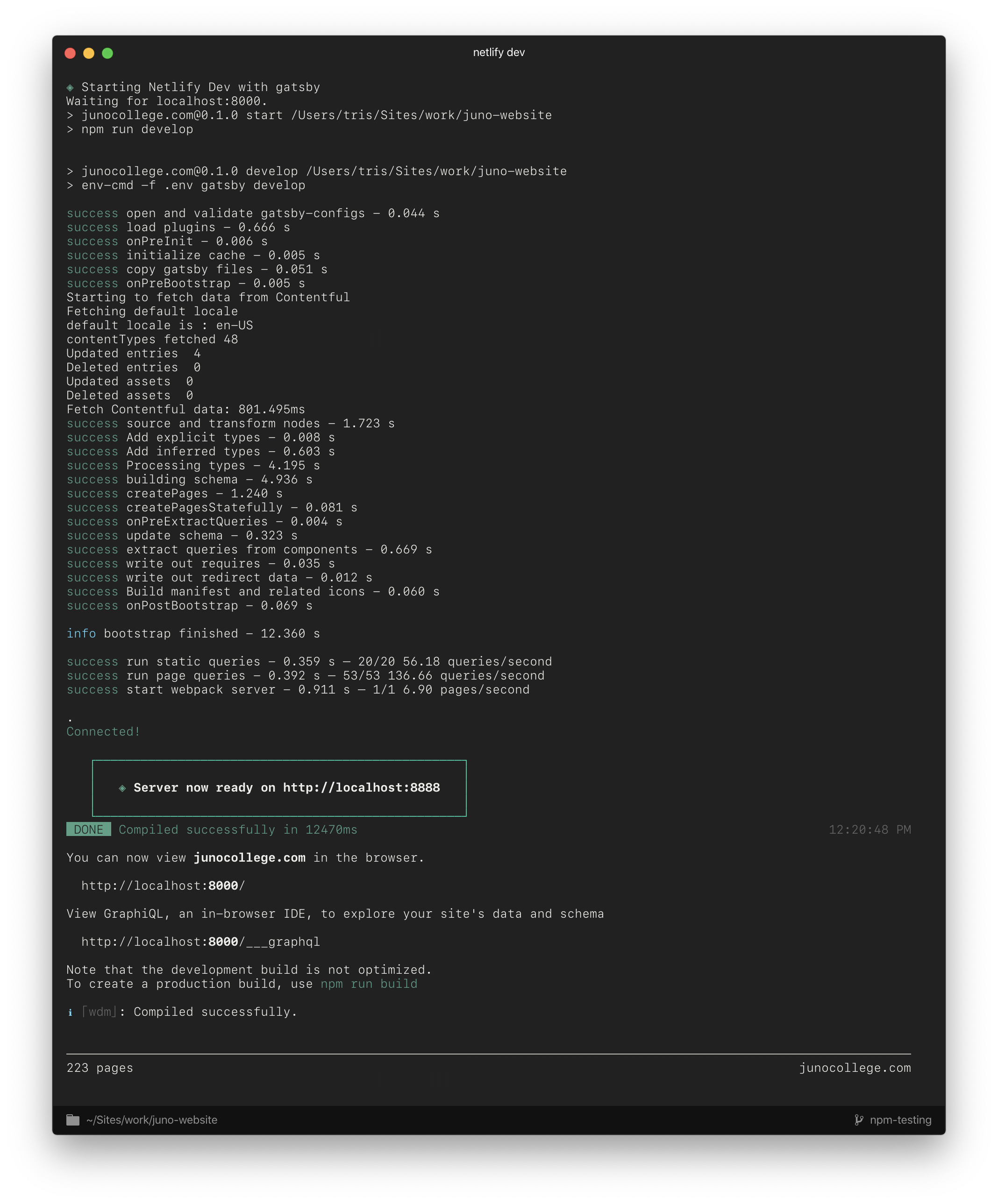
Oddly enough, re-installing netlify-cli sent me back to the SAME version I was on, but now everything's fixed. But the localhost: is randomly generating 6* numbers. Which doesn't bother me, but honestly I'm just confused. Actually I tested it 3 times, so the numbers vary a lot now.
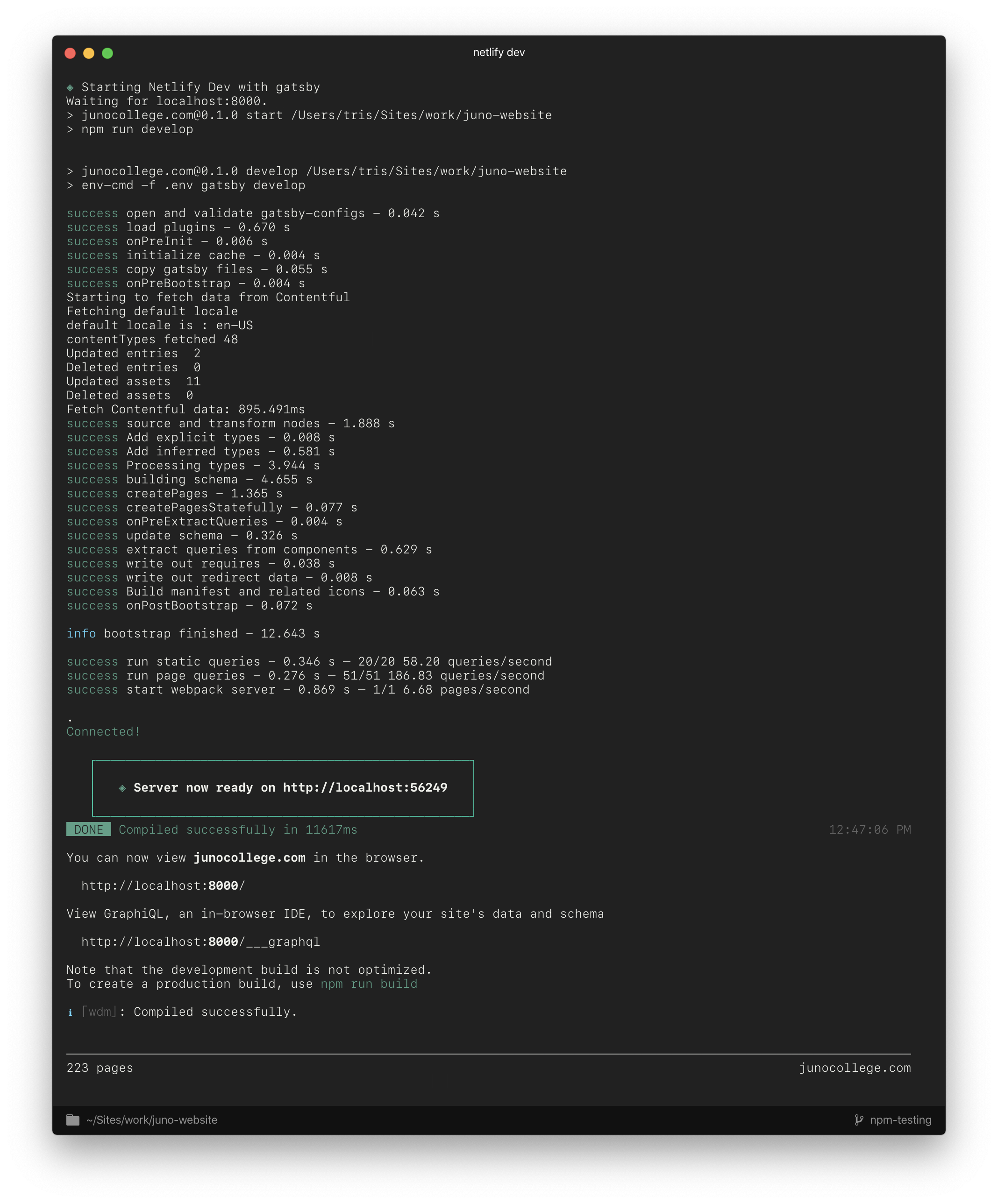
I'm going to see if I can reproduce the returning promises error now that this is fixed, and I'll try and implement those suggestions you made as well about the node! Thank you for that.
I know this seems to be a Netlify CLi issue now but I'll leave this is because it seems relevant.
tr1s
on 19 Dec 2019
It sounds like something might already be running on localhost:8888 on your machine and netlify dev assigns as random port instead.
Can you run killall -9 node in your terminal to stop all node processes and run netlify dev again to see if this fixes the port issue?
 DavidWells
on 19 Dec 2019
DavidWells
on 19 Dec 2019
Nope, I never got the prompt about "do you want to run on another port y/n". Just to be sure I also restarted my computer and re-ran the netlify-dev command. Still getting random servers:
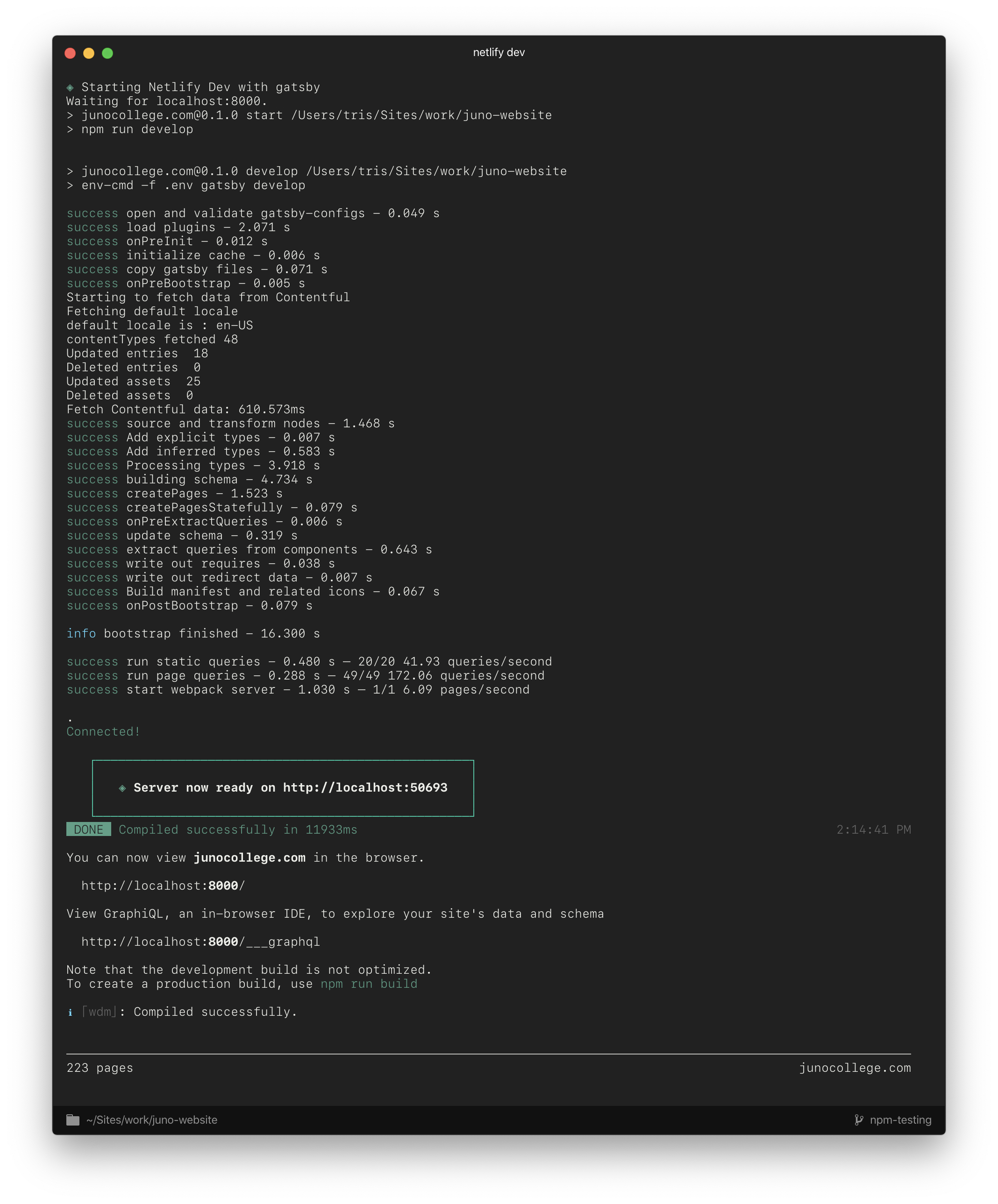
I'm just happy it looks normal again though. So this is unexpected behaviour back on netlify-cli/2.25.0 darwin-x64 node-v10.16.2 ?
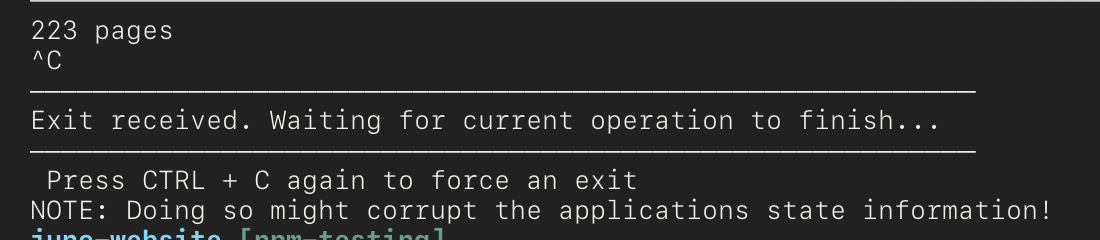
I also get this little "Exit received" message now which is presumably just from the newer versions.
tr1s
on 19 Dec 2019
Interesting.
Can we try running netlify dev with the port specified
USAGE
  $ netlify dev

OPTIONS
  -c, --command=command      command to run
  -f, --functions=functions  Specify a functions folder to serve
  -o, --offline              disables any features that require network access
  -p, --port=port            Specify port of netlify dev
Try this:
netlify dev -p 8888
Followup Q, Do you have a [dev] block in your toml file?
DavidWells
on 19 Dec 2019
Running it with -p 8888 worked as expected with a localhost:8888, but then running it again without went back to random numbers.
netlify.toml:
[build]
  publish = "public"
  command = "npm run build"
It sounds like the detection we use to determine gatsby is being used it not working on your machine for some reason.
You can set the netlify dev settings in the toml file like so https://github.com/netlify/cli/blob/master/docs/netlify-dev.md#netlifytoml-dev-block
Thanks for reporting this issue and for the detail!
Sounds like you are running gatsby 2.8.18, what version was the other developer running (where it was working fine)
DavidWells
on 19 Dec 2019
It's in the screenshot a few replies up!
He's using gatsby 2.7.7 with netlify 2.11.13
I'm on gatsby 2.8.19 with netlify 2.25.0
I'm just an update whore which can be a blessing and a curse.
Thanks, is there any pros / cons about having a random port, or why I'd need to always have 8888, out of curiosity?
And just to re-iterate. I was on netlify 2.25.0 when all these weird things were happening, but the act of rolling back to 2.11.13 and then again back to the latest, fixed my UI issues but started the random ports. Hopefully that information is useful 🤷🏽♂️
tr1s
on 19 Dec 2019
The 8888 port shouldn't matter. If the dev server at random port 23112 works for you.
It would be nice to have this consistency though.
Under the hood, we have detectors to figure out what SSG is being used. Those detectors should be setting the port to 8888 for gatsby https://github.com/netlify/cli/blob/master/src/detectors/gatsby.js#L22 . It appears that your version isn't being detected though. We will need to look into this!
DavidWells
on 19 Dec 2019
Having the same issue with Nuxt and 2.25.0. Tried rolling back to 2.11.13 with no effect. Came back to 2.25.0 endless dots continue.
$ netlify dev -p 8888
◈ Netlify Dev ◈
◈ Starting Netlify Dev with yarn
Waiting for localhost:3000.
◈ Lambda server is listening on 50299

> [email protected] start
> nuxt -port 3333

.
 WARN  vendor has been deprecated due to webpack4 optimization                                    01:08:05

.
   ╭─────────────────────────────────────────────╮
   │                                             │
   │   Nuxt.js v2.10.2                           │
   │   Running in development mode (universal)   │
   │                                             │
   │   Listening on: http://localhost:3333/      │
   │                                             │
   ╰─────────────────────────────────────────────╯

.ℹ Preparing project for development                                                               01:08:07
ℹ Initial build may take a while                                                                  01:08:07
✔ Builder initialized                                                                             01:08:07
✔ Nuxt files generated                                                                            01:08:07

✔ Client
  Compiled successfully in 24.17s

✔ Server
  Compiled successfully in 20.96s

ℹ Waiting for file changes                                                                        01:08:33
ℹ Memory usage: 424 MB (RSS: 879 MB)                                                              01:08:33
..............................................................................................................................................
 jhull
on 21 Dec 2019
jhull
on 21 Dec 2019
Related issues
 jasikpark
·
5Comments
jasikpark
·
5Comments
 karl-cardenas-coding
·
3Comments
karl-cardenas-coding
·
3Comments
 rabbah
·
3Comments
rabbah
·
3Comments
 ingride
·
4Comments
ingride
·
4Comments
 sw-yx
·
4Comments
sw-yx
·
4Comments