Cli: [netlify deploy] Don't tell me Live URL when my deploys are locked
- Do you want to request a feature or report a bug?
bug
- What is the current behavior?
i have locked deploys. i publish using netlify deploy --prod. CLI tells me this:
Deploying to live site URL...
✔ Finished hashing 180 files✔ CDN requesting 81 files
😄  (72/82) Uploading client/app.0a6d7911.css..✔ Finished uploading 82 assets
✔ Deploy is live!

Logs:              https://app.netlify.com/sites/scout-videos-51664/deploys/5d7e64a6fa03b8fb214cb84a
Unique Deploy URL: https://5d7e64a6fa03b8fb214cb84a--scout-videos-51664.netlify.com
Live URL:          https://www.swyx.io
the last line is misleading, because what i just deployed is not live. we should not show that and prompt people to go and manually publish if they are sure they want to
 sw-yx
sw-yx
All 6 comments
I suspect this is likely an issue in the API rather than the CLI, as tracked in this internal-to-netlify-staff issue. If not it is anyway related so crosslinking them here :)
 fool
on 16 Sep 2019
fool
on 16 Sep 2019
excellent thank you!
sw-yx
on 16 Sep 2019
We can handle this in CLI. Will require additional fetches about current site information before deploys.
netlify api getSite -d '{"site_id": "your-site-id"}'
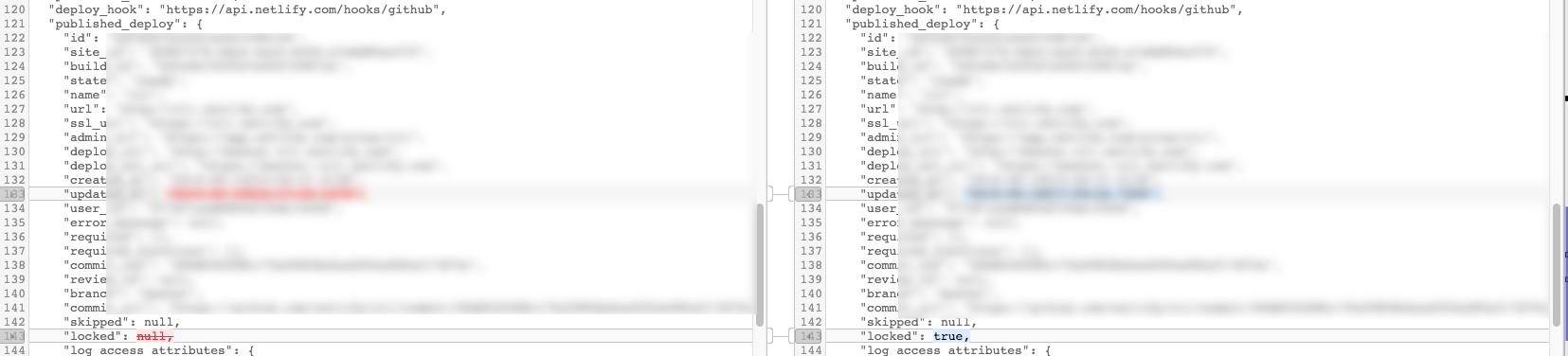
published_deploy.locked is the property
 DavidWells
on 16 Sep 2019
DavidWells
on 16 Sep 2019
This should solve the trick.
https://github.com/netlify/cli/blob/master/src/commands/deploy.js#L145
const remoteSiteData = await api.deploy(siteId)
if(`prod` flag && remoteSiteData.published_deploy.locked) {
  // exit early and show other console messgae
}
I just had a similair confusion. I have turned auto-publishing off, but still netlify deploy --prod gives me the Live URL as if it has published it, which it hadn't
 laurenskling
on 21 Oct 2019
laurenskling
on 21 Oct 2019
This has been fixed in latest version
 RaeesBhatti
on 14 May 2020
RaeesBhatti
on 14 May 2020
Related issues
 ercgrat
·
3Comments
sw-yx
·
3Comments
ercgrat
·
3Comments
sw-yx
·
3Comments
 mrlubos
·
5Comments
mrlubos
·
5Comments
 dalmo3
·
4Comments
dalmo3
·
4Comments
 karl-cardenas-coding
·
4Comments
karl-cardenas-coding
·
4Comments
Most helpful comment
This should solve the trick.
https://github.com/netlify/cli/blob/master/src/commands/deploy.js#L145