Cli: Metro Bundler immediately closes after react-native run-android
Environment
System:
    OS: Windows 10
    CPU: (8) x64 Intel(R) Core(TM) i7-7700HQ CPU @ 2.80GHz
    Memory: 8.99 GB / 15.89 GB
  Binaries:
    Node: 10.16.0 - C:\Program Files\nodejs\node.EXE
    Yarn: 1.16.0 - C:\Program Files (x86)\Yarn\bin\yarn.CMD
    npm: 6.9.0 - C:\Program Files\nodejs\npm.CMD
  SDKs:
    Android SDK:
      Android NDK: 18.1.5063045
  IDEs:
    Android Studio: Version  3.3.0.0 AI-182.5107.16.33.5264788
react-native-cli: 2.0.1
react-native: 0.60.0
Description
Doing yarn react-native run-android opens the metro bundler but it immediately closes. Don't know if its a bug with the cli or the metro itself. This only happens on Windows, I think.
Things I have tried:
- Restarting my system
- Clearing cache etc.
Reproducible Demo
- Create a new project using
react-native init - Run
yarn react-native run-android
 thecodrr
All 75 comments
We'll need help debugging what's causing this. What does it mean that "it closes"? Can you share more details?
 thymikee
on 5 Jul 2019
thymikee
on 5 Jul 2019
@thymikee well I can't see the error on it as it only blinks. How can I debug it?
Edit: after looking really closely, the Metro Bundler window is completely empty when it closes, so no error there.
thecodrr
on 5 Jul 2019
Can you post a video? :D Set up some console.logs in commands/server/runServer.js
thymikee
on 5 Jul 2019
@thymikee runServer gives nothing so it's not even getting there.
thecodrr
on 5 Jul 2019
Btw, does running yarn react-native start works without issues? If so, check files related to this diff: https://github.com/react-native-community/cli/pull/310
thymikee
on 5 Jul 2019
Running launchPackager.bat directly gives this error:
error: unknown option--projectRoot'`
thecodrr
on 5 Jul 2019
Doing yarn react-native start gives me the console.logs I had set so I am guessing, runServer is getting called in that case.
thecodrr
on 5 Jul 2019
Running node .\node_modules\react-native\cli.js --projectRoot also gives this error:
error: unknown option `--projectRoot'
thecodrr
on 5 Jul 2019
Yea, because we removed this option. It's not necessary now. Can you remove it from https://github.com/facebook/react-native/blob/master/scripts/launchPackager.bat and see if that works?
thymikee
on 5 Jul 2019
@thymikee yup. Working without a hitch.
thecodrr
on 5 Jul 2019
Yea, can you send a PR to RN? The patch release make take a while (cc @kelset). I think we should own these files, but that may be a bit bigger change.
thymikee
on 5 Jul 2019
@thymikee okay, I will do that.
thecodrr
on 5 Jul 2019
removing node_modules/react-native/scripts/launchPackager.bat then even the splash window of Metro Bundler will not show, of course it's not running.
 zenz
on 5 Jul 2019
zenz
on 5 Jul 2019
@zenz it's not about rmeoving the file, but doing this diff:
-node "%~dp0..\cli.js" --projectRoot ../../../ start
+node "%~dp0..\cli.js" start
@thymikee oops... yes, it's working now.
zenz
on 5 Jul 2019
@thymikee can't we ship a temporary fix with the cli until RN releases the fix?
thecodrr
on 5 Jul 2019
If you'd like to contribute this then of yea. I don't have too much bandwidth currently, just trying to be helpful.
thymikee
on 5 Jul 2019
It seems that another problem raised after modify this launchPackager.bat file. Metro Bundler tells me there's no index file
Error: Unable to resolve module./indexfromC:\Users\zenz\programs\test_app\node_modules\react-native\scripts/.: The module./indexcould not be found fromC:\Users\zenz\programs\test_app\node_modules\react-native\scripts/.. Indeed, none of these files exist:
But using react-native start to start the Metro Bundler is working correctly.
zenz
on 5 Jul 2019
@zenz same here. I changed lanchPackager.bat, Metro bundler shows up, but with this error.
 victorwpbastos
on 5 Jul 2019
victorwpbastos
on 5 Jul 2019
Maybe projectRoot parameter is necessary after all.
victorwpbastos
on 5 Jul 2019
modify it like this, solves the problem:
@echo off
title Metro Bundler
call .packager.bat
cd ../../../
node "%~dp0..\cli.js" start
pause
exit
hard coding it to swith to root directory.
zenz
on 5 Jul 2019
I think that makes sense, this is similar to what Linux script does: https://github.com/facebook/react-native/blob/master/scripts/launchPackager.command
thymikee
on 5 Jul 2019
@thymikee should I add it to the PR?
thecodrr
on 5 Jul 2019
Let's make sure it works as intended, and then yes
thymikee
on 5 Jul 2019
@thymikee after adding the cd command, the packager loads and bundles successfully. So it is working.
thecodrr
on 5 Jul 2019
After the cd ../../../ command, it works successfully!
victorwpbastos
on 5 Jul 2019
Hey guys, still having problems...
Today I started a new RN project, after the setupe, my Metro Bundler opens, starts, but it keeps in the "Loading Depedency Graph..." screen. It starts to consume my computer memory like crazy and everything gets really slow, but the Metro Bundler don't finish the Dependency Graph proccess.
Any workaround to that?
P.S.: I already tried the steps above!
 Inovassist-dev
on 6 Jul 2019
Inovassist-dev
on 6 Jul 2019
@Inovassist-dev
kill all background node process, run
react-native start
is it running correct or not?
zenz
on 6 Jul 2019
Thx, zenz
I have this problem
Environment
System:
    OS: Windows 10
Yarn version:
  1.16.0

Node version:
  10.15.3

Platform:
  win32 x64
react-native --version
react-native-cli: 2.0.1
react-native: 0.60.0
react-native run-android
`D:ADS\curso-react-native\ReactNativeReduxGraphQl>react-native run-android
info Starting JS server...
info Installing the app...
Task :app:installDebug
01:20:29 V/ddms: execute: running am get-config
01:20:29 V/ddms: execute 'am get-config' on 'emulator-5554' : EOF hit. Read: -1
01:20:29 V/ddms: execute: returning
Installing APK 'app-debug.apk' on 'Pixel_3_API_28_86(AVD) - 9' for app:debug
01:20:29 D/app-debug.apk: Uploading app-debug.apk onto device 'emulator-5554'
01:20:29 D/Device: Uploading file onto device 'emulator-5554'
01:20:29 D/ddms: Reading file permision of D:ADS\curso-react-native\ReactNativeReduxGraphQl\android\app\build\outputs\apk\debug\app-debug.apk as: rwx------
01:20:29 V/ddms: execute: running pm install -r -t "/data/local/tmp/app-debug.apk"
01:20:30 V/ddms: execute 'pm install -r -t "/data/local/tmp/app-debug.apk"' on 'emulator-5554' : EOF hit. Read: -1
01:20:30 V/ddms: execute: returning
01:20:30 V/ddms: execute: running rm "/data/local/tmp/app-debug.apk"
01:20:30 V/ddms: execute 'rm "/data/local/tmp/app-debug.apk"' on 'emulator-5554' : EOF hit. Read: -1
01:20:30 V/ddms: execute: returning
Installed on 1 device.
Deprecated Gradle features were used in this build, making it incompatible with Gradle 6.0.
Use '--warning-mode all' to show the individual deprecation warnings.
See https://docs.gradle.org/5.4.1/userguide/command_line_interface.html#sec:command_line_warnings
BUILD SUCCESSFUL in 3s
27 actionable tasks: 2 executed, 25 up-to-date
'C:\UsersAnderson' n�o � reconhecido como um comando interno
ou externo, um programa oper�vel ou um arquivo em lotes.
info Connecting to the development server...
info Starting the app...
Starting: Intent { cmp=com.reactnativereduxgraphql/.MainActivity }
D:ADS\curso-react-native\ReactNativeReduxGraphQl>`
Works only by executing commands
1st react-native start
2nd react-native run-android
or manually
the project repositori
https://github.com/Andersonfrfilho/ReactNativeReduxGraphQl
 Andersonfrfilho
on 6 Jul 2019
Andersonfrfilho
on 6 Jul 2019
@Andersonfrfilho I don't see any error in your output. What's the problem?
thecodrr
on 6 Jul 2019
I run @Andersonfrfilho 's code with modified launchPackager.bat.
No errors and it runs well.

So I think he didn't modify the launchPackager.bat file
zenz
on 6 Jul 2019
Just created a PR (#489) that should fix this for now. @thymikee waiting for your review.
thecodrr
on 6 Jul 2019
@theweavrs good, this PR moves the commands into same place.
zenz
on 6 Jul 2019
Just created a PR (#489) that should fix this for now. @thymikee waiting for your review.
when i applied the pr, i get a "fs is not defined error"
 ruhaim
on 6 Jul 2019
ruhaim
on 6 Jul 2019
As a temporary solution, I've found a little workaround :
Run the Metro Bundler manually with
react-native startThen run as usual. I'm doing
react-native run-android
You might be stuck with a blank screen after this, meaning you have to run again after Metro generated a build/bundle once. So force close the app, and then run as usual again while keeping the Metro Bundler running in the background.
You may also have to update your version of react-native-cli to 2.0.2
 EnKrypt
on 6 Jul 2019
EnKrypt
on 6 Jul 2019
Good as I saw the difficulty to find the error I posted a video showing what is happening now when I execute the commands
https://youtu.be/6qiBeKnHYSc
thank you to the impenetrate for trying to solve the problem
Andersonfrfilho
on 6 Jul 2019
@Andersonfrfilho
Please read above comments to find out the temporary solution.
Sometimes the official release will be very late.
Modify node_modules/react-native/scripts/launchPackager.bat
Change the contents like below:
@echo off
title Metro Bundler
call .packager.bat
cd ../../../
node "%~dp0..\cli.js" start
pause
exit
Again I apologize for the inconvenience, but there is neither this executable nor the file in my node_modules
Andersonfrfilho
on 6 Jul 2019
@Andersonfrfilho the path is ./node_modules/react-native/scripts/launchPackager.bat, please read carefully.
thymikee
on 6 Jul 2019
sorry, I just review here I'll try, thx
Andersonfrfilho
on 6 Jul 2019
Hey guys worked with the change in the .bat file ok, vlw but once thanks. Sorry for the inconvenience
Andersonfrfilho
on 7 Jul 2019
Closed via https://github.com/react-native-community/cli/pull/489. Published in 2.1.1, please try give it a try (see how to update the CLI)
thymikee
on 7 Jul 2019

The changes in the .bat file made the metro bundler run without closing immediately. However, the metro bundler takes too long to load the dependency graph and then the app crashes in the emulator as soon as the BUNDLE process reaches 100%.
I'm running React Native 0.60 and I've updated @react-native-community/cli to 2.1.2
 naderabdalghani
on 8 Jul 2019
naderabdalghani
on 8 Jul 2019
@naderabdalghani I suppose you use Node >=12.5, please downgrade to 12.4. See https://github.com/react-native-community/cli/issues/485#issuecomment-509210382
thymikee
on 8 Jul 2019
Memory usage has significantly improved after downgrading to node 12.4.0. However, the app still crashes after BUNDLE process reaches 100% or I manually open it

naderabdalghani
on 8 Jul 2019
@naderabdalghani That's different issue, likely caused by configuration in your app. Please try a new project with a set of libraries you use and try to find the bug. If you're then sure it's something inside React Native or CLI, please file an issue accordingly.
thymikee
on 8 Jul 2019
Same error on Linux (Elementary OS)
After running react-native start, i've got a blank screen.
For a temporary fix, this work's fine.
 DaviRJ
on 11 Jul 2019
DaviRJ
on 11 Jul 2019
Metro cannot start, so I run react-native start then I got this error, anyone know how to fix this?
events.js:174
      throw er; // Unhandled 'error' event
      ^

Error: UNKNOWN: unknown error, lstat 'D:\WarungPintar\kurir-app\node_modules\.bin\JSONStream'
Emitted 'error' event at:
    at NodeWatcher.checkedEmitError (D:\WarungPintar\kurir-app\node_modules\metro\node_modules\sane\src\node_watcher.js:143:12)
    at Walker.emit (events.js:198:13)
    at D:\WarungPintar\kurir-app\node_modules\walker\lib\walker.js:52:12
    at D:\WarungPintar\kurir-app\node_modules\graceful-fs\polyfills.js:282:31
    at FSReqWrap.oncomplete (fs.js:153:21)
 arryanggaputra
on 11 Jul 2019
arryanggaputra
on 11 Jul 2019
I have recently upgraded to RN 0.60.0 from 0.57, after running "react-native run-android" the configurations from build.grade executes successfully. But the metro bundler launches and doesn't loads and says it's done. The app crashes, as the metro bundler doesn't run.
Any approach to fix this? @thymikee

 abhirup03
on 23 Aug 2019
abhirup03
on 23 Aug 2019
Does running react-native start first help? Also, if you use Node 12, make sure to upgrade to 12.9+, there was a bug in V8 that affected Metro.
thymikee
on 23 Aug 2019
Same issue here.
System:
OS: macOS 10.14.6
CPU: (6) x64 Intel(R) Core(TM) i5-8500B CPU @ 3.00GHz
Memory: 2.19 GB / 8.00 GB
Shell: 3.2.57 - /bin/bash
Binaries:
Node: 12.9.0 - /usr/local/bin/node
Yarn: 1.16.0 - /usr/local/bin/yarn
npm: 6.10.2 - /usr/local/bin/npm
SDKs:
iOS SDK:
Platforms: iOS 12.2, macOS 10.14, tvOS 12.2, watchOS 5.2
IDEs:
Xcode: 10.2.1/10E1001 - /usr/bin/xcodebuild
npmPackages:
react: 16.8.6 => 16.8.6
react-native: 0.60.5 => 0.60.5
npmGlobalPackages:
react-native-cli: 2.0.1
as a workaround, it's works when I do "yarn start" first (or npm start)
 GaetanB999
on 23 Aug 2019
GaetanB999
on 23 Aug 2019
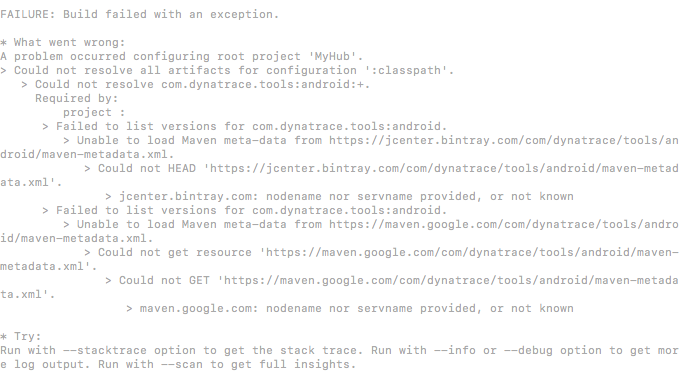
@thymikee trying out that I got the following errors:
abhirup03
on 25 Aug 2019
My system's node version is : 12.9.0 @thymikee
abhirup03
on 25 Aug 2019
Did anyone face a same issue? Any particular approach to follow and fix this? Please kindly update.
abhirup03
on 26 Aug 2019
Did you actually read the error message? The registry is down for some reason and it cannot download Android deps. It's not related to Metro anyhow.
thymikee
on 26 Aug 2019
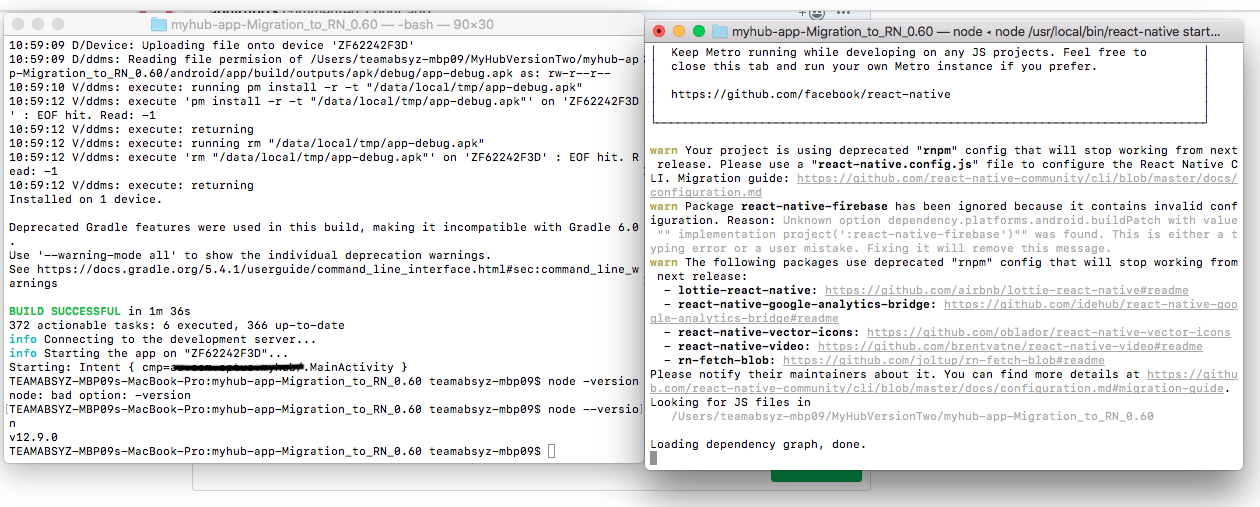
Hi @thymikee I encountered that yesterday and tried making few changes. Now, as you can see in the picture below the build is successful, but the metro bundler doesn't load.
abhirup03
on 26 Aug 2019
Looks like Metro is running fine (see the "Loading dependency graph, done." message). It's possible that your app is not able to connect to it. See https://stackoverflow.com/questions/42064283/react-nativecould-not-connect-to-development-server-on-android or similar.
thymikee
on 26 Aug 2019
I have the same issue as @abhirup03 . There is no error message, just that it refuses to actually create the bundle. No error given. PS, I'm on a mac. Have tried node 10, 11, 12.9, nothing helps
 jacquesdev
on 12 Sep 2019
jacquesdev
on 12 Sep 2019
I was using node 12.13.0 and facing the same issue. Now I downgraded it to 10.15.0 and metro bundle is running without fail.
 JindalPrashant
on 15 Nov 2019
JindalPrashant
on 15 Nov 2019
@naderabdalghani I suppose you use Node >=12.5, please downgrade to 12.4. See #485 (comment)
It worked for me. Thanks
JindalPrashant
on 15 Nov 2019
@naderabdalghani I suppose you use Node >=12.5, please downgrade to 12.4. See #485 (comment)
It worked for me. Thanks
Thanks It worked for me. running 13.1.0 not worked. downgraded to 12.4.0 and it worked. :)
 rbalaga
on 20 Nov 2019
rbalaga
on 20 Nov 2019
I also downgraded to 12.4.0 and it worked
If you are using chocolatey on windows
choco uninstall nodejs
then
choco install nodejs --version 12.4.0
 gBusato
on 23 Nov 2019
gBusato
on 23 Nov 2019
Same here, downgrading node from v12.13.1 to 12.4.0 to work
 pjunior94
on 23 Nov 2019
pjunior94
on 23 Nov 2019
I have the same issue with version 3.0.4, which is the latest right now, should I open a new issue?
 HosseinAlipour
on 28 Nov 2019
HosseinAlipour
on 28 Nov 2019
I also downgraded to 12.4.0 and it worked
If you are using chocolatey on windows
choco uninstall nodejs
then
choco install nodejs --version 12.4.0
Confirmed that it's working aswell.
 feliperugai
on 3 Dec 2019
feliperugai
on 3 Dec 2019
@zenz it's not about rmeoving the file, but doing this diff:
-node "%~dp0..\cli.js" --projectRoot ../../../ start
+node "%~dp0..\cli.js" start
where can i find the file to modify
 samdsg
on 1 Jan 2020
samdsg
on 1 Jan 2020
nodemodules/react-native/scripts/launchPackager.bat
 Pk1631037
on 5 Jan 2020
Pk1631037
on 5 Jan 2020
Actually, this work for me.
https://github.com/expo/expo-cli/issues/1074#issuecomment-546167583
 cvallejoec
on 14 Jan 2020
cvallejoec
on 14 Jan 2020
Environment
System:
    OS: Windows 10
    CPU: (8) x64 Intel(R) Core(TM) i7-7700HQ CPU @ 2.80GHz
    Memory: 8.99 GB / 15.89 GB
  Binaries:
    Node: 10.16.0 - C:\Program Files\nodejs\node.EXE
    Yarn: 1.16.0 - C:\Program Files (x86)\Yarn\bin\yarn.CMD
    npm: 6.9.0 - C:\Program Files\nodejs\npm.CMD
  SDKs:
    Android SDK:
      Android NDK: 18.1.5063045
  IDEs:
    Android Studio: Version  3.3.0.0 AI-182.5107.16.33.5264788
react-native-cli: 2.0.1 react-native: 0.60.0Description
Doing
yarn react-native run-androidopens themetro bundlerbut it immediately closes. Don't know if its a bug with theclior themetroitself. This only happens on Windows, I think.Things I have tried:
- Restarting my system
- Clearing cache etc.
Reproducible Demo
- Create a new project using
react-native init- Run
yarn react-native run-android
Open Your Project Folder in IDE like Visual Studio Code etc
Click on node_modules folder
Click on metro-config folder
Click on src folder
Click on default folder
Open blacklist.js file and replace the following code
var sharedBlacklist = [
/node_modules[/\\]react[/\\]dist[/\\].*/,
/website\/node_modules\/.*/,
/heapCapture\/bundle\.js/,
/.*\/__tests__\/.*/
];
With
var sharedBlacklist = [
/node_modules[\/\\]react[\/\\]dist[\/\\].*/,
/website\/node_modules\/.*/,
/heapCapture\/bundle\.js/,
/.*\/__tests__\/.*/
];
 MAsad-Nawaz
on 4 Feb 2020
MAsad-Nawaz
on 4 Feb 2020
guys any other solution?
I tried everything but my bundler close immediately and unable to run the app. it was working fine but I just reinstall window and below is the configuration:
System:
OS: Windows 10
Binaries:
Node: 12.4.0
npm: 6.9.0
react-native-cli: 2.0.1
react-native: 0.58.3
I really need this fix. Any quick help would appreciate it
 aamir-munir
on 19 May 2020
aamir-munir
on 19 May 2020
What is the status of this? I'm still experiencing this error, the metro bundle closing with running react-native run-android on node 12.9.1
 netgfx
on 28 Oct 2020
netgfx
on 28 Oct 2020
In my case I intentionally uninstalled app from emulator and faced the issue. Tried all options but changing app name is the best option. Else reinstall android studio with a new emulator.
 whatdtech
on 31 Oct 2020
whatdtech
on 31 Oct 2020
Try changing app name in app.Json, build.gradle, AndroidManifest.xml in both debug and main folders
whatdtech
on 31 Oct 2020
In mac env I also had the same issue and the solution was:
brew install nvm && brew unlink node && nvm install v10.23.0 && nvm use v10.23.0 && nvm alias default v10.23.0
then react-native run-android worked like a charm no single error.
 engineerbaraazakariya
on 9 Dec 2020
engineerbaraazakariya
on 9 Dec 2020
Environment
System:
    OS: Windows 10
    CPU: (8) x64 Intel(R) Core(TM) i7-7700HQ CPU @ 2.80GHz
    Memory: 8.99 GB / 15.89 GB
  Binaries:
    Node: 10.16.0 - C:\Program Files\nodejs\node.EXE
    Yarn: 1.16.0 - C:\Program Files (x86)\Yarn\bin\yarn.CMD
    npm: 6.9.0 - C:\Program Files\nodejs\npm.CMD
  SDKs:
    Android SDK:
      Android NDK: 18.1.5063045
  IDEs:
    Android Studio: Version  3.3.0.0 AI-182.5107.16.33.5264788
react-native-cli: 2.0.1 react-native: 0.60.0Description
Doing
yarn react-native run-androidopens themetro bundlerbut it immediately closes. Don't know if its a bug with theclior themetroitself. This only happens on Windows, I think.
Things I have tried:
- Restarting my system
- Clearing cache etc.
Reproducible Demo
- Create a new project using
react-native init- Run
yarn react-native run-androidOpen Your Project Folder in IDE like Visual Studio Code etc
Click on node_modules folder
Click on metro-config folder
Click on src folder
Click on default folder
Open blacklist.js file and replace the following code
var sharedBlacklist = [ /node_modules[/\\]react[/\\]dist[/\\].*/, /website\/node_modules\/.*/, /heapCapture\/bundle\.js/, /.*\/__tests__\/.*/ ];
With
var sharedBlacklist = [ /node_modules[\/\\]react[\/\\]dist[\/\\].*/, /website\/node_modules\/.*/, /heapCapture\/bundle\.js/, /.*\/__tests__\/.*/ ];
I'm using node v16.3.0 and this adjustment you posted made it work.. tks
 charleston10
on 22 Jun 2021
charleston10
on 22 Jun 2021
Related issues
 peterp
·
34Comments
peterp
·
34Comments
 m2mathew
·
36Comments
m2mathew
·
36Comments
 patrice4github
·
42Comments
patrice4github
·
42Comments
 lachenmayer
·
29Comments
lachenmayer
·
29Comments
 IljaDaderko
·
28Comments
IljaDaderko
·
28Comments
Most helpful comment
I also downgraded to 12.4.0 and it worked
If you are using chocolatey on windows
choco uninstall nodejsthen
choco install nodejs --version 12.4.0