Cli: Source commands do not display error information
Summary
In version 7.12.3 of the cli, when running sfdx force:source:deploy or sfdx force:source:push command and the execution fails, no error messages are shown.
Initially reported in VSCode extensions repo https://github.com/forcedotcom/salesforcedx-vscode/issues/1411#issuecomment-505218236
Steps To Reproduce:
- Run push or deploy on a project that has deploy errors e.g. Apex class with a reference to a method that does not exist.
- Deploy/push fails but no error messages are shown.
Expected result
When the command execution fails, I expect a table with the error details on it.
Actual result
Currently just getting Push failed. message.
Additional information
As a work around, running the commands with --json attribute on it does return the error information.
SFDX CLI Version(to find the version of the CLI engine run sfdx --version): 7.12.3
SFDX plugin Version(to find the version of the CLI plugin run sfdx plugins --core)
OS and version: Mac OS 10.13.6
 lcampos
All 34 comments
Confirming that this issue also occurs on linux version sfdx-cli/7.12.3-bfc421fa08 linux-x64 node-v10.15.3
As a workaround I'm currently using
alias sfpush="sfdx force:source:push --json 2>&1 | jq -r 'if (.status == 0) then .result.pushedSource[].fullName + \"\t\t\" + .result.pushedSource[].state else .result[].fullName + \"\t\t\" + .result[].error end'"
 hansalves
on 26 Jun 2019
hansalves
on 26 Jun 2019
FYI @hansalves If you want the error json to go to stdout you can set this:
export SFDX_JSON_TO_STDOUT=true
It will be the default in couple major releases.
 tnoonan-salesforce
on 26 Jun 2019
tnoonan-salesforce
on 26 Jun 2019
Still facing this issue in last version 7.13.0-27dbcb37d3, also, when the error is due to conflicts the reason appears
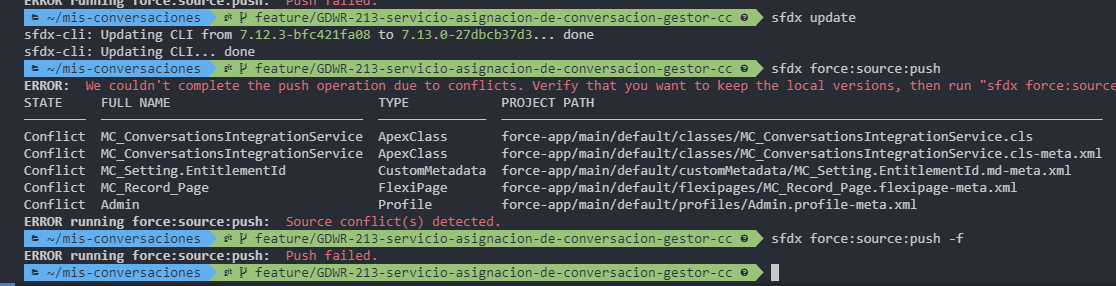
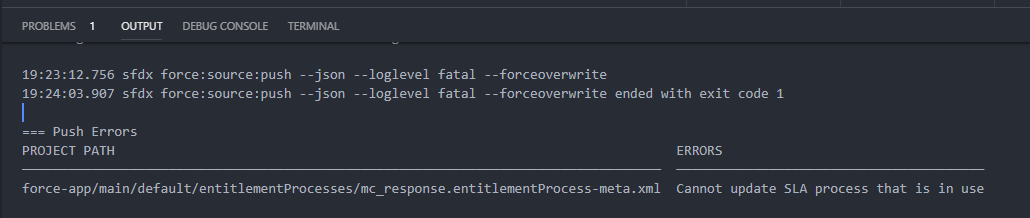
And vscode shows the error :\
 mnunezdm
on 27 Jun 2019
mnunezdm
on 27 Jun 2019
This issue has been fixed and will go out in next week's release (July 3).
 clairebianchi
on 28 Jun 2019
clairebianchi
on 28 Jun 2019
@clairebianchi Has the release been pushed out?
I am on latest version "Updating CLI... already on latest version: 7.13.0-27dbcb37d3"
But I am still facing this issue....
 martijnbrandse2
on 4 Jul 2019
martijnbrandse2
on 4 Jul 2019
Me too. Yesterday.
 rsoesemann
on 4 Jul 2019
rsoesemann
on 4 Jul 2019
Same here: the issue still exists in 7.13.0-27dbcb37d3
 chs-aosokin
on 4 Jul 2019
chs-aosokin
on 4 Jul 2019
I launched
sfdx plugins:install salesforcedx@latest
After installing I have this version: salesforcedx 46.4.0
Seems to fix the issue, maybe this works to:
sfdx plugins:update
Having the salesforcedx plugin installed overrides the code shipped by the normal Salesforce CLI. If you still have the issue in version 7.13 and have the salesforcedx plugin installed you should either uninstall that plugin or update to its latest version.
lcampos
on 5 Jul 2019
Our release was delayed last week due to an issue with the installer and then the holiday in the USA. The release went out this morning that should fix this issue the current version is 7.14.0
clairebianchi
on 8 Jul 2019
I'm facing the issue in SFDX version - sfdx-cli/7.20.1-d88ae4707c win32-x64 node-v10.15.3
See the below error following the command - sfdx force:source:push -f --json --loglevel INFO
{
"status": 1,
"result": [
{
"error": "Unknown"
}
],
"name": "DeployFailed",
"message": "Push failed.",
"exitCode": 1,
"commandName": "SourcePushCommand",
"data": [
{
"error": "Unknown"
}
],
"stack": "DeployFailed: Push failed.\n at MetadataRegistry.initializeMetadataTypeInfos.then.then.catch.e (C:\Users\ramadop\AppData\Local\sfdx\client\7.20.1-d88ae4707c\node_modules\sa
lesforce-alm\dist\lib\source\sourceApiCommand.js:64:31)\n at tryCatcher (C:\Users\ramadop\AppData\Local\sfdx\client\7.20.1-d88ae4707c\node_modules\bluebird\js\release\util.js:16:2
3)\n at Promise._settlePromiseFromHandler (C:\Users\ramadop\AppData\Local\sfdx\client\7.20.1-d88ae4707c\node_modules\bluebird\js\release\promise.js:517:31)\n at Promise._settleProm
ise (C:\Users\ramadop\AppData\Local\sfdx\client\7.20.1-d88ae4707c\node_modules\bluebird\js\release\promise.js:574:18)\n at Promise._settlePromise0 (C:\Users\ramadop\AppData\Local\
\sfdx\client\7.20.1-d88ae4707c\node_modules\bluebird\js\release\promise.js:619:10)\n at Promise._settlePromises (C:\Users\ramadop\AppData\Local\sfdx\client\7.20.1-d88ae4707c\node_m
odules\bluebird\js\release\promise.js:695:18)\n at _drainQueueStep (C:\Users\ramadop\AppData\Local\sfdx\client\7.20.1-d88ae4707c\node_modules\bluebird\js\release\async.js:138:12)\
n at _drainQueue (C:\Users\ramadop\AppData\Local\sfdx\client\7.20.1-d88ae4707c\node_modules\bluebird\js\release\async.js:131:9)\n at Async._drainQueues (C:\Users\ramadop\AppData
\Local\sfdx\client\7.20.1-d88ae4707c\node_modules\bluebird\js\release\async.js:147:5)\n at Immediate.Async.drainQueues [as _onImmediate] (C:\Users\ramadop\AppData\Local\sfdx\client
\7.20.1-d88ae4707c\node_modules\bluebird\js\release\async.js:17:14)\n at runCallback (timers.js:705:18)\n at tryOnImmediate (timers.js:676:5)\n at processImmediate (timers.js:658:5)",
"warnings": []
}
Could someone please provide a solution for this? Thanks in advance!
 PadhmaPriya
on 21 Aug 2019
PadhmaPriya
on 21 Aug 2019
This is still happening. I have the latest version.
 AllanOricil
on 14 Oct 2019
AllanOricil
on 14 Oct 2019
I am facing the same issue after update of new CLI. No Error displayed on the push.
When put --json flag, it is coming with below error.
sfdx force:source:push -f --json
{
"status": 1,
"result": [
{
"error": "Unknown"
}
],
"name": "DeployFailed",
"message": "Push failed.",
"exitCode": 1,
"commandName": "SourcePushCommand",
"data": [
{
"error": "Unknown"
}
],
"stack": "DeployFailed: Push failed.\n at MetadataRegistry.initializeMetadataTypeInfos.then.then.catch.e (/Users/ankurg/.local/share/sfdx/client/7.28.7-7bceba6f24/node_modules/salesforce-alm/dist/lib/source/sourceApiCommand.js:64:31)\n at tryCatcher (/Users/ankurg/.local/share/sfdx/client/7.28.7-7bceba6f24/node_modules/salesforce-alm/node_modules/bluebird/js/release/util.js:16:23)\n at Promise._settlePromiseFromHandler (/Users/ankurg/.local/share/sfdx/client/7.28.7-7bceba6f24/node_modules/salesforce-alm/node_modules/bluebird/js/release/promise.js:517:31)\n at Promise._settlePromise (/Users/ankurg/.local/share/sfdx/client/7.28.7-7bceba6f24/node_modules/salesforce-alm/node_modules/bluebird/js/release/promise.js:574:18)\n at Promise._settlePromise0 (/Users/ankurg/.local/share/sfdx/client/7.28.7-7bceba6f24/node_modules/salesforce-alm/node_modules/bluebird/js/release/promise.js:619:10)\n at Promise._settlePromises (/Users/ankurg/.local/share/sfdx/client/7.28.7-7bceba6f24/node_modules/salesforce-alm/node_modules/bluebird/js/release/promise.js:695:18)\n at _drainQueueStep (/Users/ankurg/.local/share/sfdx/client/7.28.7-7bceba6f24/node_modules/salesforce-alm/node_modules/bluebird/js/release/async.js:138:12)\n at _drainQueue (/Users/ankurg/.local/share/sfdx/client/7.28.7-7bceba6f24/node_modules/salesforce-alm/node_modules/bluebird/js/release/async.js:131:9)\n at Async._drainQueues (/Users/ankurg/.local/share/sfdx/client/7.28.7-7bceba6f24/node_modules/salesforce-alm/node_modules/bluebird/js/release/async.js:147:5)\n at Immediate.Async.drainQueues [as _onImmediate] (/Users/ankurg/.local/share/sfdx/client/7.28.7-7bceba6f24/node_modules/salesforce-alm/node_modules/bluebird/js/release/async.js:17:14)\n at runCallback (timers.js:705:18)\n at tryOnImmediate (timers.js:676:5)\n at processImmediate (timers.js:658:5)",
"warnings": []
}
 ankur-gandhi
on 17 Oct 2019
ankur-gandhi
on 17 Oct 2019
Hi team! i'm with the same issue
{
    "status": 1,
    "result": [
        {
            "error": "Unknown"
        }
    ],
    "name": "DeployFailed",
    "message": "Push failed.",
    "exitCode": 1,
    "commandName": "SourcePushCommand",
    "data": [
        {
            "error": "Unknown"
        }
    ],
    "stack": "DeployFailed: Push failed.\n    at MetadataRegistry.initializeMetadataTypeInfos.then.then.catch.e (/home/martinlarizzate/.local/share/sfdx/client/7.28.7-7bceba6f24/node_modules/salesforce-alm/dist/lib/source/sourceApiCommand.js:64:31)\n    at tryCatcher (/home/martinlarizzate/.local/share/sfdx/client/7.28.7-7bceba6f24/node_modules/salesforce-alm/node_modules/bluebird/js/release/util.js:16:23)\n    at Promise._settlePromiseFromHandler (/home/martinlarizzate/.local/share/sfdx/client/7.28.7-7bceba6f24/node_modules/salesforce-alm/node_modules/bluebird/js/release/promise.js:517:31)\n    at Promise._settlePromise (/home/martinlarizzate/.local/share/sfdx/client/7.28.7-7bceba6f24/node_modules/salesforce-alm/node_modules/bluebird/js/release/promise.js:574:18)\n    at Promise._settlePromise0 (/home/martinlarizzate/.local/share/sfdx/client/7.28.7-7bceba6f24/node_modules/salesforce-alm/node_modules/bluebird/js/release/promise.js:619:10)\n    at Promise._settlePromises (/home/martinlarizzate/.local/share/sfdx/client/7.28.7-7bceba6f24/node_modules/salesforce-alm/node_modules/bluebird/js/release/promise.js:695:18)\n    at _drainQueueStep (/home/martinlarizzate/.local/share/sfdx/client/7.28.7-7bceba6f24/node_modules/salesforce-alm/node_modules/bluebird/js/release/async.js:138:12)\n    at _drainQueue (/home/martinlarizzate/.local/share/sfdx/client/7.28.7-7bceba6f24/node_modules/salesforce-alm/node_modules/bluebird/js/release/async.js:131:9)\n    at Async._drainQueues (/home/martinlarizzate/.local/share/sfdx/client/7.28.7-7bceba6f24/node_modules/salesforce-alm/node_modules/bluebird/js/release/async.js:147:5)\n    at Immediate.Async.drainQueues [as _onImmediate] (/home/martinlarizzate/.local/share/sfdx/client/7.28.7-7bceba6f24/node_modules/salesforce-alm/node_modules/bluebird/js/release/async.js:17:14)\n    at runCallback (timers.js:705:18)\n    at tryOnImmediate (timers.js:676:5)\n    at processImmediate (timers.js:658:5)",
    "warnings": []
}
 truetincho
on 17 Oct 2019
truetincho
on 17 Oct 2019
I am facing the same problem when I execute the command
sfdx force:source:deploy -m ApexClass:ClassNameRepository -l RunLocalTests -u myOrgProd --json --loglevel error
I upgrade to the following versions sfdx-cli / 7.30.13-9e204762d5 win32-x64 node-v10.15.3
and salesforcedx installed v47.3.7
Error:
{
    "status": 1,
    "result": [
        {
            "error": "Unknown"
        }
    ],
    "name": "DeployFailed",
    "message": "Deploy failed.",
    "exitCode": 1,
    "commandName": "SourceDeployCommand",
    "data": [
        {
            "error": "Unknown"
        }
    ],
    "stack": "DeployFailed: Deploy failed.\n    at MetadataRegistry.initializeMetadataTypeInfos.then.then.catch.e ",
    "warnings": []
}
 whernandez
on 29 Oct 2019
whernandez
on 29 Oct 2019
I am also facing the same issue. I have the latest version of the sfdx.
G:\salesForce\FernApp>sfdx force:source:push --json -f -u [email protected]
{
"status": 1,
"result": [
{
"error": "Unknown"
}
],
"name": "DeployFailed",
"message": "Push failed.",
"exitCode": 1,
"commandName": "SourcePushCommand",
"data": [
{
"error": "Unknown"
}
],
"stack": "DeployFailed: Push failed.\n at MetadataRegistry.initializeMetadataTypeInfos.then.then.catch.e (C:\Users\bca\AppData\Local\sfdx\client\7.31.0-6a986f8be5\node_modules\salesforce-alm\dist\lib\source\sourceApiCommand.js:64:31)\n at tryCatcher (C:\Users\bca\AppData\Local\sfdx\client\7.31.0-6a986f8be5\node_modules\salesforce-alm\node_modules\bluebird\js\release\util.js:16:23)\n at Promise._settlePromiseFromHandler (C:\Users\bca\AppData\Local\sfdx\client\7.31.0-6a986f8be5\node_modules\salesforce-alm\node_modules\bluebird\js\release\promise.js:517:31)\n at Promise._settlePromise (C:\Users\bca\AppData\Local\sfdx\client\7.31.0-6a986f8be5\node_modules\salesforce-alm\node_modules\bluebird\js\release\promise.js:574:18)\n at Promise._settlePromise0 (C:\Users\bca\AppData\Local\sfdx\client\7.31.0-6a986f8be5\node_modules\salesforce-alm\node_modules\bluebird\js\release\promise.js:619:10)\n at Promise._settlePromises (C:\Users\bca\AppData\Local\sfdx\client\7.31.0-6a986f8be5\node_modules\salesforce-alm\node_modules\bluebird\js\release\promise.js:695:18)\n at _drainQueueStep (C:\Users\bca\AppData\Local\sfdx\client\7.31.0-6a986f8be5\node_modules\salesforce-alm\node_modules\bluebird\js\release\async.js:138:12)\n at _drainQueue (C:\Users\bca\AppData\Local\sfdx\client\7.31.0-6a986f8be5\node_modules\salesforce-alm\node_modules\bluebird\js\release\async.js:131:9)\n at Async._drainQueues (C:\Users\bca\AppData\Local\sfdx\client\7.31.0-6a986f8be5\node_modules\salesforce-alm\node_modules\bluebird\js\release\async.js:147:5)\n at Immediate.Async.drainQueues [as _onImmediate] (C:\Users\bca\AppData\Local\sfdx\client\7.31.0-6a986f8be5\node_modules\salesforce-alm\node_modules\bluebird\js\release\async.js:17:14)\n at runCallback (timers.js:705:18)\n at tryOnImmediate (timers.js:676:5)\n at processImmediate (timers.js:658:5)",
"warnings": []
}
 Pargavifern
on 3 Nov 2019
Pargavifern
on 3 Nov 2019
Can someone please help me to resolve this
Pargavifern
on 3 Nov 2019
Regards,
In my case I solved the problem using the Ant Migration Tool https://developer.salesforce.com/docs/atlas.en-us.daas.meta/daas/meta_development.htm
With this tooling I was able to obtain more details of my problem, finally my problem is that it was not covering 75% of the code in the Test.
I hope this can help you too.
whernandez
on 5 Nov 2019
Can someone confirm that this issue is happening on version 7.31.0?
I am able to see error messages as expected:
sfdx force:source:deploy -u [email protected] -p force-app/main/default/
PROJECT PATH  ERROR
────────────  ────────────────────────────
N/A           Invalid language en_S (3:13)
ERROR running force:source:deploy:  Deploy failed.
 mdonnalley
on 5 Nov 2019
mdonnalley
on 5 Nov 2019
Regards,
In my case I solved the problem using the Ant Migration Tool https://developer.salesforce.com/docs/atlas.en-us.daas.meta/daas/meta_development.htmWith this tooling I was able to obtain more details of my problem, finally my problem is that it was not covering 75% of the code in the Test.
I hope this can help you too.
Thank you for this solution. I will let you know after working with this. I hope it works to.
Pargavifern
on 6 Nov 2019
Team I solved the issue with a version downgrade.
Please check at this stackexchange question
 mlarizzate
on 6 Nov 2019
mlarizzate
on 6 Nov 2019
@mlarizzate @Pargavifern
Can either of you confirm that the issue is occurring in version 7.31.0?
mdonnalley
on 7 Nov 2019
Yes its occurring in the version of sfdx-cli/7.31.0 win32-x64 node-v12.13.0
Pargavifern
on 8 Nov 2019
@Pargavifern Thank you. Can you show me the output of sfdx plugins --core?
mdonnalley
on 8 Nov 2019
@mdonnalley Yeah definitely but can I send you the output on this Monday. If you don't mind.
Pargavifern
on 8 Nov 2019
Hi @mdonnalley
Sorry for the late reply
C:\Users\admin>sfdx plugins --core
@oclif/plugin-commands 1.2.3 (core)
@oclif/plugin-help 2.2.1 (core)
@oclif/plugin-not-found 1.2.3 (core)
@oclif/plugin-plugins 1.7.8 (core)
@oclif/plugin-update 1.3.9 (core)
@oclif/plugin-warn-if-update-available 1.7.0 (core)
@oclif/plugin-which 1.0.3 (core)
@salesforce/sfdx-trust 3.0.7 (core)
analytics 1.2.2 (core)
generator 1.1.2 (core)
salesforcedx 47.4.0 (core)
├─ salesforcedx-templates 47.3.2 (core)
└─ salesforce-alm 47.7.0 (core)
sfdx-cli 7.31.0 (core)
Pargavifern
on 11 Nov 2019
Hi @Pargavifern, I'll be taking over this task for the week... I tried pushing an apex class with a lot of errors, and they all appeared for me.
```public class foo {
foo(){
let x = "abc";
x=23
}
x => axb();
}
PROJECT PATH ERROR
────────────────────────────────────── ─────────────────────────────────────────────────────────────────────────
force-app/main/default/classes/foo.cls Unrecognized symbol '"', which is not a valid Apex identifier. (5:17)
force-app/main/default/classes/foo.cls Unrecognized symbol '"', which is not a valid Apex identifier. (5:21)
force-app/main/default/classes/foo.cls Missing ';' at '}' (7:5)
force-app/main/default/classes/foo.cls Unexpected token '=>'. (9:7)
force-app/main/default/classes/foo.cls Method already defined:
force-app/main/default/classes/foo.cls Invalid type: let (5:9)
force-app/main/default/classes/foo.cls Illegal assignment from Integer to let (6:9)
force-app/main/default/classes/foo.cls Invalid constructor name: axb (9:10)
force-app/main/default/classes/foo.cls Unexpected token '=>'. (9:7)
ERROR running force:source:push: Push failed.
```
looking in the code it has error catches for Failed Deploys, Timeouts, and Source Conflicts, so the error you're facing isn't one of those. Have you tried pushing only parts of your code in order to narrow down what specific parts of the file the error might be in. Or is it that you're not meeting the 75% code coverage issue like mentioned above? Is the ANT tool able to provide any more information?
 ghost
on 12 Nov 2019
ghost
on 12 Nov 2019
Hi @williamruemmele-sf
I created only a custom object and linked to standard object. Like this I created 2 project and merged into to one to push it into the scratch. That time it throws error like this. I didn't add anything.
Pargavifern
on 12 Nov 2019
so it failed correctly, with errors?
ghost
on 12 Nov 2019
Yes. But it doesn't show error
Pargavifern
on 12 Nov 2019
Would you be available to set up a quick meeting to walk me through your reproduction steps?
ghost
on 12 Nov 2019
Sorry I don't understand @williamruemmele-sf
Pargavifern
on 12 Nov 2019
Can we video call to go over the problem?
ghost
on 12 Nov 2019
Really sorry to say this. But currently I can't able to do it. But I can share my project
Pargavifern
on 12 Nov 2019
Related issues
 btamburrino
·
3Comments
btamburrino
·
3Comments
 aheber
·
3Comments
aheber
·
3Comments
 Julian88Tex
·
4Comments
Julian88Tex
·
4Comments
 loganm
·
4Comments
loganm
·
4Comments
 e02d96ec16
·
4Comments
e02d96ec16
·
4Comments
Most helpful comment
@clairebianchi Has the release been pushed out?
I am on latest version "Updating CLI... already on latest version: 7.13.0-27dbcb37d3"
But I am still facing this issue....