I am not able to retrieve my LWC components from org to local on windows machine . I ran below commands but both failed
sfdx force:source:retrieve -m LightningComponentBundle
or
sfdx force:source:retrieve -m LightningComponentBundle:helloWorld
 vijaykumar8448
All 25 comments
Hi @vijaykumar8448, can you provide the following details so we can look into this, sfdx cli version you are using, salesforcedx vscode extensions version and vscode version. Thanks.
 lcampos
on 7 Feb 2019
lcampos
on 7 Feb 2019
Vs Code version information
Version: 1.30.2 (user setup)
Commit: 61122f88f0bf01e2ac16bdb9e1bc4571755f5bd8
Date: 2019-01-07T22:54:13.295Z
Electron: 2.0.12
Chrome: 61.0.3163.100
Node.js: 8.9.3
V8: 6.1.534.41
OS: Windows_NT x64 10.0.17134
sfdx version : sfdx-cli/6.51.1-ba7205094b (windows-x64) node-v8.9.4
Salesforce vs code extension version : 44.18.0
vijaykumar8448
on 8 Feb 2019
Same issue with me too
 pagwekar
on 8 Feb 2019
pagwekar
on 8 Feb 2019
I have the same issue, but on Windows only.
I had a look and it seems that it's related to a path separator used "\", while on Windows the path returned is something like 'unpackaged/lwc/myField/myField.html'.
The full stack trace:
ERROR: Cannot read property 'fileName' of undefined.
ERROR:
*** Internal Diagnostic ***

TypeError: Cannot read property 'fileName' of undefined
  at Function.getMetadataFileNameFromBundleFileProperties (D:\Users\ftaillon\AppData\Local\sfdx\plugins\node_modules\salesforce-alm\dist\lib\bundlePathHelper.js:27:48)
  at LightningComponentBundleMetadataType.getRetrievedMetadataPath (D:\Users\ftaillon\AppData\Local\sfdx\plugins\node_modules\salesforce-alm\dist\lib\metadataTypeImpl\lightningComponentBundleMetadataType.js:44:62)
  at SourceWorkspaceAdapter.processMdapiFileProperty (D:\Users\ftaillon\AppData\Local\sfdx\plugins\node_modules\salesforce-alm\dist\lib\sourceWorkspaceAdapter.js:241:78)
  at result.fileProperties.forEach (D:\Users\ftaillon\AppData\Local\sfdx\plugins\node_modules\salesforce-alm\dist\lib\mdapiPullApi.js:134:22)
  at Array.forEach (<anonymous>)
  at MdapiPullApi._syncDownSource (D:\Users\ftaillon\AppData\Local\sfdx\plugins\node_modules\salesforce-alm\dist\lib\mdapiPullApi.js:128:31)
  at SourceRetrieve.<anonymous> (D:\Users\ftaillon\AppData\Local\sfdx\plugins\node_modules\salesforce-alm\dist\lib\source\sourceRetrieve.js:110:56)
  at Generator.next (<anonymous>)
  at fulfilled (D:\Users\ftaillon\AppData\Local\sfdx\plugins\node_modules\salesforce-alm\dist\lib\source\sourceRetrieve.js:10:58)
  at <anonymous>
******
Workaround
It's possible to use a package.xml like the following:
<?xml version="1.0" encoding="UTF-8" standalone="yes"?>
    <Package xmlns="http://soap.sforce.com/2006/04/metadata">
        <types>
            <members>*</members>
            <name>LightningComponentBundle</name>
        </types>
    <version>45.0</version>
</Package>
Then using sfdx force:mdapi:retrieve, it should work.
More details:
Under mdapiPullApi._syncDownSource, result.fileProperties is getting a fileName like this: 'unpackaged/lwc/myField/myField.html'.
Later on, in bundlePathHelper.scanFilePathForAggregateFullName, the separator used (const pathArray = path.dirname(filePath).split(path.sep);) is "\" (which is not the same as what's in the path previously returned in result.fileProperties, I assume because I'm on Windows).
Function then returns because of the following line:
if (defaultDirIndex === -1 || (defaultDirIndex + 1) > pathArray.length), no fileName path is found and the command crashes a little bit later.
 FabienTaillon
on 8 Feb 2019
FabienTaillon
on 8 Feb 2019
Hi @vijaykumar8448, @pagwekar, @FabienTaillon - does this problem persist even if you update your Salesforcedx CLI plugin to v45 (currently the pre-release version)? You can update the version by running:
sfdx plugins:install salesforcedx@pre-release
 allileong
on 8 Feb 2019
allileong
on 8 Feb 2019
@allileong Yes . I have already installed this when I was doing setup for LWC .
vijaykumar8448
on 8 Feb 2019
Yes, same here. LWC is only available in v45, so this bug is only happening in prerelease.
FabienTaillon
on 8 Feb 2019
Great, thanks for the info. A fix is currently in progress.
allileong
on 8 Feb 2019
Yes, same here. LWC is only available in v45, so this bug is only happening in prerelease.
This bug still exist in v45 stable( Only in Windows ), but it works fine in Linux.
Below Screenshot is from v45 stable release without salesforcedx plugin.
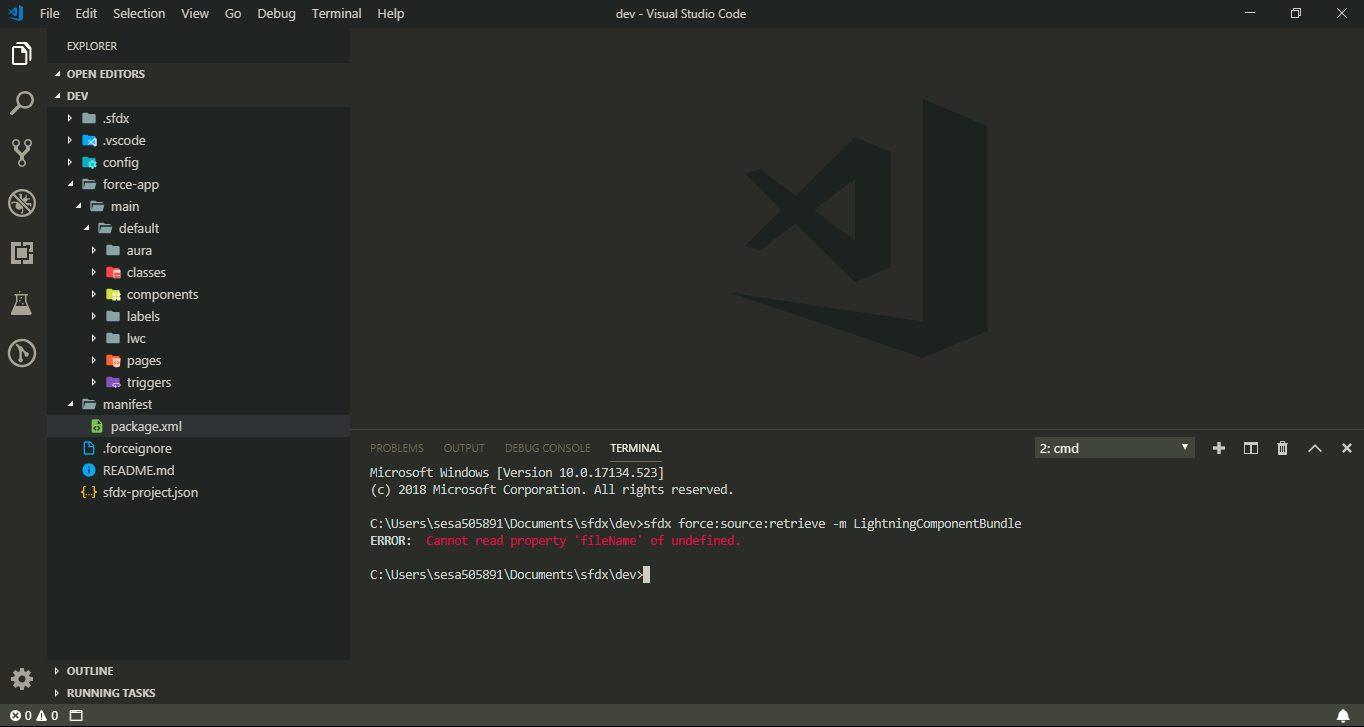 .
.
Same Command works fine in Linux with the same Configuration.
 vinodatschneider
on 12 Feb 2019
vinodatschneider
on 12 Feb 2019
Wanted to provide an update on this. We've replicated the issue on our side and are currently working on a fix. Apologies for the bad experience this is currently causing, we'll update this thread once the fix is available.
lcampos
on 13 Feb 2019
Same issue here, waiting for a fix !!
 sfdcbox
on 13 Feb 2019
sfdcbox
on 13 Feb 2019
I'm having the same issue with retrieving LightningComponentBundle source from my sandbox (FYI, ApexClass worked fine to retrieve a controller I had created for the lwc I was working on). I tried the package.xml method that was mentioned above, but I received the same error (ERROR: Cannot read property 'fileName' of undefined.). I ended up using workbench to login to the sandbox and retrieve a zip using the Metadata API and the package I had created for getting my lwc component. This worked fine and then I just copied the files into the shell folder I had created with the same component name in VS Code. Now I'm able to make changes to the lwc component and deploy those changes to the sandbox. I hope this is useful for someone who is in a pinch, like I was, to get the source data for your lwc components and continue development.
 Richman7
on 14 Feb 2019
Richman7
on 14 Feb 2019
Well, the same issue is with AuraDefinationBundle, It is not showing any error, but components are not retrieved.
$ sfdx force:source:retrieve -m AuraDefinationBundle
=== Retrieved Source
No results found
Using VS Code on Windows 64 bit
 rajendrasnagar
on 15 Feb 2019
rajendrasnagar
on 15 Feb 2019
Well, the same issue is with AuraDefinationBundle, It is not showing any error, but components are not retrieved.
$ sfdx force:source:retrieve -m AuraDefinationBundle
=== Retrieved Source
No results found
Using VS Code on Windows 64 bit
Please check the metadata spelling, it should be "AuraDefinitionBundle" instead of "AuraDefinationBundle"
vinodatschneider
on 15 Feb 2019
I'm having the same issue with retrieving LightningComponentBundle source from my sandbox (FYI, ApexClass worked fine to retrieve a controller I had created for the lwc I was working on). I tried the package.xml method that was mentioned above, but I received the same error (ERROR: Cannot read property 'fileName' of undefined.). I ended up using workbench to login to the sandbox and retrieve a zip using the Metadata API and the package I had created for getting my lwc component. This worked fine and then I just copied the files into the shell folder I had created with the same component name in VS Code. Now I'm able to make changes to the lwc component and deploy those changes to the sandbox. I hope this is useful for someone who is in a pinch, like I was, to get the source data for your lwc components and continue development.
Thanks a lot for providing the alternative.
vinodatschneider
on 15 Feb 2019
It was my bad @vinodatschneider, Thanks for your update.
rajendrasnagar
on 15 Feb 2019
This will be fixed in the next patch release of the salesforcedx plugin (2/21/19). Thanks for your patience!
 shetzel
on 16 Feb 2019
shetzel
on 16 Feb 2019
This is not fixed in this release. I am still facing the same issue.
 ThiruManoj
on 25 Feb 2019
ThiruManoj
on 25 Feb 2019
I tried today after running sfdx update (salesforcedx 45.3.4 (core)), and it's now working fine :)
FabienTaillon
on 25 Feb 2019
*.js-meta.xml file not retrieved when retrieving component for the first time. I've updated to salesforcedx plugin version 45.3.4 and tried to retrieve an lwc component that was created on a different computer. I was unable to retrieve the lwc component by its name from my Sandbox environment. I was able to retrieve the component.html and component.js files using a package.xml file to retrieve all LightningComponentBundles. I can also retrieve all lwc components using 'sfdx force:source:retrieve -m LightningComponentBundle'. In both cases, this does retrieve the *.js-meta.xml files from other lwc components that were already on this computer, but not the component.js-meta.xml file for the component I was trying to retrieve to this computer for the first time. I had to get the LightningComponentBundle using Workbench (with the exact same package.xml) to also retrieve the component.js-meta.xml file for this component.
Additionally, I am not able to retrieve any component using 'sfdx force:source:retrieve -m LightningComponentBundle:componentName' for any of my lwc components. I am able to retrieve the lwc component by right-clicking the folder in VS Code and selecting 'SFDX: Retrieve Source from Org', but only after I have added the component.js-meta.xml file to the folder (and possibly after deploying the folder with the component.js-meta.xml file in the folder).
Richman7
on 25 Feb 2019
I reproduced the issue and am working on a fix now. I'm hopeful to get this into the next patch release this Thursday. My apologies for the incomplete fix!
shetzel
on 25 Feb 2019
This should be fixed with the patch release tomorrow. Closing this issue. Thanks for reporting and for patiently awaiting the fixes.
shetzel
on 27 Feb 2019
i have this issue with AuraDefinitionBundle
1)sfdx -v:
sfdx-cli/7.19.0-c5be43915c win32-x64 node-v10.15.3
2)sfdx plugins:
no plugins installed
 santiagobermudezparra
on 14 Aug 2019
santiagobermudezparra
on 14 Aug 2019
SfdxError: You must specify the Aura bundle folder, not an individual component.
 elvisleonm
on 9 Sep 2019
elvisleonm
on 9 Sep 2019
I still same error while retrieving AuraDefinitionBundle
sfdx-cli 7.82.0 (core)
 sajidpeerjade
on 2 Jan 2021
sajidpeerjade
on 2 Jan 2021
Related issues
 rogeramitchell
·
3Comments
rogeramitchell
·
3Comments
 pozil
·
3Comments
pozil
·
3Comments
 kratoon3
·
4Comments
kratoon3
·
4Comments
 ImJohnMDaniel
·
5Comments
ImJohnMDaniel
·
5Comments
 AllanOricil
·
3Comments
AllanOricil
·
3Comments
Most helpful comment
Great, thanks for the info. A fix is currently in progress.