Install Heroku + Setup Bash Completion:
$ brew install bash-completions@2
$ brew install heroku/brew/heroku
$ heroku update
$ heroku autocomplete bash
$ ln -s ~/Library/Caches/heroku/autocomplete/bash_setup /usr/local/etc/bash_completion.d
$ echo '. /usr/local/share/bash-completion/bash_completion' >> ~/.bash_profile
$ . ~/.bash_profile
Try autocomplete examples (TABTAB):
$ heroku ^[[01;31m^[[K
$ heroku apps:info --
First displays odd characters, second does nothing and seems to hang when using DEBUG.
Heroku: 7.18.4
Bash: 4.4.23(1)
Mac OS Mojave 10.14
NOTE: It used to work, I noticed the issue shortly after upgrading to Mojave. Other bash completions are working.
 JBallin
All 6 comments
Thanks, for the heads-up @JBallin! We'll investigate.
cc @RasPhilCo
 elbandito
on 6 Nov 2018
elbandito
on 6 Nov 2018
Greetings here @elbandito @RasPhilCo !
I am experiencing a similar issue with completion now.
Also, I have to say, CLI got unbelievably slow.
But all this happens only when I am inside a Heroku dyno in python shell:
heroku run bash
python
>>> ^[[A
It was working with Mac OS Mojave 10.14.1 for me (with autocompletion and fast).
It just broke recently with one of the recent Heroku CLI updates, we should check what happened there.
P.S. Reinstalling CLI and heroku autocomplete --refresh-cache did not help.
P.P.S I've got feedback from a couple of my colleagues having the same issue.
 amureki
on 11 Dec 2018
amureki
on 11 Dec 2018
I have the same issue on Ubuntu 18.04.1 LTS.
 Ashlett
on 13 Dec 2018
Ashlett
on 13 Dec 2018
Hey there,
This seems not related to the system where the shell_plus is invoked from.
I tried on the console you are providing in the heroku interface, and it is the same broken behaviour.
See screenshot:
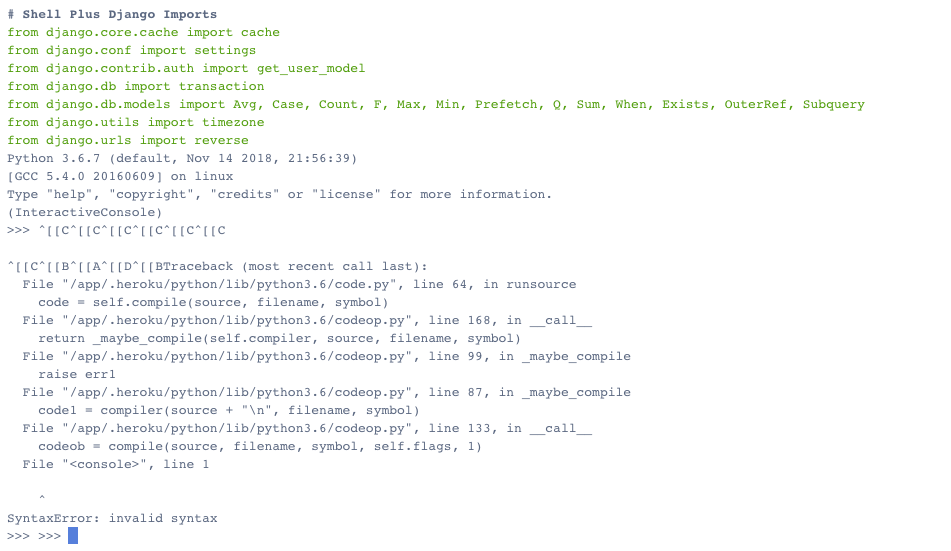
Help would be very appreciated.
best regards
 fidelitas
on 13 Dec 2018
fidelitas
on 13 Dec 2018
Try this load order:
$ rm /usr/local/etc/bash_completion.d/heroku
$ printf "$(heroku autocomplete:script bash)" >> ~/.bash_profile; source ~/.bash_profile
 RasPhilCo
on 3 Jan 2019
RasPhilCo
on 3 Jan 2019
Just added the autocomplete and can confirm the same issue. @RasPhilCo heroku does not exist in /usr/local/etc/bash_completion.d/ on my system.
 btoone
on 11 Apr 2020
btoone
on 11 Apr 2020
Related issues
 omarcostahamido
·
4Comments
omarcostahamido
·
4Comments
 saintthor
·
4Comments
saintthor
·
4Comments
 pushcx
·
7Comments
pushcx
·
7Comments
 beerlington
·
9Comments
beerlington
·
9Comments
 sdalezman
·
4Comments
sdalezman
·
4Comments
Most helpful comment
Greetings here @elbandito @RasPhilCo !
I am experiencing a similar issue with completion now.
Also, I have to say, CLI got unbelievably slow.
But all this happens only when I am inside a Heroku dyno in python shell:
It was working with Mac OS Mojave 10.14.1 for me (with autocompletion and fast).
It just broke recently with one of the recent Heroku CLI updates, we should check what happened there.
P.S. Reinstalling CLI and
heroku autocomplete --refresh-cachedid not help.P.P.S I've got feedback from a couple of my colleagues having the same issue.