Steps to reproduce the issue:
- add docker to the plugins array
- type docker and hit tab twice
Describe the results you received:
list of the files in the current directory
Describe the results you expected:
docker commands such as run
Additional information you deem important (e.g. issue happens only occasionally):
Output of docker version:
Client:
 Version:      17.03.1-ce
 API version:  1.27
 Go version:   go1.7.5
 Git commit:   c6d412e
 Built:        Tue Mar 28 00:40:02 2017
 OS/Arch:      darwin/amd64

Server:
 Version:      17.03.1-ce
 API version:  1.27 (minimum version 1.12)
 Go version:   go1.7.5
 Git commit:   c6d412e
 Built:        Fri Mar 24 00:00:50 2017
 OS/Arch:      linux/amd64
 Experimental: true
Output of docker info:
Containers: 2
 Running: 0
 Paused: 0
 Stopped: 2
Images: 2
Server Version: 17.03.1-ce
Storage Driver: overlay2
 Backing Filesystem: extfs
 Supports d_type: true
 Native Overlay Diff: true
Logging Driver: json-file
Cgroup Driver: cgroupfs
Plugins:
 Volume: local
 Network: bridge host ipvlan macvlan null overlay
Swarm: inactive
Runtimes: runc
Default Runtime: runc
Init Binary: docker-init
containerd version: 4ab9917febca54791c5f071a9d1f404867857fcc
runc version: 54296cf40ad8143b62dbcaa1d90e520a2136ddfe
init version: 949e6fa
Security Options:
 seccomp
  Profile: default
Kernel Version: 4.9.27-moby
Operating System: Alpine Linux v3.5
OSType: linux
Architecture: x86_64
CPUs: 4
Total Memory: 1.952 GiB
Name: moby
ID: G4R3:BP7S:FOLV:44UL:RWQ7:Z4FP:PPAC:VGD5:GDJR:LQPP:VTEC:B2QR
Docker Root Dir: /var/lib/docker
Debug Mode (client): false
Debug Mode (server): true
 File Descriptors: 16
 Goroutines: 26
 System Time: 2017-06-28T18:09:21.525357926Z
 EventsListeners: 1
No Proxy: *.local, 169.254/16
Registry: https://index.docker.io/v1/
Experimental: true
Insecure Registries:
 127.0.0.0/8
Live Restore Enabled: false
Additional environment details (AWS, VirtualBox, physical, etc.):
host os:osx sierra 10.12.16 beta
 NikosEfthias
All 28 comments
docker commands such as run
This sounds like the correct behaviour. Why do you expect a list of files?
 dnephin
on 19 Jul 2017
dnephin
on 19 Jul 2017
 this is what happens when I hit tab after docker. Does it seem correct? @dnephin
NikosEfthias
on 19 Jul 2017
Sorry, I misread the issue. Yes this looks wrong. I believe this is the default tab completion when nothing is installed. So maybe the problem is that it didn't get installed correctly?
dnephin
on 19 Jul 2017
hi
this is the line of plugins
plugins=(git,docker)
And this is what I read on the internet to prevent username on the prompt
prompt_context(){}
I don't know if it has something to do with this.
And these are the plugins containing the word docker

NikosEfthias
on 19 Jul 2017
I just tested the zsh completion and I hate to say that but _it works as expected on my machine_.

I'm using zprezto so I don't have the exact same setting but it should be really similar. From your screenshot I was wondering if the file shouldn't be _docker like it is in source.
You may also be interested in looking at that README especially if you are already using the zsh-completion package.
Hope that helps.
 jphuynh
on 20 Jul 2017
jphuynh
on 20 Jul 2017
i have added zsh completion package as described in the doc and then sourced zshrc but it doesnt fix the issue and i couldnt understand what you meant by ' I was wondering if the file shouldn't be _docker like it is in source'
NikosEfthias
on 20 Jul 2017
Sorry I misread the content of your screenshot. I assume that your tree looks like that ~/.oh-my-zsh/plugins/docker/_docker.
I think the array in your ~/.zshrc should be plugins=(git docker) (space separated) instead of plugins=(git,docker)
jphuynh
on 21 Jul 2017
@jphuynh yep that was the issue 🥇 thank you so much when i replace commas with spaces it worked like a charm .
NikosEfthias
on 21 Jul 2017
I am running a Digital Ocean VPS with Ubuntu 16.04.4 LTS installed and the oh-my-zsh setup.
Autocompletion works for docker commands but not for images. This is when I am logging in as a user without admin rights (sudo is always needed when doing anything with docker ).
Logging in as root however, autocomplete for images does work.
Does someone have a clue how I get autocompletion for images for the user to work?
 gitlines
on 27 Apr 2018
gitlines
on 27 Apr 2018
You don't have to be root to run Docker and arguably shouldn't.
Make sure your user is part of the Docker group or add it using: usermod -aG docker <yourUsername>
jphuynh
on 27 Apr 2018
@jphuynh ... like charm, thank you! I had to logout/ login. The autocomplete for the images also works now!
gitlines
on 27 Apr 2018
uninstall/remove oh-my-zsh and install it again.
 terryfernz
on 26 Mar 2019
terryfernz
on 26 Mar 2019
not working for me, take a look https://asciinema.org/a/gh0dsAd7wv14VyEIXi4OBJpke
 leite
on 2 Apr 2019
leite
on 2 Apr 2019
I solved the issue removing docker-ce and installing docker & docker.io from ubuntu repository
and also put these two lines at the end of my .zshrc
autoload -Uz compinit
compinit
thanks @naoliv
leite
on 2 Apr 2019
The solution from @leite worked for me as well. Can anyone explain why this works? Why it's necessary that I add this and why it isn't in the core already?
 dambrogia
on 11 Apr 2019
dambrogia
on 11 Apr 2019
Same issue @leite's suggestion fixed it for me as well.
 snaveevans
on 24 Apr 2019
snaveevans
on 24 Apr 2019
Although @leite's solution worked for me too, manually removing the shell's completion database via
rm -v ~/.zcompdump*
forces the shell to rebuild it and the completion for Docker finally starts working, without adding
autoload -Uz compinit && compinit
to my .zshrc file.
 brainplot
on 24 Apr 2019
brainplot
on 24 Apr 2019
Same issue. Tried @leite, @brainplot and @gitlines suggestions.
Not sure which suggestion actually made the fix.

 jnoelvictorino
on 26 Apr 2019
jnoelvictorino
on 26 Apr 2019
rm ~/.zcompdump*
Work for me.
 callofdutyops
on 7 May 2019
callofdutyops
on 7 May 2019
rm ~/.zcompdump* and reopening terminal still working on Linux Mint 17.04 too
 w4nd
on 27 Aug 2019
w4nd
on 27 Aug 2019
rm ~/.zcompdump* worked on ubuntu 18.04 thanks !
 Chichilele
on 8 Nov 2019
Chichilele
on 8 Nov 2019
Works on Mac OS (Mojave)! Thanks
 domvo
on 12 Nov 2019
domvo
on 12 Nov 2019
rm ~/.zcompdump* and reopening terminal worked for me too (macOS Catalina 10.15.1). No need to do compinit as mentioned above - which also works btw.
 mtmk
on 14 Nov 2019
mtmk
on 14 Nov 2019
Thank you. rm ~/.zcompdump* worked for me as well.
 SamEdwardes
on 17 Nov 2019
SamEdwardes
on 17 Nov 2019
Although @leite's solution worked for me too, manually removing the shell's completion database via
rm -v ~/.zcompdump*forces the shell to rebuild it and the completion for Docker finally starts working, without adding
autoload -Uz compinit && compinitto my
.zshrcfile.
Thank you. this also worked for me.
 SarathLUN
on 9 Dec 2019
SarathLUN
on 9 Dec 2019
If you've tried all of the above, and it zsh-completion for docker still doesn't work for you, that may be because you're in my situation:
- using oh-my-zshell
- file
~/.oh-my-zshell/plugins/docker/_dockeris not loaded
I don't know why this file is in the standard plugins folder, but I've head to add it to the zsh-completionsfpathvariable explicitly per the mentioned stackoverflow answer:
  plugins=(git)

  # Docker completions don't follow the standard, and path needs to be added directly to zsh-completions
  # Also, "rm ~/.zcompdump*", and "source ~/.zshrc"
  # https://stackoverflow.com/questions/37428133/zsh-docker-plugin-not-working
  fpath+=($ZSH/plugins/docker)

  plugins=(zsh-completions)
  autoload -U compinit && compinit
TL;DR
https://github.com/zsh-users/zsh-completions/blob/master/zsh-completions-howto.org
 axenol85
on 14 Apr 2020
axenol85
on 14 Apr 2020
Thank you @leite . It also solved my problem.
 rcepni
on 3 May 2020
rcepni
on 3 May 2020
Thank you @axenol85 . Leite's solution good but had to do it every time when I open a new terminal.
Yours look like permanent solution. I followed steps from below link which you provided already.
- https://stackoverflow.com/a/45406609/11959398
used Youhans's solution which I shared a screenshot of it below
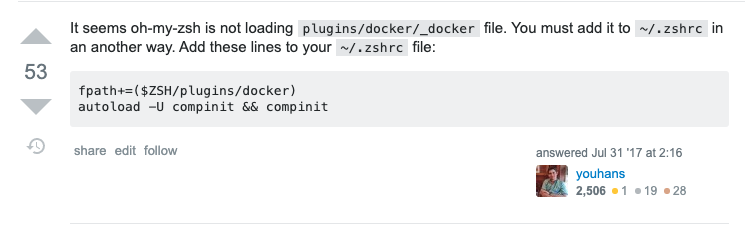
- You might have permission issue to make changes on zshrc. I have changed the permission from UI to make it "read and write" and added the code snippet to the end of the file. Now solved permanently.
rcepni
on 3 May 2020
Related issues
 stevenengler
·
3Comments
stevenengler
·
3Comments
 dedalusj
·
3Comments
dedalusj
·
3Comments
 bossmc
·
4Comments
bossmc
·
4Comments
 bryanhuntesl
·
3Comments
bryanhuntesl
·
3Comments
 johanneswuerbach
·
4Comments
johanneswuerbach
·
4Comments
Most helpful comment
Although @leite's solution worked for me too, manually removing the shell's completion database via
forces the shell to rebuild it and the completion for Docker finally starts working, without adding
to my
.zshrcfile.