Cli-microsoft365: Bug report: m365 teams team list -> Error: Request failed with status code 404
Description
Try to list all teams in my tenant with the teams team list command. Throws an error in "regular" mode, but I see the data if I provide the --debug switch.
Steps to reproduce
D:\DEV\PowerShell\Test
λ m365 teams team list
Error: Request failed with status code 404
Expected result
list of all teams in tenant
Actual result
Error: Request failed with status code 404
Environment
D:\DEV\PowerShell\Test
λ m365 version
v3.2.0
Win10 preview Build 201030-1438
 thomyg
All 19 comments
Hey @thomyg, thanks for reporting. When running the command against a CDX/MOD tenant, with 8 Teams it works just fine. We'd need some more information about what's going wrong exactly. Can you share some more information from the debug mode about the request that's failing to help us reproduce it?
 waldekmastykarz
on 13 Nov 2020
waldekmastykarz
on 13 Nov 2020
Thx @waldekmastykarz for the quick response!
That is the debug output part I assume to be the problem:
Request error
data      : {"error":{"code":"NotFound","message":"Failed to execute Skype backend request GetThreadS2SRequest.","innerError":{"date":"2020-11-13T11:19:33","request-id":"379513b6-099a-4e3a-ad36-c2e1c1bed5cd","client-request-id":"379513b6-099a-4e3a-ad36-c2e1c1bed5cd"}}}
headers   : {"cache-control":"private","content-type":"application/json","request-id":"379513b6-099a-4e3a-ad36-c2e1c1bed5cd","client-request-id":"379513b6-099a-4e3a-ad36-c2e1c1bed5cd","x-ms-ags-diagnostic":"{\"ServerInfo\":{\"DataCenter\":\"North Europe\",\"Slice\":\"SliceC\",\"Ring\":\"4\",\"ScaleUnit\":\"001\",\"RoleInstance\":\"AGSFE_IN_16\"}}","strict-transport-security":"max-age=31536000","date":"Fri, 13 Nov 2020 11:19:33 GMT","connection":"close","content-length":"322"}
status    : 404
statusText: Not Found
As the debug output has 4029 lines and it seems that all other request before are working and I have around 300 something teams in that tenant, I wouldn't be surprise for that to be something like a "boundary condition" case.
I'll try later today against another tenant, because this user here is in Ring 1.5 on a TAP tenant. Will try on a Ring 4 one for reference and follow up here.
thomyg
on 13 Nov 2020
Running against a tenant with 39 teams using version 3.1.0 is working. Will try to get a test tenant with some more teams :D
 appieschot
on 13 Nov 2020
appieschot
on 13 Nov 2020
Thanks for a quick turnaround and the additional info @thomyg. The more data we can gather, the quicker we should be able to fix it 👍
waldekmastykarz
on 13 Nov 2020
Looks like something is not working on my tenant. Tried "m365 teams team list" against a regular dev tenant with 181 teams and worked without a problem.
I tried walking through the debug output from the tenant that keeps failing. I have 295 teams in that tenant. And I tried to count the teams I get back from the calls. Looks like there are 3 batches made. If I count "displayName" in each of the response data lines, right at the beginning of the output, I count 100+100+95 times "displayName". So, that seems to get everything.
In the response section of the debug output I only count 286 responses, so there is something missing. This led me to have a look in the Teams admin center and I think I found a "suspect"
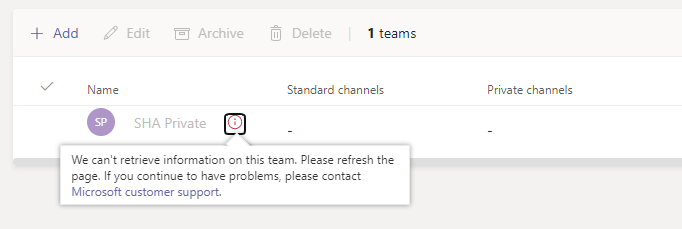
Keeps in that state also after a couple of refreshes. I guess, if the ootb admin center can't get detailed data for that team, I can't complain about the cli not being able to get the data either. It looks like the name is still retrievable through the API but accessing details throws an error.
Thank you all for your help and tests and let's hope this will be useful to others that might run into similar issues in the future.
thomyg
on 14 Nov 2020
That's some decent research. Thanks for the input!
appieschot
on 14 Nov 2020
Good find! So the question is how we should handle such cases where you can retrieve some data but not all. Shall we show what we can retrieve, potentially giving you the impression that it's all you've got, or shall we throw an error like we do now, even if we can retrieve some data?
waldekmastykarz
on 14 Nov 2020
I will use one of my MVP support cases to go deeper on the error. At least I would like to know how I can change that team to make the API work again without the obvious solution of deleting it.
I'm not sure that generating the impression of everything worked fine is the way to go if the API returns a 404. I do like the current behaviour of throwing an error. Without it, or with only a warning, I might not challenge the result and in my case would have not realised, that one of my teams has a potential issue.
thomyg
on 15 Nov 2020
Awesome! Appreciate your help @thomyg. Please, let us know if you find anything more about what's wrong with some of the Teams in your tenant.
waldekmastykarz
on 16 Nov 2020
Hey @thomyg, were you able to find anything more or shall we close this issue for now?
waldekmastykarz
on 13 Dec 2020
Closing due to lack of response
waldekmastykarz
on 11 Jan 2021
Actually just tripped across this same issue here, but in my case the Team that is causing the problem has no issues in my administration console. I can also take the exact same Graph call that fails in the CLI debug log, issue it through Graph Explorer, and it succeeds. We're in a GCC tenant, though, so there might be something different in our environment that's causing it. If I can gather any information that would be helpful, let me know what that would be.
 mcannava
on 12 Jan 2021
mcannava
on 12 Jan 2021
Right now, we don't support GCC High as it requires issuing different requests. We have a possible solution but we can't test it ourselves because we don't have access to a GCC tenant. If you'd be so kind, would you mind giving it a try? You can find more information about how to test at #1931
waldekmastykarz
on 12 Jan 2021
Right now, we don't support GCC High as it requires issuing different requests. We have a possible solution but we can't test it ourselves because we don't have access to a GCC tenant. If you'd be so kind, would you mind giving it a try? You can find more information about how to test at #1931
Oh, actually we're on GCC, not GCC High. Is this fix still relevant to our environment? I'm happy to try it anyway.
mcannava
on 12 Jan 2021
Yes, I believe it would be. Thank you so much for willing to give it a try 👏
waldekmastykarz
on 13 Jan 2021
Well, my experimenting was halted, the GCC High version didn't seem to want to do much with my GCC tenant; I had trouble even logging in and getting credentials to the shell. A lot of the commands didn't work, but again we're not in a GCC High environment, just good old GCC.
I can live with the 404 for now and use PowerShell to list all Teams. :-)
Thanks for the help, though!
mcannava
on 14 Jan 2021
You mean you couldn't use the version from the issue I referenced at all? If so, then we'd need to investigate what's wrong because it's meant to work on all clouds rather than just GCC High
waldekmastykarz
on 15 Jan 2021
You mean you couldn't use the version from the issue I referenced at all? If so, then we'd need to investigate what's wrong because it's meant to work on all clouds rather than just GCC High
I may have done something silly on my side, I was incredibly busy and trying to multitask when I tested it. I'll give it another go and let you know. Don't worry yet. :-)
mcannava
on 16 Jan 2021
Thank you for giving it another try, much appreciated!
waldekmastykarz
on 16 Jan 2021
Related issues
 VelinGeorgiev
·
3Comments
VelinGeorgiev
·
3Comments
 StfBauer
·
3Comments
VelinGeorgiev
·
3Comments
waldekmastykarz
·
3Comments
StfBauer
·
3Comments
VelinGeorgiev
·
3Comments
waldekmastykarz
·
3Comments
 aakashbhardwaj619
·
3Comments
aakashbhardwaj619
·
3Comments
Most helpful comment
I will use one of my MVP support cases to go deeper on the error. At least I would like to know how I can change that team to make the API work again without the obvious solution of deleting it.
I'm not sure that generating the impression of everything worked fine is the way to go if the API returns a 404. I do like the current behaviour of throwing an error. Without it, or with only a warning, I might not challenge the result and in my case would have not realised, that one of my teams has a potential issue.