Cli-microsoft365: Bug report: Adding File to SharePoint fails with status code 400, file uploads
Description
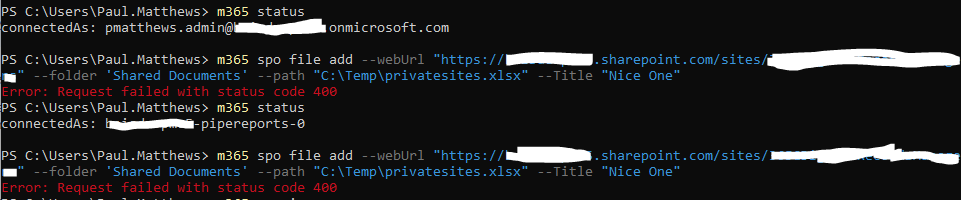
Receive a 400 status code error when uploading a file to SharePoint Online using m365
Steps to reproduce
Using Version 3.2.0
I am logged into m365 as myself who is a Site Collection Administrator on the site.
Using Powershell with the following command.
m365 spo file add --webUrl "https://[tenant].sharepoint.com/sites/Demo" --folder 'Shared Documents' --path 'c:\temp\filetoupload.csv'
I always get a response
node.exe : Error: Request failed with status code 400
At C:\Program Files\nodejs\m365.ps1:12 char:3
+   & "$basedir/node$exe"  "$basedir/node_modules/@pnp/cli-microsoft365 ...
+   ~~~~~~~~~~~~~~~~~~~~~~~~~~~~~~~~~~~~~~~~~~~~~~~~~~~~~~~~~~~~~~~~~~~
    + CategoryInfo          : NotSpecified: (Error: Request ...status code 400:String) [], RemoteException
    + FullyQualifiedErrorId : NativeCommandError
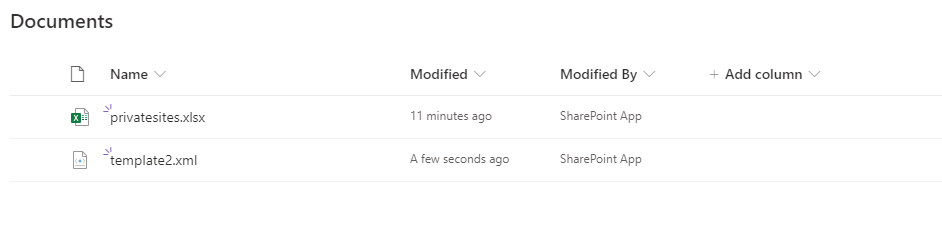
The file does appear on the site.
If I use my own Azure AD Identity with certificate, which has the following permissions (incase I have them wrong):
Microsoft Graph:
- Group.Read.All
- Sites.Manage.All
SharePoint: - Sites.FullControl.All
I also get 400 exception.
I have tried this in PowerShell, PowerShell Core and Bash and get the same response each time.
Expected result
No error message.
Actual result
node.exe : Error: Request failed with status code 400
At C:\Program Files\nodejs\m365.ps1:12 char:3
+   & "$basedir/node$exe"  "$basedir/node_modules/@pnp/cli-microsoft365 ...
+   ~~~~~~~~~~~~~~~~~~~~~~~~~~~~~~~~~~~~~~~~~~~~~~~~~~~~~~~~~~~~~~~~~~~
    + CategoryInfo          : NotSpecified: (Error: Request ...status code 400:String) [], RemoteException
    + FullyQualifiedErrorId : NativeCommandError


Environment
M365 CLI v 3.2.0
Windows Bash
PowerShell
PowerShell Core.
 pmatthews05
All 13 comments
Thanks for reporting @pmatthews05 and sorry for the trouble. We'll have a look if we can repro it and will take it from there 👍
 waldekmastykarz
on 6 Nov 2020
waldekmastykarz
on 6 Nov 2020
The ValidateUpdateListItem API returns "Column '_' does not exist. Will investigate it a bit more, as I currently require this as well for my solution.
 estruyf
on 6 Nov 2020
estruyf
on 6 Nov 2020
Found the issue, seems to be an issue in the mapUnknownOptionsAsFieldValue method. This passes all options to map them as field values. There is a list to exclude fields, but this list is not complete, as it does not contain all the flags:
[
  { FieldName: '_', FieldValue: 'spo,file,add' },
  {
    FieldName: 'u',
    FieldValue: 'https://tenant.sharepoint.com/sites/mainsite'
  },
  { FieldName: 'f', FieldValue: 'Shared Documents' },
  {
    FieldName: 'p',
    FieldValue: '/assets/sample1.png'
  }
]
Our bad and good catch @estruyf.
waldekmastykarz
on 6 Nov 2020
The
ValidateUpdateListItemAPI returns"Column '_' does not exist. Will investigate it a bit more, as I currently require this as well for my solution.
@arjunumenon did you not fix an issue like this recently on another command?
I think it was by product related to us removing the dependency on Vorpal.
/cc @waldekmastykarz
 garrytrinder
on 7 Nov 2020
garrytrinder
on 7 Nov 2020
We have just released a fix for this in the latest preview version. Would you mind checking if all is working as expected @pmatthews05?
waldekmastykarz
on 7 Nov 2020
@waldekmastykarz thank you for this. I will confirm this by Monday at the latest. Not near a PC this weekend.
pmatthews05
on 7 Nov 2020
Excellent! Thank you once again for reporting and please, don't hesitate to reach out if there is anything out of the ordinary. Enjoy your weekend!
waldekmastykarz
on 7 Nov 2020
The
ValidateUpdateListItemAPI returns"Column '_' does not exist. Will investigate it a bit more, as I currently require this as well for my solution.@arjunumenon did you not fix an issue like this recently on another command?
I think it was by product related to us removing the dependency on Vorpal.
/cc @waldekmastykarz
Hey @garrytrinder - Guess I am late for the party. Seems like @waldekmastykarz has already implemented the fix. Guess I should be more fast.. 🏃♂️.
You are right Garry. Issue #1903 talks about similar issue. We have to give the exception for the fields in the method which will fix the issue. Now since Waldek has alrady given the fox globally, we may not have to do that from the command scope I guess.
 arjunumenon
on 7 Nov 2020
arjunumenon
on 7 Nov 2020
Thank you the reply @arjunumenon I was just sanity checking that we had seen this issue before 😊
garrytrinder
on 7 Nov 2020
It was actually @estruyf who fixed it, I just happened to be the messenger. Elio fixed only this one command, not everything, so it could theoretically happen that we'll see it in other places as well.
waldekmastykarz
on 8 Nov 2020
Hi @waldekmastykarz and @estruyf,
I can confirm this is now fixed in the v3.3.0-beta.a89af63 this is working correctly. 👍🎉
I've tested with a service principal, added the root folder of a library, and a folder 3 levels deep. With and without the title property filled in.
I'm happy that this is working correctly.
Thank you.
When can I expect v3.3.0 to be available?
pmatthews05
on 8 Nov 2020
Hey @pmatthews05 👋🏻
We release a new stable version of the CLI at the end of every month, so expect the 3.3.0 release to be around 29th November.
garrytrinder
on 9 Nov 2020
Related issues
waldekmastykarz
·
3Comments
garrytrinder
·
3Comments
arjunumenon
·
3Comments
 andrewconnell
·
3Comments
andrewconnell
·
3Comments
 plamber
·
3Comments
plamber
·
3Comments
Most helpful comment
Found the issue, seems to be an issue in the
mapUnknownOptionsAsFieldValuemethod. This passes all options to map them as field values. There is a list to exclude fields, but this list is not complete, as it does not contain all the flags: