Cli-microsoft365: Bug report: teams user app add is not using the proper Graph permission to add new apps
Description
When using the teams users app add command, we are getting a 403.
Steps to reproduce
m365 teams user app add --appId $app.id --userId $currentUser.id --verbose --debug
Expected result
I would expect a 200 if the app is not already installed.
Actual result

Getting a 403 Forbidden. When looking at the JWT used we find the following scoped : AllSites.FullControl AppCatalog.ReadWrite.All Directory.AccessAsUser.All Directory.ReadWrite.All Group.ReadWrite.All IdentityProvider.ReadWrite.All Mail.ReadWrite Mail.Send Reports.Read.All Tasks.ReadWrite TermStore.ReadWrite.All User.Invite.All User.Read.All

To support adding an app as a user personal app, the required permissions are the following
Permission type | Permissions (from least to most privileged)
-- | --
Delegated (work or school account) | TeamsAppInstallation.ReadWriteForUser
Delegated (personal Microsoft account) | Not supported.
Application | TeamsAppInstallation.ReadWriteForUser.All
Therefore, the PnP Management Shell should require these permissions, or we should be able to elevate our permissions with the consent command, maybe?
Environment
3.1.0 on Windows
 sebastienlevert
All 15 comments
We should definitely adjust permissions of our AAD app. Thanks for reporting @sebastienlevert ❤️
 waldekmastykarz
on 16 Oct 2020
waldekmastykarz
on 16 Oct 2020
Let me know if I can help somehow!
sebastienlevert
on 16 Oct 2020
Good catch @sebastienlevert 👍🏻
I've investigated into this and it looks like the permissions required on the Graph side changed a month after we added this command to the CLI.
As this command uses a beta endpoint, we always run the risk that things maybe changed before it makes it into the v1.0 endpoint.
Whilst we are adding the required permissions to the common identity to fix the issue, a workaround for this currently would be to use your own Azure AD identity that the CLI can use to authenticate with your tenant, this allows you to control what permissions the CLI has to your tenant as well.
You can find a tutorial on how to do that in our docs https://pnp.github.io/cli-microsoft365/user-guide/using-own-identity/
Hope this helps, thanks again for highlighting this.
 garrytrinder
on 16 Oct 2020
garrytrinder
on 16 Oct 2020
This is great! Happy this is a solution, I was actually looking for something similar yesterday!
Do you have the list of permissions the multi-tenant app is requesting for the user? I feel like I could contribute a small script to create an "exact" copy of the app for folks to start from instead of starting from scratch and maybe missing scopes that could break their usage of the CLI knowing they might not be aware of all the Graph permissions that are required! Thanks!
sebastienlevert
on 16 Oct 2020
This is great! Happy this is a solution, I was actually looking for something similar yesterday!
Fantastic, glad to have helped.
Do you have the list of permissions the multi-tenant app is requesting for the user?
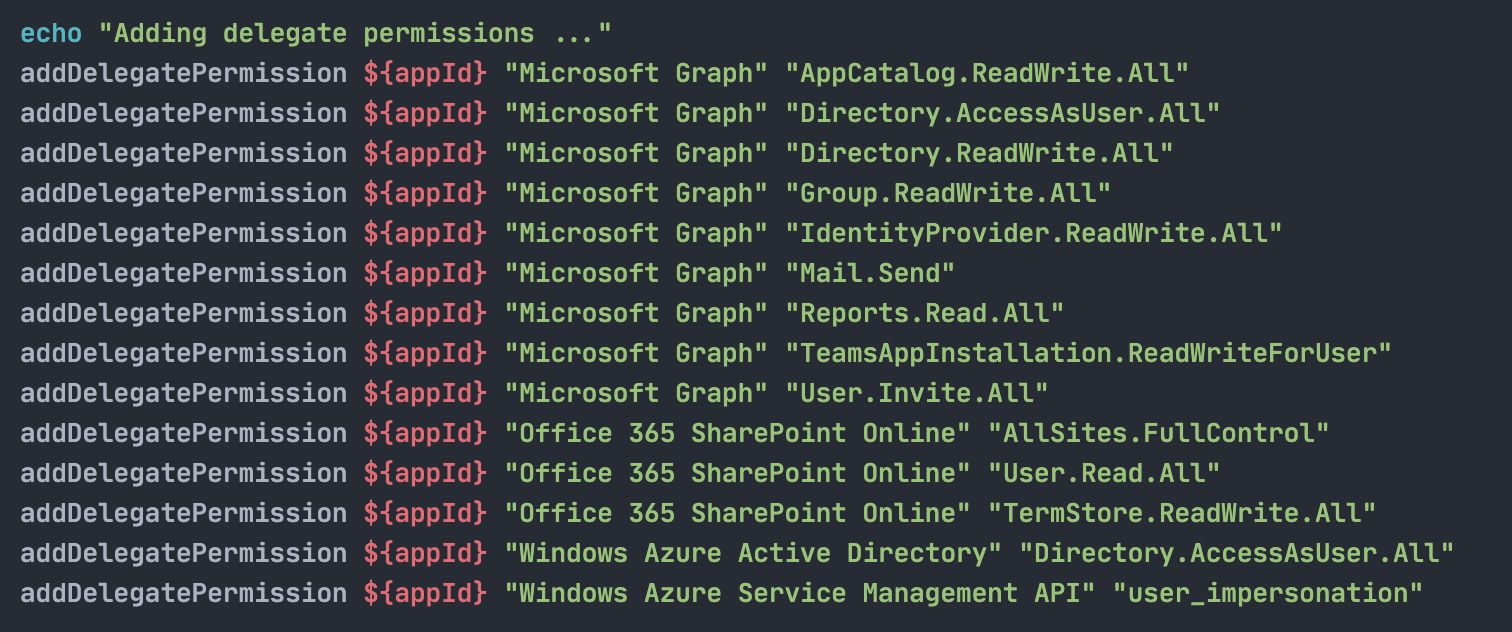
Below is a list of the current permissions used on the multi-tenant app.
- Microsoft Graph
- AppCatalog.ReadWrite.All
- Directory.AccessAsUser.All
- Directory.ReadWrite.All
- Group.ReadWrite.All
- IdentityProvider.ReadWrite.All
- Mail.Send
- Reports.Read.All
- User.Invite.All
- SharePoint Online
- AllSites.FullControl
- User.Read.All
- TermStore.ReadWrite.All
- Windows Azure Active Directory
- Directory.AccessAsUser.All
- Windows Azure Service Management API
- user_impersonation
I feel like I could contribute a small script to create an "exact" copy of the app for folks to start from instead of starting from scratch and maybe missing scopes that could break their usage of the CLI knowing they might not be aware of all the Graph permissions that are required!
That would be a great contribution and very welcomed. I had been working in the background on such a script using bash & Azure CLI but hasn't had much attention, so I'm looking at it right now, but we have many systems that we target so maybe a Windows based PowerShell script would be something that you could pick up?
garrytrinder
on 17 Oct 2020
I've completed the script I was working on that creates a new identity from scratch, configures the authentication settings, sets the default permissions (as above) and grants admin consent, so it is then ready to use.
https://gist.github.com/garrytrinder/27124b2670580ba97d1a04fe86724758
garrytrinder
on 17 Oct 2020
Well done! That's amazing! I Even just heard that @mpowney has built a PowerShell version of this 👍
sebastienlevert
on 17 Oct 2020
Nice job Garry 👍
 phillipharding
on 17 Oct 2020
phillipharding
on 17 Oct 2020
Thank you 😊
Yes, there is a PowerShell version that Mark has worked on and we will look to get these into the docs shortly 👍🏻
garrytrinder
on 17 Oct 2020
I've added the permission to the app registration. For this change to become effective in your tenant, assuming you used the app in the past, you'd need to reconsent the app by executing m365 cli reconsent. Let's keep this issue open until we've updated the docs to include the newly added scope in the list of scopes used by the multitenant app.
waldekmastykarz
on 17 Oct 2020
Just to let you know that I've updated the gist to use functions, which makes it much more readable and friendlier to admins who may end up running these scripts against production tenants.
garrytrinder
on 17 Oct 2020
@garrytrinder thanks for bringing this into docs! I was wondering if these "ready-made" script should be part of this repo? I would love to just download and run the script rather than finding it as content on a webpart. Was this something that was discussed in the past?
sebastienlevert
on 18 Oct 2020
We're looking into the ability to externalize pieces of docs to separate files. If this works out, we could definitely store scripts separately. We haven't discussed it previously, so it's definitely an interesting angle to research further.
waldekmastykarz
on 18 Oct 2020
Interesting suggestion.
We haven't discussed adding these scripts to the repo as downloadable files but is something we can consider.
I'd say in this case however that these scripts are to be amended to individual needs and use cases, rather than just dowloaded and then executed as is.
@pnp/cli-for-microsoft-365-maintainers any thoughts?
garrytrinder
on 18 Oct 2020
I guess the question is how much of a trouble is copy-pasting the script. It's a valid point that they often need to be adjusted before running. Shall we start a discussion and take action after getting some more feedback?
waldekmastykarz
on 18 Oct 2020
Related issues
garrytrinder
·
3Comments
waldekmastykarz
·
3Comments
 aakashbhardwaj619
·
3Comments
aakashbhardwaj619
·
3Comments
 arjunumenon
·
3Comments
waldekmastykarz
·
3Comments
arjunumenon
·
3Comments
waldekmastykarz
·
3Comments
Most helpful comment
Just to let you know that I've updated the gist to use functions, which makes it much more readable and friendlier to admins who may end up running these scripts against production tenants.