Cli-microsoft365: Enhancement: add Codespaces setup
All 19 comments
I'll take this one.
 garrytrinder
on 28 Oct 2020
garrytrinder
on 28 Oct 2020
It has been a fun night building this out 😁
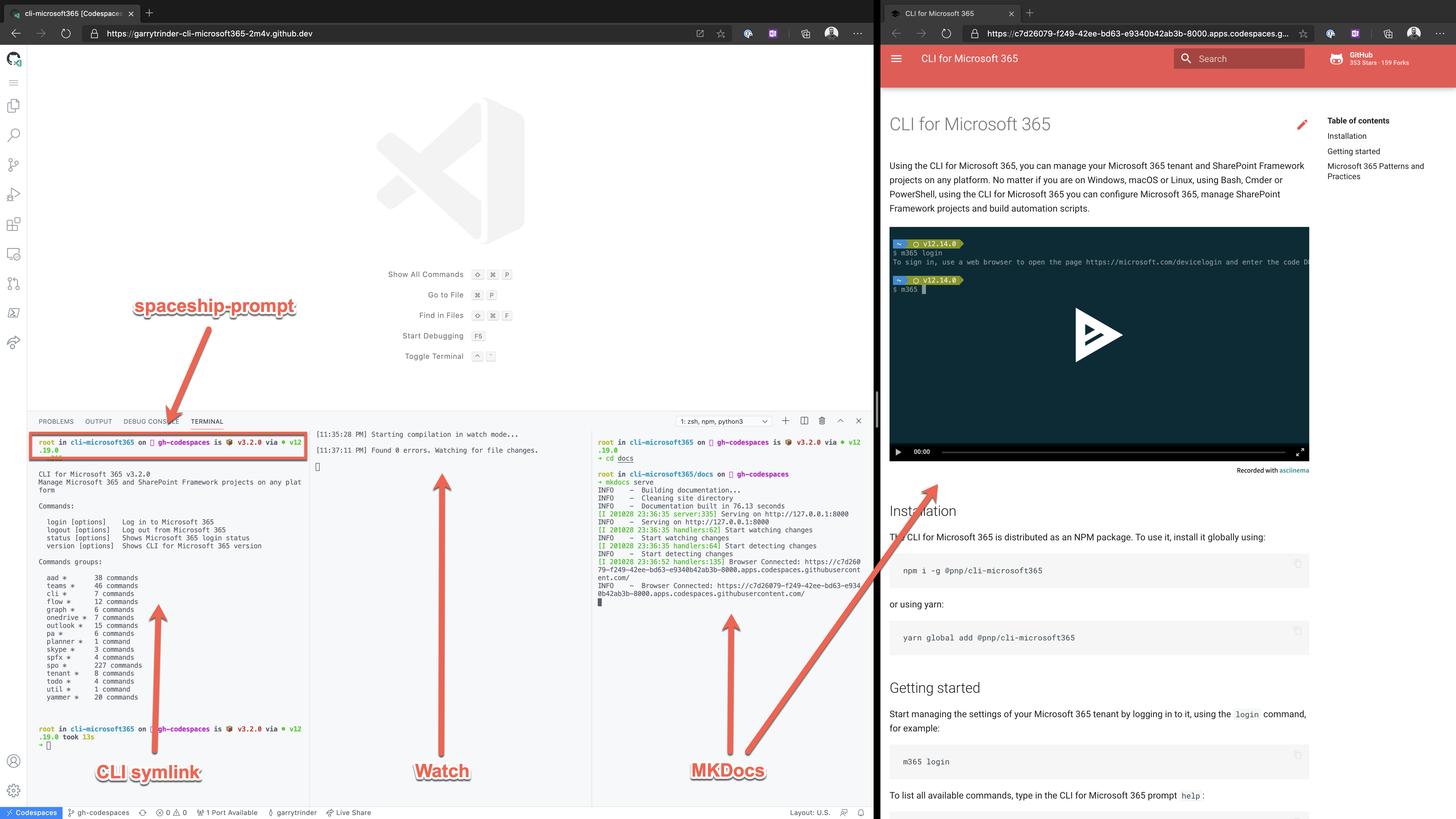
I think it has everything required for CLI development, with some added extras.
- Ubuntu 18.04
- Pre-requisites
- sudo
- zsh
- jq
- curl
- git
- wget
- PowerShell (7.0.3)
- node (v12.9.0) & npm (6.14.8)
- Python3 (3.6.9) & pip3 (9.0.1)
- MKDocs Material (3.1.0)
- oh-my-zsh (zsh-in-docker)
- spaceship-prompt
- zsh-autosuggestions
- zsh-completions
- zsh-syntax-highlighting
The real beauty about this is that the Development Container can also be run locally using the VSCode Remote Development extensions, without the need for Codespaces.

When you open the project locally, VSCode detects that there is a container file and prompts if you would like to build and start the container.
When the container is first built, it automatically runs npm install, npm run build and npm link at the end of the build so that it is ready for use.
garrytrinder
on 29 Oct 2020
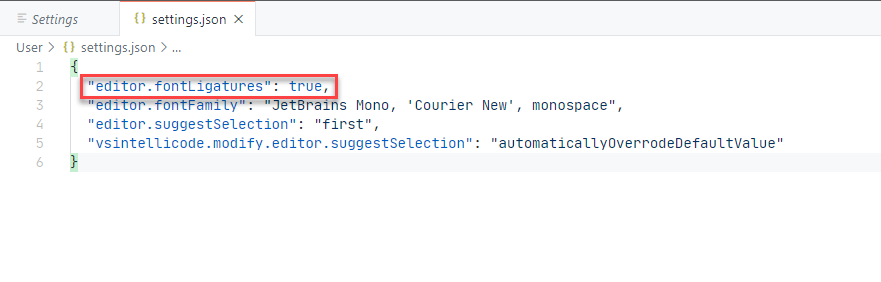
Not sure if this is something we can fix in the container, but for the spaceship-prompt to work correctly it needs a font that has ligature support.
The default font used in the Codespace is Consolas which doesn't have ligature support, however I've been able to update the Settings in the Codespace to use the JetBrains Mono font family and enabled ligatures, which has fixed the [?] in the zsh prompt without having to install anything in the Codespace.


garrytrinder
on 29 Oct 2020
Sweet! Have you also installed pymdown-extensions which we use in our CI? We need them for a few things among which includes which we are currently working on.
Here is the list of extensions included in the mkdocs Docker image: https://github.com/squidfunk/mkdocs-material/blob/master/requirements.txt
In our CI we're not using all of them at the moment: https://github.com/pnp/cli-microsoft365/blob/0ecc00b13ea63d1241686bf05fa7449908346192/.circleci/config.yml#L81-L89
 waldekmastykarz
on 29 Oct 2020
waldekmastykarz
on 29 Oct 2020
Sweet! Have you also installed
pymdown-extensionswhich we use in our CI?
Yes, all dependencies are installed as part of the pip install 😊
https://squidfunk.github.io/mkdocs-material/getting-started/#installation
garrytrinder
on 29 Oct 2020
Looping in @arjunumenon as he's been testing the very early version and we've been having some offline conversations about feedback.
Lets discuss the way forward in the issue and work in the open 👍
garrytrinder
on 18 Dec 2020
Thanks @garrytrinder for looping me. More than happy to help you in whatever way I can. Looking forward that to be rolled and shipped 🚀
 arjunumenon
on 18 Dec 2020
arjunumenon
on 18 Dec 2020
This is now ready to be tested locally and in Codespaces (if you have access to the preview) and I would love to hear your feedback before we go forward with this.
To test locally, you will need to pull down the gh-codespaces branch from my fork and install the Remote Development extension, if not installed already, as well as Docker installed and running. You should be prompted to open in the container when opening the project in VSCode, if not, use 'Open in Container' option in the command palette to build & run the container.
To test in Codespaces, navigate to gh-codespaces on my fork and open the branch in Codespaces from the Code menu in the UI.
The development container includes the following
Ubuntu 20.04.1 LTScli-microsoft365-devnon-root user[email protected]node@14[email protected][email protected]- oh-my-zsh with
git,zsh-autosuggestions,zsh-syntax-highlightingplugins & completiondots - Spaceship theme
- Auto execution of
npm install,npm build&npm linkon container creation
We have the ability to also install recommended Code extensions in the Remote Container, at the moment I have not defined any, but would love to know your thoughts on what we should include.
@pnp/cli-for-microsoft-365-maintainers @arjunumenon
garrytrinder
on 16 Jan 2021
Nice work @garrytrinder 💪🏾. Tested in Codespaces and works like a charm. Build, test and docs serve on local. Not tested locally. On it now
 rabwill
on 17 Jan 2021
rabwill
on 17 Jan 2021
Tested in Codespaces and works awesome! One thing I had to do, was to manually run npm i before I could run npm run build and npm t. Looking at the config it seems like it should've been done automatically, but it seems like it wasn't in my case.
Building and previewing docs also works like a charm and the whole thing is blazing fast. Well done! 👏
waldekmastykarz
on 17 Jan 2021
Yes good point I thought we had to run npm i. Looks like that's not the expected. I saw in our PnP call last time npm i was run so assumed that was needed.
rabwill
on 17 Jan 2021
I forgot to mention that building the image took a moment and the symbol denoting the branch was missing in codespaces.
waldekmastykarz
on 17 Jan 2021
Testing locally, I noticed that the setup is slower than in Codespaces. Building the image took again a moment. Building CLI and running tests took significantly longer (build ~1m, tests ~2min). Previewing docs worked like a charm.
waldekmastykarz
on 17 Jan 2021
Thank you for the feedback @rabwill & @waldekmastykarz ❤️
Tested in Codespaces and works awesome! One thing I had to do, was to manually run
npm ibefore I could runnpm run buildandnpm t. Looking at the config it seems like it should've been done automatically, but it seems like it wasn't in my case.
This could be a quirk in Codespaces, I did have an issue with the default terminal displaying bash instead of zsh on startup, which has since been resolved. https://github.community/t/integrated-terminal-setting-not-respected/145625
Does this automatically run when using the container locally?
I forgot to mention that building the image took a moment and the symbol denoting the branch was missing in codespaces.
Yes the build takes a while, not much can be done but is a one time action, subsequent runs are much faster. As for the symbol, I assume you mean the ligatures, as this is a user setting (based on the users font) there's nothing we can do on that front.
Building CLI and running tests took significantly longer (build ~1m, tests ~2min).
I suspect this is due to using volumes locally, rather than cloning the files into the container which gives a significant IO boost, this is the way that it would work in Codespaces. There is an option to clone locally on startup but I think this is a user preference.
What do you think to the terminal customisations? I'm in two minds whether we should be opinionated on the terminal experience and the ligature support is an extra step we require from the end user 🤔
garrytrinder
on 17 Jan 2021
Does this automatically run when using the container locally?
I didn't pay attention to it. Sorry. Will have another look.
What do you think to the terminal customisations? I'm in two minds whether we should be opinionated on the terminal experience and the ligature support is an extra step we require from the end user 🤔
While the prompt we have at the moment is different than what I'm using myself, I'm fine with giving an opinionated default and let users customize it.
waldekmastykarz
on 17 Jan 2021
Got time just now to test the same .
Super Awesome work @garrytrinder. Like always, nothing better than a clean consistent development environment. Your effort is super worthy I can see lot of use-cases right away.
I was super late to the Codespaces party and hence do not have access to that. Still in waiting mode. So could test only on the local one. Like @waldekmastykarz and @rabwill mentioned, do we need to run npm i.??
I am assuming it is not needed since it is already available in postCreateCommand of the devcontainer.json file.
At this point of time, I did not run npm i and I get an error when I run npm run build.

In the Demo, you had executed and npm iand post that it may work as expected.
Do we need to run npm i for it to work? I did not want to go ahead with that before I get it right from the horse's mouth. 😊.
Once I et an idea, I will try npm run build and npm test and will let you know about the speed of that as well
Like Waldek mentioned, even for me I am not getting the icons of the Git in the terminal (I am just getting square blocks instead). Other icons look perfect.
The MkDocs serve is super cool. Working like a charm and that is the best part I would say among everything. All you need to do is to run a single command and not install other pre-requisites.
Plus I felt it is faster compared to the interactive run approach of VS Code Docker extension which I use currently for the testing the docs for CLI.
Not sure it is because I am biased to this approach rather than the one which I am using. 😎
arjunumenon
on 19 Jan 2021
Thank you for your feedback @arjunumenon it is much appreciated.
Do we need to run npm i for it to work?
You shouldn't have to run npm I, as it is included in the postCreateCommand property in the devContainer.json file.
"postCreateCommand": "npm i && npm run clean && npm run build && npm link"
Can I ask how you started the Remote Container? In the screenshot below, options one shows an auto prompt to open in the Container, or you can use option 2, by click the button in the bottom left which opens the command menu where you can select Reopen in Container, this will start the image build which will include the post create command.

Like Waldek mentioned, even for me I am not getting the icons of the Git in the terminal (I am just getting square blocks instead). Other icons look perfect.
The square blocks are caused by using a font that does not have ligature support, see https://github.com/denysdovhan/spaceship-prompt/blob/master/docs/Troubleshooting.md#whats-the-weird-character-in-front-of-a-section in the Spaceship Prompt troubleshooting docs, if you change your font to something like JetBrains Mono (my favourite) or Fira Code, then you will start to see the icons, the others that work are just emojis 😄
Super Awesome work @garrytrinder. Like always, nothing better than a clean consistent development environment. Your effort is super worthy I can see lot of use-cases right away.
Thank you for the kind words @arjunumenon ❤️ 😊
The MkDocs serve is super cool. Working like a charm and that is the best part I would say among everything. All you need to do is to run a single command and not install other pre-requisites.
Plus I felt it is faster compared to the interactive run approach of VS Code Docker extension which I use currently for the testing the docs for CLI.
Awesome, that's great to hear!
garrytrinder
on 19 Jan 2021
Thanks @garrytrinder for the super explained response.
Can I ask how you started the Remote Container? In the screenshot below, options one shows an auto prompt to open in the Container, or you can use option 2, by click the button in the bottom left which opens the command menu where you can select Reopen in Container, this will start the image build which will include the post create command.
I had gone ahead with Step # 1 as per your screenshot. The moment I opened the VS Code, it identified the the container file and asked me whether I need to Reopen in container and I did that. Then for the first time, it went ahead with some steps which took around 9 minutes (550 seconds approx.) After that when I tried npm command, I am unable to see that. Adding to that, following is the approach which I did
- Locally cloned your branch
gh-codespacesin my WSL Ubuntu Terminal - Opened the project using
code . - Then it prompted whether I need to Reopen in container and I did that.
Is there a way whether we can get to know the npminstallation is completed or not?
The square blocks are caused by using a font that does not have ligature support, see https://github.com/denysdovhan/spaceship-prompt/blob/master/docs/Troubleshooting.md#whats-the-weird-character-in-front-of-a-section in the Spaceship Prompt troubleshooting docs, if you change your font to something like JetBrains Mono (my favourite) or Fira Code, then you will start to see the icons, the others that work are just emojis 😄
Thanks for that. I kinda assumed it might be because of the fonts. Thanks for confirming that.
arjunumenon
on 19 Jan 2021
Is there a way whether we can get to know the npm installation is completed or not?
When you start the remote container, you will see a prompt flash up with a link to show the log, this will display all the commands that are run when building and running the container.

garrytrinder
on 22 Jan 2021
Related issues
 OodapowUiPath
·
3Comments
waldekmastykarz
·
3Comments
OodapowUiPath
·
3Comments
waldekmastykarz
·
3Comments
 andrewconnell
·
3Comments
garrytrinder
·
3Comments
andrewconnell
·
3Comments
garrytrinder
·
3Comments
 vineet2907
·
3Comments
vineet2907
·
3Comments
Most helpful comment
This is now ready to be tested locally and in Codespaces (if you have access to the preview) and I would love to hear your feedback before we go forward with this.
To test locally, you will need to pull down the
gh-codespacesbranch from my fork and install the Remote Development extension, if not installed already, as well as Docker installed and running. You should be prompted to open in the container when opening the project in VSCode, if not, use 'Open in Container' option in the command palette to build & run the container.To test in Codespaces, navigate to
gh-codespaceson my fork and open the branch in Codespaces from the Code menu in the UI.The development container includes the following
Ubuntu 20.04.1 LTScli-microsoft365-devnon-root user[email protected]node@14[email protected][email protected]git,zsh-autosuggestions,zsh-syntax-highlightingplugins & completiondotsnpm install,npm build&npm linkon container creationWe have the ability to also install recommended Code extensions in the Remote Container, at the moment I have not defined any, but would love to know your thoughts on what we should include.
@pnp/cli-for-microsoft-365-maintainers @arjunumenon