Cli-microsoft365: [QUESTION] Difference between m365 flow run get and Run history CSV export in Power Automate
The results of running "m365 flow run get" on a specific flow are not the same as downloading the CSV file for the runs from Power Automate
Steps to reproduce
From M365 CLI
- m365 login
- m365 flow environment list (this returns all environments, use the name from the default one in the next step)
- m365 flow list -e
(this returns all flows, use the name of the flow you're after in the next step) - m365 flow run list -e
-f (this returns all runs for this flow, use the name of the run you're after in the next step) - m365 flow run get -e
-f -n
Return from the CLI command as text

Return from the CLI command as json (same command in step 5 with -o json parameter)

From Power Automate UI
- Navigate to https://flow.microsoft.com
- Open My flows, select the flow in question
- Click 'All Runs'
- Click 'Get .csv file' to download the file

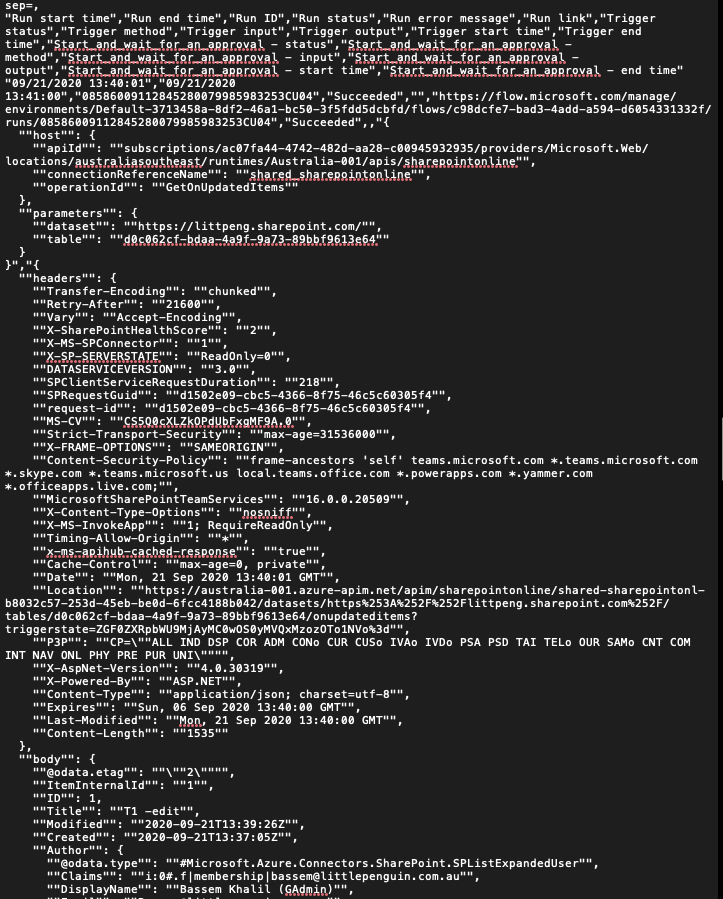
Excerpt from the csv file for the same workflow and the same run
 BassemNKhalil
All 16 comments
Thanks for the detailed description. We'll have a look at it asap
 waldekmastykarz
on 23 Sep 2020
waldekmastykarz
on 23 Sep 2020
Ok, so it seems like the CSV format uses a different API which we could use as well:
POST https://emea.api.flow.microsoft.com/providers/Microsoft.ProcessSimple/environments/Default-241b06db-207d-4e88-b71d-e38653ac0464/flows/f11bc16b-dfd5-4c12-b510-9a1e562c6d61/exportRuns?api-version=2016-11-01
content-type: application/json

{"statusFilter":"NotSpecified"}
What if extended the flow run list command with an additional option like --detailed or --export to get data from the CSV export rather than the API? Would that work? Would it be clear?
waldekmastykarz
on 24 Sep 2020
I think it comes down to whether the new API endpoint returns an expanded version of the other one or a different scheme altogether - expanded can overload the same command but a different scheme should warrant a new command.
Thanks a bunch, you’ve done a lot in a short period of time and on Ignite week none the less.
Side note: my question was regarding flow run get and not flow run list but I assume the same applies to both
What if extended the
flow run listcommand with an additional option like--detailedor--exportto get data from the CSV export rather than the API? Would that work? Would it be clear?
BassemNKhalil
on 24 Sep 2020
The CSV export contains an overview of all runs, so it's actually an equivalent of flow run list rather than flow run get. As far as I can tell, there is no way to get details for just one run and you get them for all runs in a single call.
From the functional point of view it's really the same as flow run list: it returns information about flow runs. Since we can't just replace the current functionality of flow run list, as that would be a breaking change, we could either expose it behind a flag, or perhaps introduce a new command altogether like flow run report which is consistent with other report commands that we have in the CLI and which are based on CSV data retrieved from Microsoft 365.
waldekmastykarz
on 24 Sep 2020
The CSV export contains an overview of all runs, so it's actually an equivalent of
flow run listrather thanflow run get. As far as I can tell, there is no way to get details for just one run and you get them for all runs in a single call.
Gotcha! Makes sense to extend flow run list rather than flow run get given how the API works
From the functional point of view it's really the same as
flow run list: it returns information about flow runs. Since we can't just replace the current functionality offlow run list, as that would be a breaking change, we could either expose it behind a flag, or perhaps introduce a new command altogether likeflow run reportwhich is consistent with otherreportcommands that we have in the CLI and which are based on CSV data retrieved from Microsoft 365.
If report is more consistent we can go with that but both are fine options for me.
BassemNKhalil
on 24 Sep 2020
@pnp/cli-for-microsoft-365-maintainers any preference between flow run report and extending flow run list?
waldekmastykarz
on 26 Sep 2020
My vote goes to flow run report.
 garrytrinder
on 26 Sep 2020
garrytrinder
on 26 Sep 2020
I analyzed Fiddler log when run PowerShell command to get Flow Run History. I found that PowerShell Get-FlowRun calls
GET https://api.flow.microsoft.com/providers/Microsoft.ProcessSimple/environments/~default/flows/b7fef442-5c72-4652-baca-23a183692f65/runs?api-version=2016-11-01
I notice this end-point is very similar to one you mentioned early, however the output I am getting is different from manual export of .CSV file. Below are PowerShell script and output. I am interested to learn what end-point should I call to get extended log history that includes approver information and outcome?
.PS1
Install-Module -Name Microsoft.PowerApps.Administration.PowerShell -Scope CurrentUser
Install-Module -Name Microsoft.PowerApps.PowerShell -AllowClobber -Scope CurrentUser

$flows = Get-AdminFlow

$flows | foreach-object -process {

    $_ | ConvertTo-Json | Write-Host

    $pathJSON = "C:\temp\FlowExport - " + $_.DisplayName + ".json"

    $flow = Get-FlowRun -FlowName $_.FlowName | select -Property * | ConvertTo-Json
    $flow | Write-Host -ForegroundColor Yellow
    $flow | Out-File $pathJSON
}
Output:
///////////////////////////////////////////////////////////////////////////////////////////////////
{
    "FlowName": "a12b9353-7852-484f-8c22-586a8f69973f",
    "Enabled": true,
    "DisplayName": "Test02",
    "UserType": null,
    "CreatedTime": "2020-09-22T04:57:57.7170954Z",
    "CreatedBy": {
        "tenantId": "67e88f39-f855-4d41-b9c1-57c392d6f891",
        "objectId": "2acd63ea-863e-4281-9bb7-edc6fca7b0a3",
        "userId": "2acd63ea-863e-4281-9bb7-edc6fca7b0a3",
        "userType": "ActiveDirectory"
    },
    "LastModifiedTime": "2020-09-22T04:58:02.3712514Z",
    "EnvironmentName": "Default-67e88f39-f855-4d41-b9c1-57c392d6f891",
    "Internal": {
        "name": "a12b9353-7852-484f-8c22-586a8f69973f",
        "id": "/providers/Microsoft.ProcessSimple/environments/Default-67e88f39-f855-4d41-b9c1-57c392d6f891/flows/a12b9353-7852-484f-8c22-586a8f69973f",
        "type": "Microsoft.ProcessSimple/environments/flows",
        "properties": {
            "apiId": "/providers/Microsoft.PowerApps/apis/shared_logicflows",
            "displayName": "Test02",
            "state": "Started",
            "createdTime": "2020-09-22T04:57:57.7170954Z",
            "lastModifiedTime": "2020-09-22T04:58:02.3712514Z",
            "flowSuspensionReason": "None",
            "environment":  "@{name=Default-67e88f39-f855-4d41-b9c1-57c392d6f891; type=Microsoft.ProcessSimple/environments; id=/providers/Microsoft.ProcessSimple/environments/D
efault-67e88f39-f855-4d41-b9c1-57c392d6f891
        }",
                                        "definitionSummary": "@{triggers=System.Object[]; actions=System.Object[]}",
        "creator":  "@{tenantId=67e88f39-f855-4d41-b9c1-57c392d6f891; objectId=2acd63ea-863e-4281-9bb7-edc6fca7b0a3; userId=2acd63ea-863e-4281-9bb7-edc6fca7b0a3; userType=Ac
tiveDirectory
    }",
                                        "provisioningMethod": "FromDefinition",
    "flowFailureAlertSubscribed": true
}
}
}
[
{
"FlowRunName": "08586008555628135885445198029CU26",
"Status": "Running",
"StartTime": "2020-09-22T05:08:42.8403466Z",
"Internal": {
    "name": "08586008555628135885445198029CU26",
    "id":  "/providers/Microsoft.ProcessSimple/environments/Default-67e88f39-f855-4d41-b9c1-57c392d6f891/flows/a12b9353-7852-484f-8c22-586a8f69973f/runs/08586008555628135885445198029CU
26",
                         "type": "Microsoft.ProcessSimple/environments/flows/runs",
    "properties": "@{startTime=2020-09-22T05:08:42.8403466Z; status=Running; correlation=; trigger=}"
}
},
{
"FlowRunName": "08586008561205340242777743037CU16",
"Status": "Succeeded",
"StartTime": "2020-09-22T04:59:25.1666534Z",
"Internal": {
    "name": "08586008561205340242777743037CU16",
    "id":  "/providers/Microsoft.ProcessSimple/environments/Default-67e88f39-f855-4d41-b9c1-57c392d6f891/flows/a12b9353-7852-484f-8c22-586a8f69973f/runs/08586008561205340242777743037CU
16",
                         "type": "Microsoft.ProcessSimple/environments/flows/runs",
    "properties": "@{startTime=2020-09-22T04:59:25.1666534Z; endTime=2020-09-22T05:01:52.6243125Z; status=Succeeded; correlation=; trigger=}"
}
}
]
{
"FlowName": "b7fef442-5c72-4652-baca-23a183692f65",
"Enabled": true,
"DisplayName": "Test01",
"UserType": null,
"CreatedTime": "2020-09-21T08:18:30.2523531Z",
"CreatedBy": {
"tenantId": "67e88f39-f855-4d41-b9c1-57c392d6f891",
"objectId": "2acd63ea-863e-4281-9bb7-edc6fca7b0a3",
"userId": "2acd63ea-863e-4281-9bb7-edc6fca7b0a3",
"userType": "ActiveDirectory"
},
"LastModifiedTime": "2020-09-21T08:19:15.8581008Z",
"EnvironmentName": "Default-67e88f39-f855-4d41-b9c1-57c392d6f891",
"Internal": {
"name": "b7fef442-5c72-4652-baca-23a183692f65",
"id": "/providers/Microsoft.ProcessSimple/environments/Default-67e88f39-f855-4d41-b9c1-57c392d6f891/flows/b7fef442-5c72-4652-baca-23a183692f65",
"type": "Microsoft.ProcessSimple/environments/flows",
"properties": {
    "apiId": "/providers/Microsoft.PowerApps/apis/shared_logicflows",
    "displayName": "Test01",
    "state": "Started",
    "createdTime": "2020-09-21T08:18:30.2523531Z",
    "lastModifiedTime": "2020-09-21T08:19:15.8581008Z",
    "flowSuspensionReason": "None",
    "environment":  "@{name=Default-67e88f39-f855-4d41-b9c1-57c392d6f891; type=Microsoft.ProcessSimple/environments; id=/providers/Microsoft.ProcessSimple/environments/D
efault-67e88f39-f855-4d41-b9c1-57c392d6f891
}",
                                        "definitionSummary": "@{triggers=System.Object[]; actions=System.Object[]}",
"creator":  "@{tenantId=67e88f39-f855-4d41-b9c1-57c392d6f891; objectId=2acd63ea-863e-4281-9bb7-edc6fca7b0a3; userId=2acd63ea-863e-4281-9bb7-edc6fca7b0a3; userType=Ac
tiveDirectory
}",
                                        "provisioningMethod": "FromDefinition",
"flowFailureAlertSubscribed": true
}
}
}
[
{
"FlowRunName": "08586008555626363638240490885CU29",
"Status": "Running",
"StartTime": "2020-09-22T05:08:43.0355414Z",
"Internal": {
"name": "08586008555626363638240490885CU29",
"id":  "/providers/Microsoft.ProcessSimple/environments/Default-67e88f39-f855-4d41-b9c1-57c392d6f891/flows/b7fef442-5c72-4652-baca-23a183692f65/runs/08586008555626363638240490885CU
29",
                         "type": "Microsoft.ProcessSimple/environments/flows/runs",
"properties": "@{startTime=2020-09-22T05:08:43.0355414Z; status=Running; correlation=; trigger=}"
}
},
{
"FlowRunName": "08586008561203909498299507386CU15",
"Status": "Succeeded",
"StartTime": "2020-09-22T04:59:25.255032Z",
"Internal": {
"name": "08586008561203909498299507386CU15",
"id":  "/providers/Microsoft.ProcessSimple/environments/Default-67e88f39-f855-4d41-b9c1-57c392d6f891/flows/b7fef442-5c72-4652-baca-23a183692f65/runs/08586008561203909498299507386CU
15",
                         "type": "Microsoft.ProcessSimple/environments/flows/runs",
"properties": "@{startTime=2020-09-22T04:59:25.255032Z; endTime=2020-09-22T05:02:13.5932018Z; status=Succeeded; correlation=; trigger=}"
}
},
{
"FlowRunName": "08586009303657173421338086237CU21",
"Status": "Succeeded",
"StartTime": "2020-09-21T08:21:59.983429Z",
"Internal": {
"name": "08586009303657173421338086237CU21",
"id":  "/providers/Microsoft.ProcessSimple/environments/Default-67e88f39-f855-4d41-b9c1-57c392d6f891/flows/b7fef442-5c72-4652-baca-23a183692f65/runs/08586009303657173421338086237CU
21",
                         "type": "Microsoft.ProcessSimple/environments/flows/runs",
"properties": "@{startTime=2020-09-21T08:21:59.983429Z; endTime=2020-09-21T08:27:53.1128059Z; status=Succeeded; correlation=; trigger=}"
}
}
]
///////////////////////////////////////////////////////////////////////////////////////////////////
 klubis
on 28 Sep 2020
klubis
on 28 Sep 2020
Correct, so this is the same endpoint that we're using in the flow run get command if I'm not mistaken.
waldekmastykarz
on 29 Sep 2020
Apologies in advance for the lengthy post, I was trying to see if implementing this would be as straight forward as I thought - hit a blocker and wanted to verify:
I cloned the run-list command and replaced the base URL with https://australia.api.flow.microsoft.com as well as the method to be exportRuns but that returned an error:
Error: AADSTS500011: The resource principal named https://australia.api.flow.microsoft.com was not found in the tenant named 3713458a-8df2-46a1-bc50-3f5fdd5dcbfd. This can happen if the application has not been installed by the administrator of the tenant or consented to by any user in the tenant. You might have sent your authentication request to the wrong tenant.
Assuming that was just because this is an API not consumed previously by the CLI (hence not requested along with the permissions at app consent), I went ahead and configured my own identity following this one (spot on btw, easy as to follow), still no luck. As far as I can tell, the URL https://australia.api.flow.microsoft.com is not actually mentioned for any of the permissions available for an app under AAD. Adding the usual suspects (Graph, Dynamics and Flow) did not seem to make any difference.
I then tried to grab an access token for the same URL https://australia.api.flow.microsoft.com using m365 util accesstoken get --resource https://australia.api.flow.microsoft.com --new which returned the exact same error as above
Error: AADSTS500011: The resource principal named https://australia.api.flow.microsoft.com was not found in the tenant named 3713458a-8df2-46a1-bc50-3f5fdd5dcbfd. This can happen if the application has not been installed by the administrator of the tenant or consented to by any user in the tenant. You might have sent your authentication request to the wrong tenant.
What am I missing? Or is this actually an API that we can't currently request access to under an AAD application?
If that's the case, is there a way for the CLI to impersonate a user and execute commands under user's permissions? I know we can login to CLI as a named user using m365 login --authType password but I understand that would just bypass the login screen, CLI still executing in the context of the AAD application.
For reference, my full URL looked like this https://australia.api.flow.microsoft.com/providers/Microsoft.ProcessSimple/environments/Default-3713458a-8df2-46a1-bc50-3f5fdd5dcbfd/flows/c98dcfe7-bad3-4add-a594-d6054331332f/exportRuns?api-version=2016-11-01 which I assume is the correct format for getting the CSV
The one for a typical m365 flow run list looks like this
https://management.azure.com/providers/Microsoft.ProcessSimple/environments/Default-3713458a-8df2-46a1-bc50-3f5fdd5dcbfd/flows/c98dcfe7-bad3-4add-a594-d6054331332f/runs?api-version=2016-11-01
BassemNKhalil
on 3 Oct 2020
Thanks for looking into it @BassemNKhalil! In AAD API permissions, there are two sets of permissions: Azure Management and Flow. It could be that the second endpoint requires the latter permissions while currently we're using the first one. Another thing that could be the case is that the access token is retrieved for example for https://management.azure.com but can be used for the other endpoint just fine. I believe I've seen this behavior when using the paging links on responses from the Flow API on Azure Management API. If it's any help, I can have a look at it and see if I can find any more information about how we can get it work.
waldekmastykarz
on 5 Oct 2020
Thanks @waldekmastykarz - if you can have a look that would be great. I did try with a custom AAD app that was granted both sets of permissions (Azure Management & Flow Service) but neither seem to be providing the right permissions for APIs under https://australia.api.flow.microsoft.com.
BassemNKhalil
on 6 Oct 2020
@BassemNKhalil it turns out you can call the API with an access token for https://service.flow.microsoft.com/ and the Flows.Manage.All scope. Since the token audience doesn't match the URL, things will get tricky in the CLI as you won't be able to rely on automatic token retrieval. Instead, you will need to:
- retrieve token for
https://service.flow.microsoft.com/yourself usingauth.ensureAccessToken('https://service.flow.microsoft.com/', logger, this.debug) - suppress auto token retrieval by setting the
x-anonymous: truerequest header - setting the token retrieved in 1. yourself on the request in the
authorizationrequest header
waldekmastykarz
on 20 Oct 2020
@BassemNKhalil is this question still relevant?
waldekmastykarz
on 22 Dec 2020
I think you can close it off. I was tinkering with the idea of how to add that as a new command in the CLI but I think given the level of interest it’s not required at this point. Thank you for the help and assistance @waldekmastykarz, enjoy the holidays!
BassemNKhalil
on 23 Dec 2020
Thank you for confirming. Have a great holidays!
waldekmastykarz
on 23 Dec 2020
Related issues
garrytrinder
·
3Comments
 plamber
·
3Comments
plamber
·
3Comments
 arjunumenon
·
3Comments
waldekmastykarz
·
3Comments
arjunumenon
·
3Comments
waldekmastykarz
·
3Comments
 thomyg
·
3Comments
thomyg
·
3Comments
Most helpful comment
My vote goes to
flow run report.