Cli-microsoft365: Bug report: Unable to create modern sites using app-only authN (using cert)
Description
I am using certificate based login with O365 CLI. Below command to add new modern site fails with following error.
Command:
spo site add --alias t1 --title t1
After looking at the code, I observed its using undocumented endpoint (_api/GroupSiteManager/CreateGroupEx). The code needs to be updated to use the Site Manager api (https://docs.microsoft.com/en-us/sharepoint/dev/apis/site-creation-rest)
Error:
Error: {"odata.error":{"code":"Authorization_RequestDenied","message":{"lang":"en","value":"Insufficient privileges to complete the operation."},"requestId":"07133caf-496f-4b6d-9c6b-27bb4bd7379e","date":"2020-07-24T22:22:04"}}
Steps to reproduce
Login using cert to get app-only token.
Example:
login --authType certificate --certificateFile C:\OpenSSL\bin\protected.pfx --thumbprint XYZ --password pass@word1
Run below command:
spo site add --alias t1 --title t1
Expected result
Creates the modern site.
Actual result
Error:
Error: {"odata.error":{"code":"Authorization_RequestDenied","message":{"lang":"en","value":"Insufficient privileges to complete the operation."},"requestId":"07133caf-496f-4b6d-9c6b-27bb4bd7379e","date":"2020-07-24T22:22:04"}}
Environment
OS: Windows 10 v1909
PS: ver 5.1.18362.752
O365 CLI: 2.12.0
 svarukala
All 10 comments
Here is the scrubbed output from running the cmd with debug and verbose:
o365$ spo site add --alias t1 --title t1 --verbose --debug
SPO URL previously retrieved https://CONTOSO.sharepoint.com. Returning...
Creating new site...
Existing access token eyJ0eXAiOiJKV1QiLCJhbGciOiJSUzI1NiIsIng1dCI6Imh1Tjk1SXZQZmVocTM0R3pCRFoxR1hHaXJuTSIsImtpZCI6Imh1Tjk1SXZQZmVocTM0R3pCRFoxR1hHaXJuTSJ9.eyJhdWQiOiJodHRwczovL20zNjV4MjI5OTEwLnNoYXJlcG9pbnQuY29tIiwiaXNzIjoiaHR0cHM6Ly9zdHMud2luZG93cy5uZXQvMDQ0ZjdhODEtMTQyMi00YjNkLThmNjgtMzAwMTQ1NmU2NDA2LyIsImlhdCI6MTU5NTYyNzg5MCwibmJmIjoxNTk1NjI3ODkwLCJleHAiOjE1OTU2MzE3OTAsImFpbyI6IkUyQmdZSkR6VG5mWjlzZCsvWHQxbHhkN09LYTJBd0ETRUNCATED.... still valid. Returning...
REQUEST { headers:
{ 'user-agent': 'NONISV|SharePointPnP|Office365CLI/2.12.0',
'content-type': 'application/json; odata=verbose; charset=utf-8',
accept: 'application/json;odata=nometadata',
authorization:
'Bearer eyJ0eXAiOiJKV1QiLCJhbGciOiJSUzI1NiIsIng1dCI6Imh1Tjk1SXZQZmVocTM0R3pCRFoxR1hHaXJuTSIsImtpZCI6Imh1Tjk1SXZQZmVocTM0R3pCRFoxR1hHaXJuTSJ9.eyJhdWQiOiJodHRwczovL20zNjV4MjI5OTEwLnNoYXJlcG9pbnQuY29tIiwiaXNzIjoiaHR0cHM6Ly9zdHMud2luZG93cy5uZXQvMDQ0ZjdhODEtMTQyMi00YjNkLThmNjgtMzAwMTQ1NmU2NDA2LyIsImlhdCI6MTU5NTYyNzg5MCwibmJmIjoxNTk1NjI3ODkwLCJleHAiOjE1OTU2MzE3OTAsImFpbyI6IkUyQmdZSkR6VG5mWjlzZCsvWHQxbHhkN09LYTJBd0E9IiwiYTRUNCATED' },
gzip: true,
url:
'https://CONTOSO.sharepoint.com/_api/GroupSiteManager/CreateGroupEx',
json: true,
body:
{ displayName: 't1',
alias: 't1',
optionalParams: { Description: '', CreationOptions: [Object] } },
method: 'POST',
callback: [Function: RP$callback],
transform: undefined,
simple: true,
resolveWithFullResponse: false,
transform2xxOnly: false }
REQUEST make request https://CONTOSO.sharepoint.com/_api/GroupSiteManager/CreateGroupEx
REQUEST onRequestResponse https://CONTOSO.sharepoint.com/_api/GroupSiteManager/CreateGroupEx 400 { 'cache-control': 'private, max-age=0',
'transfer-encoding': 'chunked',
'content-type':
'application/json;odata=nometadata;streaming=true;charset=utf-8',
expires: 'Thu, 09 Jul 2020 22:22:04 GMT',
'last-modified': 'Fri, 24 Jul 2020 22:22:04 GMT',
p3p:
'CP="ALL IND DSP COR ADM CONo CUR CUSo IVAo IVDo PSA PSD TAI TELo OUR SAMo CNT COM INT NAV ONL PHY PRE PUR UNI"',
'x-sharepointhealthscore': '0',
'x-sp-serverstate': 'ReadOnly=0',
dataserviceversion: '3.0',
spclientservicerequestduration: '240',
'x-aspnet-version': '4.0.30319',
sprequestguid: '8251699f-201a-0000-6145-9a0a2641204c',
'request-id': '8251699f-201a-0000-6145-9a0a2641204c',
'ms-cv': 'n2lRghogAABhRZoKJkEgTA.0',
'strict-transport-security': 'max-age=31536000',
'x-frame-options': 'SAMEORIGIN',
'content-security-policy':
'frame-ancestors \'self\' teams.microsoft.com *.teams.microsoft.com *.skype.com *.teams.microsoft.us local.teams.office.com *.powerapps.com;',
'x-powered-by': 'ASP.NET',
microsoftsharepointteamservices: '16.0.0.20308',
'x-content-type-options': 'nosniff',
'x-ms-invokeapp': '1; RequireReadOnly',
'x-msedge-ref':
'Ref A: 65751A00EB5D4F91A20EA7DC8B8DB9D3 Ref B: BN3EDGE0613 Ref C: 2020-07-24T22:22:04Z',
date: 'Fri, 24 Jul 2020 22:22:04 GMT',
connection: 'close' }
REQUEST reading response's body
REQUEST finish init function https://CONTOSO.sharepoint.com/_api/GroupSiteManager/CreateGroupEx
REQUEST response end https://CONTOSO.sharepoint.com/_api/GroupSiteManager/CreateGroupEx 400 { 'cache-control': 'private, max-age=0',
'transfer-encoding': 'chunked',
'content-type':
'application/json;odata=nometadata;streaming=true;charset=utf-8',
expires: 'Thu, 09 Jul 2020 22:22:04 GMT',
'last-modified': 'Fri, 24 Jul 2020 22:22:04 GMT',
p3p:
'CP="ALL IND DSP COR ADM CONo CUR CUSo IVAo IVDo PSA PSD TAI TELo OUR SAMo CNT COM INT NAV ONL PHY PRE PUR UNI"',
'x-sharepointhealthscore': '0',
'x-sp-serverstate': 'ReadOnly=0',
dataserviceversion: '3.0',
spclientservicerequestduration: '240',
'x-aspnet-version': '4.0.30319',
sprequestguid: '8251699f-201a-0000-6145-9a0a2641204c',
'request-id': '8251699f-201a-0000-6145-9a0a2641204c',
'ms-cv': 'n2lRghogAABhRZoKJkEgTA.0',
'strict-transport-security': 'max-age=31536000',
'x-frame-options': 'SAMEORIGIN',
'content-security-policy':
'frame-ancestors \'self\' teams.microsoft.com *.teams.microsoft.com *.skype.com *.teams.microsoft.us local.teams.office.com *.powerapps.com;',
'x-powered-by': 'ASP.NET',
microsoftsharepointteamservices: '16.0.0.20308',
'x-content-type-options': 'nosniff',
'x-ms-invokeapp': '1; RequireReadOnly',
'x-msedge-ref':
'Ref A: 65751A00EB5D4F91A20EA7DC8B8DB9D3 Ref B: BN3EDGE0613 Ref C: 2020-07-24T22:22:04Z',
date: 'Fri, 24 Jul 2020 22:22:04 GMT',
connection: 'close' }
REQUEST end event https://CONTOSO.sharepoint.com/_api/GroupSiteManager/CreateGroupEx
REQUEST has body https://CONTOSO.sharepoint.com/_api/GroupSiteManager/CreateGroupEx 366
REQUEST emitting complete https://CONTOSO.sharepoint.com/_api/GroupSiteManager/CreateGroupEx
Error: {"odata.error":{"code":"Authorization_RequestDenied","message":{"lang":"en","value":"Insufficient privileges to complete the operation."},"requestId":"07133caf-496f-4b6d-9c6b-27bb4bd7379e","date":"2020-07-24T22:22:04"}}
svarukala
on 25 Jul 2020
Hey @svarukala the message you are getting "Insufficient privileges to complete the operation." looks like issue related with your app privileges. Are you sure your app has permissions to create sites? For this it is required to have SharePoint Sites full permissions I believe.
I am looking the output and everything seems ok with the command and your cert since you've got that far to get token. My first impression is that the Azure AD app does not have enough permissions to create SharePoint sites.
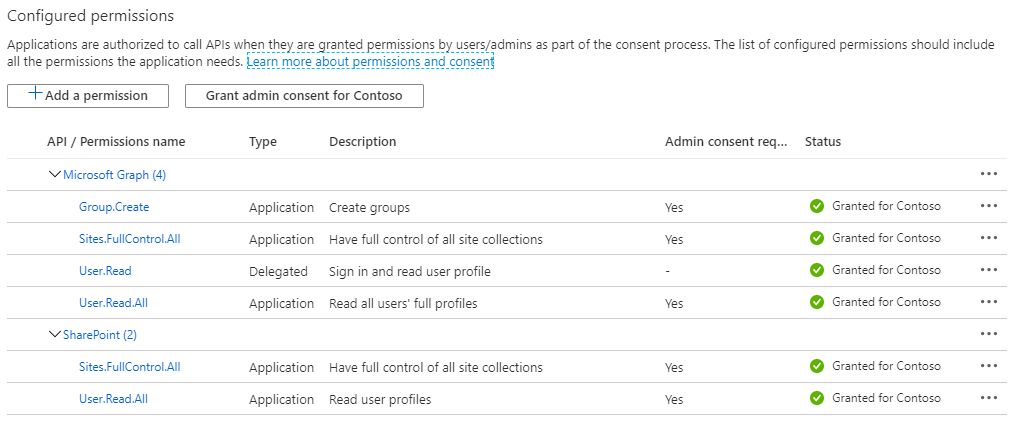
Could you please paste a screen your app permissions grant? This could help in our investigation.
 VelinGeorgiev
on 26 Jul 2020
VelinGeorgiev
on 26 Jul 2020
Here's the app perms granted:
svarukala
on 26 Jul 2020
Hey @svarukala , could you please let me know if this related to the other issue you have opened https://github.com/pnp/office365-cli/issues/1738?
I am keen to understand if your research in the other issue solved this one.
VelinGeorgiev
on 27 Jul 2020
Hello @VelinGeorgiev , here is a quick update. I couldn't find anything conclusive though.
Scenario 1:
With SharePoint > Sites.FullControl.All perms, its failing with the "Insufficient privileges to complete the operation" error. You can take a look at the full debug trace in my 2nd response in this thread. The REST api call is returning HTTP 400 in this case if I am reading the trace correctly.
Scenario 2:
I removed SharePoint, Sites.FullControl.All perms, and added Microsoft Graph > Sites.FullControl.All perms. This time the debug trace looks the same except the response code is HTTP 401. The error is: "_Error: The server was unable to process the request due to an internal error. For more information about the error, either turn on IncludeExceptionDetailInFaults (either from ServiceBehaviorAttribute or from the
Scenario 3:
Added Microsoft Graph > Group.Create permissions. Nothing has changed after this. It behaves exactly like scenario 2.
In all the above scenarios the endpoint its calling is the same (/_api/GroupSiteManager/CreateGroupEx).
Below I am pasting full trace from scenario 2:
o365$ spo site add --alias SiteFromCLI-01 --title SiteFromCLI-01 --debug
SPO URL previously retrieved https://CONTOSO.sharepoint.com. Returning...
Creating new site...
Existing access token eyJ0eXAiOiJKV1QiLCJhbGciOiJSUzI1NiIsIR3pCRFoxR1hHaTRUNCATED still valid. Returning...
REQUEST { headers:
{ 'user-agent': 'NONISV|SharePointPnP|Office365CLI/2.12.0',
'content-type': 'application/json; odata=verbose; charset=utf-8',
accept: 'application/json;odata=nometadata',
authorization:
'Bearer eyJ0eXAiOiJKV1QiLCJhbGciOiJSUzI1NiIsIng1dCI6Imh1Tjk1SXZQZmVocTM0R3pCRFoxR1hHaXJuTSIsImTRUNCATED' },
gzip: true,
url:
'https://CONTOSO.sharepoint.com/_api/GroupSiteManager/CreateGroupEx',
json: true,
body:
{ displayName: 'SiteFromCLI-01',
alias: 'SiteFromCLI-01',
optionalParams: { Description: '', CreationOptions: [Object] } },
method: 'POST',
callback: [Function: RP$callback],
transform: undefined,
simple: true,
resolveWithFullResponse: false,
transform2xxOnly: false }
REQUEST make request https://CONTOSO.sharepoint.com/_api/GroupSiteManager/CreateGroupEx
REQUEST onRequestResponse https://CONTOSO.sharepoint.com/_api/GroupSiteManager/CreateGroupEx 401 { 'content-length': '453',
p3p:
'CP="ALL IND DSP COR ADM CONo CUR CUSo IVAo IVDo PSA PSD TAI TELo OUR SAMo CNT COM INT NAV ONL PHY PRE PUR UNI"',
'www-authenticate':
'Bearer realm="044f7a81-1422-4b3d-8f68-3001456e6406",client_id="00000003-0000-0ff1-ce00-000000000000",trusted_issuers="00000001-0000-0000-c000-000000000000@,D3776938-3DBA-481F-A652-4BEDFCAB7CD8@,https://sts.windows.net//,00000003-0000-0ff1-ce00-000000000000@90140122-8516-11e1-8eff-49304924019b",authorization_uri="https://login.windows.net/common/oauth2/authorize"',
'x-ms-diagnostics':
'3001000;reason="There has been an error authenticating the request.";category="invalid_client"',
sprequestguid: 'c1306a9f-f04a-0000-4b05-1dbfcf3532f5',
'request-id': 'c1306a9f-f04a-0000-4b05-1dbfcf3532f5',
'ms-cv': 'n2owwUrwAABLBR2/zzUy9Q.0',
'strict-transport-security': 'max-age=31536000',
'x-frame-options': 'SAMEORIGIN',
sprequestduration: '92',
spiislatency: '1',
'x-powered-by': 'ASP.NET',
microsoftsharepointteamservices: '16.0.0.20308',
'x-content-type-options': 'nosniff',
'x-ms-invokeapp': '1; RequireReadOnly',
'x-msedge-ref':
'Ref A: B18193781FA9406D8B065B747DE695C0 Ref B: BN3EDGE0911 Ref C: 2020-07-27T15:23:35Z',
date: 'Mon, 27 Jul 2020 15:23:35 GMT',
connection: 'close' }
REQUEST reading response's body
REQUEST finish init function https://CONTOSO.sharepoint.com/_api/GroupSiteManager/CreateGroupEx
REQUEST response end https://CONTOSO.sharepoint.com/_api/GroupSiteManager/CreateGroupEx 401 { 'content-length': '453',
p3p:
'CP="ALL IND DSP COR ADM CONo CUR CUSo IVAo IVDo PSA PSD TAI TELo OUR SAMo CNT COM INT NAV ONL PHY PRE PUR UNI"',
'www-authenticate':
'Bearer realm="044f7a81-1422-4b3d-8f68-3001456e6406",client_id="00000003-0000-0ff1-ce00-000000000000",trusted_issuers="00000001-0000-0000-c000-000000000000@,D3776938-3DBA-481F-A652-4BEDFCAB7CD8@,https://sts.windows.net//,00000003-0000-0ff1-ce00-000000000000@90140122-8516-11e1-8eff-49304924019b",authorization_uri="https://login.windows.net/common/oauth2/authorize"',
'x-ms-diagnostics':
'3001000;reason="There has been an error authenticating the request.";category="invalid_client"',
sprequestguid: 'c1306a9f-f04a-0000-4b05-1dbfcf3532f5',
'request-id': 'c1306a9f-f04a-0000-4b05-1dbfcf3532f5',
'ms-cv': 'n2owwUrwAABLBR2/zzUy9Q.0',
'strict-transport-security': 'max-age=31536000',
'x-frame-options': 'SAMEORIGIN',
sprequestduration: '92',
spiislatency: '1',
'x-powered-by': 'ASP.NET',
microsoftsharepointteamservices: '16.0.0.20308',
'x-content-type-options': 'nosniff',
'x-ms-invokeapp': '1; RequireReadOnly',
'x-msedge-ref':
'Ref A: B18193781FA9406D8B065B747DE695C0 Ref B: BN3EDGE0911 Ref C: 2020-07-27T15:23:35Z',
date: 'Mon, 27 Jul 2020 15:23:35 GMT',
connection: 'close' }
REQUEST end event https://CONTOSO.sharepoint.com/_api/GroupSiteManager/CreateGroupEx
REQUEST has body https://CONTOSO.sharepoint.com/_api/GroupSiteManager/CreateGroupEx 453
REQUEST emitting complete https://CONTOSO.sharepoint.com/_api/GroupSiteManager/CreateGroupEx
Error: The server was unable to process the request due to an internal error. For more information about the error, either turn on IncludeExceptionDetailInFaults (either from ServiceBehaviorAttribute or from the
svarukala
on 27 Jul 2020
@svarukala , this is my assumption and I will try to reproduce your situation in the upcoming days and let you know what happened
- The CLI requires at least Microsoft Graph Sites.Read application rights for the
o365 logincommand which is trying to get the token for resource SharePoint dynamically via requesting this https://graph.microsoft.com/v1.0/sites/root?$select=webUrl to get the root site URL and pass it as resource to the Microsoft Identity endpoints. - The CLI requires SharePoint Sites.FullControl.All application rights to create the site
- The
/_api/GroupSiteManager/CreateGroupExlooks like part of the SharePoint apis, but I will try to reproduce and see if any additional SharePoint rights other than SharePoint Sites.FullControl.All are required for this one.
Bear with me for a few days till I find time to reproduce it and I apologize for the trouble. Once we have the minimum app permissions required for site creation we will officially document it.
VelinGeorgiev
on 28 Jul 2020
Hi @svarukala,
Same as you, I could not overcome the https://CONTOSO.sharepoint.com/_api/GroupSiteManager/CreateGroupEx error message no matter of what permissions I have selected in my Azure AD app, but there is a workaround in the CLI. This error seems like internal to the CreateGroupEx API that bubbles up. My assumption is that API behind the /_api/GroupSiteManager/CreateGroupEx endpoint is using it own Azure AD application to communicate with Microsoft Graph, but _application_ permissions for the MS Graph are not granted (just _delegated_). Then the error bubbles up deceiving us to play with permissions on our applications. Example:

Ideally SharePoint Sites.FullControl.All should be sufficient to work with this api since it is part of SharePoint, but there seem to be an issue.
At this moment the spo site add --alias t1 --title t1 will not work with application permissions (only delegated) because of this.
Workaround is to use o365 aad o365group add command to create Team sites
If your goal is to create team sites you can use the o365 aad o365group add command which is creating a group and site collection associated with the group using Microsoft Graph apis. Here is how to do it

When creating an Office 365 Group, the Office 365 APIs are creating a site collection with it. The mailNickname is the site URL of the site collection. You can combine the o365 aad o365group add with o365 spo site set to change additional properties of the site not available in the o365 aad o365group add command. From my screenshot above you can see that I am executing spo site set to change the stie --clasification after I created the group and site. Combining these two commands will give you the same functionality as spo site add and the site created from the same WebTemplate as you would Team site from the UI or with user delegated permissions.
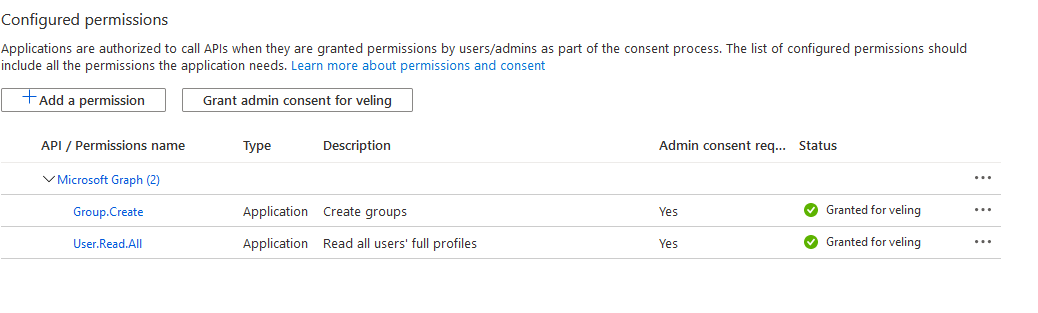
Minimum permissions required to use o365 aad o365group add only are
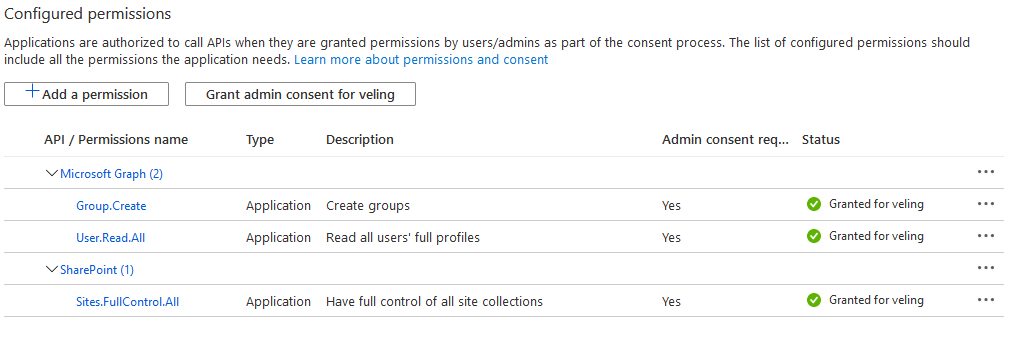
Minimum permissions required to use o365 aad o365group add together with o365 spo site set
The workaround will not work for Communication sites nor Classic sites
This workaround works only for Team sites.
For Communication sites: I submitted a PR https://github.com/pnp/office365-cli/pull/1748 which will make the creation of Communication sites from the
spo site addcommand possible once the PR is in.For Classic sites: The
spo site addcreates classic sites without issues for me.
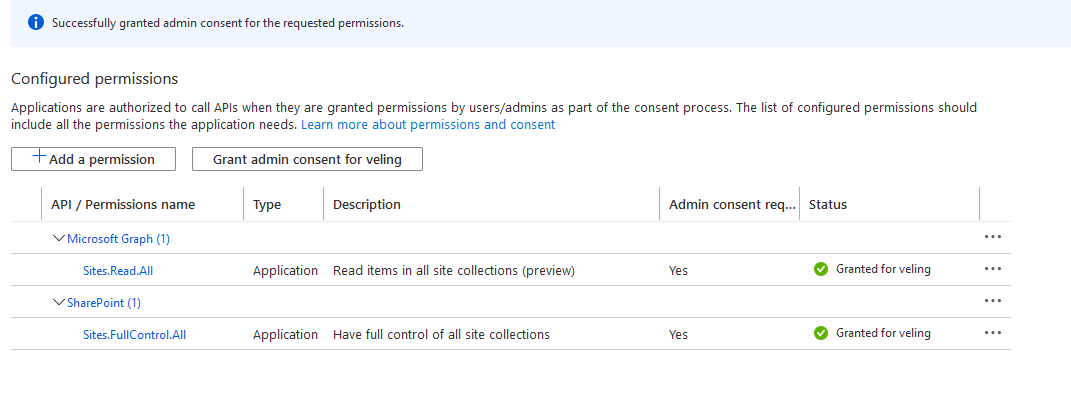
The minimum permissions for Communication or Classic site creation would be
Why not make the Team Sites being created by just executing spo site add?
We will discuss this with the rest of the team and we might implement fallback to the Microsoft Graph Group apis to create the site in case of application permissions. So, it will basically use the same apis as the aad o365group add command uses. This might not happen over night, so that is why I am suggesting the workaround.
Will this be documented?
There is a demand for documentation on how to work with CLI and SharePoint commands using custom Azure AD app and it is very likely that we create a doc in which we explain the caveats and bear minimum of permissions needed to execute SharePoint commands.
@svarukala, Please let me know what do you think. I am open for other suggestions. @garrytrinder , @rabwill , @appieschot
VelinGeorgiev
on 31 Jul 2020
Hello @VelinGeorgiev - Thank you so much for your valuable time on this. I think your response can go directly into docs. :)
I was helping my colleague and that's how I stumbled upon this issue. I will pass this workaround to her.
Question: Is there a reason to not use the well-documented Site Manager api (https://docs.microsoft.com/en-us/sharepoint/dev/apis/site-creation-rest), instead of the CreateGroupEx, which is not documented?
I will try to identify the PM on CreateGroupEx and share this thread internally if they can provide any insights on the application permission failure. If you know the PM, please let me know.
Documentation clarifying this will be helpful. Growing number of customers are adopting O365 CLI in their CI/CD pipelines. I recently published article on using custom AAD App and certificates in ADO CICD pipelines. I hope this and @garrytrinder's article will complement the documentation that this team will be creating.
svarukala
on 1 Aug 2020
Excellent work researching this @VelinGeorgiev & @svarukala 👏
As with #1738, I think we should take a similar approach.
 garrytrinder
on 2 Aug 2020
garrytrinder
on 2 Aug 2020
Hi @svarukala ,
Yes, there is a reason why we use CreateGroupEx over the well documented API here.
If you go through the article you will see that there is a paragraph saying that
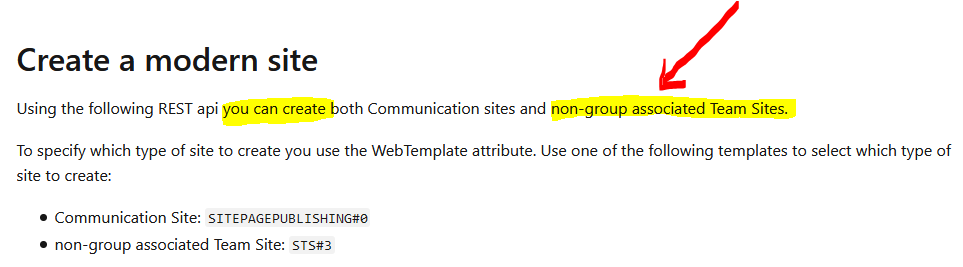
So, we use that API for the creation of the Communication sites (#SITEPAGEPUBLISHING0) indeed, but this API does not work with Team Sites (#GROUP...) and we had to reverse engineer the UI of SharePoint to get to this undocumented CreateGroupEx API. I guess the approach of creating a team site is different since there has to be an Microsoft 365 group assigned to the site and that is why the SharePoint engineering team came up with two different APIs.
I would suggest to the CLI team if we can switch from CreateGroupEx to https://docs.microsoft.com/en-us/graph/api/group-post-groups?view=graph-rest-1.0&tabs=http which is a documented and official API that can be used. If that gets approved we can switch to the Microsoft Graph and come up with guidance that you would need Graph Group permissions to create SharePoint modern Team sites.
I hope that this will clarify for you the current situation. Please let me know if any issues and I will try to help.
VelinGeorgiev
on 3 Aug 2020
Related issues
garrytrinder
·
3Comments
garrytrinder
·
3Comments
 plamber
·
3Comments
plamber
·
3Comments
plamber
·
3Comments
plamber
·
3Comments
 waldekmastykarz
·
3Comments
waldekmastykarz
·
3Comments
Most helpful comment
@svarukala , this is my assumption and I will try to reproduce your situation in the upcoming days and let you know what happened
o365 logincommand which is trying to get the token for resource SharePoint dynamically via requesting this https://graph.microsoft.com/v1.0/sites/root?$select=webUrl to get the root site URL and pass it as resource to the Microsoft Identity endpoints./_api/GroupSiteManager/CreateGroupExlooks like part of the SharePoint apis, but I will try to reproduce and see if any additional SharePoint rights other than SharePoint Sites.FullControl.All are required for this one.Bear with me for a few days till I find time to reproduce it and I apologize for the trouble. Once we have the minimum app permissions required for site creation we will officially document it.