Cli-microsoft365: New command: spo file sharinginfo get
Usage
spo file sharinginfo get [options]
Description
Generates the sharing information report for specified file
Options
| Option | Description |
| ----------------------- | ----------------------------------------- |
| -w, --webUrl<webUrl> | The URL of the site where the file is located |
| -i, --id[id] | The UniqueId (GUID) of the file for the sharing report. Specify either url or id but not both|
| -u, --url[url] | The server-relative URL of the file for the sharing report. Specify either url or id but not both |
| -o, --output [output] | Output type. json,text. Default text |
| --verbose | Runs command with verbose logging |
| --debug | Runs command with debug logging |
Additional Information
Can be done using REST using _api/SP.Web.GetObjectSharingSettings?$expand=ObjectSharingInformation,ObjectSharingInformation/SharedWithUsersCollection,SharePointSettings,SharePointSettings/PickerProperties,SharingPermissions
Based on research by @arjunumenon it turns out the REST option is not providing all options (most likely due to beta nature of the call). Should resort to CSOM option, More info on the object on: https://docs.microsoft.com/en-us/previous-versions/office/sharepoint-csom/mt143096(v%3Doffice.15). Once in place we could scale this command out for more options like using it on both site, web and library levels :).
As the command expects the ID, if the url is specified please use a REST call to retrieve the ID and process further.
 appieschot
All 29 comments
A couple of comments to finalize the spec, before we start working on it :)
- looking at other file commands they all reference files via web URL + file URL/ID. For consistency, this command should do the same
- if
sharingwould be the command's verb (technicallysharingit's not a verb and by convention the last word of a CLI command is a verb), then it could indicate sharing a file rather than getting its sharing information. How about we choose a different name that clearer indicates the command's purpose, likespo file sharinginfo get? - what will be the command's output in non-JSON mode? The API returns a complex object with multiple collections. While there is no problem returning the whole object as-is in JSON mode, what would we show in text mode?
 waldekmastykarz
on 18 Jun 2020
waldekmastykarz
on 18 Jun 2020
- We could use the file ID but that would make the command a bit harder as the SharingInfo requires an URL, meaning we would have to get the URL first. Do we favour consistency over complexity?
- Absolutely right, changed the specs
- I am not sure how other commands solve this, and given the results complexity I am not sure if we can get a nice text representation.. The result has: Invitations (direct links), LinkMembers (users who accepted an invitation), Principals (Groups that the item is shared to), Admins (site coll admins) and a whole bunch of settings around what has been shared when / how.
We could try to render all principals (the who) and their permission level like [DisplayName],[Email],[Role] (where role determines permissions). But that is by no means all useful info.
appieschot
on 19 Jun 2020
We could use the file ID but that would make the command a bit harder as the SharingInfo requires an URL, meaning we would have to get the URL first. Do we favour consistency over complexity?
I don't think we need to compromise and can offer two ways. If you build a script and have file ID but not its URL, we should be able to resolve it to a URL for you without having to force you to do it yourself. If you already have a URL, that's fine as well.
Absolutely right, changed the specs
👍
output
I like your suggestion of showing the different principals who have access to the file. Let's use that as default and mention in the docs, that more information is available in the JSON output mode.
waldekmastykarz
on 19 Jun 2020
Okey, so if you specify the ID we also need the URL of the site where the ID lives, that would mean two additional parameters. Based on those two things we could call the spo file get scenario and retrieve the URL. Do we already have a sample where we call another command? Or do we want to implement it as rest calls?
appieschot
on 19 Jun 2020
I think in this particular case it would be the easiest to implement it as a separate REST call and retrieve only the file URL rather than all properties.
waldekmastykarz
on 19 Jun 2020
Updated specs
appieschot
on 22 Jun 2020
Hey folks 😊 can I pick this one up please? @appieschot @waldekmastykarz
 rabwill
on 19 Jul 2020
rabwill
on 19 Jul 2020
Absolutely, all yours 😊
 garrytrinder
on 19 Jul 2020
garrytrinder
on 19 Jul 2020
Hey @garrytrinder / @waldekmastykarz I am unassigning this to be free for someone looking to contribute with good first issue 🙂
rabwill
on 24 Aug 2020
Hey @rabwill - Can I take this up if it is available to work upon?
 arjunumenon
on 25 Aug 2020
arjunumenon
on 25 Aug 2020
All yours @arjunumenon 👏 🚀 🔥
waldekmastykarz
on 25 Aug 2020
Hey @appieschot / @waldekmastykarz - I am trying to implement the command for getting the file sharing information. While doing that, , I had checked the fiddler trace for the CSOM equivalent and I see that CSOM method is achieving the same by passing payloads to clients.svc using the method GetObjectSharingSettings. Can you advise whether this is the way we want to achieve this?
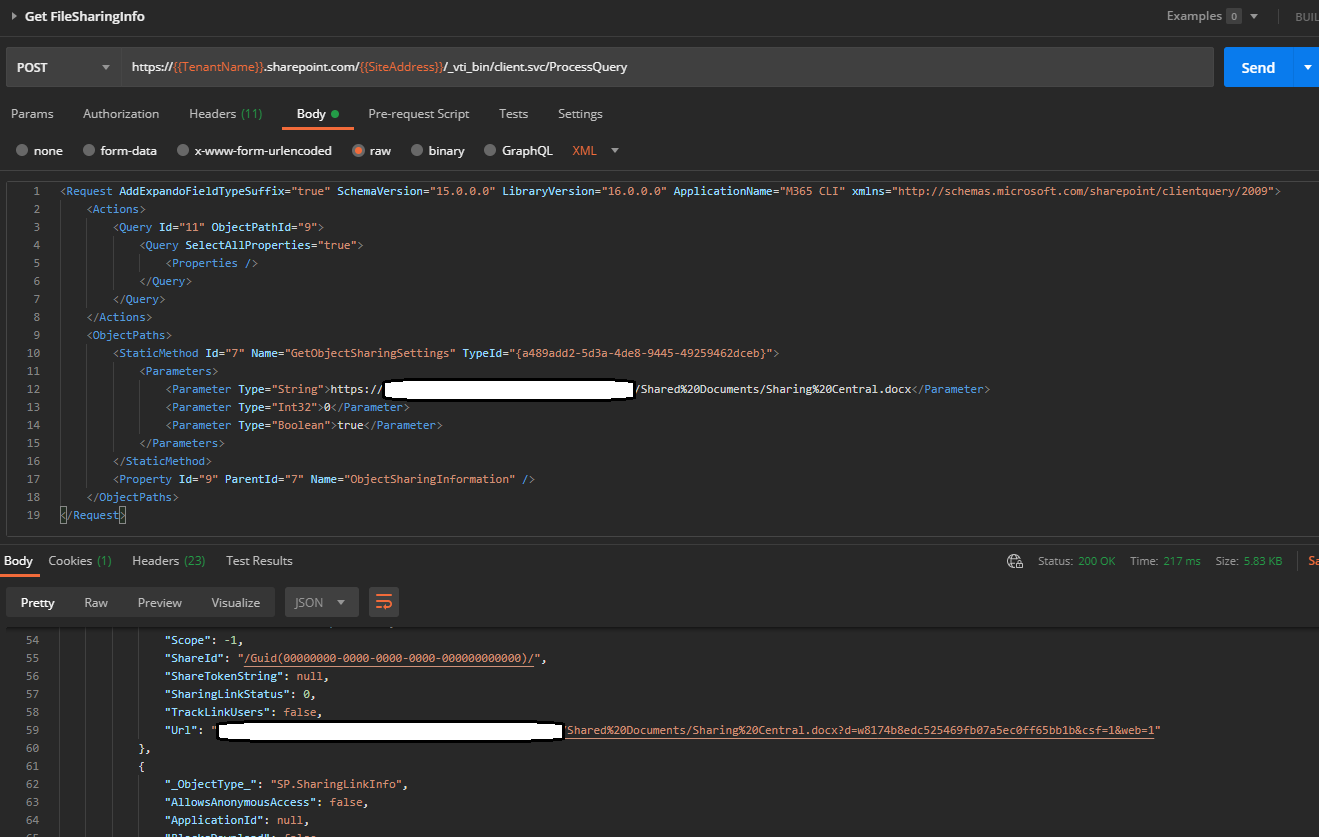
I am somehow unable to find the details about the REST method which is mentioned in the specs _api/SP.Web.GetObjectSharingSettings?$expand=ObjectSharingInformation,ObjectSharingInformation/SharedWithUsersCollection,SharePointSettings,SharePointSettings/PickerProperties,SharingPermissions
As per the specs, I guess the command expects IDand I am unable to find that in the documentation. REST API Explorer reveals that the expected parameters are objectUrl, groupId, useSimplifiedRoles
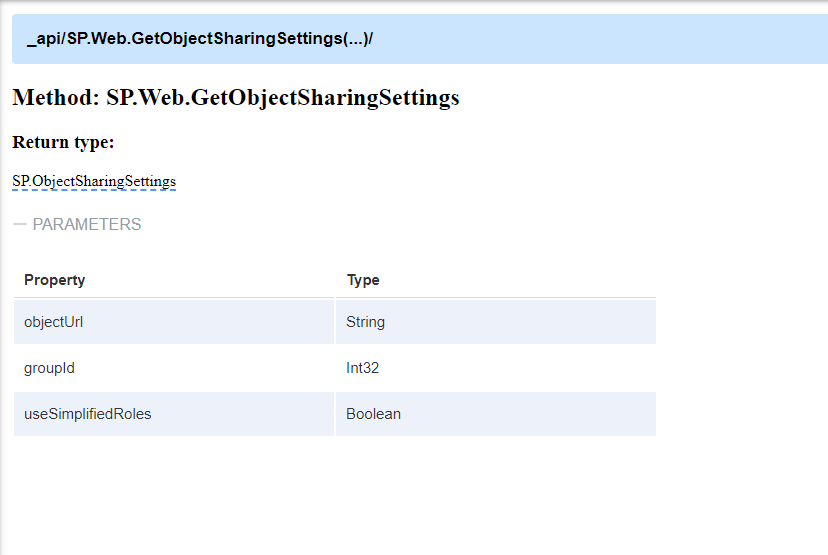
Can you advise on that please.
Kindly pardon me if I am missing something.
arjunumenon
on 14 Sep 2020
@arjunumenon I am not quite sure if things have been changed recently. We have been using the REST api internally, but I haven't heard anything about our code breaking. Initially I had a look at PnPJS where they seem to got it working, but I also find that there has been changes to the sharing stuff REST API Explorer.
I suggest we use the client.svc approach as that seems to be a richer option. You can have a look at the cdn-origin-list for inspiration on how to use the client.svc.
appieschot
on 23 Sep 2020
Thanks @appieschot for the lead on that. Not sure how PnPJS is handling that. Have not tried my hands on that specific case before.
I suggest we use the client.svc approach as that seems to be a richer option. You can have a look at the
cdn-origin-listfor inspiration on how to use the client.svc.
Based on your suggestion, I will go ahead by passing payload to client.svc. Thanks for the direction on the command which I can refer.
Another question if I may. Do you think the specs need to be updated since we will not be going ahead with that REST API mentioned in the specs? If you agree, do you mind updating the specs as well.
arjunumenon
on 23 Sep 2020
@arjunumenon done!
appieschot
on 23 Sep 2020
Hello @appieschot / @waldekmastykarz - Diving into the detailed implementation, I am currently in a bit of confused state.
As per the specs, it is mentioned that we will be getting file sharing info.
For doing that, I have couple of questions. Pardon me If I have missed the initial thought process of implementation.
- Case 1 : Are we going to get the information of the sharing by invoking the method
getSharingInformationpassing the below payload
    <ObjectPaths>
        <StaticMethod Id="7" Name="GetObjectSharingSettings" TypeId="{a489add2-5d3a-4de8-9445-49259462dceb}">
            <Parameters>
                <Parameter Type="String">https://sitename.sharepoint.com/sites/M365CLI/Shared%20Documents/Sharing%20Central.docx</Parameter>
                <Parameter Type="Int32">0</Parameter>
                <Parameter Type="Boolean">true</Parameter>
            </Parameters>
        </StaticMethod>
        <Property Id="9" ParentId="7" Name="ObjectSharingInformation" />
    </ObjectPaths>
- Case 2 : Will we be getting just the sharing settings of the object, using the method
GetObjectSharingSettingsby passing the payload,
    <ObjectPaths>
        <StaticMethod Id="7" Name="GetObjectSharingSettings" TypeId="{a489add2-5d3a-4de8-9445-49259462dceb}">
            <Parameters>
                <Parameter Type="String">https://sitename.sharepoint.com/sites/M365CLI/Shared%20Documents/Sharing%20Central.docx</Parameter>
                <Parameter Type="Int32">0</Parameter>
                <Parameter Type="Boolean">true</Parameter>
            </Parameters>
        </StaticMethod>
    </ObjectPaths>
If it is Case 1 we will be getting the information like below.
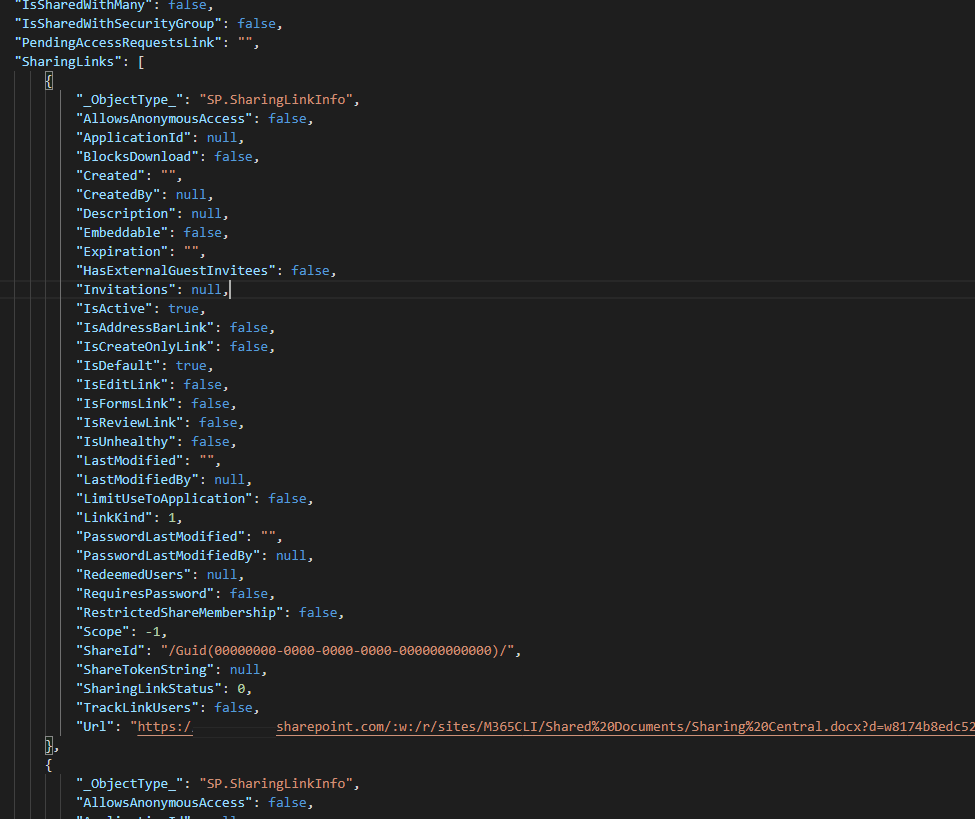
If we are going with Case 2, we will be getting information like below.
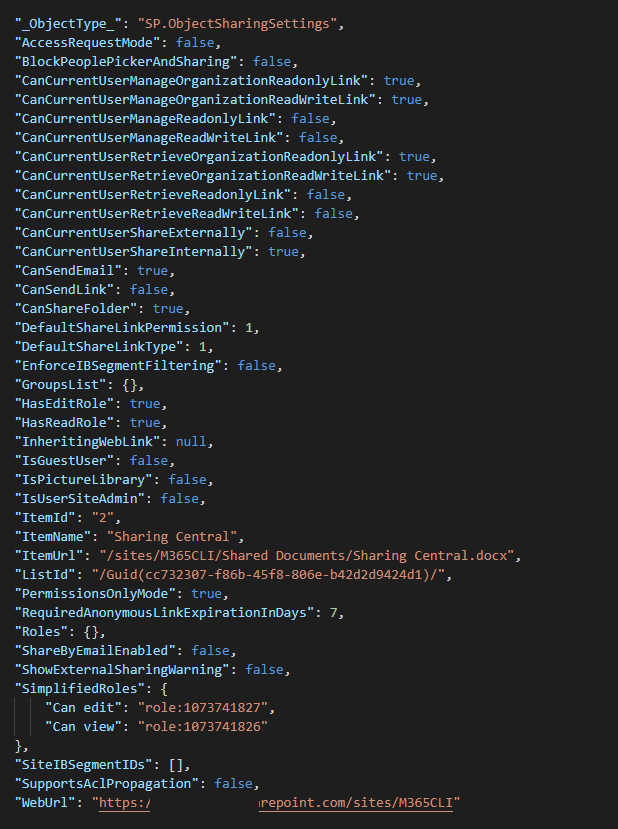
In THIS conversation and the reply by Waldek, it was mentioned that we would need principals who has access to the object. But apparently, I am only getting the sharing links and other information from the methods. Neither of the expected output is not available in the results.
Or am I looking at the wrong method here?
Since the result has complex return information, I am kind of confused what all information are we expecting out of this command. Or am I over complicating the whole requirement 🤔. Can you give the direction on this please.
Pardon me for the lengthier and confusing question.
arjunumenon
on 25 Sep 2020
@arjunumenon no need to be sorry. This is actually very good stuff and we should definitely clarify it before dev to avoid building things the wrong way.
Like you noticed, information about the principals is missing in the response. I'm not sure if it's because of the difference of REST vs. CSOM or if there is something else going in? Just to double check: what kind of permissions do you have when issuing the call?
waldekmastykarz
on 26 Sep 2020
@arjunumenon no need to be sorry. This is actually very good stuff and we should definitely clarify it before dev to avoid building things the wrong way.
Like you noticed, information about the principals is missing in the response. I'm not sure if it's because of the difference of REST vs. CSOM or if there is something else going in? Just to double check: what kind of permissions do you have when issuing the call?
Thanks @waldekmastykarz for the direction. I should have mentioned in the before message that following is the CSOM code which I am using in CSOM.
 ObjectSharingSettings info = Web.GetObjectSharingSettings(ctsSiteContext, FullDocumentURL, 0, true);
 ctsSiteContext.Load(info.ObjectSharingInformation);
 ctsSiteContext.Load(info);
 ctsSiteContext.ExecuteQuery();
Even in the CSOM, we are not getting the principals where the permissions are granted currently. All we are getting is the same output as mentioned in THIS Conversation .
Answering your question about permission level,
for API call, I use the accesstoken generated from M365 CLI
util accesstoken getmethod using the Full Control user.For the CSOM, I use Azure Add-in which has Sites.FullControl permission.
I also had done another research confining to the specific item / document which reveals that, we can get the sharing information which is for specific item using the below API https://{{TenantName}}.sharepoint.com/{{SiteAddress}}/_api/web/lists/getbytitle('Documents')/items(2)/GetSharingInformation?$Expand=permissionsInformation , we get the principals and all the links which are available for the document.
Result set is mentioned below.
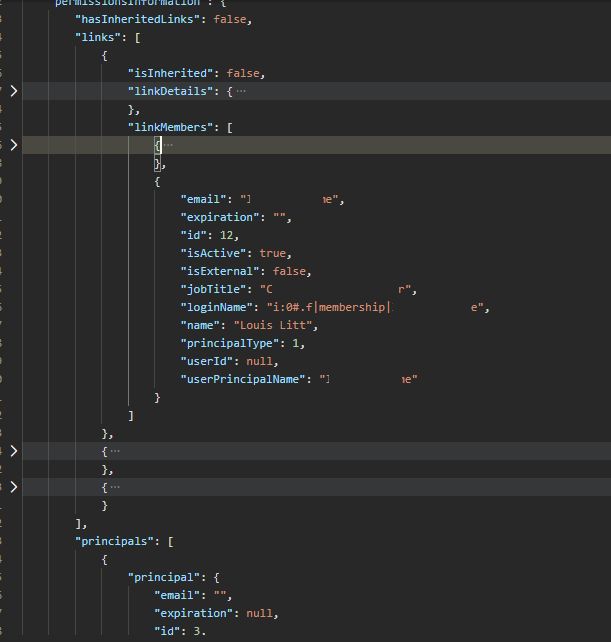
Can you advise on that please. Pardon me since I am overwhelming with lots of information. ☹
arjunumenon
on 28 Sep 2020
@arjunumenon just to clarify: initially we found out that we wouldn't get principal information from the REST call and decided to have a look at CSOM, but now it turns out we get principal information from REST after all?
waldekmastykarz
on 30 Sep 2020
@arjunumenon just to clarify: initially we found out that we wouldn't get principal information from the REST call and decided to have a look at CSOM, but now it turns out we get principal information from REST after all?
Hi @waldekmastykarz - I am sorry the conversations were confusing and I don't blame you for that. I should have made it clear in the initial conversation itself. ☹. Blame is on me.
REST based on initial spec
Initially my research was around the API suggested in the specs which is, _api/SP.Web.GetObjectSharingSettings since we were planning to scale it up to sites or other objects if needed.
The above REST calls does not fetch the principals and does not match the parameters which was mentioned in the initial specs All it returns is the Sharing related information.
CSOM based approach
When we tried with CSOMcall, even that doesn't fetch the principals either when I did the analysis.
Item Specific REST API
Since we did not get the needed results in the above 2 steps, my research went with using another REST which is, https://{{TenantName}}.sharepoint.com/{{SiteAddress}}/_api/web/lists/getbytitle('Documents')/items(2)/GetSharingInformation?$Expand=permissionsInformation which are item specific.
Now the problem with this approach is, we will get the principals to which is sharing is available. But I am not sure how will we scale this up if we want to use the same method to get the sharing information like mentioned in the specs,
Once in place we could scale this command out for more options like using it on both site, web and library levels :).
Hope it is clear for you now.
I might be wrong here, not sure whether I have detoured during any of my researches. 😔
arjunumenon
on 30 Sep 2020
Thank you for clarifying. No blame to take. Async communication is challenging at times so always good to double check if everyone has the same understanding. I appreciate your patience.
Let me have another look at the _api/SP.Web.GetObjectSharingSettings API and my notes and I will get back to you ASAP with the next step, deal? 😊
waldekmastykarz
on 3 Oct 2020
Liked your metaphor async communication. I am taking it without your permission.
You made me an offer I can't refuse. Done and Deal.. 👊
arjunumenon
on 4 Oct 2020
Hey @arjunumenon, I can confirm your findings. Looking at the spec though, it's referring to a single file/item rather than a list or web so with the GetSharingInformation call, we should be good, right?
waldekmastykarz
on 5 Oct 2020
Hey @arjunumenon, I can confirm your findings. Looking at the spec though, it's referring to a single file/item rather than a list or web so with the
GetSharingInformationcall, we should be good, right?
Thanks @waldekmastykarz for spending your time and confirming the approach. It is perfect. Just to make sure our understanding are in same page.
- The ID which we are expecting is NOT the GUID, but the ID of the file right, say 1,10 and NOT _7d15b06a-c1c0-48c7-b266-bfc4e917e111_ etc., Is that correct? The REST API expects the item ID and not GUID.
_REST Call Would be something like this : _https://{{TenantName}}.sharepoint.com/{{SiteAddress}}/_api/web/lists/getbytitle('Documents')/items(2)/GetSharingInformation?$Expand=permissionsInformation
Information to be shown
REST API fetches lot of information. Sample is given in THIS LINK.
Response has 2 aspects,
- Links
- Principals
_Links_ will have the list of invitations which is available for the file
_Principals_ will have the list of groups which has been given permission to.
Based on that following are the information which I thought would be needed to be shown in the text output which will have both principals and links clubbed together. Do you think it is a good idea or do you prefer it to be shown as separate entities
Shared with | Is Active
-- | --
[email protected] | True
[email protected] | True
O365CLI Owners | True
O365CLI Visitors | True
Can you please suggest / advise on that as well. Pardon me for bombarding with lot of questions. Since the response has lot of information, not sure what information we need to show in the text.
arjunumenon
on 6 Oct 2020
No need to apologize, @arjunumenon and I really love the way you go about it: measure twice cut once! 👏
With regards to the ID, we could consider allowing users to provide any kind of ID they have and then resolve it whatever type we need internally. For starters though, let's keep it simple and require user to provide the list item ID and we can adjust it in the future.
I like your proposal for the text output. If @pnp/cli-for-microsoft-365-maintainers have no objections/suggestions then I'd propose that we proceed with that.
Appreciate your thoroughness @arjunumenon 👏
waldekmastykarz
on 6 Oct 2020
No objections from me.
Great work on this @arjunumenon 👏🏻
garrytrinder
on 7 Oct 2020
Hello @waldekmastykarz / @garrytrinder - I am back with couple of questions which may need your valuable guidance. I am kind of done with the implementation of the command. Just a final confirmation on some of the items. I sincerely hope this would be my last set of questions for this issue 🤔
Parameters - Resorting to GUID as per the initial specs rather than Item Id
In THIS CONVERSATION, I had mentioned that we may need to use Item Id rather than File GUID. After some research and understanding the implication if we get the item ID, I see that it is better to follow the onventional GUID approach which we follow in other commands rather than Item id. Hence we would expect the user to enter the GUID of the file rather than Item Id.
I thought it would be good to keep you informed on the same.
Output in Text Format
Following is the output which I am thinking to give for text format. In the previous conversation, we had told that we would just show SharedWith and Is Active. But when I go through the usability, I felt it make sense to give couple of more information like IsExternal and PrincipalType as well in the result so that it will be more useful for the end users.
Sample output would be something like below.
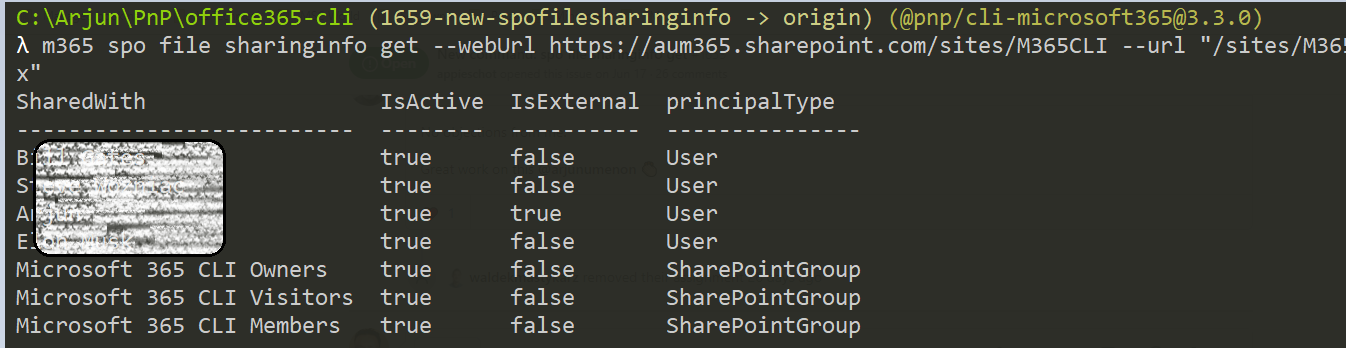
Output in JSON Format
Currently the JSON for the REST API call is pretty complex with so much information. Sample is given in THIS LINK. That is fine right?
It will be great if you can give me your guidance in the above points so that I can initiate a PR pretty soon. Thanks again for the all guidance.
_PS : I do have a clarification which I need in the code implementation. I am not pretty sure the approach which I am following is as per the best practices. I guess it will be better if you can give your comments during the review. Or do you prefer it to be given here?_
arjunumenon
on 5 Nov 2020
Thanks for reaching out @arjunumenon and always great to check things upfront to avoid rework 👍
I like your suggestion of extending the output. Let's do it. Is the principalType property something that we create ourselves? If so, let's capitalize the first p so that it's consistent with other properties.
As for JSON, let's definitely keep it intact. It allows users to build powerful scripts and gives them full flexibility in retrieving just the right information they need.
When it comes to implementation, we can go through the different things in a PR, where we can refer to the different lines. If you're unsure, you can submit it as a draft and comment on the specific pieces, you'd like our input.
Thanks for staying in touch! ❤️
waldekmastykarz
on 5 Nov 2020
Thanks for the valuable guidance like always @waldekmastykarz 🙏
I like your suggestion of extending the output. Let's do it. Is the principalType property something that we create ourselves? If so, let's capitalize the first p so that it's consistent with other properties.
Sure. That is a typo. The info is being taken from an interface properties. Will rename it to follow the standards. Thanks for pointing that out 👍.
As for JSON, let's definitely keep it intact. It allows users to build powerful scripts and gives them full flexibility in retrieving just the right information they need.
👍
When it comes to implementation, we can go through the different things in a PR, where we can refer to the different lines. If you're unsure, you can submit it as a draft and comment on the specific pieces, you'd like our input.
Perfect. Thanks the guidance. That is a great idea to point exactly to the specific line or piece of code so that it will be easy for everyone. Will follow that when I initiate the PR. 🚀.
Pleasure to be back to Active CLIing after a brief vacation and hectic work.. 🤟.
arjunumenon
on 5 Nov 2020
Related issues
 aakashbhardwaj619
·
3Comments
aakashbhardwaj619
·
3Comments
 andrewconnell
·
3Comments
arjunumenon
·
3Comments
andrewconnell
·
3Comments
arjunumenon
·
3Comments
 joshua-probst
·
3Comments
arjunumenon
·
3Comments
joshua-probst
·
3Comments
arjunumenon
·
3Comments
Most helpful comment
Hey @appieschot / @waldekmastykarz - I am trying to implement the command for getting the file sharing information. While doing that, , I had checked the fiddler trace for the CSOM equivalent and I see that CSOM method is achieving the same by passing payloads to clients.svc using the method
GetObjectSharingSettings. Can you advise whether this is the way we want to achieve this?I am somehow unable to find the details about the REST method which is mentioned in the specs
_api/SP.Web.GetObjectSharingSettings?$expand=ObjectSharingInformation,ObjectSharingInformation/SharedWithUsersCollection,SharePointSettings,SharePointSettings/PickerProperties,SharingPermissionsAs per the specs, I guess the command expects

IDand I am unable to find that in the documentation. REST API Explorer reveals that the expected parameters areobjectUrl,groupId,useSimplifiedRolesCan you advise on that please.
Kindly pardon me if I am missing something.