Cli-microsoft365: Bug report: Error on 'spo theme set' with JSON. Theme works in SPO powershell.
Description
Running
spo theme set --verbose -n XYZ-Green -p C:...\theme.json
Error
File contents is not a valid theme
Steps to reproduce
Create theme in theme designer, save json in a file
Expected result
New XYZ-Green theme in tenancy
Actual result
Error
File contents is not a valid theme
Environment
Windows Server 16
o365 version 2.10.0
theme.json below:
{
"themePrimary": "rgba(46, 135, 46, 0.733)",
"themeLighterAlt": "rgba(244, 250, 244, 0.733)",
"themeLighter": "rgba(211, 236, 211, 0.733)",
"themeLight": "rgba(176, 219, 176, 0.733)",
"themeTertiary": "rgba(111, 183, 111, 0.733)",
"themeSecondary": "rgba(63, 150, 63, 0.733)",
"themeDarkAlt": "rgba(41, 122, 41, 0.733)",
"themeDark": "rgba(35, 103, 35, 0.733)",
"themeDarker": "rgba(26, 76, 26, 0.733)",
"neutralLighterAlt": "#faf9f8",
"neutralLighter": "#f3f2f1",
"neutralLight": "#edebe9",
"neutralQuaternaryAlt": "#e1dfdd",
"neutralQuaternary": "#d0d0d0",
"neutralTertiaryAlt": "#c8c6c4",
"neutralTertiary": "#a19f9d",
"neutralSecondary": "#605e5c",
"neutralPrimaryAlt": "#3b3a39",
"neutralPrimary": "#323130",
"neutralDark": "#201f1e",
"black": "#000000",
"white": "#ffffff"
}
PLEASE NOTE:
SPO PowerShell below works:
$themepalette = @{
"themePrimary" = "#2e872e49.4ccccccccccc";
"themeLighterAlt" = "#f4faf449.4ccccccccccc";
"themeLighter" = "#d3ecd349.4ccccccccccc";
"themeLight" = "#b0dbb049.4ccccccccccc";
"themeTertiary" = "#6fb76f49.4ccccccccccc";
"themeSecondary" = "#3f963f49.4ccccccccccc";
"themeDarkAlt" = "#297a2949.4ccccccccccc";
"themeDark" = "#23672349.4ccccccccccc";
"themeDarker" = "#1a4c1a49.4ccccccccccc";
"neutralLighterAlt" = "#faf9f8";
"neutralLighter" = "#f3f2f1";
"neutralLight" = "#edebe9";
"neutralQuaternaryAlt" = "#e1dfdd";
"neutralQuaternary" = "#d0d0d0";
"neutralTertiaryAlt" = "#c8c6c4";
"neutralTertiary" = "#a19f9d";
"neutralSecondary" = "#605e5c";
"neutralPrimaryAlt" = "#3b3a39";
"neutralPrimary" = "#323130";
"neutralDark" = "#201f1e";
"black" = "#000000";
"white" = "#ffffff";
}
Add-SPOTheme -Identity "XYZ-Green" -Palette $themepalette -IsInverted $false
 alexabramkin
All 5 comments
Thank you for reporting this issue @alexabramkin and sorry for the trouble.
We recently introduced validation on this command (issue #1466) as it was possible to send an invalid theme object to the SharePoint API and not receive an error, resulting in a false positive.
Having checked the Theme Generator site (https://aka.ms/themedesigner), all colours in the generated theme object are hex values, which is what we have used to validate the incoming theme object.
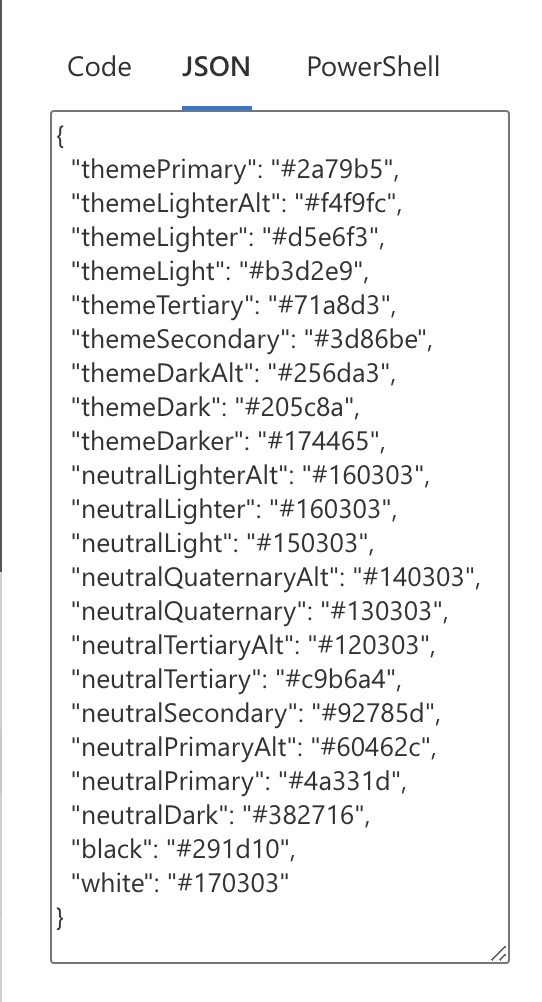
To unblock you, you should be able to use the below theme object. I have converted the rgba colours for you using https://rgbatohex.com/
{
    "themePrimary": "#2e872e",
    "themeLighterAlt": "#f4faf4",
    "themeLighter": "#d3ecd3",
    "themeLight": "#b0dbb0",
    "themeTertiary": "#6fb76f",
    "themeSecondary": "#3f963f",
    "themeDarkAlt": "#297a29",
    "themeDark": "#236723",
    "themeDarker": "#1a4c1a",
    "neutralLighterAlt": "#faf9f8",
    "neutralLighter": "#f3f2f1",
    "neutralLight": "#edebe9",
    "neutralQuaternaryAlt": "#e1dfdd",
    "neutralQuaternary": "#d0d0d0",
    "neutralTertiaryAlt": "#c8c6c4",
    "neutralTertiary": "#a19f9d",
    "neutralSecondary": "#605e5c",
    "neutralPrimaryAlt": "#3b3a39",
    "neutralPrimary": "#323130",
    "neutralDark": "#201f1e",
    "black": "#000000",
    "white": "#ffffff"
}
 garrytrinder
on 3 Jun 2020
garrytrinder
on 3 Jun 2020
@waldekmastykarz we previously agreed that all colours should be hex values for the validating the incoming theme object, is there anything specific that requires hex values?
garrytrinder
on 3 Jun 2020
Thank you for prompt reply!
2c:
Explanation works for me (suspected that, but was not sure). I think the problem was that color I was trying to match in Generator was originally in rgba and I did cut and paste (might have also been me playing with color selector in genrator). Also that "half-tone" did not match color selected once applied via SO PowerShell.
Might be a good idea to enhance docs and/or add more details the error message.
Love the o365 cli :)
alexabramkin
on 3 Jun 2020
Might be a good idea to enhance docs and/or add more details the error message.
Great suggestion, we can absolutely do that. I will raise a separate issue to track the work to update the docs with some guidance on how the theme is validated. Would you be happy for this issue to be closed now that you are unblocked?
Love the o365 cli :)
Thank you for the kind words ❤️
garrytrinder
on 3 Jun 2020
Yes to closing the issue and thank you for your help!
alexabramkin
on 4 Jun 2020
Related issues
 waldekmastykarz
·
3Comments
waldekmastykarz
·
3Comments
 plamber
·
3Comments
plamber
·
3Comments
 VelinGeorgiev
·
3Comments
VelinGeorgiev
·
3Comments
 rabwill
·
3Comments
rabwill
·
3Comments
 thomyg
·
3Comments
thomyg
·
3Comments
Most helpful comment
Yes to closing the issue and thank you for your help!