Cli-microsoft365: New command: 'add approleassignment add'
Usage
add approleassignment add [options]
Description
Adds service principal permissions also known as scopes and app role assignments for specified Azure AD application registration
Options
Option | Description
-- | --
--appId [appId] | Application appId also known as clientId of the App Registration on which the configured scopes (app roles) should be applied
--objectId [objectId] | Application objectId of the App Registration on which the configured scopes (app roles) should be applied
--displayName [displayName] | Application name of the App Registration on which the configured scopes (app roles) should be applied
--resource <resource> | Service principal name, appId or objectId that has the scopes (roles) ex. SharePoint. Autocomplete values 'Microsoft Graph', 'SharePoint', 'OneNote', 'Exchange', 'Microsoft Forms', 'Azure Active Directory Graph', 'Skype for Business'
-s, --scope <scope> |Permissions known also as scopes and roles to grant the application with. If multiple permissions have to be granted, they have to be comma separated ex. 'Sites.Read.All,Sites.ReadWrite.all' |
| -o, --output [output] | Output type. json,text. Default text |
| --verbose | Runs command with verbose logging |
| --debug | Runs command with debug logging |
Note: Autocomplete values for the resourceName option do not mean allowed values. The autocomplete will just suggest some known names, but that would not restrict the users to use name of their own custom application or other application within their tenant if they will.
Note: I use resourceName and scope as options names to follow the same pattern used in the oauth2grant add. We can perhaps use servicePrincipal instead of resourceId and appRoles instead of scope, but this would probably not make the terms less confusing for the users since Microsoft always has 5 different terms that have similar meaning.
Note: This command can also be used to assign permissions to system or user-assigned managed identity.
Examples
Adds SharePoint Sites.Read.All application permissions to Azure AD application with app id _57907bf8-73fa-43a6-89a5-1f603e29e451_
o365 aad approleassignment add --appId "57907bf8-73fa-43a6-89a5-1f603e29e451" --resourceName "SharePoint" --scope "Sites.Read.All"
Adds multiple Microsoft Graph application permissions to an Azure AD application with name _MyAppName_
o365 aad approleassignment add --displayName "MyAppName" --resourceName "Microsoft Graph" --scope "Mail.Read,Mail.Send"
Adds Microsoft Graph Mail.Read application permissions to an system managed identity app with objectId _57907bf8-73fa-43a6-89a5-1f603e29e451_
o365 aad approleassignment add --objectId "57907bf8-73fa-43a6-89a5-1f603e29e451" --resourceName "Microsoft Graph" --scope "Mail.Read"
Links
https://docs.microsoft.com/en-us/graph/permissions-reference
Reference of Microsoft Applications (from the Azure Portal) that have app permissions available
Microsoft Graph
Azure Rights Management Services
Dynamics 365 Business Central
Microsoft Intune API (Intune)
Office 365 Management APIs
Power BI Service
Office 365 SharePoint Online (SharePoint)
Skype for Business
Azure Import/Export
Dynamics ERP
OneNote
Universal Print
Azure Active Directory Graph
Office 365 Exchange Online (Exchange)
Microsoft Exchange Online Protection
Skype and Teams Tenant Admin API
Microsoft Information Protection Sync Service
Office 365 Information Protection
Compute Recommendation Service
DeploymentScheduler
StreamToSubstrateRepl
Microsoft Forms
Microsoft Invoicing
Signup
Azure AD Identity Governance Insights
Application Insights API
Microsoft Teams Retail Service
M365DataAtRestEncryption
Skype Presence Service
Sway
Microsoft Teams Chat Aggregator
ProjectWorkManagement
Microsoft Stream Service
Microsoft Teams Services
Microsoft Teams UIS
Cortana at Work Bing Services
Microsoft Teams Graph Service
Cortana Runtime Service
Cortana at Work Service
Log Analytics API
Office 365 Enterprise Insights
Microsoft Teams ADL
Microsoft Service Trust
Microsoft Information Protection API
Microsoft Threat Protection
WindowsDefenderATP
IC3 Long Running Operations Service
Graph Connector Service
Windows Store for Business
Note: Some of them have alias name in brackets. This is how they are displayed in the Azure portal. So in the portal they are seen as:
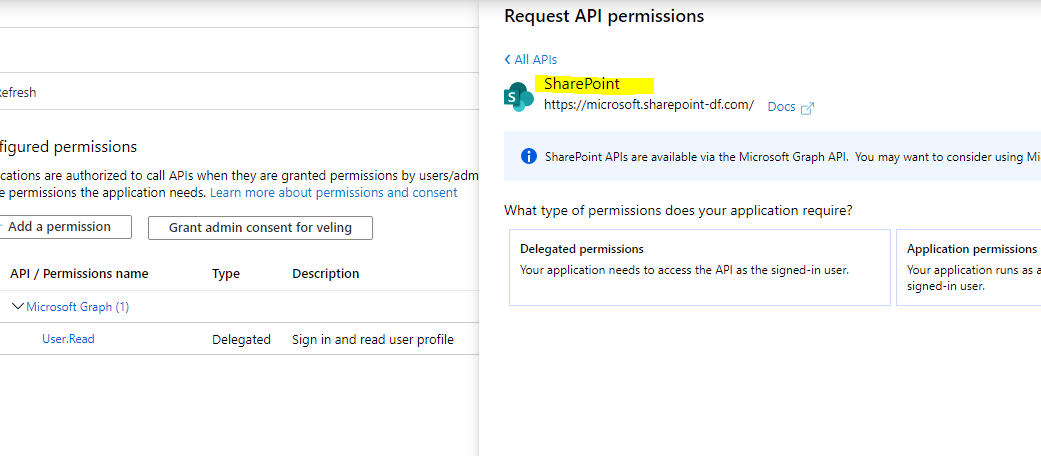
but the actual name of the app is

@waldekmastykarz , @garrytrinder , @appieschot please comment on this , so we can finalize it and I can make it happen.
 VelinGeorgiev
All 5 comments
Application appId, clientId, objectId or name of the App Registration on which the configured scopes (app roles) should be applied
Typically all these were a separate option. Having them all in one would be potentially easier for the users, but it's not the pattern we follow in other commands. Shall we keep them separate for now (we can still offer three options) and then perhaps consider such a consolidation consistently across all commands?
Other than that, it's a very well-done spec that's ready to go.
 waldekmastykarz
on 14 May 2020
waldekmastykarz
on 14 May 2020
I tried to simplify it as much as possible for the user. I can change it to different options, but this is more cognitive load and knowledge what that id actually is appid or objectid or name.
Do you see starting to use one id instead of separate as bigger initiative? .. something lile v3.
I am just thinking is it just the consistency that is stopping us from breaking the consistency rules with this command and move forward with more user friendly approach while changing the old commands on the fly :)
Will we benefit from introducing id that is a combined option as well as separate options like appId, objectId to see if the telemetry will show some usage number?
VelinGeorgiev
on 14 May 2020
I get the reasoning behind it and I do agree that it would be easier for the user. Perhaps to make it clear we shouldn't use id but identity. id is a defined property on many objects whereas identity can refer to any value uniquely identifying the specified object, basically what you have in PowerShell.
We could consider including consolidation in v3 or v4 depending on the effort involved. The question is how much work would it be and is it worth it, given we haven't had a single 'complaint' about the current structure ;) If we spend all this time on a refactoring, we won't introduce new functionality which could be more helpful.
I think we should strive for consistency across the CLI rather than introduce commands that work differently, even though in some cases like this one, it could be just easier to have a single ID. If someone uses multiple different commands with the CLI, it would be confusing to have to switch the mind model for each one of them. Also, looking at az cli it uses separate options for names and ids so it could be another argument for us to align with.
What if we used separate options for now and started discussion about using identity instead of id, name, url and other things that we use as identifiers to see if there is any interest in that area that would justify such a significant effort?
waldekmastykarz
on 15 May 2020
Thanks for the explanation @waldekmastykarz ! That is fair , I have introduced --appId, --objectId and --displayName instead of --id in the command description and have changed the examples accordingly.
Will start working on it.
VelinGeorgiev
on 15 May 2020
I changed the resourceId with resource since the value can be name, appId or objectId like for e.g "SharePoint" or GUID for the objectId.
VelinGeorgiev
on 15 May 2020
Related issues
 arjunumenon
·
3Comments
waldekmastykarz
·
3Comments
arjunumenon
·
3Comments
waldekmastykarz
·
3Comments
 vineet2907
·
3Comments
VelinGeorgiev
·
3Comments
vineet2907
·
3Comments
VelinGeorgiev
·
3Comments
 garrytrinder
·
3Comments
garrytrinder
·
3Comments