Cli-microsoft365: Bug report: The file that provides a tab completion in PowerShell is missing
Description
I've installed Office 365 CLI beta (2.10.0-beta.9e086a8) in Azure Cloud Shell.
The Register-O365CLICompletion.ps1 file that should provide a tab completion for Office 365 CLI in PowerShell is missing.
/home/<USERNAME>/.npm-global/lib/node_modules/@pnp/office365-cli/scripts/Register-O365CLICompletion.ps1 doesn't exist.
 alexandair
All 16 comments
Thank you for reporting this @alexandair and apologies for the inconvenience.
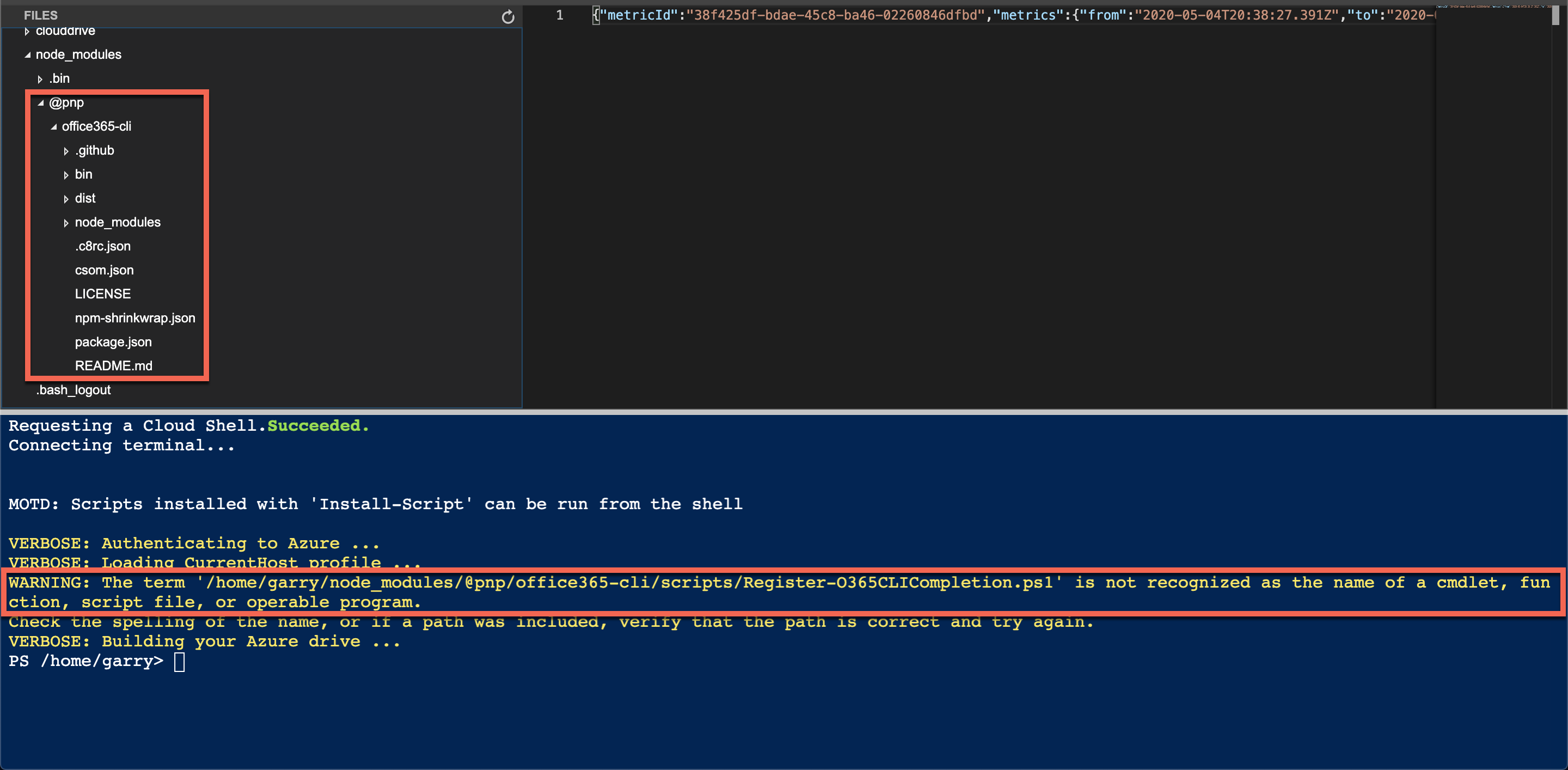
I've been able to reproduce in the cloud shell using a local install.
 garrytrinder
on 4 May 2020
garrytrinder
on 4 May 2020
I also have this issue locally when installing the CLI globally, using either the @latest & @next releases.
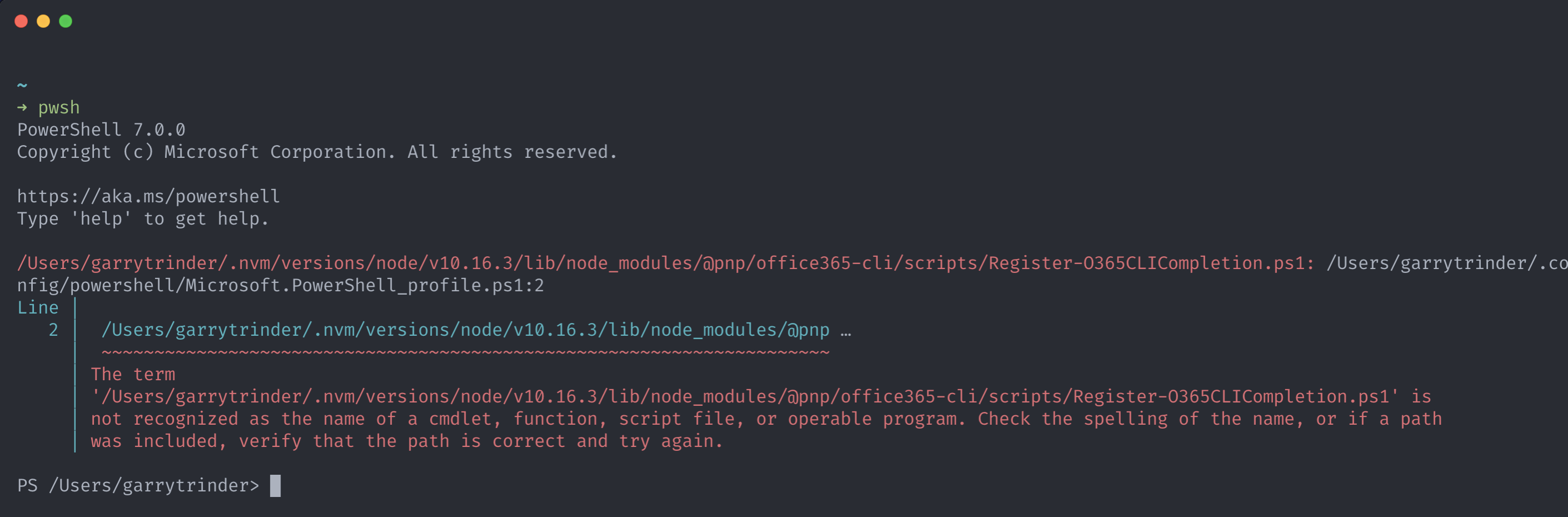
Interestingly, I had setup completion previously on my machine with no issues, it however transpires that this was working fine for me due to having the CLI source on my machine for development which I had created a symlink to using npm link.
Therefore, the path added to my PowerShell profile when executing o365 cli completion pwsh setup command was to this local folder where the Register-O365CLICompletion.ps1 exists in the scripts folder.
It looks like the scripts folder is missing from the npm package.
@waldekmastykarz would you be able to take a look at this?
garrytrinder
on 4 May 2020
@garrytrinder Could you share the steps you've used to install Office 365 CLI in Cloud Shell? (this is not related to a bug; just curious about your approach)
alexandair
on 4 May 2020
Sure, I just did a local install, npm i @pnp/office365-cli, so I can then execute o365 from within the node_modules/.bin folder without installing it globally.
I can then use node_modules/.bin/o365 <command> to execute commands in non-immersive mode.
garrytrinder
on 5 May 2020
Reproduced on my windows 10 machine (node v12.14.1) and cli version 2.9.0
 appieschot
on 5 May 2020
appieschot
on 5 May 2020
@garrytrinder seems like we're excluding the scripts folder in .npmignore, so while it works locally with npm link it doesn't when the package is installed by itself because the folder isn't there :(
https://github.com/pnp/office365-cli/blob/b3d1515a82b701a099d803943a14fa7a97d9b6b0/.npmignore#L7
Removing scripts from .npmignore should fix the issue. Good catch @alexandair and pretty bad that we haven't spotted it earlier.
 waldekmastykarz
on 5 May 2020
waldekmastykarz
on 5 May 2020
Rather than including all scripts in the package, I've included only the PowerShell completion registration script. Other, admin-related scripts are still excluded to keep things clean for users.
waldekmastykarz
on 5 May 2020
We have just released a new preview version that should have this issue fixed. Once again sorry for the inconvenience and thank you for bringing it to our attention 👏
waldekmastykarz
on 5 May 2020
I am having a similar issue ( assuming PowerShell Core 7.03 isn't the issue) when installing the tab complate in the Windows Terminal.
npm install -g @pnp/cli-microsoft365@next
m365 cli completion pwsh setup --profile $profile
restarted Windows Terminal
C:\Users\danie\AppData\Roaming\nvm\v10.22.0\node_modules\@pnp\cli-microsoft365\scripts\Register-O365CLICompletion.ps1: C:\Users\danie\OneDrive\Documents\PowerShell\Microsoft.PowerShell_profile.ps1:6
Line |
6 | C:\Users\danie\AppData\Roaming\nvm\v10.22.0\node_modules\@pnp\cli-mic …
| ~~~~~~~~~~~~~~~~~~~~~~~~~~~~~~~~~~~~~~~~~~~~~~~~~~~~~~~~~~~~~~~~~~~~~
| The term
| 'C:\Users\danie\AppData\Roaming\nvm\v10.22.0\node_modules\@pnp\cli-microsoft365\scripts\Register-O365CLICompletion.ps1' is not recognized as the name of a cmdlet, function, script file, or operable program. Check the spelling of the name,
Could be a path length issue 🤔.
 westerdaled
on 1 Sep 2020
westerdaled
on 1 Sep 2020
Thanks for letting us know @westerdaled could I ask you to raise a new issue to highlight the behaviour you are seeing, so that it is more visible to others and we will investigate. Thank you.
garrytrinder
on 2 Sep 2020
@garrytrinder and @westerdaled I had the same issue; just added it: #1793. Also think I identified the cause already.
appieschot
on 2 Sep 2020
@appieschot , good news.
westerdaled
on 2 Sep 2020
hi @garrytrinder , I am happy to try the next beta release if this issue has now been resolved.
westerdaled
on 3 Sep 2020
Thanks @westerdaled that would be great if you could and confirm that there is no longer an issue 👍
garrytrinder
on 3 Sep 2020
@garrytrinder all looking good👍 .. the PS script is added to my $profile , is executed and I do get tab completion in my PS 7 terminal
m365 flow connector

  CLI for Microsoft 365 v3.0.0-beta.577f614
  Manage Microsoft 365 and SharePoint Framework projects on any platform
Thank you for confirming @westerdaled ❤️
waldekmastykarz
on 3 Sep 2020
Related issues
 aakashbhardwaj619
·
3Comments
aakashbhardwaj619
·
3Comments
 OodapowUiPath
·
3Comments
OodapowUiPath
·
3Comments
 rabwill
·
3Comments
rabwill
·
3Comments
 joshua-probst
·
3Comments
garrytrinder
·
3Comments
joshua-probst
·
3Comments
garrytrinder
·
3Comments
Most helpful comment
@garrytrinder all looking good👍 .. the PS script is added to my $profile , is executed and I do get tab completion in my PS 7 terminal