Cli-microsoft365: Bug report: apply theme to site
Description
I'm trying to apply a theme to a site with the command spo theme apply and I got a strange error.
Steps to reproduce
PowerShell:
o365 login -t password -u $("user") -p $("password")
o365 spo theme apply --name xxxxx --webUrl https://xxxxx.sharepoint.com/sites/xxxxx
Actual result
On the second command I'm getting the next error:
Error: Operation is not valid due to the current state of the object.
Environment
PowerShell on windows 10
o365 version: 2.8.0
 sergiosanchezd
All 10 comments
Thank you for reporting this @sergiosanchezd
I have taken a look at this and unfortunately I cannot replicate your issue, applying either a default theme or a custom theme using the below examples.
Default
o365 spo theme apply --name Purple --webUrl https://contoso.sharepoint.com --sharePointTheme
Custom
o365 spo theme set --name "CustomTheme" --filePath ./theme.json
o365 spo theme apply --name CustomTheme --webUrl https://contoso.sharepoint.com
Would it be possible for you to use the --debug or --verbose when you execute the command and paste the output into this issue?
 garrytrinder
on 8 Apr 2020
garrytrinder
on 8 Apr 2020
Hi, thanks for your quick response.
My theme exists because when I execute the next command, I got in the response my custom theme:
o365 spo theme list
And this is the stakctrace when I execute the command with the flag debug:
PS xxxxxxxxx> o365 spo theme apply --name xxxxx --webUrl https://xxxxx.sharepoint.com/sites/CtrlOperativo --debug
SPO URL previously retrieved https://xxxxx.sharepoint.com. Returning...
Existing access token
node.exe : REQUEST { headers:
En path\o365.ps1: 15 Carácter: 3
- & "node$exe" "$basedir/node_modules/@pnp/office365-cli/dist/index. ...
~~~~~~~~~~~~~~~
- CategoryInfo : NotSpecified: (REQUEST { headers::String) [], RemoteException
- FullyQualifiedErrorId : NativeCommandError
{ 'user-agent': 'NONISV|SharePointPnP|Office365CLI/2.8.0',
accept: 'application/json;odata=nometadata',
authorization:
'Bearer
gzip: true,
url: 'https://xxxxx-admin.sharepoint.com/_api/contextinfo',
json: true,
method: 'POST',
callback: [Function: RP$callback],
transform: undefined,
simple: true,
resolveWithFullResponse: false,
transform2xxOnly: false }
REQUEST make request https://xxxxx-admin.sharepoint.com/_api/contextinfo
REQUEST onRequestResponse https://xxxxx-admin.sharepoint.com/_api/contextinfo 200 { 'cache-control': 'private, max-age=0',
'transfer-encoding': 'chunked',
'content-type':
'application/json;odata=nometadata;streaming=true;charset=utf-8',
'content-encoding': 'gzip',
expires: 'Tue, 24 Mar 2020 20:16:25 GMT',
'last-modified': 'Wed, 08 Apr 2020 20:16:25 GMT',
vary: 'Accept-Encoding',
p3p:
'CP="ALL IND DSP COR ADM CONo CUR CUSo IVAo IVDo PSA PSD TAI TELo OUR SAMo CNT COM INT NAV ONL PHY PRE PUR UNI"',
'x-sharepointhealthscore': '0',
'x-sp-serverstate': 'ReadOnly=0',
dataserviceversion: '3.0',
spclientservicerequestduration: '33',
'x-aspnet-version': '4.0.30319',
sprequestguid: 'cad9469f-102a-2000-2e78-d1770d471c18',
'request-id': 'cad9469f-102a-2000-2e78-d1770d471c18',
'ms-cv': 'n0bZyioQACAueNF3DUccGA.0',
'strict-transport-security': 'max-age=31536000',
'x-frame-options': 'SAMEORIGIN',
'x-powered-by': 'ASP.NET',
microsoftsharepointteamservices: '16.0.0.19925',
'x-content-type-options': 'nosniff',
'x-ms-invokeapp': '1; RequireReadOnly',
'x-msedge-ref':
'Ref A: 831C84A260B647FABC40D626811F7659 Ref B: LON21EDGE0614 Ref C: 2020-04-08T20:16:25Z',
date: 'Wed, 08 Apr 2020 20:16:24 GMT',
connection: 'close' }
REQUEST reading response's body
REQUEST finish init function https://xxxxx-admin.sharepoint.com/_api/contextinfo
REQUEST response end https://xxxxx-admin.sharepoint.com/_api/contextinfo 200 { 'cache-control': 'private, max-age=0',
'transfer-encoding': 'chunked',
'content-type':
'application/json;odata=nometadata;streaming=true;charset=utf-8',
'content-encoding': 'gzip',
expires: 'Tue, 24 Mar 2020 20:16:25 GMT',
'last-modified': 'Wed, 08 Apr 2020 20:16:25 GMT',
vary: 'Accept-Encoding',
p3p:
'CP="ALL IND DSP COR ADM CONo CUR CUSo IVAo IVDo PSA PSD TAI TELo OUR SAMo CNT COM INT NAV ONL PHY PRE PUR UNI"',
'x-sharepointhealthscore': '0',
'x-sp-serverstate': 'ReadOnly=0',
dataserviceversion: '3.0',
spclientservicerequestduration: '33',
'x-aspnet-version': '4.0.30319',
sprequestguid: 'cad9469f-102a-2000-2e78-d1770d471c18',
'request-id': 'cad9469f-102a-2000-2e78-d1770d471c18',
'ms-cv': 'n0bZyioQACAueNF3DUccGA.0',
'strict-transport-security': 'max-age=31536000',
'x-frame-options': 'SAMEORIGIN',
'x-powered-by': 'ASP.NET',
microsoftsharepointteamservices: '16.0.0.19925',
'x-content-type-options': 'nosniff',
'x-ms-invokeapp': '1; RequireReadOnly',
'x-msedge-ref':
'Ref A: 831C84A260B647FABC40D626811F7659 Ref B: LON21EDGE0614 Ref C: 2020-04-08T20:16:25Z',
date: 'Wed, 08 Apr 2020 20:16:24 GMT',
connection: 'close' }
REQUEST end event https://xxxxx-admin.sharepoint.com/_api/contextinfo
REQUEST has body https://xxxxx-admin.sharepoint.com/_api/contextinfo 404
REQUEST emitting complete https://xxxxx-admin.sharepoint.com/_api/contextinfo
REQUEST response body
{"FormDigestTimeoutSeconds":1800,"FormDigestValue":"0xEC4EE02115D8492EAEB4DF0E127E9D388198480FE2FBDDA66B6F783282FFF650ECCD15D67743859819BD20896F2506BDE06EE498EE19F840A6A8A154B20773A0
,08 Apr 2020 20:16:25 -0000","LibraryVersion":"16.0.19925.12013","SiteFullUrl":"https://xxxxx-admin.sharepoint.com","SupportedSchemaVersions":["14.0.0.0","15.0.0.0"],"WebFullUrl":
"https://xxxxx-admin.sharepoint.com"}
Applying theme xxxxx to the https://xxxxx.sharepoint.com/sites/CtrlOperativo site...
Existing access token
REQUEST { headers:
{ 'user-agent': 'NONISV|SharePointPnP|Office365CLI/2.8.0',
'X-RequestDigest':
'0xEC4EE02115D8492EAEB4DF0E127E9D388198480FE2FBDDA66B6F783282FFF650ECCD15D67743859819BD20896F2506BDE06EE498EE19F840A6A8A154B20773A0,08 Apr 2020 20:16:25 -0000',
authorization:
'Bearer
gzip: true,
url:
'https://xxxxx-admin.sharepoint.com/_vti_bin/client.svc/ProcessQuery',
body:
'
method: 'POST',
callback: [Function: RP$callback],
transform: undefined,
simple: true,
resolveWithFullResponse: false,
transform2xxOnly: false }
REQUEST make request https://xxxxx-admin.sharepoint.com/_vti_bin/client.svc/ProcessQuery
REQUEST onRequestResponse https://xxxxx-admin.sharepoint.com/_vti_bin/client.svc/ProcessQuery 200 { 'cache-control': 'private',
'transfer-encoding': 'chunked',
'content-type': 'application/json; charset=utf-8',
'content-encoding': 'gzip',
vary: 'Accept-Encoding',
p3p:
'CP="ALL IND DSP COR ADM CONo CUR CUSo IVAo IVDo PSA PSD TAI TELo OUR SAMo CNT COM INT NAV ONL PHY PRE PUR UNI"',
'set-cookie':
[ 'SPWorkLoadAttribution=Url=https://xxxxx-admin.sharepoint.com/_vti_bin/client.svc/ProcessQuery&AppId=E0D3C05D-9133-40D1-8413-1C4522A4E7C2; expires=Wed, 08-Apr-2020 20:16:55
GMT; path=/' ],
'x-sharepointhealthscore': '1',
'x-sp-serverstate': 'ReadOnly=0',
spclientservicerequestduration: '239',
'x-aspnet-version': '4.0.30319',
sprequestguid: 'cad9469f-3036-2000-524e-0e92ce98db1a',
'request-id': 'cad9469f-3036-2000-524e-0e92ce98db1a',
'ms-cv': 'n0bZyjYwACBSTg6SzpjbGg.0',
'strict-transport-security': 'max-age=31536000',
'x-frame-options': 'SAMEORIGIN',
'x-powered-by': 'ASP.NET',
microsoftsharepointteamservices: '16.0.0.19925',
'x-content-type-options': 'nosniff',
'x-ms-invokeapp': '1; RequireReadOnly',
'x-msedge-ref':
'Ref A: DD7943E29DF64E989DBE2F8125595DC9 Ref B: LON21EDGE1121 Ref C: 2020-04-08T20:16:25Z',
date: 'Wed, 08 Apr 2020 20:16:25 GMT',
connection: 'close' }
REQUEST reading response's body
REQUEST finish init function https://xxxxx-admin.sharepoint.com/_vti_bin/client.svc/ProcessQuery
REQUEST response end https://xxxxx-admin.sharepoint.com/_vti_bin/client.svc/ProcessQuery 200 { 'cache-control': 'private',
'transfer-encoding': 'chunked',
'content-type': 'application/json; charset=utf-8',
'content-encoding': 'gzip',
vary: 'Accept-Encoding',
p3p:
'CP="ALL IND DSP COR ADM CONo CUR CUSo IVAo IVDo PSA PSD TAI TELo OUR SAMo CNT COM INT NAV ONL PHY PRE PUR UNI"',
'set-cookie':
[ 'SPWorkLoadAttribution=Url=https://xxxxx-admin.sharepoint.com/_vti_bin/client.svc/ProcessQuery&AppId=E0D3C05D-9133-40D1-8413-1C4522A4E7C2; expires=Wed, 08-Apr-2020 20:16:55
GMT; path=/' ],
'x-sharepointhealthscore': '1',
'x-sp-serverstate': 'ReadOnly=0',
spclientservicerequestduration: '239',
'x-aspnet-version': '4.0.30319',
sprequestguid: 'cad9469f-3036-2000-524e-0e92ce98db1a',
'request-id': 'cad9469f-3036-2000-524e-0e92ce98db1a',
'ms-cv': 'n0bZyjYwACBSTg6SzpjbGg.0',
'strict-transport-security': 'max-age=31536000',
'x-frame-options': 'SAMEORIGIN',
'x-powered-by': 'ASP.NET',
microsoftsharepointteamservices: '16.0.0.19925',
'x-content-type-options': 'nosniff',
'x-ms-invokeapp': '1; RequireReadOnly',
'x-msedge-ref':
'Ref A: DD7943E29DF64E989DBE2F8125595DC9 Ref B: LON21EDGE1121 Ref C: 2020-04-08T20:16:25Z',
date: 'Wed, 08 Apr 2020 20:16:25 GMT',
connection: 'close' }
REQUEST end event https://xxxxx-admin.sharepoint.com/_vti_bin/client.svc/ProcessQuery
REQUEST has body https://xxxxx-admin.sharepoint.com/_vti_bin/client.svc/ProcessQuery 370
REQUEST emitting complete https://xxxxx-admin.sharepoint.com/_vti_bin/client.svc/ProcessQuery
REQUEST response body
"[\r{\r\"SchemaVersion\":\"15.0.0.0\",\"LibraryVersion\":\"16.0.19925.12013\",\"ErrorInfo\":{\r\"ErrorMessage\":\"Operation is not valid due to the current state of the object.\",\"E
rrorValue\":null,\"TraceCorrelationId\":\"cad9469f-3036-2000-524e-0e92ce98db1a\",\"ErrorCode\":-1,\"ErrorTypeName\":\"System.InvalidOperationException\"\r},\"TraceCorrelationId\":\"c
ad9469f-3036-2000-524e-0e92ce98db1a\"\r}\r]"
Error: Operation is not valid due to the current state of the object.
sergiosanchezd
on 8 Apr 2020
Thanks for the response.
Is it possible to select and apply your custom theme in the SharePoint user interface?
garrytrinder
on 8 Apr 2020
Yes, I can do it by the interface. The strange thing that I discover know is that I can change to another custom theme by the command but not to the specific one.
Maybe something is wrong in the theme... But I don`t know what because when I created I used the same command (o365 theme set....) and I didn't get any error.
sergiosanchezd
on 8 Apr 2020
Could you share your theme json? I can try it on my tenant and see if I can replicate.
Out of interest what name did you give your theme? Does it have any special characters in it?
garrytrinder
on 8 Apr 2020
This is my json:
{"Palette":{"themePrimary":"#d81e05","themeLighterAlt":"#fdf5f4","themeLighter":"#f9d6d2","themeLight":"#f4b4ac","themeTertiary":"#e87060","themeSecondary":"#dd351e","themeDarkAlt":"#c31a04","themeDark":"#a51603","themeDarker":"#791002","neutralLighterAlt":"#eeeeee","neutralLighter":"#f5f5f5","neutralLight":"#e1e1e1","neutralQuaternaryAlt":"#d1d1d1","neutralQuaternary":"#c8c8c8","neutralTertiaryAlt":"#c0c0c0","neutralTertiary":"#c2c2c2","neutralSecondary":"#858585","neutralPrimaryAlt":"#4b4b4b","neutralPrimary":"#333333","neutralDark":"#272727","black":"#1d1d1d","white":"#f5f5f5"}}
And the name of the theme is something like name-lastname
Thanks in advance for your support!
sergiosanchezd
on 8 Apr 2020
No problem, happy to help 😊
The issue is caused by the JSON object that you are supplying to the spo theme set command to create the custom tenant theme.
The API is expecting _only_ the colour properties, so you just need to remove the Palette property, resulting in the below JSON.
{
    "themePrimary": "#d81e05",
    "themeLighterAlt": "#fdf5f4",
    "themeLighter": "#f9d6d2",
    "themeLight": "#f4b4ac",
    "themeTertiary": "#e87060",
    "themeSecondary": "#dd351e",
    "themeDarkAlt": "#c31a04",
    "themeDark": "#a51603",
    "themeDarker": "#791002",
    "neutralLighterAlt": "#eeeeee",
    "neutralLighter": "#f5f5f5",
    "neutralLight": "#e1e1e1",
    "neutralQuaternaryAlt": "#d1d1d1",
    "neutralQuaternary": "#c8c8c8",
    "neutralTertiaryAlt": "#c0c0c0",
    "neutralTertiary": "#c2c2c2",
    "neutralSecondary": "#858585",
    "neutralPrimaryAlt": "#4b4b4b",
    "neutralPrimary": "#333333",
    "neutralDark": "#272727",
    "black": "#1d1d1d",
    "white": "#f5f5f5"
}
That said, it is odd that the API did not throw an error as you had been sending an invalid object. I'll take a closer look and see make sure that is the case and we are not accidentally suppressing an error to give a false positive.
garrytrinder
on 9 Apr 2020
Looks like this is an issue with the API and not the CLI.
As you can see from the screenshot below there is no error returned in the response when passing the invalid JSON, which results in the error you are seeing when attempting to apply the theme to a given site.
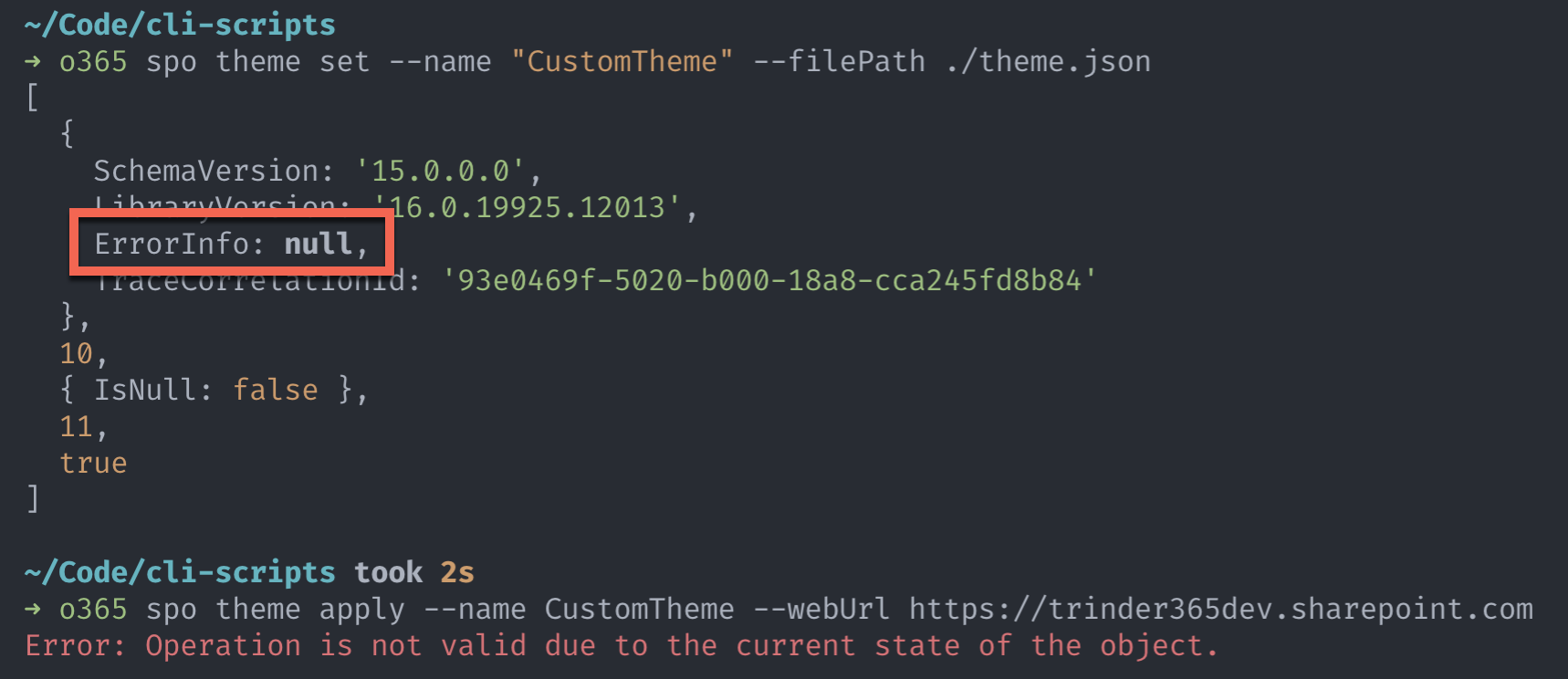
I think we should consider adding some validation into the command to check the incoming JSON and throw an error if invalid before we send it to the API.
garrytrinder
on 9 Apr 2020
NICE! I fix that and now is working!
sergiosanchezd
on 9 Apr 2020
Awesome! Great to hear that you are now unblocked 👍🏻
I will raise a new issue to look at enhancing the command based on this report.
garrytrinder
on 9 Apr 2020
Related issues
 rabwill
·
3Comments
rabwill
·
3Comments
 andrewconnell
·
3Comments
garrytrinder
·
3Comments
andrewconnell
·
3Comments
garrytrinder
·
3Comments
 VelinGeorgiev
·
3Comments
VelinGeorgiev
·
3Comments
 waldekmastykarz
·
3Comments
waldekmastykarz
·
3Comments
Most helpful comment
NICE! I fix that and now is working!