Cli-microsoft365: New command: Return all modern and classic site collections in the tenant scoped recycle bin
spo tenant recyclebinitem list
Return all modern and classic site collections in the tenant scoped recycle bin
Implementation similar to Get-PnPTenantRecycleBinItem cmdlet (https://docs.microsoft.com/en-us/powershell/module/sharepoint-pnp/get-pnptenantrecyclebinitem?view=sharepoint-ps)
 garrytrinder
All 11 comments
I am using this issue to get acquainted with the code. I have a working command now, but having no experience of sinon I can't get a test to pass. I am trying to copy what is done in site-list, asserting calledWith but it fails. Any pointers on how to figure out more about the error?
 jhagstrom
on 15 Jan 2020
jhagstrom
on 15 Jan 2020
Hey @jhagstrom thank you for reaching out and welcome 👋🏻
As you've already started work on this command, let me assign this issue to you so that others know that is being worked on.
I would suggest looking at examples of tests that have already been written, we already have tests that cover most scenarios that can be re-used, however if you are able to share your branch (push your branch to your fork) we can take a look and help you overcome your issue.
garrytrinder
on 15 Jan 2020
Thanks, I tried to mimic the test for the site list command, but there is something there that is not quite right. Either I am not getting the assertion right or maybe it's something with my response.
jhagstrom
on 15 Jan 2020
Joakim (@jhagstrom ) are you talking about your failing test which is named lists the tenant recyclebin items (debug)?
You almost got it right. It is just typos in your assertion URL values:
assert(cmdInstanceLogSpy.calledWith([
          {
            DaysRemaining: 92,
            DeletionTime: new Date(2020, 0, 15, 11, 4, 3, 893),
            Url: 'https:/contoso.sharepoint.com/sites/ClassicThrowAway'
          },
          {
            DaysRemaining: 92,
            DeletionTime: new Date(2020, 0, 15, 11, 40, 58, 90),
            Url: 'https:/contoso.sharepoint.com/sites/ModernThrowAway'
          }
        ]))
So based on your stubbed response the expectation is for https://contoso.sharepoint.com/sites/ClassicThrowaway, but in your assertion you have typed the value as https:/contoso.sharepoint.com/sites/ClassicThrowAway. You have missing / on the https:// as well you have capital A in ClassicThrowAway where the expectation should be for lower a in ClassicThrowaway.
The same applies for your other URL where the stubbed request will return https://contoso.sharepoint.com/sites/ModernThrowaway, but the assertion has https:/contoso.sharepoint.com/sites/ModernThrowAway.
So finally if you change your assertion to
assert(cmdInstanceLogSpy.calledWith([
          {
            DaysRemaining: 92,
            DeletionTime: new Date(2020, 0, 15, 11, 4, 3, 893),
            Url: 'https://contoso.sharepoint.com/sites/ClassicThrowaway'
          },
          {
            DaysRemaining: 92,
            DeletionTime: new Date(2020, 0, 15, 11, 40, 58, 90),
            Url: 'https://contoso.sharepoint.com/sites/ModernThrowaway'
          }
        ]));
you should get your test fixed.
Would you need help to up the coverage? Perhaps, you can take it from here because you did brilliant so far and let me know if you have issues with rising the coverage to 100%.
 VelinGeorgiev
on 21 Jan 2020
VelinGeorgiev
on 21 Jan 2020
d'oh! Nothing like peer review for code quality :) Can't believe I didn't catch that obvious typo. Thank you!
jhagstrom
on 21 Jan 2020
About 100% coverage, I guess it would make sense to test a successful call to an empty bin and also test calling using the --json switch, or what do you think?
jhagstrom
on 21 Jan 2020
@jhagstrom just a hint how I do the tests. Instead of assert(cmdInstanceLogSpy.calledWith([ ... I would use
assert.equal(cmdInstanceLogSpy.lastCall.args[0][0].DaysRemaining, 92);
assert.equal(cmdInstanceLogSpy.lastCall.args[0][0].DeletionTime, new Date(2020, 0, 15, 11, 4, 3, 893));
assert.equal(cmdInstanceLogSpy.lastCall.args[0][0].Url, 'https://contoso.sharepoint.com/sites/ClassicThrowaway');
...
assert.equal(cmdInstanceLogSpy.lastCall.args[0][1].Url, 'https:/contoso.sharepoint.com/sites/ModernThrowAway');
Having strict assert.equal will immediately show the issue in the tests like:
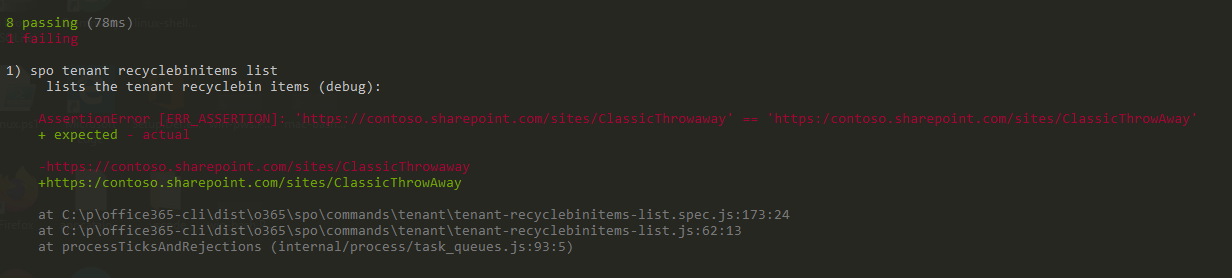
You can also troubleshot by adding simple console.log like console.log(cmdInstanceLogSpy.lastCall.args[0]);. This value will also display while running the test.
Regarding the coverage, please do try to make it yourself because you are doing brilliant so far and I very confident that you will just do it. If you encounter issues please let me know.
Just follow the missing lines, they will tell you what to do :D :

VelinGeorgiev
on 21 Jan 2020
Cool tip, thanks @VelinGeorgiev , I like the equals assertions better. However I had to use deepEqual for my non-primitive asserts (the dates).
How do I list the code coverage, also is there an easy way to run just one test? I added a script in package.json to just run my new specs for now.
jhagstrom
on 21 Jan 2020
To run a single test, I just amend the package.json file.
Change the line ...
"test": "c8 mocha \"dist/**/*.spec.js\""
... to point to the test you want to run. For the command you are working on, it would be...
"test": "c8 mocha \"dist/**/tenant-recyclebinitems-list.spec.js\"
... just remember to not commit the package.json change 😊
garrytrinder
on 21 Jan 2020
Less confused now, it's been a while since I touched my WSL so I was behind on node and npm which resulted in me not seeing the code coverage report following the tests. A few updates and some more tests and I got to 100%
jhagstrom
on 22 Jan 2020
Great to hear!
VelinGeorgiev
on 22 Jan 2020
Related issues
 plamber
·
3Comments
plamber
·
3Comments
 StfBauer
·
3Comments
StfBauer
·
3Comments
 OodapowUiPath
·
3Comments
garrytrinder
·
3Comments
OodapowUiPath
·
3Comments
garrytrinder
·
3Comments
 aakashbhardwaj619
·
3Comments
aakashbhardwaj619
·
3Comments
Most helpful comment
Less confused now, it's been a while since I touched my WSL so I was behind on node and npm which resulted in me not seeing the code coverage report following the tests. A few updates and some more tests and I got to 100%